Claude Code Workflow Practical Guide: Multi-Agent Workflow Orchestration Driven by JS Scripts

Claude Code adds Workflow feature, solidifying multi-Agent orchestration into re-runnable JavaScript scripts.
Anthropic introduced the Workflow feature in Claude Code, triggered via the ultrawork keyword. Its core concept transforms multi-Agent orchestration from natural language descriptions into JavaScript scripts, enabling observable, re-runnable, and shareable workflows. Unlike SubAgents' temporary spawning and Agent Teams' parallel collaboration, Workflow explicitly declares stages and execution order through code, balancing flexibility with determinism.
What is Claude Code's Workflow Feature
Anthropic quietly introduced a major new feature in Claude Code V2.1.47 and V2.1.48 — Workflow. Although it was briefly mentioned in the Change Log before being quickly removed, the feature is now stable and usable in Claude Code.
The core concept of Workflow is: solidifying multi-Agent orchestration from natural language descriptions into JavaScript scripts. When users trigger a Workflow in Claude Code using the ultrawork keyword, Claude Code doesn't immediately execute the task. Instead, it first programmatically constructs a complete workflow script, then executes it precisely according to the script. This means workflows become observable, structurally verifiable, and reusable.
Technical Background on Multi-Agent Orchestration
Multi-Agent Systems (MAS) represent a rapidly evolving core paradigm in AI engineering. The fundamental idea is to decompose complex tasks into multiple subtasks, processed in parallel or sequentially by specialized Agents, with results ultimately aggregated. This architecture draws inspiration from microservice design in software engineering — each Agent functions like an independent service unit with clearly defined responsibility boundaries. In the LLM era, OpenAI's Swarm framework, LangChain's LangGraph, and Microsoft's AutoGen are all representative implementations of multi-Agent orchestration. However, these frameworks universally face a core contradiction: orchestration logic either relies entirely on the model's natural language reasoning (flexible but unpredictable) or requires developers to write extensive framework code (precise but high barrier to entry). Claude Code's Workflow feature attempts to find a balance between the two — using AI to generate code, then using code to control AI.
Getting Started: How to Enable Workflow
Enabling the Workflow feature is straightforward and requires just two steps:
- Export an environment variable in the terminal to enable the feature
- After launching Claude Code, use the
ultraworkkeyword to trigger a Workflow
When you type the ultrawork keyword, it transforms into colorful gradient text, and you simply follow it with your specific task description. For example, you can have Claude Code generate and run a multi-agent Review Workflow for a PR.
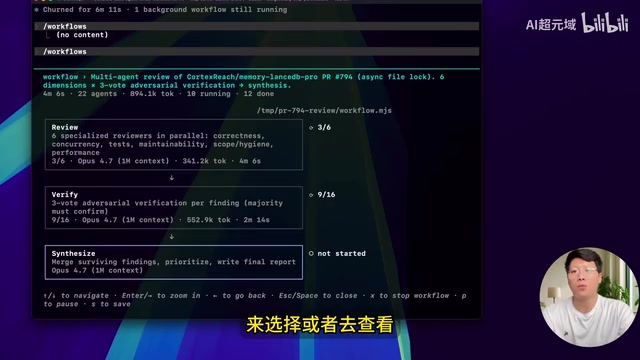
While the Workflow is running, you can check progress via the /workflows slash command, including stage status, Agent runtime duration, token consumption, and tool call information. In one test, a PR Review Workflow ran 97 Agents and generated a comprehensive review report.
The Engineering Value of Observability and Deterministic Execution
The three characteristics Workflow emphasizes — "observable, trackable, and re-runnable" — have clear technical implications in software engineering. Observability is one of the core design principles of modern cloud-native systems, composed of three dimensions: Logs, Metrics, and Traces. The
/workflowscommand effectively provides a lightweight observability panel, exposing key metrics like Agent runtime duration, token consumption, and tool call counts to users in real time. Deterministic Execution is the core value that distinguishes this from traditional prompt-driven approaches: code execution paths are deterministic, so even if model outputs contain randomness, the workflow's structure and stage ordering remain unchanged. This is analogous to the advantage of Stored Procedures over dynamic SQL in the database domain — business logic is solidified in version-controllable code rather than relying on runtime dynamic parsing.
The Fundamental Differences Between Workflow, SubAgents, and Agent Teams
SubAgents: Temporarily Spawned Child Agents
SubAgents are child Agents temporarily spawned by Claude Code's main Agent. They can be launched via natural language with minimal startup cost. However, they are essentially the model's "on-the-fly decisions," lacking predictability and reusability.
Agent Teams: Multi-Role Collaboration in Parallel Sessions
Agent Teams support multiple roles running in parallel sessions, with humans leading the scheduling and monitoring. However, they also cannot achieve true "re-runnability."
Workflow: Precise Orchestration Through Code
The revolutionary aspect of Workflow is — it writes processes as code, not as Prompts. Claude Code generates a JavaScript script that explicitly declares stages, defines Agent roles, and controls execution order through code.
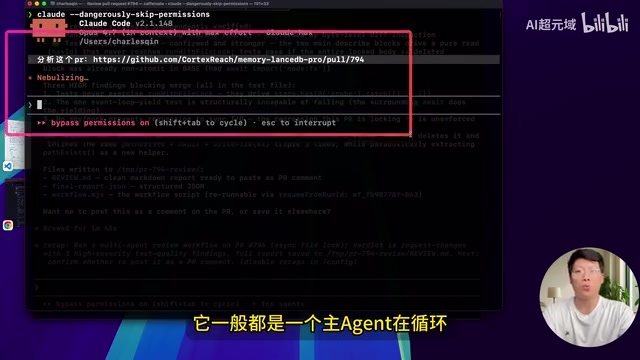
This brings three key advantages:
- Re-runnable: The same script can be executed repeatedly with consistent results
- Trackable: The execution status of each stage and each Agent is clearly visible
- Shareable: Scripts can be shared with other users for direct reuse
The Difference Between Workflow and Skills
Skills encapsulate a particular capability, telling the model when to use it, how to use it, and what constraints exist — they are automatically discovered and used by the model. Workflow solidifies multi-Agent orchestration into JS scripts that require explicit triggering with the ultrawork keyword.
The two serve different purposes: Skills focus on "encapsulating a single capability," while Workflow focuses on "orchestrating complex processes."
Related articles
 Tutorials
ChatGPT Plus Subscription Guide: Are GPT-5.5, image-2, and Codex Worth the Upgrade?
A detailed look at ChatGPT Plus features — GPT-5.5, image-2, and Codex — with a Plus vs Pro comparison and a complete step-by-step subscription guide for users outside the US.
 Tutorials
Harness AI Engineering in Practice: Using Claude Code to Master Enterprise-Level E-Commerce Development
Deep dive into Harness AI Engineering: master enterprise e-commerce development with Claude Code using the Rules, Skills, Wiki, and Changes framework.
 Tutorials
Cursor + Codex Dual-IDE Collaboration: A Practical Methodology for Open-Source Project Customization
A complete methodology for open-source project customization based on real-world experience, detailing the Cursor+Codex dual-IDE workflow, seven-stage process, MVP validation, and AI source code reading techniques.