Claude Code Worktree Tutorial: Complete Guide to Multi-Branch Parallel Development

Deep dive into Claude Code's official Worktree support: how it works, operations, and limitations.
Claude Code recently introduced official parallel development support based on Git Worktree, enabling multi-branch file isolation. This article covers three parallel task approaches (Worktree, Subagent, Agent Teams), details Worktree creation commands, exit/cleanup mechanisms, .worktreeinclude environment file synchronization, highlights the key limitation of being based on local state rather than remote latest, and compares it with Codex.
Introduction
Claude Code recently introduced official Worktree support, enabling developers to perform multi-branch parallel development locally. This feature is built on the Git Worktree mechanism, providing foundational task isolation capabilities for AI-assisted programming scenarios. This article provides an in-depth analysis of how Claude Code Worktree works, how to use it, and its current limitations, helping you identify the right use cases for your workflow.
What Is Git Worktree? Why Is It Critical for Parallel Development?
Git Worktree is a core feature introduced in Git 2.5 (released in 2015). Before this, developers who needed to work on multiple branches simultaneously had to either use git stash to shelve their current work or clone multiple complete repository copies—the former risks losing context, while the latter wastes disk space and can't share local commits. Worktree's design resolves this contradiction: multiple working directories share the same .git directory (object store, refs, configuration), while each working directory has its own independent HEAD pointer and index file, achieving "one history, multiple workspaces."
A Git Worktree is essentially an independent working directory with its own files and branch, while sharing the same commit history and remote repository connection with your locally checked-out repository.
In the Claude Code context, each session running in a Worktree means: changes in one session will never touch the files of another session. You can develop a new feature in one session while fixing a bug in another, with complete isolation between them.
This makes Worktree the best working model for parallel branch task development:
- File state isolation: Changes across branches don't interfere with each other
- Shared history: All working directories share Git history and remote connections
- Broad applicability: Parallel development across dev branches, release branches, feature branches, and hotfix branches
Three Ways to Run Parallel Tasks in Claude Code
In the current Claude Code ecosystem, there are three ways to support parallel task execution:
- Worktree: The focus of this article, providing workspace-level isolation
- Subagent: Suitable for decomposing complex tasks into multiple subtasks for execution
- Agent Teams: Still maturing, awaiting further model capability improvements
In Subagent mode, Claude Code breaks down a complex task into multiple subtasks executed concurrently by independent Agent instances, each sub-Agent having its own tool-calling context and file operation scope. Agent Teams takes this further, allowing multiple Agents with different role definitions to collaborate on tasks, similar to the "role division" concept in software engineering. Both rely on Worktree at the underlying level to provide file-system-level isolation and prevent concurrent write conflicts.
Interestingly, Subagent and Agent Teams also allow the use of Worktree for isolation internally. In other words, Worktree is the foundational infrastructure for workspace isolation in the Claude Code ecosystem.
In the Claude Code Desktop application, Worktree is used by default to create sessions—each new session creates a Worktree behind the scenes, ensuring basic isolation while retaining full local repository capabilities.
Claude Code Worktree Operations Explained
Commands for Creating a Worktree
Creation is very straightforward. The most minimal command is simply:
claude -w
You can also specify a name:
claude --worktree my-feature
If you don't specify a name, Claude Code will auto-generate a random name similar to Docker containers, making it very difficult to find later. It's strongly recommended to give your Worktree a meaningful name, such as fix-issue-123 or feature-auth.

Key Limitation: Based on Local State, Not Remote Latest
Claude Code's choice to create Worktrees based on local state reflects an "offline-first, locally controllable" design philosophy: operations require no network, are extremely fast, and aren't affected by remote repository permissions or network instability. Tools like Codex that default to pulling from remote are better suited for CI/CD pipelines or cloud-based code review scenarios, ensuring each task is based on the latest consensus state. Each strategy has its tradeoffs, and developers need to choose based on their workflow—local-intensive development favors the former, while team collaboration or code review favors the latter.
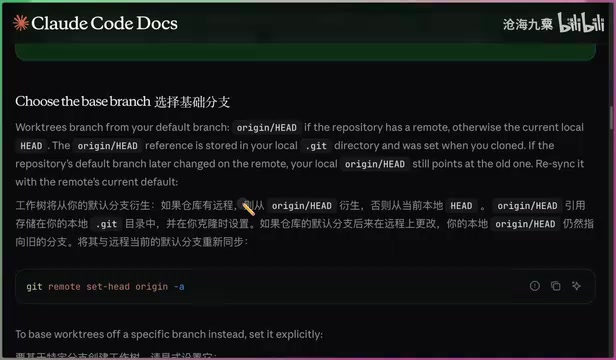
This is currently the biggest pain point of Claude Code Worktree: it creates based on your current local branch state, rather than pulling the latest content from the remote branch.
For example, if you're currently on the develop branch but your local is 5 commits behind remote, the newly created Worktree will also be based on this outdated state. If you need to create a Worktree based on the latest remote state, you must manually run git pull to fetch updates first.
This contrasts with other tools (like Codex) that default to pulling from remote. Claude Code's design philosophy is to derive from the local working branch as the root—the advantage is speed and no network dependency, but it's less friendly for scenarios requiring remote synchronization.
Environment File Synchronization: .worktreeinclude Configuration
.gitignore was originally designed to exclude build artifacts, secrets, and local configurations from version control—these files typically contain environment-specific sensitive information. However, in a Worktree scenario, the new working directory won't inherit these ignored files, causing applications to fail to start or tests to fail. .worktreeinclude is essentially a "reverse whitelist"—it tells Claude Code which Git-ignored files need to be proactively copied when creating a new Worktree, filling a gap in Git's native mechanism for multi-workspace scenarios.
Newly created workspaces typically lack files ignored by .gitignore, such as .env, .local, and various secret files. Claude Code provides the .worktreeinclude configuration file to solve this problem:
Write the file paths that need synchronization into .worktreeinclude, and Claude Code will automatically copy these files to the newly created Worktree, avoiding manual operations and oversights.
Worktree Exit and Cleanup Mechanism
The behavior when exiting a Worktree (double Ctrl+C) depends on whether files have changed:

Case 1: Auto-deletion When No File Changes
If no files in the workspace have changed (even if you've had extensive conversations), the Worktree will be directly deleted on exit. This means your conversation content is also lost, so be especially careful.
Case 2: Optional Retention When Files Are Modified
If there are file changes, Claude Code will ask you:
- Keep: The Worktree remains in place and can be re-entered later
- Delete: Clean up immediately, freeing local space
In most cases, you'll choose to keep it. This is also why giving your Worktree a meaningful name is so important—otherwise it's very hard to find your target workspace among a pile of random names.
Managing Existing Worktrees
Currently, Claude Code doesn't provide official Worktree management commands (like list or prune), but you can directly ask Claude Code to help you in conversation:
- View all Worktrees: Simply say "list worktree" and Claude Code will execute
git worktree listand provide a structured summary - Clean up invalid Worktrees: Similar to Docker's prune concept, have Claude Code find and clean up reclaimable workspaces
You don't need to memorize these underlying Git commands—Claude Code can execute them correctly. However, the experience would be better if official native management commands were provided.
Claude Code Worktree vs. Codex Comparison
Codex handles Worktree management more elegantly:
- Clearer working directory naming
- Worktrees have numbered identifiers
- Branch names are immediately visible
- Overall organizational structure is more standardized
In comparison, Claude Code's Worktree feature is in a "functional but not yet polished" state.
Related articles
 Tutorials
ChatGPT Plus Subscription Guide: Are GPT-5.5, image-2, and Codex Worth the Upgrade?
A detailed look at ChatGPT Plus features — GPT-5.5, image-2, and Codex — with a Plus vs Pro comparison and a complete step-by-step subscription guide for users outside the US.
 Tutorials
Harness AI Engineering in Practice: Using Claude Code to Master Enterprise-Level E-Commerce Development
Deep dive into Harness AI Engineering: master enterprise e-commerce development with Claude Code using the Rules, Skills, Wiki, and Changes framework.
 Tutorials
Cursor + Codex Dual-IDE Collaboration: A Practical Methodology for Open-Source Project Customization
A complete methodology for open-source project customization based on real-world experience, detailing the Cursor+Codex dual-IDE workflow, seven-stage process, MVP validation, and AI source code reading techniques.