Claude Computer Control Best Practices: The Complete Guide to Screenshot Scaling and Coordinate Mapping
Claude Code click inaccuracy is caused by screenshot compression and missing coordinate mapping.
This article analyzes the core reason Claude Code misclicks when controlling computers: screenshots exceeding API pixel limits get auto-compressed, causing coordinate space mismatches. The official recommendation is to scale screenshots to tiers like 1280×720 and implement proportional coordinate mapping in code (paying special attention to Retina display DPR). Additionally, placing text instructions before screenshots leverages the attention mechanism to significantly improve recognition accuracy.
In-Depth Analysis of Claude Code Computer Control Best Practices
Claude Code can now control your computer—opening browsers, filling out forms, clicking buttons, you name it. But many people run into a critical problem: it clicks in the wrong place. Don't blame the model just yet—the issue is most likely with your screenshots. Every screenshot you send to the model gets quietly compressed, so what the model sees and what you see are simply not the same image.
Anthropic's latest official computer interaction best practices provide a thoroughly tested solution set covering everything from screenshot scaling and coordinate mapping to model pairing strategies. This article breaks down each key technique.
The Core Problem: Screenshot Compression Causes Coordinate Drift
This is the root cause of the vast majority of click offset issues: you need to manually downscale screenshots before sending them to the API.
The Claude API has hard limits on images:
- Claude 4.6 series: longest edge no more than 1568 pixels, total pixels no more than 1.15 million
- Opus 4.7: relaxed to 2576 pixels and 3.75 million pixels
Once these limits are exceeded, the API automatically compresses the image. But the compressed screenshot no longer matches the coordinate space you specified—the model sees Image A while you're asking it to click coordinates for Image B. Of course it's going to be off.
Technical Background: Pixel Budget and Training Data Distribution
This limitation stems from the underlying architecture of Vision Language Models (VLMs). When processing images, the Vision Encoder splits pictures into fixed-size patches, with each patch corresponding to a certain number of tokens—the larger the image, the more tokens consumed, and inference latency and cost increase linearly. Anthropic's pixel caps are essentially an engineering boundary drawn between precision and cost. The reason 1280×720 is the "safest tier" isn't just because it fits within the pixel budget—it's because this resolution appears extremely frequently in the model's training dataset. A huge volume of web screenshots and UI recording materials are naturally at this size, so the model has the strongest "visual intuition" for it, resulting in naturally higher recognition accuracy.
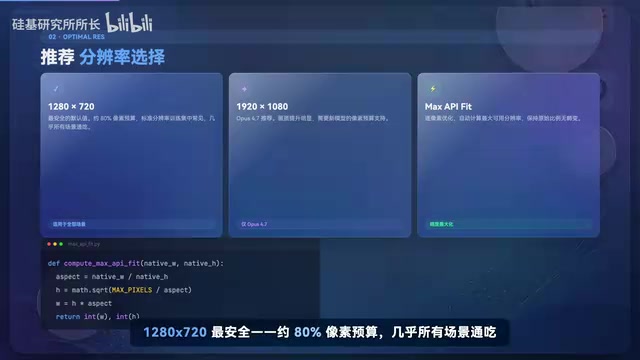
The official documentation provides three recommended screenshot scaling tiers:
- 1280×720: Safest option, uses about 80% of the pixel budget, standard resolution found throughout training sets, works for virtually all scenarios
- 1920×1080: Available for Opus 4.7 users, noticeably better image quality
- MAX_API_FEAT algorithm: Automatically calculates optimal scaling based on original resolution, not wasting a single pixel of budget
Critical Warning: Never send native resolution screenshots directly, especially Retina 2x display screenshots from Macs. This is the number one killer of "can't click accurately" issues, bar none.
Coordinate Scaling: The Most Common Pitfall for Developers
You send the API a 1280×720 screenshot, but your actual screen is 2560×1440. The coordinates returned by the API are calculated in the smaller space, so you must map them back to the real screen proportionally.
The consequence of not doing coordinate mapping: every click is proportionally offset. You think the model is glitching, but it's actually offsetting in the same direction by the same mathematical formula every time—this is called systematic misjudgment, which is harder to debug than random errors.
The formula is really just three lines: calculate the ratio, multiply back. But most people simply never write this coordinate mapping code.
Technical Background: Affine Transformation and Device Pixel Ratio
The essence of the coordinate offset problem is a missing affine transformation between two coordinate systems. The mapping formula is:
x = x' × (screen_width / screenshot_width),y = y' × (screen_height / screenshot_height). On Retina displays, you also need to multiply by the Device Pixel Ratio (DPR, typically 2), otherwise all clicks will land within the top-left quarter of the screen. This systematic offset is extremely difficult to catch through visual debugging because the direction and magnitude of each click's offset are highly consistent, easily misdiagnosed as the model "stubbornly clicking the wrong spot," when in reality the model's visual judgment is completely correct—it's just the coordinate system conversion step that's missing.
Text First: A Simple but Extremely Effective Technique
Place text instructions before the screenshot—tell the model "click the submit button" first, then show it the screenshot.
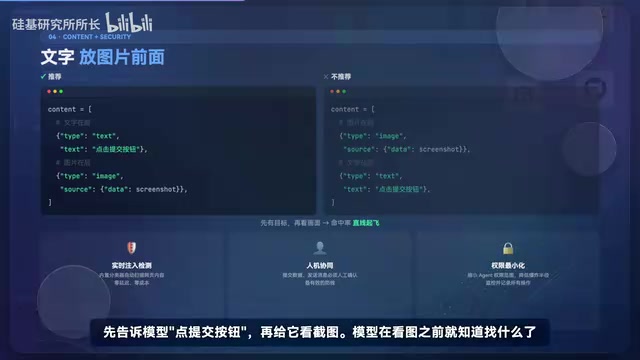
This isn't mysticism—it's the underlying principle of the attention mechanism. Having a target before seeing the image means the model already knows what to look for before it processes the picture, and hit rates skyrocket. Ridiculously simple, yet most people never think of it.
Technical Background: Cross-Attention and Goal-Directed Visual Search
The cross-attention mechanism in Transformer architecture means that input order has a substantive impact on model behavior. In multimodal models, text tokens and image tokens compute attention weights against each other. When text instructions precede the image input, the model has already formed a clear "query vector" by the time it encodes the image, prioritizing activation of visual regions semantically related to the target. This closely mirrors the cognitive mechanism of human visual search—psychology research shows that subjects who know their search target in advance have more direct eye movement trajectories and shorter time-to-first-fixation on targets. Placing text instructions before the screenshot essentially leverages the model's attention mechanism to simulate this goal-directed visual search behavior.
Related articles
 Tutorials
ChatGPT Plus Subscription Guide: Are GPT-5.5, image-2, and Codex Worth the Upgrade?
A detailed look at ChatGPT Plus features — GPT-5.5, image-2, and Codex — with a Plus vs Pro comparison and a complete step-by-step subscription guide for users outside the US.
 Tutorials
Harness AI Engineering in Practice: Using Claude Code to Master Enterprise-Level E-Commerce Development
Deep dive into Harness AI Engineering: master enterprise e-commerce development with Claude Code using the Rules, Skills, Wiki, and Changes framework.
 Tutorials
Cursor + Codex Dual-IDE Collaboration: A Practical Methodology for Open-Source Project Customization
A complete methodology for open-source project customization based on real-world experience, detailing the Cursor+Codex dual-IDE workflow, seven-stage process, MVP validation, and AI source code reading techniques.