Claude Cowork Hands-On: An AI Second Brain That Goes Beyond Coding

Cowork brings Claude's power to non-technical users through a friendly visual interface for everyday workflows.
Cowork is an AI collaboration tool built on Claude, designed for non-technical users who want the power of Claude Code without the command-line complexity. Bilibili creator Lydia shares how she's embedded it into her daily workflow — using scheduled routines to summarize Slack and email, connecting Gmail and Calendar via MCP-powered Connectors, and leveraging AppleScript for OS-level operations. The standout example: using a weather API to reverse-engineer a date from the vague memory of "it was raining in San Francisco," then pinpointing the exact file — something Siri couldn't do. Her advice: if you're already using Claude Code for non-coding tasks, Cowork is the lower-friction alternative.
What Is Cowork: An AI Collaboration Tool Built for Non-Technical Users
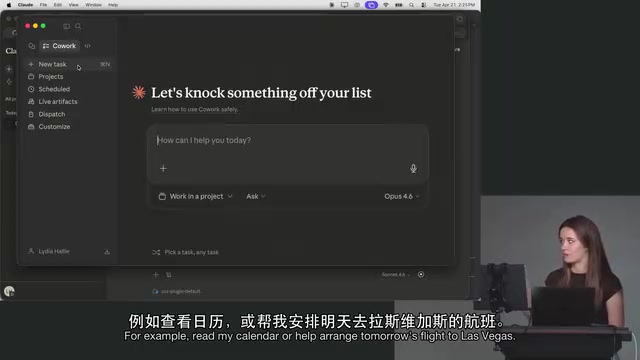
If you've used Claude Code, your first encounter with Cowork might leave you wondering — the two seem to overlap significantly in what they can do. Bilibili creator Lydia offers her take in this introductory overview video: Cowork's core value lies in being a more user-friendly interface built around Claude's capabilities, explicitly designed for non-technical use cases.
In other words, unlocking Claude Code's full power requires a certain technical baseline, while Cowork packages those same capabilities into a form that everyday professionals can actually use. It doesn't replace Claude Code — it brings the same underlying power to a broader audience. As Lydia repeatedly emphasizes throughout the video: "This is basically how I handle everything in my life."
From Scheduling to Email: Using Cowork as an Always-On Collaborator
Lydia has deeply embedded Cowork into her workflow. On her work computer, she's set up fixed routines and scheduled tasks: at the end of each day, Cowork automatically aggregates all the Slack messages she missed, unread emails, and pending replies into a single comprehensive overview.
This is similar to routines in Claude Code, but Cowork lets you run specific preset prompts at scheduled times. Booking a business trip flight, reading your calendar, batch-processing communications — tasks that previously required jumping between multiple apps are now consolidated into one entry point.
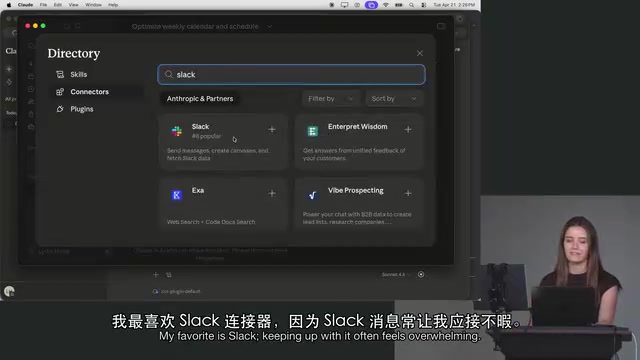
One real pain point she mentions is Slack: "I don't know why, but I always struggle to keep up with Slack — it's just always overwhelming for me." After switching to Cowork, she no longer feels drained at the end of the day, because she doesn't have to constantly context-switch between checking emails, iMessages, and Slack one by one.
Connectors: A Visual Gateway to MCP Capabilities
Cowork's extensibility comes from Connectors — essentially a wrapped implementation of MCP (Model Context Protocol). During Lydia's demo, her account was already connected to Gmail, Chrome, and Cloud, with options to add Google Drive, Google Calendar, and more.
On the permissions side, Cowork offers options like "request permission" and "skip all approvals," which correspond to bypass and auto modes in Claude Code — just presented in a more approachable way. The interface also includes pre-built shortcuts like "Optimize my week," which prompts Cowork to read your calendar and offer scheduling suggestions.
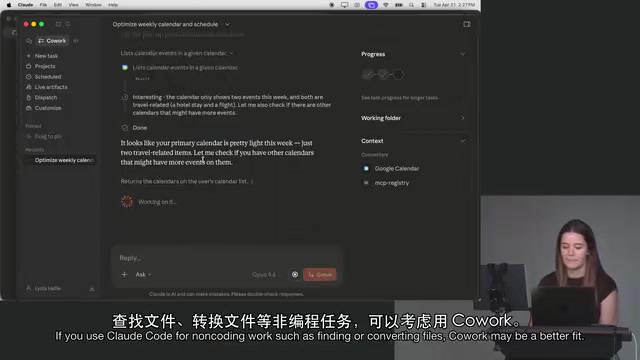
One caveat: all of this depends on having your connectors properly configured. During Lydia's live demo, the "Optimize my week" feature was limited because some connectors hadn't been set up on that particular device — a reminder that Cowork's value is directly proportional to how many data sources you're willing to connect.
MCP (Model Context Protocol) is an open standard protocol from Anthropic that defines how AI models communicate with external tools and data sources. The core idea: rather than having every AI application build its own integrations with third-party services, define a unified "plugin interface" so tool developers can connect once and reuse everywhere. From a developer's perspective, an MCP Server acts as a middleware layer that exposes external service functionality (like Gmail, GitHub, or databases) to AI models; MCP Clients (like Claude Code or Cowork) then communicate with these servers via the standard protocol. Cowork's "Connectors" wrap this technology into a graphical interface — users don't need to understand the protocol details; a click to authorize is all it takes. This is one of the key reasons it's more accessible to non-technical users than configuring MCP directly in Claude Code.
Beyond Coding: An OS-Level AI Assistant
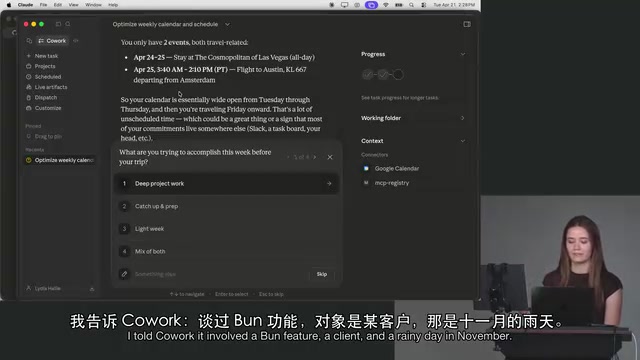
The most compelling part of the video is Lydia's description of Cowork's (and Claude Code's) capabilities at the operating system level. She gives a particularly vivid example: she remembered having a specific conversation with a client in November about a particular feature, but couldn't recall the exact date or who the client was — only that she was in San Francisco and it was raining outside.
She fed these vague clues to Cowork, and the tool actually called a public weather API to reverse-engineer which days in November it rained in San Francisco, then used that time window to precisely locate the relevant user interview file on her computer. Her verdict: "Siri could never do this — it can't even return results when I type in the exact file name."
This kind of fuzzy-description-based search capability, combined with system-level operations like changing desktop wallpapers, adjusting alarms, and managing notifications via AppleScript, is what makes Cowork a genuine "second brain" in her words. She openly admits she's already replaced Siri with it in many scenarios.
AppleScript is an automation scripting language built into macOS since its early days. It lets programs control system applications and OS features by sending "instructions" — adjusting notification settings, changing desktop wallpapers, operating the Finder file manager, and more. Because AppleScript is deeply integrated into macOS, it can reach system-level behaviors that many modern APIs cannot. When Claude Code and Cowork use AppleScript to perform system-level operations, they're essentially acting as "script writers" — dynamically generating and executing automation scripts based on natural language instructions. This elevates the AI assistant from "answering questions" to "actually operating your computer," which is the fundamental reason Lydia calls it a "second brain" rather than just another chatbot. That said, these system-level permissions require manual authorization in macOS settings — they're not available out of the box.
Cowork or Claude Code: Which Should You Choose?
Throughout the video, Lydia offers a pragmatic decision framework: if you find yourself using Claude Code for lots of non-coding tasks — finding files, converting documents, managing schedules — then Cowork is likely the more natural fit.
Technical users can still accomplish nearly everything Cowork does through Claude Code; the two share the same underlying capabilities. But for professionals who don't want to deal with the command line, Cowork's better UI, pre-built routines, and visual connectors dramatically lower the barrier to entry. It's not positioned as "more powerful" — it's positioned as "easier to use."
Of course, this video is primarily a personal experience share with an obvious subjective lean (Lydia herself jokes that she "sounds like a salesperson"). Real-world results will still depend on how many data sources you connect and your own usage habits — treat this as an introductory reference rather than a rigorous review.
Related articles

AI Is Not a Replacement: Human-AI Collaboration Through the Lens of Factory Root Cause Analysis
Starting from factory root cause analysis, this article explains how AI accelerates evidence chain construction rather than replacing human experts, exploring the pragmatic implementation logic and business value of 'AI supporting people rather than replacing them.'

AI Agent Decision Auditing: Building an Evidence Chain in Regulated Workflows
Starting from a Reddit discussion, this article analyzes three core issues in AI agent decision auditing within regulated workflows: what fields audit records should contain, how to handle feedback latency for erroneous decisions, and how to continuously calibrate LLM judge consistency with human judgment.

Apple Opens Multiseat Subscription Purchasing: App Subscriptions Can Now Be Sold in Bulk to Businesses and Schools
Apple opens multiseat purchasing for auto-renewable subscriptions: businesses and schools can bulk-buy via Apple Business and Apple School Manager, adding or removing seats anytime. Enabled by default in App Store Connect—developers should verify settings; group purchasing sandbox testing opens October 2026.