Claude Desktop China Guide: Use DeepSeek and Other Domestic LLMs Without Login

Use a third-party API gateway to connect Claude Desktop to DeepSeek and other Chinese LLMs without login
This article explains how to use Claude Desktop in China without a VPN or Anthropic account by leveraging a third-party open-source API gateway tool that connects to domestic LLMs like DeepSeek. The gateway works by launching a local proxy that converts Claude's API requests into OpenAI-compatible format and forwards them to domestic model endpoints. The setup involves obtaining a DeepSeek API Key, configuring model mappings, and features like web search and code generation work normally at very low cost.
Introduction
Claude Desktop is Anthropic's desktop client, offering a smoother interactive experience than the web version. However, users in China face two major barriers: network restrictions and account registration. This article shares a method using a third-party API gateway tool to connect Claude Desktop with domestic LLMs like DeepSeekAd and Kimi—no account login required, no VPN needed, and it works long-term after a one-time configuration.
Downloading and Installing Claude Desktop
Getting the Installer
Visit the official Claude website to download the desktop client. The page offers both Windows and macOS versions. The Windows installer is approximately 222MB, and download speeds in China can be slow, so using a download accelerator is recommended.
After downloading, double-click to install. The normal flow requires registering an account or signing in with Google, but with a third-party gateway tool, you can skip this step entirely and connect directly to domestic models.
Installing the Third-Party API Gateway Tool
The tool used here is an open-source API gateway software (the specific download link can be found in the original video description). An API Gateway is a middleware architectural pattern that acts as a "translation layer" between the client and backend services: Claude Desktop normally communicates only with Anthropic's official servers. The third-party gateway tool launches a local proxy service that intercepts API requests from Claude Desktop, converts the request format, and forwards them to domestic model endpoints like DeepSeek, then reverse-converts the responses back into Claude's format before returning them to the client. This "protocol adaptation" technique is extremely common in enterprise development. It's essentially a compatibility layer for the OpenAI API format—since OpenAI's interface specification has become the de facto industry standard, domestic models like DeepSeek and Kimi all provide interfaces compatible with this format, making such gateway tools possible.
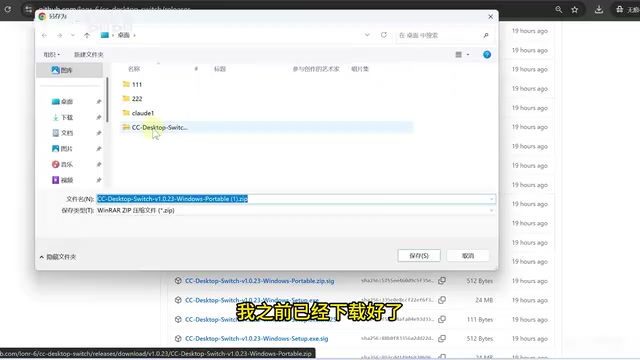
Download the latest Windows installer, extract it, and double-click to run. The tool supports connecting to DeepSeek, Kimi, Xiaomi's LLM, Alibaba Cloud Tongyi, and many other models. Models not listed can also be added manually.
Configuring DeepSeek API Access
Getting a DeepSeek API Key
DeepSeek is a large language model series developed by DeepSeek (深度求索). It has achieved outstanding results in both domestic and international AI benchmarks. Its open platform offers two main model tiers: DeepSeek V3 (fast response, low token cost, suitable for high-frequency daily conversations) and DeepSeek R1 series (reasoning-enhanced, suitable for complex tasks like math, coding, and logical reasoning). DeepSeek uses a MoE (Mixture of Experts) architecture, which significantly reduces inference costs while maintaining high performance—this is the technical reason why its API pricing is far lower than models like GPT-4.
Using DeepSeek as an example, here are the specific steps to obtain an API Key:
- Go to the DeepSeek open platform to register and log in
- Top up your balance (minimum 2 RMB to get started)
- Navigate to the "API Keys" page
- Click "Create API Key," enter a name, and generate it
- Copy the generated API Key (make sure to save it securely)
Filling in Gateway Configuration
Paste the API Key into the corresponding input field in the gateway tool. Leave other options at their default settings.
Pay special attention to the model mapping configuration, which determines which model is actually called for each option in the Claude Desktop interface. The principle behind model mapping is: Claude Desktop has Anthropic's own model names hardcoded at the UI layer, and users cannot directly input third-party model names in the interface. The gateway tool maintains an "alias lookup table" and replaces Claude's model identifiers with DeepSeek's corresponding model_id strings during request forwarding, achieving seamless switching. This mapping relationship is fully user-customizable, meaning you can also map model names to Alibaba Tongyi Qianwen, Baidu ERNIE, Tencent Hunyuan, or any other domestic model that provides an OpenAI-compatible API interface.
| Claude Desktop Display Name | Actual Model Called |
|---|---|
| Claude 4.7 (Sonnet) | DeepSeek V4 Pro |
| Claude 4.6 | DeepSeek V4 Pro |
| Claude 4.5 | DeepSeek V4 Flash |
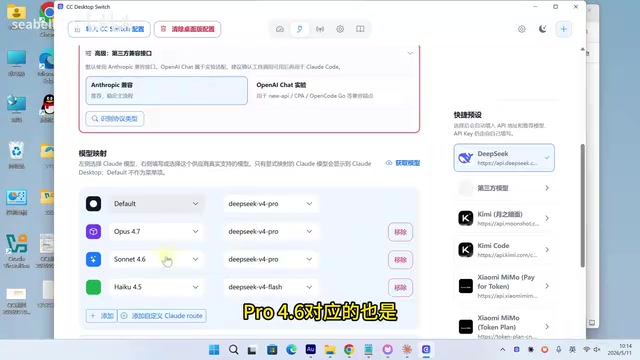
You can delete unnecessary mapping entries as needed, and you can also check "Unlock 1 million context" for longer conversation support.
After completing the configuration, click the "Apply to Claude Desktop with one click" button, confirm, and keep the gateway tool running—do not close it.
Launching Claude Desktop and Getting Started
Restarting the Client to Complete Setup
After configuration, you need to restart Claude Desktop:
- Completely quit Claude Desktop
- Reopen the application
- In the popup options, select "Use without logging in"
- Seeing the normal chat interface indicates successful configuration
Resolving Virtual Machine Platform Errors
If an error appears after opening, you typically need to enable the Windows Virtual Machine Platform feature. Windows Virtual Machine Platform is a lightweight virtualization component built into Windows 10/11, serving as the underlying dependency for WSL2 and Hyper-V. The Windows version of Claude Desktop relies on container or sandbox-based runtime environments for certain functional modules, which require this component. For most modern PCs, CPUs support hardware virtualization (Intel VT-x or AMD-V), but some machines require manually enabling virtualization support in BIOS. If errors persist after enabling, check whether the "Virtualization Technology" option is turned on in BIOS.
Steps to enable:
- Search for "Windows Features" in the Start menu
- Open "Turn Windows features on or off"
- Find and check "Virtual Machine Platform"
- Click OK, wait for installation to complete, then restart your computer
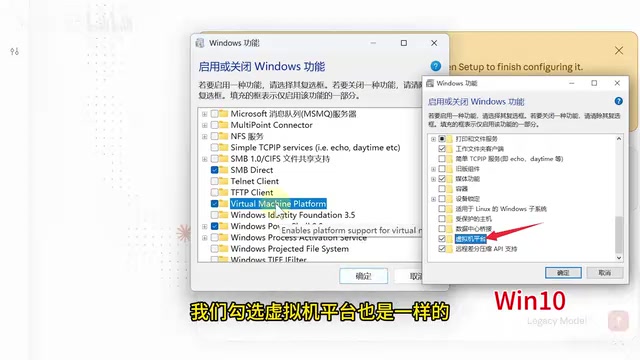
After restarting, open the gateway tool first, then Claude Desktop, and everything should work normally.
Practical Usage Experience and Costs
Model Selection and Switching
You can switch models in the bottom-right corner of Claude Desktop. Although the interface displays Claude model names, the actual models called are the corresponding DeepSeek models:
- Select "4.5" → Calls DeepSeek V4 Flash (fast response, low cost, suitable for daily Q&A)
- Select "4.6" or "4.7" → Calls DeepSeek V4 Pro (stronger reasoning ability, suitable for complex tasks)
Feature Test Results
Through actual testing, the following features work normally after connecting via the gateway:
- Web search: Can retrieve real-time information and answer time-sensitive questions
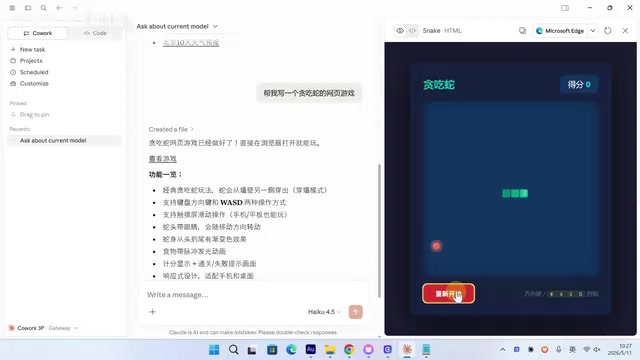
- Code generation: Can generate complete web game code, save as HTML files and run directly
- Extended conversations: Supports long-form content processing with the 1 million context option enabled
Costs and Budget Control
Domestic LLM platforms like DeepSeek generally adopt a token-based billing model. A token is the basic unit of text processing for models—in Chinese, 1 character is roughly equivalent to 1.5–2 tokens, while in English, 1 word is approximately 1–2 tokens. Open platforms price input and output tokens separately, and Flash-tier models typically cost less than 1 RMB per million tokens overall.
Using the tests in this article as an example, a complete conversation using the Flash model costs approximately 0.09 RMB (about 1 cent USD), offering excellent value. For individual users, a monthly top-up of a few dozen RMB is usually sufficient to support heavy usage. Note that the "1 million context" feature consumes more tokens per conversation, so keep an eye on your balance if you enable it frequently.
Related articles
 Tutorials
ChatGPT Plus Subscription Guide: Are GPT-5.5, image-2, and Codex Worth the Upgrade?
A detailed look at ChatGPT Plus features — GPT-5.5, image-2, and Codex — with a Plus vs Pro comparison and a complete step-by-step subscription guide for users outside the US.
 Tutorials
Harness AI Engineering in Practice: Using Claude Code to Master Enterprise-Level E-Commerce Development
Deep dive into Harness AI Engineering: master enterprise e-commerce development with Claude Code using the Rules, Skills, Wiki, and Changes framework.
 Tutorials
Cursor + Codex Dual-IDE Collaboration: A Practical Methodology for Open-Source Project Customization
A complete methodology for open-source project customization based on real-world experience, detailing the Cursor+Codex dual-IDE workflow, seven-stage process, MVP validation, and AI source code reading techniques.