CLAUDE.md, AGENTS.md, GEMINI.md: A Configuration Guide to AI Coding Assistant Instruction Files

Naming differences, merged-reading mechanics, and best practices for unifying AI coding assistant instruction files with AGENTS.md.
The article systematically introduces the instruction file that AI coding assistants read before each session: a plain-text description answering "what must a new teammate know before getting started," covering test running methods, code style, and a forbidden-zone list. Instruction files are divided into project files shared with the repository and user files that only apply to individuals; when the two conflict, the AI typically reads them merged rather than simply overriding, with the later-read project file carrying higher semantic weight. Currently, ecosystem naming is fragmented—Claude Code, Codex, Cursor, and Gemini CLI each use different filenames—while AGENTS.md, maintained by the Linux Foundation, is becoming the cross-platform open standard. The article recommends using AGENTS.md as the single source of truth with a one-line pointer in claude.md, and starting from a minimal viable version while keeping the file concise and maintainable.
AI coding assistants read an instruction file at the start of every session—but do you really know what's written in yours? This file is like a note left for a new teammate, telling the AI how to run tests, what code style to follow, and which operations are absolutely off-limits. Different tools give this note different names: Claude Code uses claude.md, Codex and Cursor recognize agents.md, and Gemini CLI uses gemini.md. Behind the confusing naming, there's actually a clear logic of collaboration.
What Exactly Is an Instruction File?
An instruction file is a plain-text description stored in a project directory or personal home directory, automatically read by the AI assistant at the start of each session. Its content doesn't need to be complex—the core is to answer one question: What must a new teammate know before getting started?
According to a walkthrough by the YouTube channel AI Academy, a good instruction file covers at least three things: how to run tests, the project's code style, and a list of "never do this" forbidden zones. This amounts to codifying the team's verbal agreements into AI-executable context, reducing the cost of re-explaining things in every conversation.

You may not have noticed, but instruction files aren't better when they're thicker. AI Academy recommends starting with a minimal viable version—first writing out test commands, style conventions, and priority questions to ask—then gradually supplementing based on real-world experience.
Technically, an AI coding assistant's instruction file is part of the system prompt. The model itself doesn't retain memory across sessions; each new session starts from scratch, and the instruction file's role is to inject project conventions into the context at session initialization—essentially a lightweight form of retrieval augmentation. Compared to writing rules into the conversation, the advantage of an instruction file is automatic loading, no need for repeated input, and the ability to be version-controlled. Its limitation is that it consumes context window space—the longer the content, the fewer tokens remain for actual code and dialogue, and excessive length can dilute the weight of key instructions. Therefore, in practice, it's recommended to keep it within a few hundred lines, put high-frequency, hard constraints first, and split detailed explanations into separate documents for reference as needed.
Project Files vs. User Files: Division of Labor and Priority
Instruction files have two storage locations with distinctly different responsibilities.
Project files are placed in the code repository and shared with all team members along with the project. They carry team consensus—how to run tests, how to create branches, hard requirements for code review. User files are placed in the personal home directory and only take effect for you, but they apply to every project you participate in. They're suitable for personal habits, such as "always ask before adding a new dependency package."
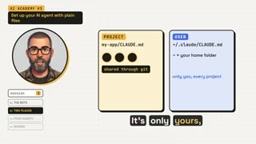
When the two conflict, who wins? The answer is somewhat counterintuitive: In most cases there's no override relationship—the AI reads both files merged, just with the one closer to the current project read last. This means content read later carries higher semantic weight, but it's not simply "project overrides user" or vice versa. In practice, putting team rules in project files and personal preferences in user files naturally forms a reasonable layering.
When an AI coding assistant starts a session, it typically concatenates context from multiple sources into a single system prompt: user-level configuration, project-level configuration, and file content attached during the session. Different tools have limited token budgets for context; when the merged content is too long, the parts near the end or with higher priority are more likely to get the model's attention. This is also why project files read later carry higher semantic weight. Note that merged reading means conflicting instructions may coexist—the model doesn't necessarily handle it strictly as an "override" but rather as a combined understanding. Therefore, the two files should avoid directly contradictory instructions—for example, a project file requiring all tests to run before committing while a user file allows skipping tests. Such conflicts lead to unstable AI behavior.
Naming Differences Across Tools and the Cross-Platform Value of AGENTS.md
Ecosystem fragmentation is the most practical pain point right now. Claude Code reads claude.md, Codex reads agents.md, Gemini CLI reads gemini.md, and Cursor uses its own rules file system. When a single team mixes multiple tools, maintaining multiple instruction files with nearly identical content is both redundant and prone to falling out of sync.
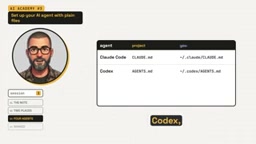
AGENTS.md is becoming the common denominator. According to the video, Codex and Cursor read agents.md directly; Gemini requires a setting to recognize it; Claude Code only falls back to it when claude.md is missing. In other words, agents.md has become an open standard, maintained by the Linux Foundation.
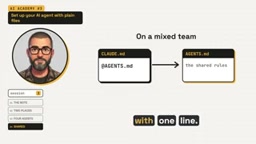
For teams using mixed tools, AI Academy's practical recommendation is: Use agents.md as the single source of truth, then point to it with a single line in claude.md. This preserves Claude Code's native entry point while avoiding content divergence.
AGENTS.md is an open convention initiated by OpenAI and later maintained by the Agentic AI Foundation under the Linux Foundation, used to describe the instructions AI coding agents should follow in a repository. Its design goal is to provide a unified context entry point for coding agents from different vendors, avoiding fragmentation caused by each tool defining its own rules file. It uses plain Markdown format with no specific schema required; its readers are AI agents rather than human developers, so content typically focuses on build commands, how to run tests, code style, and security forbidden zones. Currently, a variety of tools including Codex, Cursor, Gemini CLI, and Aider already support or can enable recognition of AGENTS.md through settings, making it gradually become the de facto standard for cross-tool collaboration.
Practical Recommendations: Start with a Minimal File
The barrier to configuring an instruction file is lower than you might think. At the starting stage, there's no need to aim for completeness—just write three things clearly: how to run tests, what the code style is, and what to ask first when encountering uncertainty. These three cover the most error-prone aspects of AI collaboration.
As the project evolves, supplement build commands, directory structure conventions, commit message specifications, and more as needed. The key is to keep the file concise and maintainable—a lengthy instruction file that no one wants to update is a burden for both the AI and human teammates.
For teams with multiple coexisting tools, unifying on agents.md early and configuring the pointer properly can save significant synchronization costs. Although the instruction file is small, it's the most deterministic and cost-effective link in the AI coding collaboration workflow.
One-line Summary
The naming differences, merged-reading mechanism, and best practices for unifying with AGENTS.md across AI coding assistant instruction files.
Paragraph Summary
This article systematically introduces the instruction file that AI coding assistants read before each session: a plain-text description answering "what must a new teammate know before getting started," covering test running methods, code style, and a forbidden-zone list. Instruction files are divided into project files shared with the repository and user files that only apply to individuals; when the two conflict, the AI typically reads them merged rather than simply overriding, with the later-read project file carrying higher semantic weight. Currently, ecosystem naming is fragmented—Claude Code, Codex, Cursor, and Gemini CLI each use different filenames—while AGENTS.md, maintained by the Linux Foundation, is becoming the cross-platform open standard. The article recommends using AGENTS.md as the single source of truth with a one-line pointer in claude.md, and starting from a minimal viable version while keeping the file concise and maintainable.
Related articles

VERS: Editing Activation Explanations to Halve Reasoning Model Tokens
VERS guides reasoning models by editing activation explanations, cutting 45.8% of tokens on GSM8K with only a 0.82 pp accuracy drop and transferring to larger models, but losing accuracy on competition problems.

Finding Errors Is Not Enough: Selective Model Escalation for Entity-Targeted Sentiment Analysis
This study explores selective model escalation for entity-targeted sentiment analysis, comparing data collection ordering, uncertainty-driven re-examination, and model routing—finding that minority-class priority only helps at very small data volumes, the oracle upper bound far exceeds actual gains, and escalation must be tailored to each dataset.
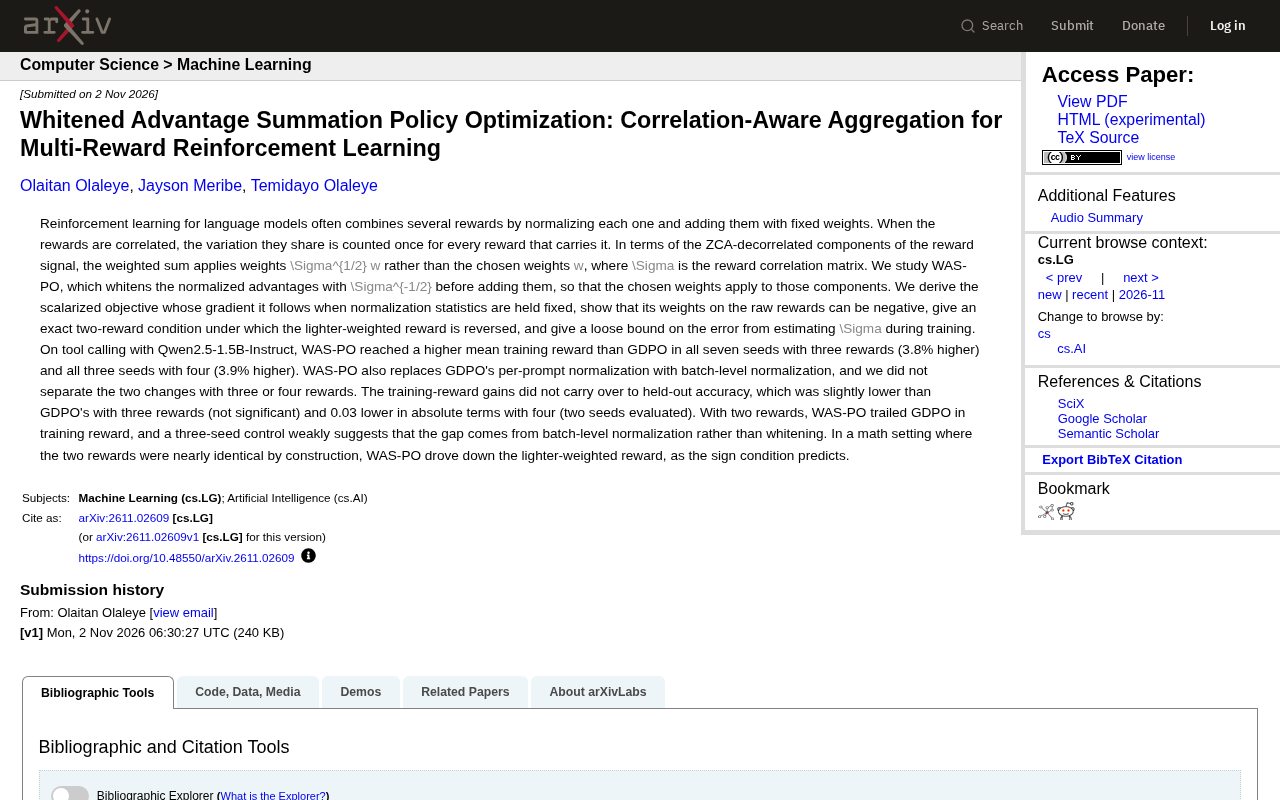
WAS-PO: Using Whitened Advantages to Solve the Correlation Trap in Multi-Reward Reinforcement Learning
WAS-PO paper proposes whitening advantages to correct correlation bias in multi-reward RL: when rewards are correlated, naive weighted summation effectively applies Σ^{1/2}w instead of w. Experiments show training reward improves steadily, but held-out accuracy does not improve in sync, and under two rewards it actually falls behind.