CLAUDE.md Loading Mechanism Explained: Hierarchical Stacking Rules and Writing Methods

CLAUDE.md is Claude Code's persistent system prompt that supports multi-level hierarchical stacking.
CLAUDE.md is a "user manual" for Claude Code — essentially a persistent system prompt mechanism. It uses an upward traversal strategy for loading: searching from the current directory up through parent directories, stacking rules at each level. Subdirectory rules don't override parent directory rules but stack additively. Best practices include keeping the filename uppercase, limiting content to under 500 words, leveraging hierarchical stacking, and using the /init command for auto-generation.
Many people new to Claude Code assume CLAUDE.md is just a configuration file where you jot down a few rules. In reality, it loads different levels of rules depending on which directory you launch Claude Code from. This article uses a simple experiment to thoroughly explain the nature of CLAUDE.md, its path loading logic, and how beginners should write it.
What Exactly Is CLAUDE.md?
Put simply, CLAUDE.md is a "user manual" — but it's not for humans to read; it's for Claude Code to read.
If you think of Claude Code as a new colleague joining your team, then CLAUDE.md is like an employee handbook. Whatever you write in it, Claude Code will read through before starting work on your project, then try to follow those rules as much as possible.
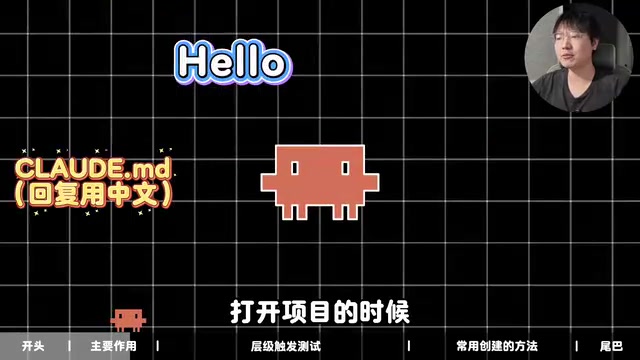
For example, you could write "Always reply in Simplified Chinese," and all subsequent responses in that project will follow this rule.
From a technical perspective, CLAUDE.md is a Persistent System Prompt mechanism. In the working principles of large language models, system prompts are background instructions injected into the model before the actual conversation begins, used to define the model's role, behavioral boundaries, and output format. Normally, such instructions need to be manually entered for each conversation, but CLAUDE.md automates this process — Claude Code automatically injects the file contents at the very front of the context upon startup, essentially "pre-filling" a system instruction for you every time. This explains why it can continuously influence the entire project session's behavior without users having to repeatedly state rules.
One important detail to note: CLAUDE in the filename must be entirely uppercase, otherwise it may not be detected. This is a common pitfall for beginners.
CLAUDE.md Loading Rules at Different Paths: A Hierarchical Stacking Experiment
This is the core section of this article. To understand CLAUDE.md's loading logic at different paths, let's conduct a simple experiment.
Experiment Design
Using the DeepSeekAd model, create a new empty folder containing a subfolder src, and create a CLAUDE.md in each folder with different rules:
- Root directory rule: Add "Root-Tag-Meow" at the beginning of every response
- Subdirectory rule: Add "Sub-Tag-Woof" at the end of every response
Then launch Claude Code from both locations and observe which tags appear in the responses.
Experiment Results
- Launched from root directory: Only the "Root-Tag-Meow" tag appeared at the beginning of responses
- Launched from src subdirectory: "Root-Tag-Meow" appeared at the beginning AND "Sub-Tag-Woof" was appended at the end

This demonstrates a key conclusion: CLAUDE.md hierarchies are additive, not overriding. Subdirectories stack their own rules on top of the root directory's rules.
Technical Background of Hierarchical Stacking: Upward Traversal Strategy
Claude Code's CLAUDE.md hierarchical loading logic is highly similar to the configuration file discovery mechanisms of many mainstream development tools. For example, ESLint's .eslintrc, Git's .gitignore, and EditorConfig's .editorconfig all employ a similar "Upward Traversal" strategy: starting from the current working directory, searching parent directories level by level for configuration files, and merging all found configurations by priority. In Claude Code's implementation, subdirectory rules have higher priority than parent directory rules (subdirectory rules take effect in case of conflicts), but the two are not mutually exclusive — they stack together. The advantage of this design is supporting Monorepo architectures — global coding standards go in the root directory, while business-specific rules go in each submodule directory, coexisting without interference while sharing base conventions.
Loading Behavior with Multiple Nested Levels
What if subdirectories contain further subdirectories — can you achieve an endlessly "nested" effect? The answer is yes, but with an important prerequisite — it depends on which folder level you enter.
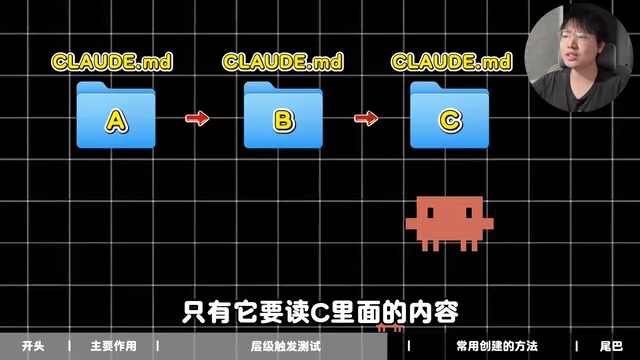
Assume this structure: Folder A → Subfolder B → Subfolder C, with each folder having its own CLAUDE.md.
- If Claude Code enters Folder B, then both A's and B's CLAUDE.md files will be read — the principle of "upward compatibility"
- C's CLAUDE.md will NOT be loaded — only when Claude Code needs to read content inside C will it check C's CLAUDE.md
Here's a practical tip: Don't make your CLAUDE.md content too long, because it consumes the Context Window.
The context window is the maximum number of tokens a large language model can process in a single inference. Tokens are the basic units the model uses to process text — roughly, each Chinese character equals about 1-2 tokens, and each English word equals about 1 token. Taking the Claude model series as an example, their context window typically ranges from 100,000 to 200,000 tokens. CLAUDE.md content is fully loaded into the context with every conversation. If the rules file runs several thousand words, it continuously "occupies seats," compressing the space available for code analysis, file reading, and actual conversation. Therefore, concise rules aren't just good practice — they're an actual optimization for model performance. It's recommended to keep CLAUDE.md under 500 words, retaining only core rules that genuinely affect behavior.
How Beginners Should Write CLAUDE.md: Three Practical Methods
Method 1: Manual Creation
The most straightforward approach. Use Notepad, VS Code, or any editor you're comfortable with, write whatever you want, and save it to your project folder. This method suits developers who already have a clear idea of their project standards.
Method 2: Let AI Write It for You
If you have no idea what to put in it, press Shift + Tab to switch to Plan mode, let Claude Code ask questions to understand your needs, confirm, and then have it create the file directly.
Of course, you're not limited to Claude Code — you can use other AI tools to generate content, then manually create the file and paste it in.
Method 3: Use the /init Command to Auto-Generate
This is a built-in Claude Code command. After entering Claude Code, simply type /init, and it will scan the current project's file structure and automatically generate a CLAUDE.md tailored to that project.
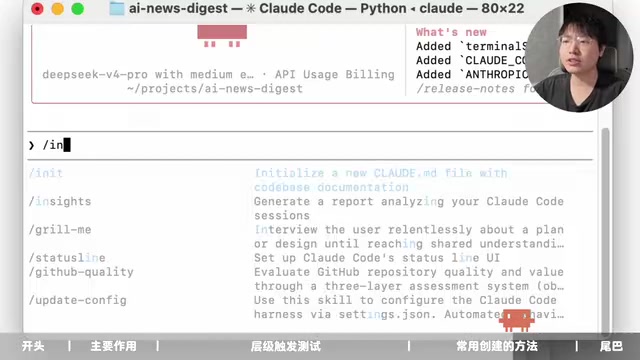
The core capability of the /init command is performing Static Analysis on the project — without running any code, it scans the file structure and reads key configuration files (such as package.json, requirements.txt, Makefile, etc.) to infer the project's tech stack, dependencies, and code organization. Claude Code then auto-generates a CLAUDE.md draft containing the project's language, framework, directory structure description, common commands, and more. This process is similar to an IDE's project indexing feature, but outputs natural language descriptions rather than code indices.
In my hands-on testing with a news summarization project, the content generated after scanning the file structure largely covered the project's actual situation — quite practical. For projects of a certain scale, the /init-generated content serves as an excellent starting point. Developers only need to supplement it with team-specific conventions (such as commit message formats, code review guidelines, etc.) before putting it to use.
However, there's one prerequisite: It's best used on projects that already have content — don't use it on empty projects. Empty projects have nothing to reference, so the generated content won't be very meaningful.
CLAUDE.md Best Practices Summary
Based on the analysis above, here are some usage recommendations for CLAUDE.md:
- Strictly uppercase filename: Use
CLAUDE.mdnotclaude.mdto avoid loading failures - Leverage hierarchical stacking: Put universal rules in the root directory (language, code style), and module-specific rules in subdirectories
- Control content length: Keep rules concise, ideally under 500 words, to avoid consuming too much context window
- Use /init for existing projects: Quickly generate base rules for existing projects, then manually adjust
- Iterate continuously: As the project evolves, keep updating and optimizing the rules in CLAUDE.md
CLAUDE.md may seem simple, but once you understand its mechanics, it becomes a powerful tool for precisely controlling your AI coding assistant's behavior.
Related articles
 Tutorials
ChatGPT Plus Subscription Guide: Are GPT-5.5, image-2, and Codex Worth the Upgrade?
A detailed look at ChatGPT Plus features — GPT-5.5, image-2, and Codex — with a Plus vs Pro comparison and a complete step-by-step subscription guide for users outside the US.
 Tutorials
Harness AI Engineering in Practice: Using Claude Code to Master Enterprise-Level E-Commerce Development
Deep dive into Harness AI Engineering: master enterprise e-commerce development with Claude Code using the Rules, Skills, Wiki, and Changes framework.
 Tutorials
Cursor + Codex Dual-IDE Collaboration: A Practical Methodology for Open-Source Project Customization
A complete methodology for open-source project customization based on real-world experience, detailing the Cursor+Codex dual-IDE workflow, seven-stage process, MVP validation, and AI source code reading techniques.