Claude Opus 5.5 Best Practices: 9 Official Prompting Guidelines from Anthropic
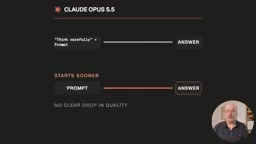
Anthropic's 9 official tips for Claude Opus 5.5: use effort control, give complete tasks, skip the prompting tricks.
Anthropic has released official interaction guidelines for Claude Opus 5.5, shifting the philosophy from complex prompting techniques to working with the model's built-in design. Key changes include dropping redundant "think carefully" instructions in favor of the effort parameter, submitting complete tasks with clearly defined deliverables, using CLAUDE.md and tasks.md to manage long sessions and bypass context window limits, providing raw screenshots and charts instead of retyped content, and specifying unwanted design styles explicitly. The overall direction is to reduce prompt complexity and let the model's capabilities shine through more directly.
Anthropic has released a new set of usage guidelines for Claude Opus 5.5, with a clear core message: you no longer need to master complex prompting techniques — instead, you need to change how you interact with the model. These updates cover effort control, task assignment, handling screenshots and research materials, and managing long conversations. Here's a breakdown of the most practical changes and how they can improve everyday workflows, research, writing, and project development.
Stop Asking Claude to "Think Harder" — Use Effort Control Instead
Anthropic recommends removing instructions like "think carefully" or "think step-by-step" that prompt the model to reason more deeply. The reason: Opus 5.5 already thinks before each response, making these instructions redundant. In testing, dropping phrases like "think carefully" led to faster responses with no noticeable drop in quality.
For simple questions where you just want a quick answer, just say "answer directly."
The real lever for controlling reasoning depth is Opus 5.5's built-in effort setting. The default is Medium. Rather than piling on more instructions to force deeper thinking, use this control to calibrate: lower effort for simple tasks, higher effort for complex ones. This is Anthropic's recommended alternative — far cleaner than repeatedly emphasizing "think it through" in your prompts.
What is effort control? The effort parameter is an API-level setting in Claude Opus 5.5 that lets developers or users specify how much computational resources the model should invest in reasoning. This is fundamentally different from early models where users could only "persuade" the model to think harder through prompts — an indirect, natural-language approach with inconsistent and unquantifiable results. The effort parameter directly regulates model behavior. Low effort suits deterministic tasks like information retrieval or format conversion; high effort is appropriate for complex analysis requiring multi-step reasoning or weighing multiple approaches. Understanding this mechanism helps you make informed trade-offs between cost, speed, and quality — rather than defaulting to maximum reasoning intensity for every task.
Give Claude the Complete Task and Define What "Done" Looks Like
Another key shift: hand Claude the full job at once, rather than feeding it one small piece at a time. Tell it what you want and what the final output should look like. For longer tasks, you can also specify when it should pause and check in with you.
Anthropic offers a useful comparison. Instead of just saying "summarize these articles," try: "Review these five articles, summarize their key differences, organize the results into a comparison table, and flag anything you're uncertain about." The latter clearly defines the deliverable — and the results are far better than vague instructions.
The underlying logic is that Opus 5.5 is capable of handling more complex, complete tasks. Breaking things down into too many fragments actually limits what it can do.
Use Two Files to Keep Claude on Track During Long Tasks
For longer Claude Code sessions, two simple files can help keep the model from going off the rails.
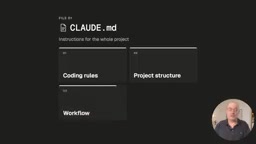
The first is a CLAUDE.md file. This is where you store instructions you want Claude to follow throughout the entire project — things like task descriptions, project structure, workflows, or specific handling instructions for certain types of work.
The second applies to longer-running sessions: have Claude save its task list to a file — for example, tasks.md — and update it in real time as it progresses. You might say: "Save your checklist in tasks.md, check off each item as you complete it, and add anything new you discover."
This matters because long runs fill up the context window, and Claude Code may start summarizing or compressing earlier parts of the conversation. A task list saved to a file is far easier to cross-reference than scrolling through chat history — it clearly shows what's done and what's left.
Simple rule of thumb: CLAUDE.md tells Claude how to work; tasks.md tells Claude what's been done and what's left.
What is the context window? The context window is the maximum amount of text a large language model can process at once, measured in tokens. When a conversation or task exceeds this limit, the model summarizes or discards earlier content, causing it to "forget" initial details and constraints. Claude Code is especially prone to this in long coding sessions — as file reads, writes, and command outputs accumulate, the context fills up quickly. Externalizing the task list to tasks.md essentially moves "working memory" from the conversation flow (which can be truncated) to persistent file storage, bypassing context limits. This lets the model reconstruct its current progress at any point by reading the file, without relying on complete recall of earlier conversation.
Don't Ask for Hidden Reasoning — Just Ask for What You Actually Want
Anthropic notes that requests to reproduce Claude's internal reasoning may be declined. Avoid phrases like "show your chain of thought," "think out loud," or "show every reasoning step."
The right approach is to ask directly for the output you actually need — for example, "explain why you're making this recommendation" rather than trying to surface the internal process. This echoes the first point: focus on the output, not on controlling the process.
Why does this matter? Claude Opus 5.5 uses an Extended Thinking architecture, where the model goes through a separate internal reasoning phase before generating its final response. This internal process is not part of the conversation history and doesn't directly map to the logical chain visible in the final reply. Anthropic treats internal reasoning as the model's "private" computation — so asking it to "show its chain of thought" or "think out loud step by step" is essentially asking it to re-narrate in natural language a process that's already completed. This can trigger refusals and tends to produce verbose, unnecessary output. The correct alternative is to describe the output format you need directly — for example, "explain your reasoning for recommending this approach" — which asks for an explanatory output, not a mirror of internal reasoning.
Provide Raw Materials and Ask Claude to Flag What It Can't Confirm
Anthropic recommends attaching real screenshots, charts, diagrams, or slides directly rather than retyping information. Opus 5.5 is stronger at understanding content that depends on visual layout — like where something appears on a page.
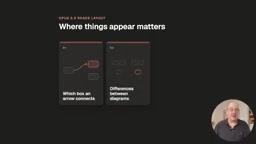
Examples Anthropic cites include: which box an arrow connects to, differences between two diagrams, and the start or end time of an event on a calendar. You can also hand Claude a long document and ask it to find contradictions in numbers, names, or dates.
A complementary recommendation: ask Claude to proactively flag what it can't confirm. For example: "Mark anything you can't verify and note where you looked." This is especially useful for research, comparisons, and fact-checking tasks that depend on sources.
Be Specific About Design Styles You Don't Want
For design tasks, Anthropic notes that vague instructions like "make this less generic" or "avoid an AI look" are rarely specific enough.
A better approach is to name the exact styles you want to avoid. For example: "Build out a personal website with placeholder content — no beige or off-white backgrounds, no italic emphasis text, no 01/02/03 numbered headings, no monospace font labels, and no pill-shaped buttons." If you already have a design system, handing it directly to Claude works even better.
Tell Claude Which Earlier Answers Are Final
In long conversations, Opus 5.5 can sometimes circle back to reconsider previous answers while working through a task.
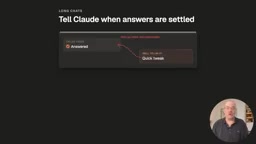
You can add something like this to your project instructions: "Once you've answered something, treat that answer as final. Focus on what I'm asking right now — don't revisit earlier answers unless I bring them up or flag an issue with them."
This keeps long conversations focused, though there's a trade-off: Claude may be less likely to catch and self-correct earlier mistakes on its own. Anthropic cautions against using this rule in extended analyses where later information might change earlier conclusions.
Takeaway: Change How You Interact, Not How Complex Your Prompts Are
The core of these Opus 5.5 guidelines isn't about mastering some new complex prompting technique — it's about shifting your habits when working with the model:
- Don't break tasks into tiny steps; give it more complete, clearly defined tasks instead
- Use the model's built-in controls (like effort) to guide behavior
- Let it work through long tasks without interruption
- Provide raw source materials whenever possible
- Most importantly, be explicit about what you want it to produce
If you have an established set of prompting habits, it's worth testing these new approaches on a small scale first — they can make Claude more effective without making your prompts any more complex.
Related articles

A Single Prompt Triggers a Global PHP Security Storm: Is AI a Savior or a Hidden Risk?
A single AI prompt triggered a global PHP security crisis affecting Wikipedia and the Internet Archive. This article reviews the incident, analyzes the OpenAI-Amazon controversy, and explores the security paradox of lowered vulnerability discovery barriers in the AI era and developer response strategies.

When AI Is Taken Away: How Reliance on Shortcuts Undermines Your Problem-Solving Resilience
A study of 1,222 people found that after using AI to answer questions, once AI was removed, people gave up on more problems than a control group that never used AI. The article analyzes the impact of AI reliance on learning resilience and metacognition, and explores design implications for AI learning tools.

Carta and NewView Partner to Let Startup Employees Cash Out Equity Early
Carta and NewView Capital partner to simplify startup tender offers, helping employees sell equity early. Analysis of the mechanism, liquidity pain points, and impact.