Cline UI SDK v0.2.0 Released: The Independent Evolution of AI Coding Tool Component Libraries

Cline releases its UI component library @cline/ui independently at 0.2.0, decoupling the interface layer from the plugin.
Cline's UI component library `@cline/ui` releases v0.2.0, signaling the team is extracting conversational UI, diff previews, and terminal interaction from the VS Code plugin into a reusable standalone SDK. The release process is now automated via github-actions, indicating a regular release cadence, but no changelog or migration guide was included, showing documentation still needs work. The 0.x version means breaking API changes are still possible, making this stage better for technical research than deep production integration. The article argues that as underlying models converge, interface experience will become a source of differentiation, and UI SDK-ification could lead to either a de facto interface standard or expanded multi-IDE host support.
AI coding assistant Cline's UI component library @cline/ui has officially released version 0.2.0. This version number may seem unremarkable, but it signals that Cline is distilling its in-editor interface capabilities into a reusable SDK—a noteworthy signal for the entire AI coding tool ecosystem.
From Plugin UI to an Independent SDK
Cline was originally known to developers as a VS Code extension, whose conversational coding interface, file diff previews, terminal interaction, and other components formed the core product experience. Previously these UI capabilities were highly coupled with the plugin itself, and the independent release of @cline/ui indicates the team is undertaking an architectural split—decoupling the interface layer from the host environment.
This approach is uncommon among AI coding tools. Most similar products choose to bundle UI and Agent logic within a single extension, prioritizing iteration speed. Cline's choice to extract a UI SDK increases maintenance costs in the short term, but in the long term may pave the way for multi-host support (such as JetBrains IDEs, standalone desktop clients). As an early version, v0.2.0's API stability is likely still being ironed out, and directly depending on it in production requires careful evaluation.
Host Architecture of AI Coding Assistants: The UI of VS Code extensions is not entirely freely customizable but runs within containers such as VS Code's Webview, native TreeView, or Editor. The so-called "decoupling from the host environment" essentially means stripping components from the APIs provided by the vscode namespace (such as WebviewPanel, command registration, theme variables) and instead obtaining host capabilities through property injection or an adapter layer. This way, the same set of components can theoretically render in JetBrains' Swing/JCEF environment, Electron desktop clients, or browsers, requiring only the replacement of a thin adapter layer. The cost is that components must handle theming, keyboard shortcuts, focus management, and accessibility themselves—things that VS Code originally handled uniformly—so decoupled component libraries often require a longer maturity cycle.
Signals Revealed by Version 0.2.0
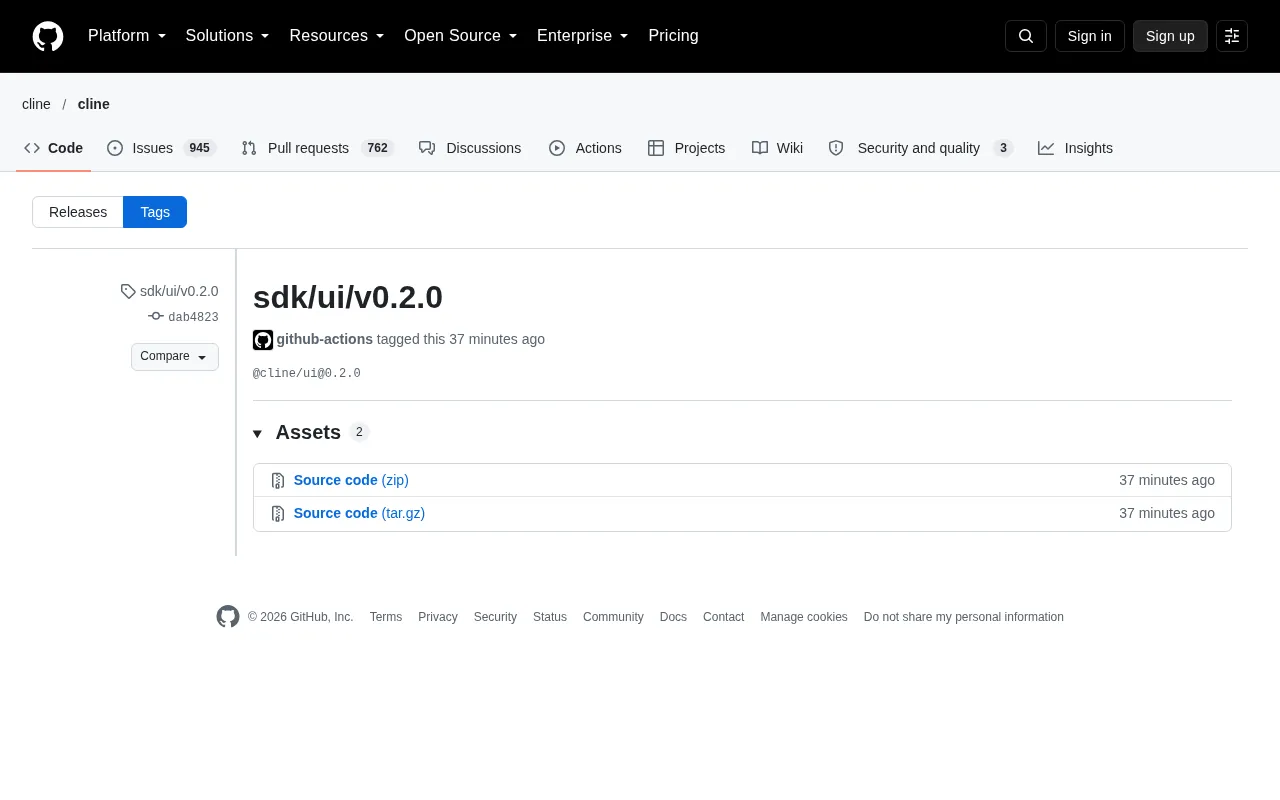
Based on the release page information, this version was automatically tagged by github-actions, with commit dab4823 and package name @cline/ui@0.2.0. The release process has been integrated with CI automation, indicating that the component library has developed a relatively standardized release cadence within the team, rather than being a one-off experimental extraction.
The 0.2.0 version number itself also conveys information: there is still a considerable distance to 1.0, meaning interface design, component partitioning, and styling solutions may all undergo breaking changes. For teams wanting to build secondary development on this SDK, the current stage is better suited for technical research rather than deep integration.
As a side note, this release page does not include a detailed changelog or migration guide, only a tag comparison entry. For developers already using 0.1.x, specific changes need to be confirmed by comparing commits themselves—a common phenomenon in early open-source projects, but it also reflects room for improvement in documentation.
Semantic Versioning and the Meaning of 0.x: According to the SemVer specification, a major version number of 0 indicates that the "public API is not yet stable," and any minor version upgrade (such as 0.1 to 0.2) may contain breaking changes—the opposite of the convention after 1.0 where "minor versions only add features without breaking compatibility." Therefore, seeing 0.2.0 should be understood as the interface still evolving rapidly, with component boundaries and styling solutions not yet frozen. For dependents, the correct approach is to pin exact versions in package.json or use ~ ranges with lockfiles, while retaining upgrade regression tests in CI; for product integration, it is recommended to isolate direct calls to this library through an internal wrapper layer to facilitate future replacement or migration with major versions.
Significance for the AI Coding Tool Ecosystem
Competition among AI coding assistants is shifting from "model capability" to "product experience." As the underlying models accessed by various players gradually converge, the refinement of interface interaction—such as diff readability, the presentation of multi-file changes, and the interaction design for permission confirmation—will become an important source of differentiation. By turning its UI layer into an SDK, Cline is in some sense productizing this expertise.
If this path succeeds, two outcomes may emerge: first, other AI coding tools reuse @cline/ui, forming a de facto interface standard; second, Cline uses it to rapidly expand multi-IDE support and broaden its user coverage. Both outcomes are positive for the open-source AI coding ecosystem. Of course, all of this depends on the SDK iterating stably to 1.0 with comprehensive documentation.
Why Diff Presentation and Permission Confirmation Are Key to Experience: The output of AI coding assistants is essentially "a series of modification proposals to the codebase," and the diff component determines whether users can judge within seconds whether the changes are correct—inline highlighting, collapsing unchanged regions, multi-file columns, syntax coloring, and the granularity of accept/reject all directly affect review efficiency. Permission confirmation interaction involves trust boundaries: whether the tool can execute terminal commands, write files, or access the network requires clear authorization prompts and revocable mechanisms. There is no unified standard for these two areas, and implementations vary greatly—which is exactly where "interface experience becomes a source of differentiation" plays out. If @cline/ui can abstract such interactions into reusable components, it indeed has the potential to become a de facto standard—provided the abstraction is general enough and not bound to a specific Agent protocol.
How Developers Should View This
If you are building VS Code extensions or AI coding-related products, @cline/ui is worth watching but there is no need to rush to integrate. It is recommended to first read the source code to understand its component abstraction approach, especially the implementation ideas for conversation flow rendering and diff display—this experience is more valuable than directly depending on the package itself.
If you are just a regular Cline user, this version brings almost no perceivable changes to daily use; it is more of an infrastructure move aimed at developers. What is truly worth looking forward to is whether, once the SDK matures, Cline can deliver a more consistent multi-platform experience and richer extension capabilities.
Related articles

Will GitHub Die? Open Source Maintainer Burnout and the Collaboration Crisis in the AI Era
Lex Fridman podcast discussion on open source maintainer burnout and GitHub's predicament: massive pull requests overwhelm core maintainers, and AI worsens code bloat. Using math journal peer review and Poincaré conjecture verification as analogies, the article analyzes why verification in knowledge production must be deliberately slow, and how open source communities can avoid the failure mode of maintainers exiting.

Stop Building Cookie-Cutter AI Websites: 3 Tools That Transform Your Coding Agent
Three tools that boost AI coding agents: FFmpeg skill for local video editing in Claude Code and Cursor, Hallmark's 50 design themes to fix cookie-cutter AI sites, and Jailbreaks' 25+ model prompts.

How America's Gerontocracy Squeezes the Younger Generation
Americans over 55 hold nearly three-quarters of national wealth, alongside an 80-year-old president and elderly congressional leaders. The Atlantic's Idrees Kahloon explains how gerontocracy drives up housing costs, squeezes opportunities for the young, and explores zoning reform and child poverty reduction as practical fixes.