Clipwise: Save Any Webpage Completely to Notion in One Click
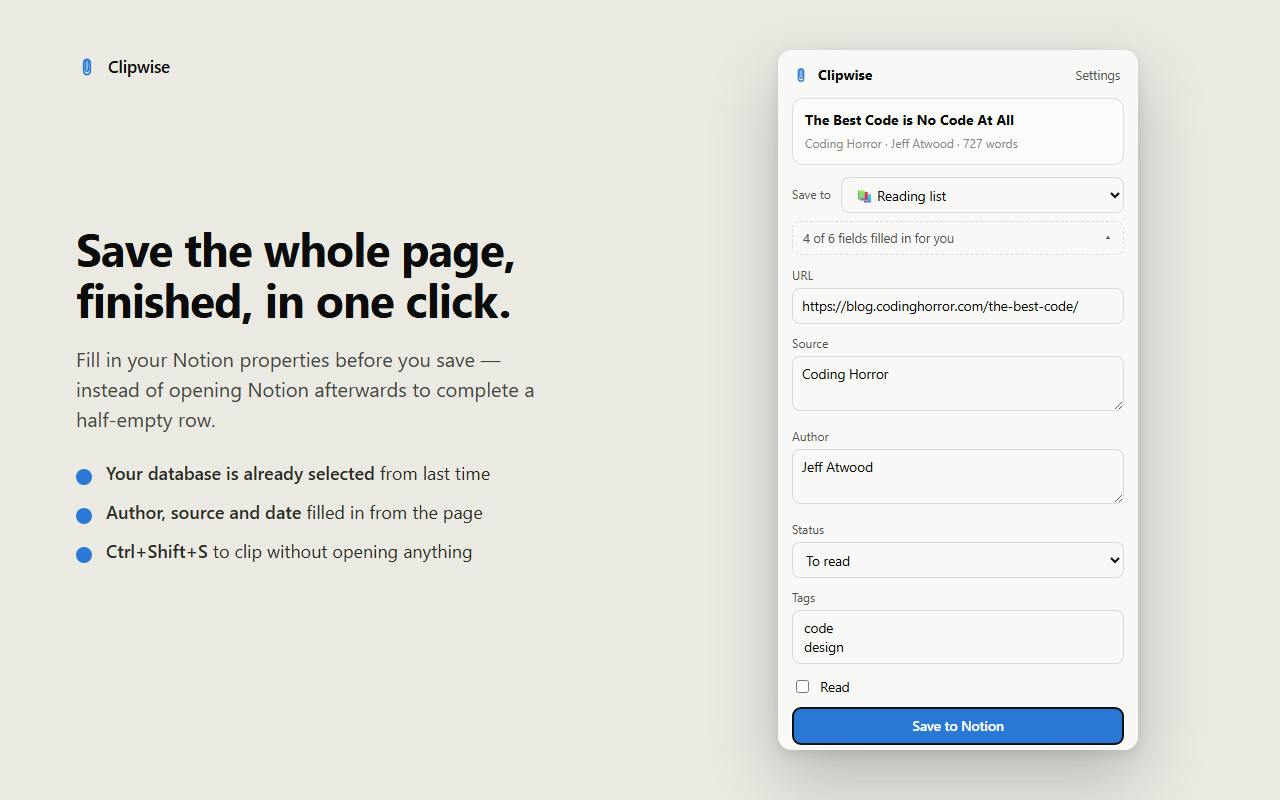
Clipwise is a login-free, local-only Chrome extension that saves complete webpages directly into Notion.
Clipwise is a Chrome web clipping extension built for Notion users, with its core promise being complete article capture — a direct answer to the long-standing content truncation issues with Notion's official Web Clipper. No account registration or paywall, all data is processed locally in the browser and written straight to the user's own Notion without passing through any third-party server. It also lets users fill in structured database properties before saving and remembers last-used settings, significantly speeding up bulk archiving. The product debuted on Product Hunt with around 100 upvotes and ranked 5th on its launch day.
The Long-Standing Problem with Web Clipping — Clipwise Wants to Fix It for Good
Saving web content to a note-taking tool is part of almost every knowledge worker's daily routine, yet genuinely good clipping solutions remain surprisingly rare. Notion's official Web Clipper has long drawn complaints for incomplete captures — article body text often saves only halfway, and code blocks, images, and formatting are frequently lost. Clipwise, a Chrome extension that recently launched on Product Hunt, targets exactly these pain points.
Clipwise's core promise is straightforward: save any webpage into your Notion database — the whole article, not half of it. It earned around 100 upvotes on Product Hunt and ranked 5th for the day, listed under the Chrome Extensions, Productivity, and Notion categories.
Three Design Choices That Set It Apart
Full Capture, Not Half an Article
One phrase that appears repeatedly in the official description is "the whole article, not half of it" — a direct criticism of existing clipping tools. Many users have encountered content being cut off when saving long articles, especially on pages with lazy loading, pagination, or complex layouts. By making "capture everything" its primary selling point, Clipwise signals that it has put targeted effort into content parsing.
No Account, No Login, No Paywall
"No account, no login, no paywall" is another defining position. The vast majority of similar extensions require account registration and often lock core features behind a subscription. Clipwise eliminates that friction entirely — install the extension and start using it immediately. For users who just want to quietly build a reading archive without signing up for yet another service, this zero-friction experience has real appeal.
Fill in Database Properties Before Saving — and It Remembers Your Last Choices
Notion's structured database capability is what sets it apart from ordinary note-taking apps. Clipwise lets you fill in the target database's properties — such as category, tags, and status — before saving, and it remembers your last selections. This means when you're clipping a batch of similar content, you don't have to reconfigure settings each time, making the clipping action remarkably fast.
Data Stays Local: A Privacy-First Trade-Off
"Everything stays on your computer" is a point worth highlighting on its own. There's no intermediary server relaying your browsing data — all processing happens locally, and clipped content is written directly to your own Notion.
This architecture is a win for privacy-conscious users: your reading history and saved content are never collected by a third-party service. The trade-off is that server-dependent features like cross-device cloud sync, collaboration, or history management aren't available. For users who treat Notion itself as the final destination for their data, this trade-off makes sense: real storage and sync are handled by Notion, while the extension is solely responsible for the "capture + write" step.
Who Is Clipwise Best For?
Based on its feature set, Clipwise targets people who already rely heavily on Notion databases to manage reading lists, resource libraries, or research materials. It's not a general-purpose note-taking tool — it's a puzzle piece in the Notion ecosystem.
If your workflow looks like this — you come across a valuable article while browsing, and you want to archive the full text into a structured Notion database along with properly tagged metadata — then Clipwise fills exactly the gap that the official Web Clipper doesn't handle well. Conversely, if you don't use Notion, or only need simple bookmarks, its value is comparatively limited.
A Few Observations
Clipwise is a textbook example of a "small and focused" tool: rather than trying to do everything, it aims to do one thing well — saving webpages into Notion completely, quickly, and privately. Its three selling points (full capture, no login required, local processing) are internally consistent, collectively pointing to a product philosophy that respects users' time and privacy.
That said, as a freshly launched Chrome extension, its long-term performance remains to be seen. Its success rate on complex pages (such as paywalled content requiring login, or dynamically rendered pages) and its ability to adapt to Notion API changes will be key factors in determining whether it truly earns a place in daily workflows. Based on current Product Hunt feedback, it has already captured the interest of heavy Notion users.
Related articles

Salesforce Acquires Rune for $375M: AI Logistics Tech Bolsters Defense Business
Salesforce reportedly acquires defense tech startup Rune for $375M. Rune's AI logistics tech will strengthen Salesforce's Missionforce defense platform, continuing its M&A spree.

Why Fair Use Benefits Everyone in the AI Era
Starting from a Hacker News discussion, this article analyzes the legal logic and controversies of the fair use principle in AI training and content creation, and its dual impact on creators and the tech ecosystem.

Mistral Large 4 Open-Sources a Trillion Parameters, Microsoft Offers Voluntary Severance to 60,000 Employees
Mistral Large 4 open-sources a trillion-parameter multimodal model with a coding agent score of 48; SanDisk earnings show AI inference reshaping NAND demand; Google Gemini adds in-app file editing, OpenAI raises Codex quotas, and Microsoft offers voluntary severance to 60,000 employees.