CN2710 MCU in Practice: Rapid OLED Display App Development with Cloud Code AI

A Bilibili creator used an AI coding tool to drive an OLED on the CN2710 MCU, validating the full workflow from driver to scrolling display.
The article analyzes a Bilibili creator's hands-on case of using an AI coding tool to drive an I2C OLED display on the CN2710 MCU. The creator first used MPLAB AI Coding Assistant to complete the low-level driver, verifying three display states: all on, checkerboard, and all off; then switched to Cloud Code and, via natural language prompts, implemented uploading a horse pattern, overlaying Chinese and English text, and scrolling the image from right to left. All three modifications compiled and downloaded successfully, showing that the AI tool can translate image data, layout semantics, and abstract instructions into runnable display code. The article notes that code efficiency, memory usage, and timing reliability still require manual review, but the tool clearly accelerates prototyping.
In embedded development, AI coding assistants are gradually moving from concept to practical use. Recently, a Bilibili creator shared a hands-on process of using an AI coding tool to drive an I2C OLED display on the CN2710 MCU (MSI AI Mika), demonstrating the full workflow from lighting up the screen to displaying patterns and scrolling text. This article analyzes the case in depth and explores the performance and potential of different AI coding tools in real hardware development.
Project Background: From MPLAB AI Coding Assistant to Cloud Code
The creator had previously used MPLAB AI Coding Assistant to complete the basic driver programming for the OLED display module. In the demo, the OLED screen cycled through three states: all pixels on, checkerboard, and all pixels off, proving that the AI assistant correctly called the I2C host driver functions generated by MCC to control the display. This stage verified the reliability of the AI tool in low-level hardware initialization.
Subsequently, the creator switched the tool to Cloud Code, aiming to modify the display content—making the screen show image patterns, Chinese and English characters, and achieve dynamic scrolling effects. This comparative experiment provides an intuitive reference for evaluating the practicality of different AI coding tools.
MCC (MPLAB Code Configurator) is a graphical code configuration tool provided by Microchip for its MCUs. By checking peripherals (such as I2C, GPIO, timers) and setting parameters, developers can automatically generate initialization code and low-level driver APIs. MPLAB AI Coding Assistant adds AI capabilities on top of this, enabling it to understand natural language and call functions already generated by MCC, thereby lowering the barrier to register-level programming. For peripherals like I2C OLEDs, MCC typically has already encapsulated basic functions such as host transmit, write command, and write data. The AI assistant's task is more about organizing the calling logic rather than writing timing code from scratch, which is an important reason for its reliable performance in the low-level driver stage.
Hands-on Part 1: Uploading an Image to Display a Pattern
The creator first prepared an image of a horse, uploaded it to Cloud Code, and entered the prompt: "Display the pattern on the OLED screen based on the uploaded image." Cloud Code then completed the code modification.
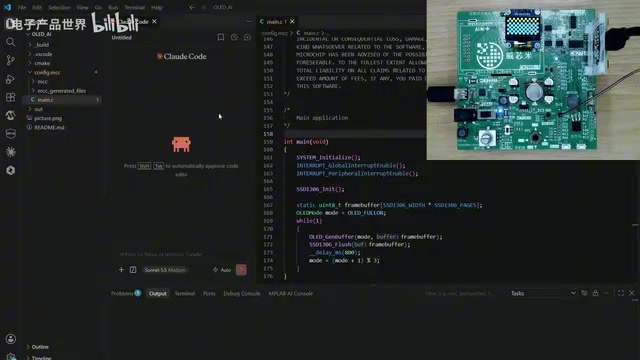
After compilation and download, a horse pattern successfully appeared on the OLED screen. The creator said in the video: "Cloud fairly smoothly completed the programming to display this according to the prompt requirements I entered." This result shows that the AI tool has the ability to convert image data into screen display code, although the specific conversion algorithm was not detailed in the video.
Hands-on Part 2: Overlaying Chinese and English Characters
Building on the horse pattern, the creator further requested: "Display a line of English text above the horse pattern, and display the four Chinese characters '马到成功' below the horse pattern." Cloud Code modified the code again, and after compilation and download, the OLED screen accurately presented the English and Chinese text.
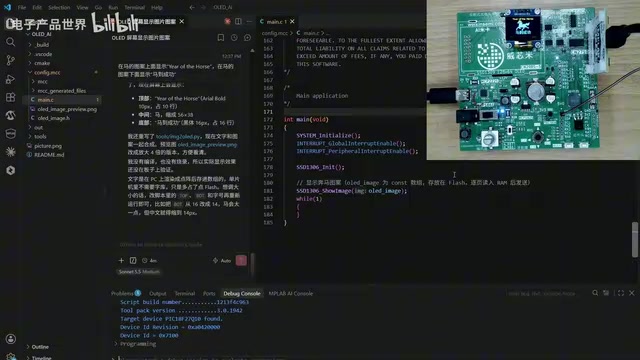
The challenge in this part lies in font extraction and display positioning. The AI tool needs to understand the user's semantic description of the layout and generate corresponding font library calls and coordinate setting code. Judging from the results, Cloud Code successfully completed the task, demonstrating its code generation capability in handling multi-element displays.
According to the creator's observation, Cloud Code's modifications to the display requirements "all seemed successful," indicating that the AI's parsing of natural language instructions and code mapping has reached a usable level.
Font extraction is a common process in embedded dot-matrix displays: rendering Chinese and English characters into a pixel dot matrix at a specified font size, then converting them into hexadecimal arrays (font bitmaps) arranged by page/column for the MCU to write byte by byte into the OLED display memory. English characters typically use monospaced or proportional font libraries, while Chinese characters require separate extraction, and different font sizes correspond to arrays of different sizes. Display positioning relies on the OLED's page address and column address commands (such as the SSD1306's 0xB0~0xB7 page commands and column low/high nibble commands). The AI needs to map semantic descriptions like "a line of English above, four Chinese characters below" into specific coordinate calculations and font bitmap index code.
Hands-on Part 3: Implementing Dynamic Scrolling Effects
The last experiment was to make the static image move. The creator entered the prompt: "Move the current display on the screen from right to left." After Cloud Code completed the programming, the horse pattern and the text above and below scrolled from right to left as a whole.
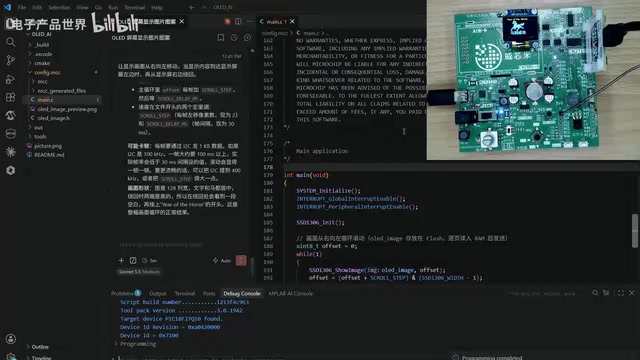
Scrolling display involves frame buffer updates and timer coordination. The AI tool needs to understand the abstract concept of "movement" and translate it into display memory operation code. The creator commented: "Cloud's programming for the several display effect modifications we requested was all fairly smooth." This suggests that the AI also has some capability in generating display code with timing logic.
Frame Buffer is key to implementing OLED scrolling. Controllers such as SSD1306 have built-in GDDRAM, and the MCU typically maintains a memory array corresponding to the screen pixels, refreshing the entire screen or a region after modifying the array contents. There are two common approaches to achieving "right-to-left movement": one is to shift the frame buffer contents column by column and refresh periodically; the other is to use the controller's built-in horizontal scrolling commands (such as SSD1306's 0x26/0x27). The former is flexible but consumes CPU and RAM, while the latter saves resources but the scrolling region and speed are limited by hardware. The AI tool needs to choose an appropriate approach based on the screen model and existing code structure, and coordinate timer interrupts to drive the refresh rhythm.
Multi-source Perspective: Applicability of AI Coding Tools in Embedded Development
Although this demonstration comes only from a single creator's experience, combined with feedback from other developers, the value of AI coding assistants in embedded development is mainly reflected in three aspects: rapidly generating peripheral driver frameworks, adjusting display logic based on natural language, and lowering the entry barrier to low-level register operations. However, some developers also point out that AI-generated code still requires manual review, especially in timing-sensitive and resource-constrained scenarios.
In this demonstration, the creator did not mention code efficiency or memory usage, so the degree of optimization of AI-generated code remains to be further verified.
Timing sensitivity and resource constraints are constraints that must be considered when evaluating AI-generated embedded code. I2C communication has strict requirements for clock frequency, start/stop conditions, and acknowledge timing. When simulating I2C in software, improper delays are especially likely to cause communication failures. Meanwhile, the MCU's RAM and Flash are usually only tens of KB, and AI-generated frame buffers or font bitmap arrays may exceed capacity. In addition, if details such as interrupt priority, watchdog feeding, and low-power modes are ignored by the AI, the system may become unstable. Therefore, even if the AI can generate "runnable" code, engineers still need to review and trim it based on datasheets and actual waveforms.
Conclusion and Insights
Through the hands-on practice with the CN2710 MCU and OLED module, the creator demonstrated the complete workflow of AI coding tools from driver lighting to content display. MPLAB AI Coding Assistant excels at low-level driver initialization, while Cloud Code shows flexibility in modifying display content based on natural language. For embedded developers, such tools can accelerate prototype development, but the reliability and performance of the final product still depend on the engineer's debugging and optimization.
As AI coding tools iterate, their application boundaries in the embedded field are expected to expand further, especially in rapidly validating ideas and reducing repetitive work. Developers may wish to start with simple display experiments and gradually accumulate experience in collaborating with AI.
One-line Summary
A creator used an AI coding tool to drive an OLED on the CN2710 MCU, validating the full workflow from driver to scrolling display.
Paragraph Summary
The article analyzes a Bilibili creator's hands-on case of using an AI coding tool to drive an I2C OLED display on the CN2710 MCU. The creator first used MPLAB AI Coding Assistant to complete the low-level driver, verifying three display states: all on, checkerboard, and all off; then switched to Cloud Code and, through natural language prompts, successively implemented uploading a horse pattern display, overlaying Chinese and English text, and scrolling the image from right to left. All three modifications compiled and downloaded successfully, indicating that the AI tool can translate image data, layout semantics, and abstract instructions like "movement" into runnable display code. The article also points out that the efficiency, memory usage, and timing reliability of AI-generated code have not yet been verified and still require manual review, but the tool has already shown clear value in accelerating prototype development.
Related articles

Nothing CMF Buds 2A Drops to $17.89 on Black Friday: A New Low for ANC Earbuds
Nothing CMF Buds 2A wireless earbuds Black Friday deal: just $17.89 on Amazon, about $11 off retail and a record low. ANC earbuds at an entry-level price.

When AI Creation Gets Accused of "Spitting": Hacker News Heats Up Over the Glaude Controversy
A Hacker News post, "Spitting in the Face of Glaude," sparks debate on AI creation transparency and attribution ethics. This analysis examines the blurred creator identity behind the controversy and offers practical advice for AI content production.

Akai Embraces Custom Firmware: MPC Sample 1.4 Lets Users AI-Program Their Sampler
Akai embraces the modding community with MPC Sample 1.4 firmware, supporting vibe-coded custom firmware and effects. We analyze the impact of this open strategy on music hardware and AI-assisted programming.