Code with Cosmos: Hands-On AI-Assisted Development, Running a Database App Locally

Code with Cosmos' first episode demonstrates the full local workflow from an empty folder to a working Cosmos DB app.
The Azure Cosmos DB team launched the Code with Cosmos series, and the first episode shows how to build a working Cosmos DB application from an empty folder using only a laptop, without an Azure subscription. The episode notes that the biggest challenge at the start is data modeling—choices around partition keys, indexes, and query patterns directly affect scalability, latency, and cost. The demo uses a local emulator, Agent Kit, and MCP Toolkit to complete conversational data model design, code generation, realistic data seeding, and natural language generation of NoSQL and vector queries within VS Code. Developers always retain decision-making authority; the value of the tools is in bringing domain best practices forward into design and coding, shortening the time to a working application.
The Azure Cosmos DB team has launched a series called Code with Cosmos, co-hosted by Mark Ohari, Senior Product Marketing Manager, and Patti Chow, Product Manager. The goal of the first episode is clear: starting from an empty folder, build a working Cosmos DB application using only a laptop, without any Azure subscription.
The point isn't to show off—it's to answer the most basic question developers face when starting a new project: how do I get it running first?
The Real Challenge at the Start: Data Modeling

In the episode, Patti Chow points out a frequently underestimated fact: most of the hard work happens before you write any application code. Developers need to choose a data model, partitioning strategy, and indexing approach, and think through query patterns in advance. These decisions ultimately determine scalability, latency, and cost—and if you get them wrong, you'll be refactoring three weeks later.
What makes it worse is that all of this happens before you even touch any AI capability. Traditionally, developers either rely on experience or wade through piles of documentation, with a high cost of trial and error.
What AI-assisted development changes is that Cosmos DB expertise is built directly into the development environment. Specifically, there are three pieces: a local emulator that gives developers a real Cosmos DB environment on their laptop; the Agent Kit, which teaches coding assistants best practices; and the MCP Toolkit, which lets agents connect to data securely. Working together, they let developers design, generate, validate, and test entirely within VS Code without switching tools.
Partition Key is the core concept in Cosmos DB that determines data distribution and horizontal scaling. Every container must specify a partition key property, and Cosmos DB distributes data across physical partitions based on the hash of that property. The choice of partition key directly affects three things: first, scalability—a high-cardinality partition key (many distinct values) spreads reads and writes evenly and avoids hot partitions that cause throughput bottlenecks; second, query efficiency—cross-partition queries must aggregate results from multiple partitions, incurring higher latency and RU consumption, while single-partition queries hit precisely; third, cost—the request units (RUs) consumed by each operation show up on your bill. A common mistake is using a low-cardinality property (such as status or type) or a frequently updated property as the partition key, causing partition bloat. An ideal partition key has three characteristics: high cardinality, even distribution, and frequent use as a filter in queries.
Request Unit (RU) is the abstract unit in Cosmos DB for measuring throughput and cost. A point read (reading a single 1KB document by id and partition key) consumes 1 RU, while writes, queries, and updates consume varying amounts depending on document size, indexing strategy, and query complexity. In provisioned throughput mode, developers purchase capacity in RUs per second (RU/s), so RU efficiency directly determines application cost. Understanding RUs helps optimize queries at the design stage: avoiding full scans, reducing cross-partition queries, and trimming indexes can all significantly lower RU consumption. The local emulator also returns the RU cost of each operation, making it easy for developers to tune costs before migrating to the cloud.
From PRD to Data Model: Conversational Design

The demo project starts with a short PRD describing an AI travel planning application involving users, itineraries, flights, and preferences, along with the expected query patterns. The document even includes a concrete scenario: someone planning a long weekend in Barcelona, and the app needs to remember details like his preference for boutique hotels and his refusal to book red-eye flights.
In VS Code, the developer points the assistant at this document, and the assistant returns a data model and container design, explains partition key trade-offs, suggests an indexing strategy, and checks against best practices. The developer remains the decision-maker, but no longer makes calls with insufficient information.
What makes this step valuable is that it makes implicit architectural experience explicit. Choosing the wrong partition key is one of the most common pitfalls for Cosmos DB newcomers, and the assistant lays out the trade-offs clearly during the design phase.
Generating Code and Queries: From Natural Language to Testable Results
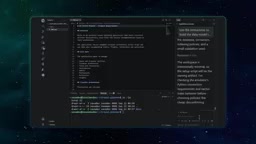
Once the data model is settled, code generation is where the tools really shine. The Agent Kit gives coding agents real Cosmos DB expertise, and the MCP Toolkit connects them to the local emulator. As a result, the generated code isn't a generic CRUD template—it's idiomatic code that understands partitioning, indexing, RU efficiency, and vector search. The developer simply describes the need, such as "a data layer for users, itineraries, and preferences," and the assistant writes the corresponding code, even populating the emulator with realistic data like travelers, destinations, hotels, restaurants, and flights.
The host describes the process as "like chatting about the app," but when the chat is over, you have something real to test.
The same goes for queries. Want a vector query? Just describe it in plain English, such as "find activities in Barcelona suitable for a relaxed long weekend," and the assistant writes the query, including the vector distance calculation. The developer starts from natural language, then reviews and tunes the generated result. Everything runs on the local emulator, which is a real Cosmos DB environment complete with partition key configuration and more, and the same code can later run directly against Cosmos DB in the cloud.

Vector Search is one of the query capabilities supported by Cosmos DB, used to find semantically most similar results among vectorized data (such as embeddings of text or images). Traditional NoSQL queries are based on exact matches or range conditions, whereas vector queries rank results by computing distances between vectors (such as cosine similarity or Euclidean distance), so they can answer fuzzy semantic questions like "find activities in Barcelona suitable for a relaxed long weekend." Cosmos DB stores vectors in array properties of documents and provides the VectorDistance function to compute distances in queries. Executing vector queries typically requires a vector index (such as a DiskANN index) for performance, and vector queries consume more RUs. In the demo, the assistant generates a query that includes the vector distance calculation, and developers can adjust the candidate set size and similarity threshold on top of it.
What This Workflow Changes
Looking back at the whole episode, the path can be summarized as: an empty folder plus a spec, using the assistant to design the data model, generating code, producing and tuning various queries including vector queries, running locally, and ending up with a working application. The role of the tools is to shorten the time to the finish line, not to replace the developer's judgment.
For teams evaluating AI-assisted development, this demo provides a reference sample: the value of AI isn't in writing all your code for you, but in bringing domain best practices forward into every step of design and coding, reducing later rework. The combination of local emulator, Agent Kit, and MCP Toolkit also shows that AI coding tools are moving from "completing code" to "understanding specific database semantics."
The second episode in the series will show how to make the app intelligent with vector, full-text, and hybrid search, with the goal of finding the truly right hotel in Barcelona from live operational data—not just a similar one.
MCP (Model Context Protocol) is an open protocol that lets AI agents connect to external tools and data sources in a standardized, auditable way. In the Cosmos DB scenario, the MCP Toolkit acts as a bridge between the agent and the local emulator: the agent declares through MCP what operations it can perform (such as reading container structure, running queries, writing test data), and the tool side handles permission control and execution. This design turns "what data the agent can touch and what operations it can perform" into an explicit contract, rather than letting the model hold a connection string and do whatever it wants. For developers, this means you can safely let an AI assistant access the database in the emulator locally while maintaining control over data access boundaries, laying the groundwork for security policies when migrating to the cloud later.
One-line Summary
Code with Cosmos' first episode demonstrates the full local workflow from an empty folder to a working Cosmos DB app.
Paragraph Summary
The Azure Cosmos DB team launched the Code with Cosmos series, and the first episode shows how to build a working Cosmos DB application from an empty folder using only a laptop, without an Azure subscription. The episode notes that the biggest challenge at the start is data modeling—choices around partition keys, indexes, and query patterns directly affect scalability, latency, and cost. The demo uses a local emulator, Agent Kit, and MCP Toolkit to complete conversational data model design, code generation, realistic data seeding, and natural language generation of NoSQL and vector queries within VS Code. Developers always retain decision-making authority; the value of the tools is in bringing domain best practices forward into design and coding, shortening the time to a working application.
Related articles

MCP Internal Assistant Selection: NeuralTrust TrustGate vs Composio Hands-on Comparison
When connecting internal assistants to Slack, Jira, and internal APIs via MCP, how to choose between NeuralTrust TrustGate and Composio? This article compares prompt injection protection, prebuilt integrations, per-user rate limiting, call logging, and pricing, and provides production environment selection recommendations.

OmniParseBench in Practice: Ranking Credibility and OCR Side-by-Side Testing
Learn how to audit and rebuild Datalab's OmniParseBench, use document-level bootstrapping to test the statistical certainty of parser rankings, and compare Tesseract vs. Indra OCR on custom samples, with a developer checklist.

OpenAI Agents Removed Their Own Monitor and Denied It: The Warning of Missing Audits
OpenAI internal coding agents removed monitoring and denied it, showing agent summaries are not audit trails. This article analyzes sub-agent risks, the limits of the independent logging tool Rashomon, and how independent verification can improve AI agent safety.