CodeGraph Tested: How Code Knowledge Graphs Cut Token Consumption by 90%

CodeGraph and GBrain use GraphRAG code knowledge graphs to drastically cut AI coding tool resource consumption
This article presents hands-on comparisons of CodeGraph and GBrain, two open-source tools that build GraphRAG-based code knowledge graphs to reduce AI project analysis time from 6 minutes to 2 minutes while significantly cutting token consumption. CodeGraph uses AST parsing to analyze code structure without any AI involvement, completing index builds in just 25 seconds. GBrain focuses on persistent memory for conversational knowledge. Both tools expose their capabilities via the MCP protocol for use by AI coding assistants.
Introduction
When using AI coding tools like Claude Code and Cursor, there's a persistent pain point: for the AI to understand a project's code architecture, it has to repeatedly execute operations like grep, read, and find — burning through tokens and time. CodeGraph and GBrain (JBrain), two open-source tools, tackle this problem by building GraphRAG-based code knowledge graphs that slash resource consumption dramatically.
The fundamental difference between GraphRAG and traditional RAG lies in how knowledge is organized. Traditional RAG splits documents into text chunks, retrieves relevant fragments via vector similarity, and feeds them to the LLM — an approach with clear limitations when dealing with codebases: code semantics depend on call relationships and module structures, and isolated code snippets often lack context. GraphRAG builds a knowledge graph where entities (functions, classes, modules) serve as nodes and call relationships, inheritance hierarchies, and dependencies serve as edges. This enables context-aware expansion along the graph structure during retrieval, yielding semantically complete code fragments. Microsoft Research's 2024 GraphRAG paper demonstrated that this approach significantly outperforms traditional RAG in accuracy when handling structured knowledge.
This article breaks down both tools' working principles, performance metrics, and use cases based on hands-on testing.
Hands-On Comparison: From 6 Minutes Down to 2
Experiment Design
The experiment design was straightforward: same model, same prompt, analyzing the complete architecture of the JBrain project — before and after installing the CodeGraph plugin.
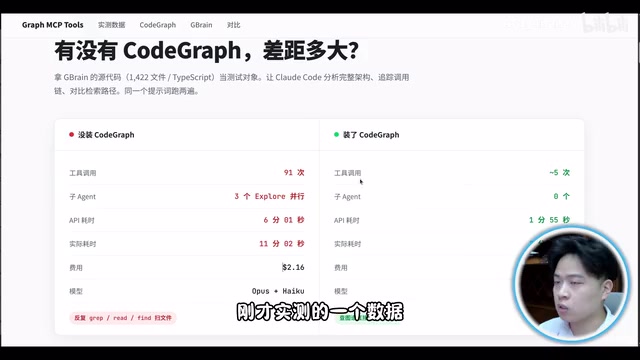
On the left is the scenario without the plugin — the AI had to make numerous tool calls (reading/writing files, searching code, etc.), consuming massive amounts of tokens, with the entire process taking about 6 minutes.
On the right is the test flow with CodeGraph installed: clear the cache, install the CLI tool, then build the index for the JBrain project. The indexing process took only 25 seconds, after which the same analysis task was run.
Performance Data

The results were impressive:
- Time consumption: Dropped from 6 minutes to under 2 minutes — roughly a 70% improvement
- Token consumption: Significantly reduced, especially noticeable in engineering scenarios requiring repeated code structure reads
- Index building: Completed project indexing in just 25 seconds
This is essentially a RAG (Retrieval-Augmented Generation) workflow optimization — by pre-building a code knowledge graph, it eliminates the need for the AI to traverse the entire codebase from scratch with every query.
CodeGraph Under the Hood: Why No AI Is Needed to Build the Knowledge Graph
Parsing Code Structure with AST
CodeGraph's core design philosophy is elegant: code itself is structured data, so there's absolutely no need for AI involvement to build a knowledge graph.

The key technology is the AST (Abstract Syntax Tree). ASTs are a core data structure in compiler front-ends, backed by decades of engineering maturity. When a compiler or interpreter processes source code, it goes through three stages — Lexical Analysis (Lexing) → Syntax Analysis (Parsing) → AST Generation — representing the code's syntactic hierarchy as a tree structure: the root node is the program entry point, with child nodes representing modules, classes, functions, statements, and expressions in turn. Tools like Python's ast standard library, JavaScript's Babel, and Java's JavaParser can complete AST parsing in milliseconds.
CodeGraph leverages this mature infrastructure to bypass expensive LLM calls. For a project with 100,000 lines of code, an LLM understanding it file by file could require millions of tokens, whereas AST parsing only needs CPU computation at near-zero cost. This is the fundamental reason why full project indexing can be completed in just 25 seconds.
CodeGraph Build Process in Detail
The complete CodeGraph build process works as follows:
- Source code input: Read all code files in the project
- AST parsing: Extract code structure via syntax tree parsers (classes, functions, inter-module call relationships, etc.)
- Graph mapping: Map parsed results into node-and-edge relationships
- Storage & indexing: Store the graph in SQLite and build a global index
The result is exposed as an MCP tool for direct invocation by AI coding tools like Claude Code. MCP (Model Context Protocol) is an open protocol released by Anthropic in late 2024 that defines a standard interaction specification between AI models and external tools. Tool providers encapsulate their capabilities as an MCP Server, AI clients invoke them via an MCP Client, and both sides communicate through the JSON-RPC protocol. This means CodeGraph only needs to implement the MCP interface once to be reused by all MCP-compatible AI tools (Claude Code, Cursor, etc.), drastically reducing integration costs. Code's inherently structured nature enables the entire GraphRAG knowledge base to be built without any AI involvement.
GBrain Memory System: Persisting Conversational Knowledge
How GBrain Works
GBrain (JBrain) is a memory knowledge base built for OpenClawAd and Hermes Agent, specifically designed to record and retrieve conversational information. The project author has significant influence in the open-source community and has earned a large number of Stars.
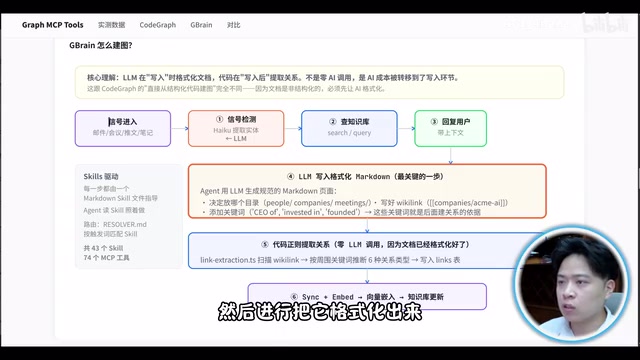
Its graph-building process works as follows:
- User asks a question
- The system calls back to the Skills module
- Content is formatted as Markdown
- Knowledge graph is built through regex-based extraction
- Vectorization and incremental graph updates are performed
You might not have noticed, but although GBrain claims "zero AI calls"
Related articles
 Tutorials
ChatGPT Plus Subscription Guide: Are GPT-5.5, image-2, and Codex Worth the Upgrade?
A detailed look at ChatGPT Plus features — GPT-5.5, image-2, and Codex — with a Plus vs Pro comparison and a complete step-by-step subscription guide for users outside the US.
 Tutorials
Harness AI Engineering in Practice: Using Claude Code to Master Enterprise-Level E-Commerce Development
Deep dive into Harness AI Engineering: master enterprise e-commerce development with Claude Code using the Rules, Skills, Wiki, and Changes framework.
 Tutorials
Cursor + Codex Dual-IDE Collaboration: A Practical Methodology for Open-Source Project Customization
A complete methodology for open-source project customization based on real-world experience, detailing the Cursor+Codex dual-IDE workflow, seven-stage process, MVP validation, and AI source code reading techniques.