Codex App Tutorial: Complete Guide from Installation & Configuration to Practical Tips

A complete guide to OpenAI Codex App covering installation, configuration, and practical tips.
This article provides a detailed walkthrough of using OpenAI Codex App, including download channels, MFA security login configuration (solving the issue of Chinese phone numbers unable to receive verification codes), project management methods, and the differences between various session work modes such as Plan mode, Goal mode, and Steer mode. It also offers an in-depth explanation of the technical principles and use cases for Local Processing and WorkTree modes.
OpenAI Codex App Complete User Guide
OpenAI's Codex App has been available for over three months now, and it's long since evolved beyond just being a coding Agent — it's a powerful personal assistant that surpasses similar products like Claude and Hermes in terms of intelligence. This article will walk you through everything from downloading and installing to feature configuration and practical tips, helping you fully master the Codex App.
Download, Installation & Secure Login
Download Channels
Codex App offers two official download options:
- ChatGPT official download page: Visit
chatgpt.com/download, where you'll find a "Download Codex" button at the bottom of the page, supporting both MacOS and Windows versions - Codex official page: Visit
chatgpt.com/codexdirectly to download
Critical Pre-Login Setup: Configuring MFA
This step is extremely important and directly affects your account security. After downloading and installing, don't rush to log in. First, open the ChatGPT web version, go to "Settings → Security & Privacy," and add an authenticator under Multi-Factor Authentication (MFA).
What is an MFA Authenticator? Multi-Factor Authentication (MFA) requires users to provide two or more identity verification factors when logging in. Authenticator apps (such as Google Authenticator, Authy) are based on the TOTP protocol (Time-based One-Time Password, RFC 6238 standard), generating a 6-digit dynamic code every 30 seconds — even if your password is compromised, an attacker cannot log in without your phone. This "something you know (password) + something you have (phone)" dual verification mechanism is one of the most widely adopted account security solutions today.
Why is this necessary? Because Codex requires identity verification during login, and without MFA configured, the system will send an SMS verification code. Phone numbers starting with China's country code 86 cannot receive these verification codes, which directly causes login failure or even triggers risk controls. Once you've configured an authenticator, you can simply enter the one-time code generated by your authenticator app to log in successfully.
For the login method, it's recommended to use your ChatGPT account. Although OpenAI API login is also supported, some features (like plugins) are unavailable with the latter. Codex quotas are tied to your ChatGPT subscription — Plus members get a basic quota, while Pro members get more.
Project Management & Work Modes
Creating and Opening Projects
The project list will be empty on first use. It's recommended to select "Existing Folder" to create a project. For example, if you have an app under active development, simply select the corresponding folder. The button in the upper left corner lets you choose which tool to open the project with (e.g., Xcode, VS Code, etc.).
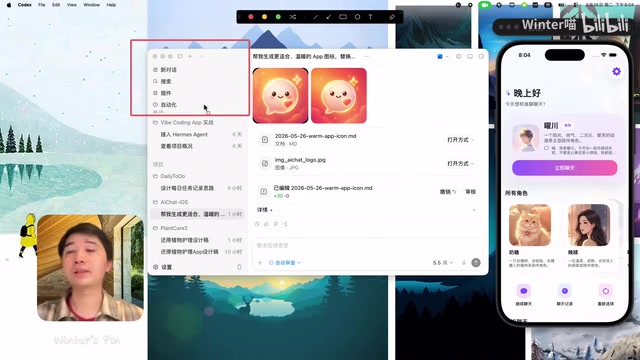
Session Modes Explained
Codex offers multiple flexible work modes for different development scenarios:
- Plan Mode: After sending a task, Codex first outlines an execution plan, proactively asks questions about unclear aspects, and only proceeds after confirmation
- Goal Mode: Suitable for long tasks — after setting a clear goal, Codex will continuously iterate until the goal is achieved. Clear acceptance criteria are needed when using this mode
- Follow-up Behavior: The default is "Follow" mode; switching to "Steer" mode allows you to insert new instructions during Codex's thinking process to adjust its direction, similar to taking over the steering wheel in autonomous driving
Local Mode vs WorkTree Mode
When creating a new session, you can choose the work mode:
- Local Processing: Works directly in the current project directory, suitable for everyday development
- WorkTree: Copies code from a specified branch to a new working directory, suitable for high-risk operations. Even if things go wrong, the original code remains unaffected. After completion, code is merged by creating a new branch and merging it back to the main branch
Technical Principles of WorkTree: Git WorkTree is a native feature introduced in Git 2.5 that allows multiple working directories to be checked out from the same repository, each directory can be on a different branch, and they share the same .git object database. Unlike a traditional git clone — which copies the entire repository history — WorkTree simply adds a new working directory pointer, using less disk space and enabling faster switching. In AI coding Agent scenarios, WorkTree's isolation property is particularly important: the Agent executes high-risk operations in an independent directory, and even if erroneous code is produced, it won't pollute the main branch. After completion, code is merged through standard branch+merge workflows, fully preserving Git's version control semantics.
It's worth noting that Codex supports multiple parallel sessions — you can open several sessions simultaneously to handle different tasks, which is also why it was previously called "Threads."
Related articles
 Tutorials
ChatGPT Plus Subscription Guide: Are GPT-5.5, image-2, and Codex Worth the Upgrade?
A detailed look at ChatGPT Plus features — GPT-5.5, image-2, and Codex — with a Plus vs Pro comparison and a complete step-by-step subscription guide for users outside the US.
 Tutorials
Harness AI Engineering in Practice: Using Claude Code to Master Enterprise-Level E-Commerce Development
Deep dive into Harness AI Engineering: master enterprise e-commerce development with Claude Code using the Rules, Skills, Wiki, and Changes framework.
 Tutorials
Cursor + Codex Dual-IDE Collaboration: A Practical Methodology for Open-Source Project Customization
A complete methodology for open-source project customization based on real-world experience, detailing the Cursor+Codex dual-IDE workflow, seven-stage process, MVP validation, and AI source code reading techniques.