Codex Beginner's Tutorial: Get Started with OpenAI's Programming Assistant in 5 Steps (2025 Hands-On Guide)

Codex isn't a chat box — it's an AI programming colleague that autonomously drives projects, with Plan Mode at its core.
This article redefines Codex's true nature: it's not a Q&A AI assistant but an AI Agent with a complete perceive-plan-execute closed loop, capable of reading/writing files, executing commands, and continuously driving multi-step tasks. The article provides a 5-step getting-started roadmap, emphasizes the separation principle for folders and Threads, introduces three key settings (rules, permissions, Skills), and recommends Plan Mode (plan first, execute later) as the most critical feature to help users avoid the risk of AI breaking their projects.
Rethinking Codex: Not a Chat Box, But an AI Programming Colleague
Many people open Codex for the first time thinking it's just a chat box that writes code. This understanding is completely wrong.
For beginners, what truly matters about Codex is this — it can enter your project folder, work toward a goal continuously, and deliver results into actual files. A regular AI assistant is more like a consultant: you ask a question, it gives an answer. Codex is more like a colleague: you give it a project, a goal, and permission boundaries, and it can break the task apart and push it forward step by step.
This difference stems from a fundamental architectural distinction. Codex falls into the "AI Agent" category, possessing a complete closed-loop capability of "perceive-plan-execute": it can read and write to the file system, execute terminal commands, call external tools, and maintain contextual coherence across multiple steps. This architecture allows Codex to autonomously complete workflows like "open file → analyze code → modify → verify → commit" without requiring users to manually pass information between each step. Traditional conversational AI produces independent responses each time and cannot actively operate on external environments; Codex, on the other hand, can continuously push a multi-step goal to completion like a real colleague.
This difference means using Codex is completely different from using ChatGPT. You don't need to chase the latest model names or hunt for "magic prompts" — instead, you need to understand how it works first.
Codex Workspace Interface and the 5-Step Getting Started Roadmap
The first step for beginners is understanding Codex's interface layout: the left side shows projects and Threads (task threads), the middle shows the task progression, and results land directly in your project files.
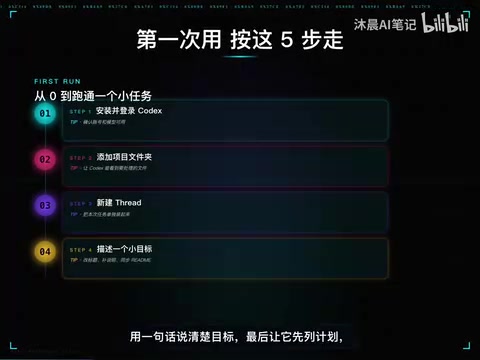
Beginner's 5-Step Roadmap
The entire getting-started process can be condensed into five steps:
- Install and Log In: Installation itself isn't difficult, but remember that entry points, accounts, models, and permissions change over time. Tutorials can only help you build a sense of direction — what ultimately matters is what you can actually see on your account's pages.
- Add Project Folders: Keep learning materials, real projects, sandbox tests, and general-purpose tools managed separately.
- Create a Thread: Open a specific task thread within the corresponding folder.
- State Your Goal in One Clear Sentence: Goals should be specific — what to do, who it's for, what to change, and how to verify completion.
- Have It List a Plan First — Don't Let It Start Modifying Right Away: This is the most critical step.
Folders and Threads: The Golden Rule of Codex Project Management
Many beginners find things getting messier the more they use Codex. It's not that Codex is broken — it's that folders weren't properly organized from the start.
Think of folders as project groups and Threads as specific topic posts within a group. The golden rule is just one sentence:
Keep the same folder for the same general direction; keep each Thread focused on only one specific task.

To understand this rule, you need to know what a Thread means at a technical level. Each Thread maintains its own independent conversation history, file operation records, and intermediate state — the AI's "memory" between different Threads is completely isolated. This design borrows from the "separation of concerns" principle in software engineering — just like different branches in Git handle different features, Thread isolation prevents cross-contamination of context between tasks, avoiding situations where the AI "remembers" faulty logic from Task B while working on Task A.
Don't modify web pages in the morning, calculate spreadsheets in the afternoon, and write copy in the evening, all stuffed into the same task thread. Multiple Threads can progress in parallel, but the prerequisite is that goals are clearly decomposed. For example, one Thread for modifying the homepage, one Thread for writing documentation, one Thread for data scripts — don't let them compete for the same batch of files.
Three Key Settings: Rules, Permissions, and Skills Configuration
For settings, focus on three things first:
1. Generally: Allow Background Running
This is a basic configuration that ensures Codex can continue pushing tasks forward in the background without interrupting the workflow when you switch windows.
2. Personalization: Clearly Write Collaboration Rules
Personalization is essentially project rules in a graphical interface. You need to tell Codex several core principles:
- Keep changes small; state the plan before taking action
- Don't fabricate paths; don't leak secret keys
- After making changes, provide the minimum verification command
Choose permission modes based on risk level — don't hand over important directories to full permissions just to save time.
3. Skills: Codify Fixed Working Methods
Skills is the part beginners most easily underestimate. It's not a flashy plugin — it's about codifying fixed working methods into reusable capability modules: writing, research, generating visual content, code review — all can become reusable ability modules.
The Skills feature involves "Tool Use/Function Calling" technology behind the scenes, which is an important capability extension for modern large language models. Through predefined skill modules, Codex can invoke specific external capabilities when needed, rather than reasoning from scratch every time. MCP (Model Context Protocol) is an open protocol standard aimed at unifying the interface specifications between AI models and external tools/data sources — similar to what USB interfaces mean for hardware devices — allowing tools from different sources to plug into AI systems in a standardized way. Once a working method is encapsulated as a Skill, it can be invoked with one click across different projects, avoiding the cost of repeated configuration.

Scheduled tasks, MCP, memory systems, and computer automation are all powerful, but beginners shouldn't enable everything on day one. The correct learning sequence is:
- First master folders and Threads
- Then master rules and Diff
- Finally connect tools and automation
Plan Mode: The Most Important Core Feature of Codex to Remember
If this entire tutorial only lets you remember one feature, it should be Plan Mode.
Its value is: have Codex only plan without touching code first, and once you confirm the plan is reasonable, then allow it to execute. This step prevents the vast majority of "AI broke the project" disasters.
Plan Mode essentially forces a decoupling of AI's "reasoning phase" from its "execution phase," which is highly isomorphic to the "design review" mechanism in software engineering. Without Plan Mode, AI mixes planning and execution together — once an early judgment goes off track, all subsequent operations stack on top of the wrong path, creating a hard-to-rollback "butterfly effect." Plan Mode forces AI to first output a reviewable natural language plan, with humans intervening at this stage — equivalent to completing an "architecture review" before any code is written. Research shows that the cost of fixing errors discovered during the requirements and design phases is only 1/10 to 1/100 of those found during the coding phase. Plan Mode introduces this engineering principle into AI collaboration workflows.
There are three entry points for daily Codex control:
- Slash commands: Quickly trigger specific operations
- Status view: Understand current task progress
- Reasoning depth adjustment: Use low reasoning depth for simple tasks; switch to High or Extra High for complex tasks
Developing the habit of "reviewing the plan before letting go" will help you avoid 90% of pitfalls when using AI programming tools.
Web Coding in Practice: From Writing Code to Describing Requirements
Once you actually start using Codex for web development, the barrier shifts from "can you write code" to "can you describe requirements clearly."
Related articles
 Tutorials
ChatGPT Plus Subscription Guide: Are GPT-5.5, image-2, and Codex Worth the Upgrade?
A detailed look at ChatGPT Plus features — GPT-5.5, image-2, and Codex — with a Plus vs Pro comparison and a complete step-by-step subscription guide for users outside the US.
 Tutorials
Harness AI Engineering in Practice: Using Claude Code to Master Enterprise-Level E-Commerce Development
Deep dive into Harness AI Engineering: master enterprise e-commerce development with Claude Code using the Rules, Skills, Wiki, and Changes framework.
 Tutorials
Cursor + Codex Dual-IDE Collaboration: A Practical Methodology for Open-Source Project Customization
A complete methodology for open-source project customization based on real-world experience, detailing the Cursor+Codex dual-IDE workflow, seven-stage process, MVP validation, and AI source code reading techniques.