Codex Cache Cleanup Guide: A Hands-On Tutorial for Slimming Down the .codex Folder

How to clean up OpenAI Codex's local .codex folder by deleting conversations and slimming log files.
OpenAI Codex accumulates substantial session data and logs in the .codex folder without providing built-in cleanup features. This article covers two core cleanup methods: using a community Python tool to precisely delete specific conversations via Session ID (with dry-run preview support), and directly deleting the logs.sqlite file after closing Codex then restarting for automatic rebuilding—reducing logs from 17MB to just 41KB. A periodic archiving strategy every one to two months is also recommended.
As you continue using OpenAI Codex, the .codex folder in your home directory keeps growing. The official tool still doesn't offer a way to delete conversations, causing this folder to become increasingly bloated—log files can even grow to sizes beyond imagination. This article systematically introduces how to use community tools and manual operations to thoroughly clean up the .codex folder, covering the two core aspects of conversation deletion and log file slimming.
OpenAI Codex is an AI programming agent from OpenAI, integrated into development environments like VS Code. It can automatically write, debug, and refactor code based on natural language instructions. Unlike traditional code completion tools, Codex operates in an "agent" mode—executing multi-step operations in an isolated sandbox environment. Each interaction produces a complete Session containing user instructions, AI reasoning processes, code change records, and execution logs. All this data is stored in the .codex folder under the user's home directory. The folder uses a hybrid storage architecture of SQLite databases and the file system, where rollouts record the complete trajectory of each agent execution, and the session index maintains indexing information for all sessions. Since every Codex operation involves extensive intermediate state recording, this design is convenient for local debugging and tracing, but it also means data growth far exceeds the cache of typical applications.
Pre-Cleanup Preparation: Backup Is Non-Negotiable
Before performing any cleanup operations, make sure to back up your .codex folder first. Data operations carry risks, and if something goes wrong, you can copy the backup folder back to its original location for seamless recovery.
Specific preparation steps:
- Download the cleanup tool: Go to GitHub to download the Codex conversation deletion tool created by community member EA (video author DP optimized it with EA's authorization; version 1.0 is recommended).
- Verify Python environment: Type
python --versionorpython3 --versionin the command line to confirm Python is installed locally (3.9+ recommended). If not installed, you can use AI guidance to complete the installation—it's very straightforward. - Back up the folder: Make a complete copy of the
.codexfolder from your user directory to another location, labeled with the date for easy management.
Querying and Deleting Specific Codex Conversations
Query All Local Conversations
Open your command-line tool and prepare two terminal windows. First, navigate to the downloaded tool's project folder, then run the query command. The tool will list all your local Codex conversations, grouped by date, with each conversation showing its ID, title, and date.

If some conversation titles display as worker names or other hard-to-identify content, you can append parameters like --format title to the command to display full title information.
Deletion Preview and Actual Deletion
Once you've identified the conversations to delete, copy their Session IDs and proceed in two steps:
- Deletion Preview (Dry Run): First execute the preview command. The tool generates a report showing which files will be deleted, which SQLite database records are involved, associated rollouts and session indices, etc., but does not actually perform the deletion.
- Actual Deletion: After confirming the preview results are correct, execute the deletion command. The tool will output "Done" and display a deletion report, including what was specifically deleted and the reset operations on the SQLite database.
Dry Run is an important safety practice in software engineering and system operations. Its core idea is: before actually executing destructive or irreversible operations, simulate the entire execution process first, output the changes that would occur, but don't actually modify any data. This pattern is used in many well-known tools, such as rsync's --dry-run parameter, Terraform's plan command, and npm's --dry-run publish preview. The community tool's two-step operation design (preview first, then execute) embodies the philosophy of defensive programming, allowing users to confirm the scope of impact before making the final decision, significantly reducing the risk of accidental operations.

If you need to batch-delete multiple conversations, simply repeat the above process with different Session IDs.
Alternative: Conversational Deletion via Codex Scales
If you find manual command-line operations too cumbersome, there's a simpler approach—use Codex's Scales feature to tell it in natural language something like "delete all conversations before a certain date." The tool will automatically invoke the Python script to complete the operation.
Scales is an extensible capability mechanism provided by Codex that allows users to define custom commands and toolchains through configuration files, enabling the AI agent to call external scripts or tools to complete specific tasks. Its working principle is similar to ChatGPT's Function Calling or MCP (Model Context Protocol)—users describe their intent in natural language, the AI parses it and maps it to specific tool calls. In the conversation deletion scenario, Scales transforms the natural language instruction "delete conversations before a certain date" into a parameterized call to the Python cleanup script. The advantage of this approach is its lower barrier to entry, but since AI interpretation and transformation of instructions can have interpretation deviations (e.g., date boundary determination, conversation scope understanding), the execution results may differ from user expectations.

However, note that this approach is executed autonomously by AI, carrying some uncertainty. In comparison, using Python commands manually offers stronger specificity and achieves 100% precise deletion, so the command-line approach is more recommended for important scenarios.
Cleaning logs.sqlite: The Real Space Hog
After deleting conversations, you might notice the .codex folder size hasn't shrunk significantly. That's because the real space consumer is the log file—logs.sqlite.
What's Stored in the Log File?
Opening logs.sqlite with a SQLite tool reveals it contains only two tables. The main table may contain tens of thousands of records (in testing, about 18 pages with approximately 1000 records each), primarily consisting of debug, info, and other runtime status logs. This information has no practical value for daily use and can be safely deleted.
SQLite is an embedded relational database engine that requires no separate server process—the entire database is a single file. It's widely used in browsers (Chrome's history), mobile apps (iOS and Android system databases), and desktop software. Codex chose SQLite as its local storage solution because it's zero-configuration, highly reliable, and offers excellent read/write performance—ideal for structured data storage in single-user scenarios. However, SQLite has a characteristic worth noting: after data deletion, the file size doesn't automatically shrink. Deleted space is marked as "free pages" for subsequent write reuse. To truly reclaim disk space, you typically need to execute the VACUUM command to rebuild the database file. This also explains why directly deleting the entire logs.sqlite file is more thorough than just clearing table data.
Software system logs are typically categorized by severity into multiple levels, from low to high: TRACE, DEBUG, INFO, WARN, ERROR, FATAL. DEBUG level records detailed program runtime state information, primarily used for development debugging; INFO level records key event nodes during normal operation. The logs.sqlite in Codex stores mainly debug and info level logs, which are very valuable for troubleshooting during development but have almost no practical significance for end users. Based on test data, over 18,000 log records accumulated to 17MB, averaging about 1KB per record—a normal per-record size for logging systems (since each may contain complete request/response context, stack information, etc.). In production environments, mature applications typically employ Log Rotation mechanisms that automatically archive old logs and create new files based on file size or time periods. Codex currently lacks this mechanism, which is the root cause of unlimited log file growth.
Specific Cleanup Steps
The procedure is very simple, but with one critical prerequisite: it must be done with Codex completely closed, otherwise you may encounter file locking issues. When a SQLite file is being used by a process, WAL (Write-Ahead Logging) locking mechanisms are active, and forcibly deleting the file could cause data corruption or operation failure.
- Close the Codex program
- Directly delete the
logs.sqlitefile in the.codexfolder - Reopen Codex (launch in VSCode), and the program will automatically initialize and rebuild the file
The rebuilt log file is only about 41KB, compared to potentially 17 million bytes (~17MB) before cleanup. Test data shows the file shrunk from 17 million to 130 thousand—a very significant reduction.
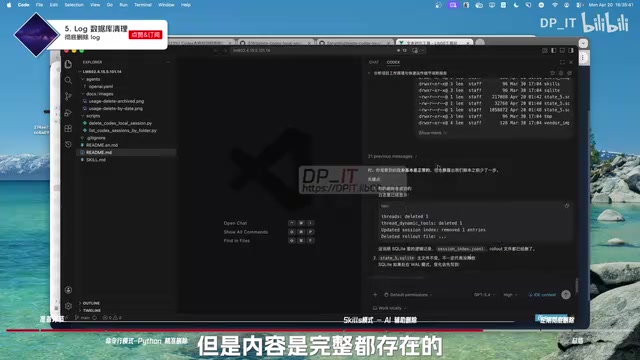
The first time you open an existing conversation after rebuilding may be slightly slower, but all conversation content and message history are fully preserved, and normal speed resumes on the second opening.
Advanced Tips: Best Practices for Periodic Archiving
Until the official team releases a complete cleanup feature, here's a maintenance habit worth adopting:
Every one to two months, when a project is completely finished and the context is no longer needed, perform a thorough archive of the
.codexfolder.
Specific approach:
- Copy the entire
.codexfolder to an archive directory with a date label (e.g.,.codex_20250401) - Clear the original
.codexfolder, keeping only theauthandconfigconfiguration files - Reopen Codex and let the program complete initialization automatically
This gives you a fresh Codex runtime environment—clean and efficient. This archiving strategy follows the design principle of "separating configuration from data." The auth file stores the user's API authentication tokens and login state, while the config file preserves personalized settings (such as model preferences, agent behavior parameters, etc.)—these two are the minimum requirements for Codex to start normally. All remaining session data, logs, and caches are regenerable data. This approach is similar to Git's gc (garbage collection) mechanism or Docker's system prune command, preventing "entropy increase" in the working environment through periodic cleanup. For developers who heavily use AI programming tools, cultivating this environmental hygiene habit is especially important, since AI agents generate far more data than traditional development tools.
Summary: Two Steps to Complete Codex Cache Cleanup
The entire cleanup process can be summarized as two core operations:
- Conversation cleanup: Use the community Python tool to precisely delete specified conversations and their associated data via Session ID
- Log cleanup: Close Codex, directly delete
logs.sqlite, restart the program for automatic rebuilding
The design philosophy of this toolset deserves praise—simple enough to download and use immediately with a single command; precise enough to completely delete all associated data for a specified conversation. While the official tool doesn't yet offer native cleanup functionality, this is undoubtedly an essential skill for every heavy Codex user. Check your .codex folder size now—it may have already bloated beyond what you'd expect.
Related articles
 Tutorials
ChatGPT Plus Subscription Guide: Are GPT-5.5, image-2, and Codex Worth the Upgrade?
A detailed look at ChatGPT Plus features — GPT-5.5, image-2, and Codex — with a Plus vs Pro comparison and a complete step-by-step subscription guide for users outside the US.
 Tutorials
Harness AI Engineering in Practice: Using Claude Code to Master Enterprise-Level E-Commerce Development
Deep dive into Harness AI Engineering: master enterprise e-commerce development with Claude Code using the Rules, Skills, Wiki, and Changes framework.
 Tutorials
Cursor + Codex Dual-IDE Collaboration: A Practical Methodology for Open-Source Project Customization
A complete methodology for open-source project customization based on real-world experience, detailing the Cursor+Codex dual-IDE workflow, seven-stage process, MVP validation, and AI source code reading techniques.