Codex Chinese Setup Tutorial: Configuring the Image Generation Skill & E-commerce Poster Creation in Practice

A hands-on guide to setting OpenAI Codex to Chinese and configuring JiuQiu's image generation Skill for e-commerce posters.
This article covers how to switch the OpenAI Codex interface to Chinese, the full configuration workflow for the JiuQiu Image2 image generation Skill, and practical applications. You can quickly switch to Chinese via the Language option in Settings; by creating an API Key on the JiuQiu platform and installing the Skill files into Codex's skills directory, you can enable AI image generation; finally, it demonstrates how to generate e-commerce promotional posters using product photos combined with text prompts.
Introduction
As a powerful AI programming assistant, OpenAI Codex is being adopted by an increasing number of users in China. Codex was originally released by OpenAI in 2021 as a code generation model, specifically trained for programming tasks based on the GPT-3 architecture, and serves as the underlying technology behind GitHub Copilot. With the rapid evolution of large language model technology, the concept of Codex has expanded from a simple code completion tool into a comprehensive AI assistant platform supporting multimodal input, a plugin ecosystem (Skills), and natural language interaction — it can understand natural language instructions and translate them into executable actions, whether generating code, calling external APIs, or processing images and documents.
However, many users encounter issues during initial setup, such as the interface defaulting to English and not knowing how to configure Skills. This article will walk you through setting Codex to a Chinese interface, configuring the JiuQiu Image2 image generation Skill, and demonstrate how to use AI to generate e-commerce promotional images and Word documents through practical examples.
How to Switch the Codex Interface to Chinese
Many users find that Codex defaults to an English interface when first opened. Switching to Chinese is actually very simple:
- Click the Settings button at the bottom of the interface
- Find the General settings option on the settings page
- Scroll down to find the Language option
- Switch the language from the default English to Chinese
Once switched, the interface will immediately display in Chinese without needing to restart the application.
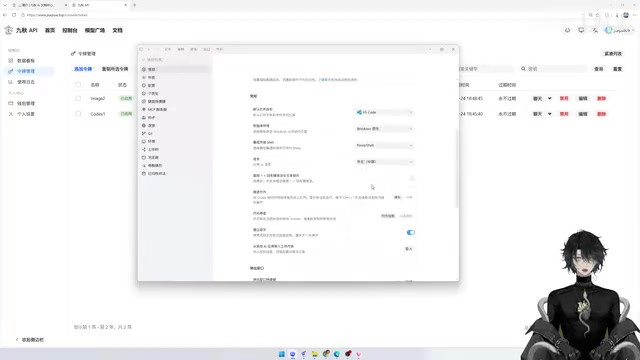
Additionally, some users report missing feature options after installation. This is usually caused by issues during the installation process — reinstalling or checking the installation logs is recommended. For permission confirmation pop-ups, you can generally choose to auto-approve in normal scenarios, as no dangerous operations will be executed.
Configuring the JiuQiu Image2 Image Generation Skill
How the Skill Plugin System Works
Codex's Skill system is essentially a plugin-based architecture, similar to ChatGPT's Plugin mechanism or the Tool concept in LangChain. Each Skill declares its functionality description, API endpoint, authentication method, and parameter specifications through a configuration file (typically in YAML or JSON format). After receiving a user instruction, the main AI model selects the appropriate Skill based on semantic matching and automatically constructs the API call request. This design allows AI capabilities to be extended on demand — much like installing applications — and developers can build custom Skills based on standard interfaces, significantly lowering the barrier to feature expansion.
About the JiuQiu Image2 Model
JiuQiu is an AI capability relay and aggregation platform designed for Chinese users. Through API proxying, it wraps mainstream image generation models like Stable Diffusion and DALL-E into a unified interface, solving the network barriers and payment hurdles that Chinese users face when directly accessing overseas AI services. The Image2 model supports both Text-to-Image and Image-to-Image modes, making it particularly suitable for e-commerce scenarios — the AI uses product photos uploaded by users as references and combines them with style, composition, and copy requirements from the prompt to generate promotional materials that meet commercial aesthetic standards.
Creating an API Key
Before using the image generation feature, you need to create a corresponding API Key on the JiuQiu website:
- Visit the JiuQiu website (accelerated for Chinese users, no VPN required)
- Delete old Keys and click to add a new Key
- Select Image Generation Model (Image2)
- Customize the model name and click submit
- Copy the generated API Key for later use
The overall usage cost is extremely low — the author ran extensive tests and only spent about 0.06 USD. The reason behind this lies in the relay service's business model: by bulk-purchasing overseas API quotas, leveraging exchange rate differences, and using pay-per-use billing (per token or per request rather than monthly subscriptions), the barrier to entry is dramatically reduced. Compared to ChatGPT's $20/month subscription plus the requirement for a foreign bank card, this solution is far more accessible for Chinese users. It's worth noting that when choosing a relay service, you should pay attention to data privacy terms and confirm whether uploaded images and document content will be retained by the platform.
Installing the Skill Files into Codex
The core steps for configuring a Skill are as follows:
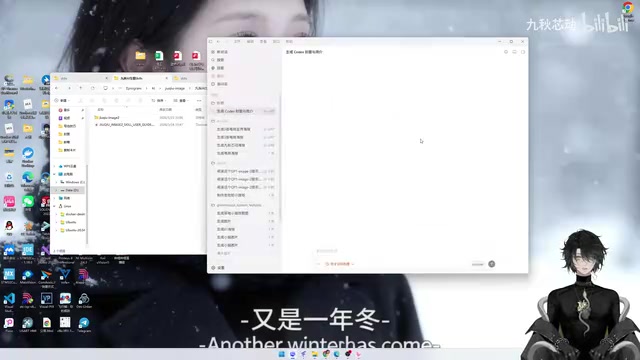
- Open File Explorer and navigate to the
C:\\Users\\YourUsername\\.codex\\skillsdirectory - Copy the JiuQiu Image2 Skill folder into this directory
- Open PowerShell (or press Win+R and type cmd)
- Run the configuration script and paste your API Key when prompted
- Keep the URL and model parameters at their defaults — just press Enter to confirm
Once configured, Codex will be able to recognize and invoke the image generation Skill.
Hands-On: Generating E-commerce Promotional Images with Codex
The Technical Logic Behind Multimodal AI Image Generation
In the e-commerce promotional image generation scenario, the AI first uses a visual encoder (such as the CLIP model) to extract features from the input product photo, identifying key attributes like product category, color, and shape. It then combines the user's text prompt and progressively denoises through a Diffusion Model to generate the target image. Modern diffusion models (such as Stable Diffusion XL) were trained on large volumes of commercial design materials, giving them a strong understanding of commercial aesthetic concepts like "e-commerce poster," "premium look," and "product showcase." They can automatically apply appropriate composition, lighting, and color schemes — this is precisely why AI can generate professional posters from an ordinary product photo.
Workflow
Using a casually taken photo of a Coca-Cola beverage as an example, here's how to generate an e-commerce poster:
- Select a working folder in Codex (e.g., the imager folder on the desktop)
- Type the slash command
/九秋to invoke the Image2 Skill - Enter a prompt: "Analyze this image and create an e-commerce promotional image for me. It should have a premium and aesthetically pleasing style, suitable for promotional use and e-commerce homepage banner display"
Related articles
 Tutorials
ChatGPT Plus Subscription Guide: Are GPT-5.5, image-2, and Codex Worth the Upgrade?
A detailed look at ChatGPT Plus features — GPT-5.5, image-2, and Codex — with a Plus vs Pro comparison and a complete step-by-step subscription guide for users outside the US.
 Tutorials
Harness AI Engineering in Practice: Using Claude Code to Master Enterprise-Level E-Commerce Development
Deep dive into Harness AI Engineering: master enterprise e-commerce development with Claude Code using the Rules, Skills, Wiki, and Changes framework.
 Tutorials
Cursor + Codex Dual-IDE Collaboration: A Practical Methodology for Open-Source Project Customization
A complete methodology for open-source project customization based on real-world experience, detailing the Cursor+Codex dual-IDE workflow, seven-stage process, MVP validation, and AI source code reading techniques.