Codex Custom Instructions: Configure Once, Let AI Remember Your Work Habits Forever

Configure Codex Custom Instructions once and let AI remember your coding habits across all projects.
Codex Custom Instructions is a built-in global memory feature that lets you define your coding preferences, workflow rules, and style standards once — and have them automatically applied to every project, forever. No more repeating yourself at the start of every conversation.
Are You Repeating Yourself to Your AI Every Single Time?
If you're using Codex to assist with coding, you've probably fallen into an exhausting loop: every time you start a new task, you have to re-explain your rules from scratch. Things like "give me an execution plan before you start" or "follow this code style" or "ask me to confirm before moving to the next step" — these preferences and habits have to be restated at the beginning of every new conversation and every new project.
As shared by content creators on Bilibili, this repetitive work is entirely avoidable. The root cause: most people don't know that Codex has a built-in feature called Custom Instructions. It lets Codex "remember" your working habits so you never have to repeat yourself again.
Background | What is Codex? OpenAI Codex is a large language model built on the GPT architecture and optimized specifically for code generation. It was the underlying engine powering early versions of GitHub Copilot, trained on tens of billions of lines of open-source code. It can understand natural language descriptions and generate corresponding code snippets, functions, or even complete modules. As general-purpose models like ChatGPT and Claude have grown stronger at coding, the term "Codex" is also commonly used in the developer community to refer broadly to AI programming tools with code generation capabilities.
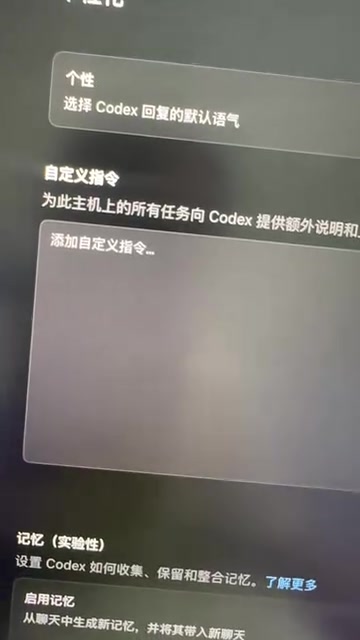
The Hidden Cost of Repeating Yourself
On the surface, typing a few extra lines to remind your AI might seem like no big deal. But in real development workflows, the cumulative cost is significant. Constantly re-establishing context interrupts your flow and forces the AI to "re-learn" you each time, making it nearly impossible to build a stable collaborative rhythm. When you need the AI to consistently follow your team's coding standards or work within a specific thinking framework (plan first, then execute), relying on manual input every time is both inefficient and prone to omissions.
What Are Codex Custom Instructions?
Codex Custom Instructions are essentially the global memory within its memory system. Unlike information you temporarily tell the AI during a single conversation, global memory is persistent — you write your rules, standards, habits, and preferences once, and Codex saves them and automatically applies them across all your projects.
How It Works | How Do Custom Instructions Take Effect? Custom Instructions are fundamentally a persistence mechanism for "System Prompts." In large language model architecture, each conversation is constructed from three components: the System Prompt, Conversation History, and User Input. The system prompt carries the highest weight and has global authority over model behavior. Custom Instructions inject user-defined rules into the system prompt layer, allowing them to reliably shape model output without needing to be restated each time. This is also one of the core ideas behind the emerging practice of "Context Engineering."

Global Memory vs. Single Conversation: The Key Difference
Understanding this feature comes down to distinguishing "global" from "local." Modern AI assistants typically operate across three memory layers: working memory (conversation history within the current session — gone when you close it), episodic memory (cross-session user preference records with some time-sensitivity, implemented via vector databases in some products), and semantic memory (globally configured rules set by the user with the highest priority). Custom Instructions belong to the third layer, offering the strongest persistence and stability:
- Single-session instructions: Only valid for the current conversation. Close the window and they're gone. Switch projects and you start over.
- Global Custom Instructions: Write once, active permanently, applicable across all projects.
In other words, Custom Instructions act as an "AI onboarding handbook." Instead of running through orientation at the start of every task, the AI already knows your full set of working standards from day one.
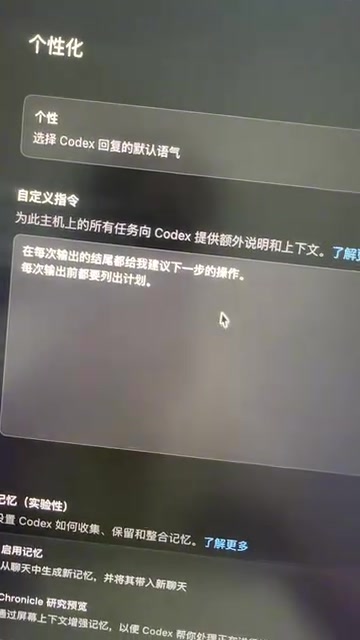
What Should You Include in Custom Instructions?
Based on practical experience, the following categories come up most frequently and are worth configuring first:
- Execution workflow preferences: For example, "Before writing any code, list a step-by-step plan and wait for my confirmation."
- Code style standards: Naming conventions, indentation style, comment language, whether to use certain syntactic sugar, etc.
- Tech stack constraints: Preferred frameworks, library versions, and dependencies to avoid introducing.
- Output format requirements: Whether to include reasoning explanations, whether to attach test cases, response language, etc.
- Personal working habits: For example, when uncertain, ask first rather than making assumptions.
Practical Tip | How to Write Effective Code Style Instructions? Writing your team's coding standards into Custom Instructions is essentially applied prompt engineering in an engineering context. Effective code style instructions should cover: naming conventions (e.g., camelCase vs. snake_case), comment density and language (Chinese vs. English comments), error-handling paradigms (try-catch vs. Result types), and whether to prioritize language-idiomatic patterns (idiomatic code). Research suggests that explicitly constraining output format and style in system prompts can significantly reduce "hallucination-style" style drift, making generated output more consistent with an existing codebase.
What Changes After Configuring Custom Instructions?
Once you've set up Codex Custom Instructions, the most immediate effect is that everything feels smoother. You no longer need to set preconditions for every task — the AI proactively works according to your established preferences, maintaining consistent behavior across every project and interaction.

From "Constant Reminders" to "Seamless Collaboration"
The significance of this shift goes far beyond saving a few lines of typing. It moves the human-AI collaboration dynamic from a mechanical "command and execute" mode toward something more like genuine mutual understanding. Once the AI grasps your underlying preferences, its output aligns more closely with your expectations, and the number of revisions and corrections drops accordingly. For developers who use AI coding tools intensively every day, this kind of efficiency gain compounds over time.
Best Practices for Configuring Custom Instructions
You might not realize this, but more instructions aren't always better. Follow these principles:
- Be concise and specific: Describe rules in clear, direct language. Avoid vague phrasing.
- Focus on high-frequency needs: Only write in preferences you genuinely use every single time. Avoid piling in everything.
- Maintain regularly: As your working habits and tech stack evolve, update your instructions accordingly.
Further Thought | What If Instructions Conflict? When a global Custom Instruction conflicts with a one-off requirement for a specific task, simply stating "this task is an exception" in the current conversation is usually enough to override the global setting. Most LLMs prioritize the most recent and most explicit context instructions. This is a reminder that global instructions should define "default behavior" rather than "absolute rules" — leaving room for flexible single-session overrides is best practice.
Final Thoughts
Codex Custom Instructions is a feature that many people overlook, yet it offers an outstanding return on the small time investment it requires. Configure it once, and every future collaboration becomes that much more effortless. If you're still manually telling Codex "make a plan first, then start coding" every single time, head over to your memory settings, find Custom Instructions, and spell out your working habits once and for all.
For developers who rely on AI coding tools, making good use of this kind of memory capability is a key step in evolving AI from a "tool" into an "assistant that gets you." Understanding the underlying system prompt injection mechanism can also help you design more targeted instructions and truly unlock the potential of AI-assisted programming.
Key Takeaways
Related articles

Salesforce Acquires Rune for $375M: AI Logistics Tech Bolsters Defense Business
Salesforce reportedly acquires defense tech startup Rune for $375M. Rune's AI logistics tech will strengthen Salesforce's Missionforce defense platform, continuing its M&A spree.

Why Fair Use Benefits Everyone in the AI Era
Starting from a Hacker News discussion, this article analyzes the legal logic and controversies of the fair use principle in AI training and content creation, and its dual impact on creators and the tech ecosystem.

Mistral Large 4 Open-Sources a Trillion Parameters, Microsoft Offers Voluntary Severance to 60,000 Employees
Mistral Large 4 open-sources a trillion-parameter multimodal model with a coding agent score of 48; SanDisk earnings show AI inference reshaping NAND demand; Google Gemini adds in-app file editing, OpenAI raises Codex quotas, and Microsoft offers voluntary severance to 60,000 employees.