Codex Efficiency Guide: Practical Strategies to Avoid Burning Through GPT-5.6 Credits

Practical Codex tips to maximize GPT-5.6 capability without burning through your credit quota.
GPT-5.6 (Sol) is far more autonomous than its predecessor, which means it can burn through credits in just one or two messages. This guide covers the key strategies: turning off Fast Mode, defaulting to the High reasoning tier, suppressing unnecessary subagents via AGENTS.md, and — most importantly — designing prompts with explicit stop points to control exactly how far the model runs.
Article Content
OpenAI's GPT-5.6 (codename Sol) is remarkably capable — but it's equally notorious for burning through credits at an alarming rate. Countless users have taken to social media to complain: quotas that barely ran out with GPT-5.5 now drain after just one or two messages with 5.6. This guide is based on extensive hands-on testing by developer and YouTuber Theo, and distills a set of practical strategies for getting the most out of 5.6 without hitting your limits.
Why GPT-5.6 Burns Through Credits So Fast
User complaints are well-founded. Some report that "a small PR with 5.6 Sol consumed roughly half of a 5-hour limit," while others say "with 5.5 X-High I could work all day — now I can't even get through a 3-hour session."
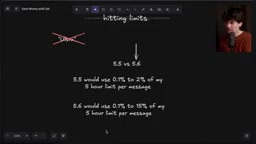
The root cause lies in the behavioral difference between 5.5 and 5.6. The reason 5.5 felt "economical" wasn't that it was cheaper — it was because it constantly stopped to ask for permission. Ask it to execute a ten-step plan and it would complete step one, get halfway through step two, then pause: "May I continue?" These frequent interruptions meant each message only consumed 0.1%–2% of the 5-hour limit.
Technical Background: Reasoning Tiers and Credit Consumption GPT-5.6's credit consumption pattern is closely tied to its underlying reasoning architecture. In modern large language models, "reasoning tiers" essentially control the depth and breadth of Chain-of-Thought expansion — the higher the tier, the more internal "thinking steps" the model performs before generating its final output, and the more computational resources (measured in tokens) are consumed exponentially. OpenAI's quota mechanism typically measures "compute units" rather than simple message counts, so a single high-reasoning message can be equivalent to dozens of ordinary conversation messages in resource consumption.

5.6 fixed this "over-cautious" behavior — but the trade-off is that it now runs for a very long time without stopping. At high reasoning tiers like X-High or Max, a single message can consume 15% of the 5-hour limit. Stack Fast Mode's 2.5× multiplier on top of that, and a single message can nearly wipe out half a 5-hour quota.
OpenAI's Emergency Response
OpenAI has acknowledged the problem and responded quickly. According to updates from team member Tibo shared by Theo, three key changes were made in the past 48 hours:
- The 5-hour limit for Plus, Business, and Pro plans has been temporarily removed, leaving only the weekly limit in place;
- Optimizations are rolling out to make 5.6 Sol significantly more efficient overall;
- The platform now has 6 million active users, and a usage reset has been performed.
This introduces a new risk worth noting: previously, the 5-hour limit acted as a "circuit breaker" — a runaway task could burn at most 25% of your weekly quota before being stopped. Now that only the weekly limit remains, a single prompt could theoretically exhaust your entire weekly quota. Exercise caution until the optimization officially launches.
The team also confirmed: optimizations making reasoning cheaper are live, expected to save ~10%; a billing anomaly caused by raising the context ceiling from 272k to 372k tokens was discovered and temporarily rolled back to 272k; reports of juice values being adjusted were true but have been reverted; multi-agent usage at high tiers exceeded expectations and is being fixed.
Three Codex Configuration Tips You Can Use Right Now
Tip 1: Avoid Ultra, Turn Off Fast Mode
Theo is explicit: Ultra isn't worth using right now — skip it until a dedicated breakdown video is available.
Fast Mode offers 1.5× speed, but at the cost of 2.5× credit consumption. In the 5.5 era it felt like a reasonable trade-off because 5.5 paused frequently and you had to babysit it. GPT-5.6, by contrast, runs autonomously for long stretches — you can start a task and go do something else: code review, emails, take a break. Since you don't need to watch it, speed becomes irrelevant, and turning off Fast Mode dramatically reduces credit consumption with almost no noticeable difference in practice.
Tip 2: High Reasoning Tier Is Good Enough as Your Default
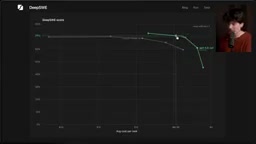
5.6 offers five reasoning tiers. The benchmark data from DeepSWE is compelling:
- Low: 45 points, $1/task
- Medium: 61 points, $1.86/task
- High: 69 points, $3.47/task
- X-High: 71 points, $4.70/task
- Max: 73 points, $8.39/task
About the DeepSWE Benchmark DeepSWE is a benchmark specifically designed to evaluate large language models on software engineering tasks. Its core evaluation scenarios include: automatically fixing bugs in real GitHub repositories, generating runnable code from requirements, and performing multi-file refactoring. Compared to general benchmarks (such as MMLU or HumanEval), DeepSWE is much closer to real-world development scenarios, making it a key reference for measuring the overall capability of "coding AI." The benchmark scores directly correspond to a model's solve rate on real SWE-bench task sets — each percentage point improvement means solving another set of real-world code problems.
From Low to High, each tier delivers a meaningful score jump. But above High, there's a steep drop in cost-effectiveness — Max costs more than twice as much as High for only a 4-point gain.
Worth noting: 5.6 at the High tier is also genuinely "smart" — it automatically reduces reasoning effort for simpler tasks. During testing, Theo even suspected a bug in how Low and High parameters were being passed, because the difference was sometimes only 50–100 tokens. Bottom line: High is the most reliable default tier; Medium works great for simpler tasks too.
Tip 3: Be Cautious About Subagents
One of the most notable behavioral changes in 5.6 is that it aggressively spins up subagents even when the task doesn't call for them.
Background on Subagents and Multi-Agent Architecture A subagent is the basic unit of a multi-agent system. In modern AI coding assistants, a primary agent can dynamically "spawn" multiple subagents to handle subtasks in parallel — for example, one searching documentation, one running tests, one analyzing error logs. This architecture can theoretically boost efficiency on complex tasks, but the cost is that each subagent independently consumes token quota, and the coordination overhead between subagents generates additional costs. GPT-5.6's tendency to over-use subagents is a concrete manifestation of the "powerful but unpredictably resource-intensive" problem.
Codex's current v1 and v2 implementations both leave something to be desired. If you've applied the other tips but still see abnormal credit consumption with subagents frequently spinning up, add this line to your global AGENTS.md:
"Only use subagents if the user explicitly requests them"
About AGENTS.md and AI Coding Assistant Configuration AGENTS.md is a "behavior configuration file" mechanism introduced by OpenAI Codex and similar AI coding tools. It's essentially a Markdown file stored in the project root directory whose contents are automatically injected into the agent's system prompt. This design draws on the software engineering philosophy of "convention over configuration" — developers can use natural language to declare behavioral boundaries, coding conventions, prohibited operations, and other constraints. Similarly, Claude Code uses a
.claudedirectory, and Cursor uses a.cursorrulesfile to achieve the same effect. The power of these configuration files lies in the fact that they directly intervene in the model's decision-making logic rather than merely changing output format — so even a single short natural-language instruction can fundamentally alter the model's behavior across an entire session.
This one line can almost completely prevent the model from automatically spawning subagents. It's also worth noting that Claude Code and Cursor's subagent implementations are noticeably more mature — some developers have even hacked their Codex subscription to route through Claude Code, with surprisingly good results.
The Most Important Trick: Define "Stop Points" in Your Prompts
Everything above is configuration-level tweaking. This tip is the one that truly changes how you use the model.
GPT-5.6 has a deep drive to "get the job done" — it will keep pushing forward until it has no reason to stop. So you need to proactively define "stop signals" in your prompts. For example:
"I want you to build this new feature. First write a plan, then stop and wait for feedback before continuing."
Or push the stop point further out:
"The plan looks good, start implementing. Use computer use to test your implementation, keep going until the code works and you're satisfied, open a PR, handle the first round of review comments, then stop — I'll take it from there."
The core insight is: "stopping" is something you can define in your prompt — it doesn't have to be controlled by tools or reasoning tiers. Once you internalize this, you can let the model go much further while maintaining precise control over when it pulls back. The real challenge is: see how far you can push the "stop signal" before output quality starts to degrade.
Bad Advice to Ignore
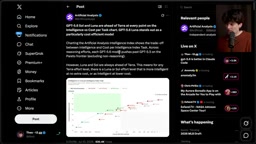
On model selection: Luna is not suited for writing code (it's better as an API data-filtering tool); Terra may seem like a middle-ground option, but multiple analyses (including Artificial Analysis) show it underperforms Sol on the intelligence/cost curve at almost every point. Defaulting to Sol High is the more reliable choice.
The worst advice to watch out for: manually limiting the context window or tweaking auto-compression thresholds.
Background on Context Windows and Token Compression The context window is the maximum text length a large language model can "see" in a single session, measured in tokens (roughly 1,000 English words ≈ 1,300 tokens). GPT-5.6's context window reaches 272k tokens, meaning it can process a codebase roughly the length of a medium-length novel in a single conversation. However, very long contexts introduce a "context compression" problem: when a session approaches the limit, the system must summarize and compress historical content to make room — and this compression process itself consumes additional compute. The OpenAI team specifically tuned the compression trigger threshold for 5.6 so that no additional billing is incurred within 271k tokens. Manually modifying this threshold not only degrades the model's intelligence due to lower-quality compressed context, but may also cause unnecessary compression to trigger more frequently — the opposite of what you want.
OpenAI team member Tibo has explicitly advised against this — the model was trained for specific compression behavior in Codex, and manually changing it will both make the model dumber and cause expensive compression to happen more often. No additional charges within 271k tokens; the context threshold has already been tuned to the optimal default for 5.6. Don't touch it.
A counterintuitive data point worth sharing: the open code team is enthusiastic fans of 5.6, but because their tooling wasn't correctly passing the reasoning tier JSON key, they used Medium for a full month while thinking they were on X-High — and the entire team still unanimously called it their favorite model. That's a compelling endorsement of Medium being more than sufficient.
A Final Note: Don't Copy — Experiment
One point the author keeps coming back to: don't blindly copy anyone else's skills, AGENTS.md, or prompts — including his own. These configurations should differ for each person and each workflow. Real progress comes from hands-on experimentation in your own .codex and .claude directories — they're just Markdown files, and a single small change can fundamentally alter how the model behaves and feels to use.
Try different prompt formulations, different reasoning tiers, and tweaked config files. Read through the agent's execution trace. Adjust when results fall short of expectations until things match your actual needs. Best practices are best practices — but this is a fast-moving field. Stay experimental. Keep prompting.
Related articles

The Truth Behind Codex 'Build a Website in 5 Minutes': AI Isn't Creating Sites—It's Helping You Copy Them
Exposing the truth behind viral Codex 5-minute website videos: creators aren't building original sites with AI—they're copying shared prompts or scraping others' work. Learn AI coding tools' real limits.

Getting Started with AI Agent Development: A Complete Guide from Concept to Practice
A comprehensive guide to AI Agent architecture and development, covering automated marketing, intelligent customer service, and investment analysis scenarios with single and multi-agent collaboration.

The Truth Behind Codex 'Build a Website in 5 Minutes': AI Isn't Creating Sites — It's Helping You Copy Them
Exposing the truth behind viral Codex 5-minute website videos: creators aren't building original sites with AI — they're copying shared prompts or scraping others' work.