Codex from Scratch: Tool Selection Logic & Complete Login Guide for Chinese Users

AI programming tool selection guide and complete Codex onboarding walkthrough
This article divides AI programming tools into two categories: hands-on productivity tools (Cloud Code, Codex) and delegatable automation assistants (Agent tools)—complements rather than competitors. It highlights Codex's four core capabilities: reading local files, Computer Use for controlling your computer, multi-task parallel execution, and mobile cross-device collaboration. It also provides two login paths for users in China—official account login and API login via the CC Switch tool—solving the overseas payment barrier.
The AI Programming Tool Ecosystem: Why Are There So Many Tools?
Since 2023, breakthroughs in large language models like GPT-4 have spawned a complete toolchain ranging from code completion (GitHub Copilot) to autonomous task execution (Agentic AI). AI programming tools are proliferating—Cloud Code, Codex, various "Agent" tools—it's overwhelming. Which one should you learn? What tool fits what scenario? And how can users in China break through login barriers? Based on the zero-to-hero Codex tutorial series by B站 (Bilibili) creator MaiDang, this article systematically breaks down tool selection logic and onboarding paths.
Too Many Tools? One Analogy That Explains Everything
The current AI tool ecosystem roughly divides into two categories. Once you understand this classification, you'll stop agonizing over "which one should I learn."
Category 1: Hands-On "Productivity Tools"
Imagine you're a boss—some things you must handle personally: important meetings, key proposals, core decisions. You need full control over these; you can't delegate them.
Cloud Code and Codex fall into this category. They're extensions of your capabilities, helping you independently complete complex tasks. Think of yourself as an architect, with these tools serving as your excavator—you direct the work, they execute efficiently.
The core difference between the two:
- Cloud Code: Essentially a CLI-based (command-line interface) developer tool, deeply integrated into the terminal environment. It's suited for users with programming backgrounds who work directly with file systems and execute scripts. The interface is command-line style, developer-oriented, and excels at writing code and debugging projects.
- Codex: Wraps a higher level of abstraction, lowering the barrier to entry through a graphical interface. It calls the same OpenAI model capabilities under the hood but is more oriented toward general users, with a friendly GUI and lower learning curve.
It's worth noting that Codex, as OpenAI's next-generation tool, is completely different from the earlier code generation model of the same name (released in 2021, primarily used as GitHub Copilot's underlying engine). It's a localized AI assistant platform with a full GUI interface, positioned more as an "AI workbench for everyone."
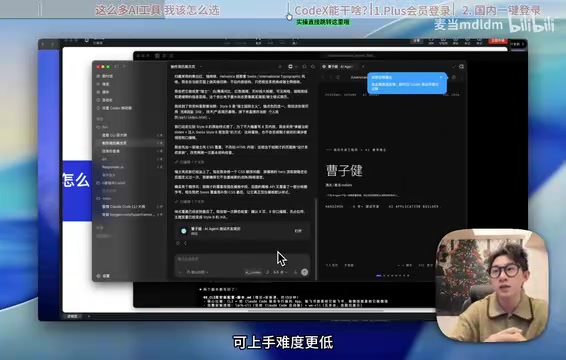
But fundamentally, 99% of what Codex can do is also achievable in Cloud Code—the Cloud Code techniques you've learned still apply in Codex. Which one you choose mainly depends on your usage habits and technical background.
Category 2: Delegatable "Automation Assistants"
There's another category of tasks you're willing to hand off—scheduling, organizing emails, generating content based on fixed strategies. If you had an intern or assistant, you'd just give them a quick instruction.
OpenAI's Operator and various cloud-based Agent tools fall into this category. Their defining feature is easy integration with messaging platforms like WeChat, Feishu, Telegram, etc. You send a command from your phone, and it executes in the background.
The technical essence of Agent tools is an LLM-based autonomous decision loop (the ReAct framework: reason → act → observe → reason again). The model autonomously plans steps, invokes tools, handles exceptions, and completes objectives without human intervention. These tools excel at: scheduled posting, auto-replies, batch processing, and workflow automation. Their core value is working in parallel with you, handling repetitive labor on your behalf.
A Decision Framework for Tool Selection
Summarized in one sentence: For things requiring your full control, use Cloud Code or Codex; for things you can delegate, use Agent assistants. They're not competitors—they're complements.
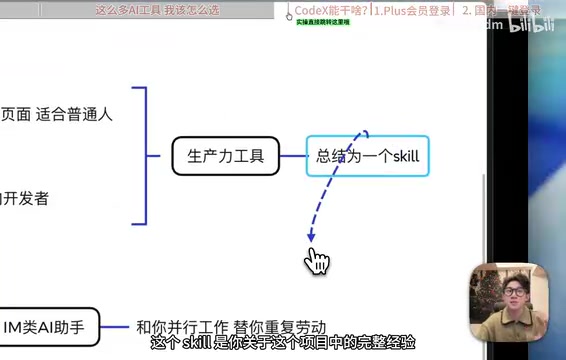
For advanced users, the best practice is: first run your project workflow through Codex or Cloud Code, then summarize it into a complete SOP (Standard Operating Procedure). In the AI context, an SOP corresponds to a structured Prompt template or workflow configuration file—it codifies human-verified decision logic so that an Agent can stably reproduce it without supervision. Then hand this SOP to an Agent assistant for repetitive execution. This is the correct approach to AI collaboration, and it's currently the mainstream practice for enterprise-level AI automation.
What Can Codex Actually Do? Four Core Capabilities
Now that we've clarified tool positioning, let's look at what makes Codex unique compared to ordinary AI chat tools (Doubao, Tongyi Qianwen, DeepSeek web version).
1. Reading Local Files
This is Codex's most essential capability. It can directly access files on your computer, rather than just processing text in a chat box. You can have it analyze local Excel spreadsheets, modify Word documents, or process image assets—truly bridging the gap between AI and local data. Ordinary web-based AI tools are limited by browser sandbox mechanisms and cannot directly access the local file system; Codex, as a local client, has OS-level file access permissions. This is the most fundamental architectural difference between them.
2. Powerful Computer Use Capability
Codex can directly control your computer and web pages—clicking in browsers, filling forms, executing operations. This capability upgrades it from a "conversational assistant" to an "operational assistant," truly freeing your hands.
Computer Use is a major breakthrough direction in recent AI development, first commercially deployed by Anthropic in Claude 3.5, with OpenAI following suit. Its core principle is letting AI models perceive screen state through screenshots, then control the computer through simulated mouse clicks, keyboard inputs, and other actions. It's essentially a closed-loop system of "visual understanding + action execution." Unlike traditional RPA (Robotic Process Automation) which relies on fixed coordinates, Computer Use can understand interface semantics and demonstrates stronger adaptability when UI changes occur.
3. Multi-Task Parallel Execution
Codex supports background multi-task parallel processing with high execution efficiency. It can also invoke external models, such as OpenAI's own GPT Image 2 (currently the strongest image generation model), completing text + image composite tasks within a single workflow. This multimodal workflow capability makes Codex not just a text processing tool, but a "task scheduling center" that can orchestrate multiple AI capability modules.
4. Mobile Cross-Device Collaboration
Codex recently launched mobile functionality. Projects not finished on your computer, documents not yet written, articles not yet organized—you can continue pushing them forward from your phone after leaving your desk. This cross-device collaboration capability is something you only appreciate after experiencing it.
How Can Users in China Log Into Codex? Two Paths Explained
The login issue is the biggest barrier for Chinese users accessing Codex. Here are two clear paths—choose based on your needs.

Path 1: Official Account Login (Recommended)
If you're able to register a GPT account, this is the most recommended approach:
- Download the Codex client: Go to the official website; the system will automatically detect your OS and provide the Mac or Windows version
- Register a GPT account: A free account works, but free quota is limited—only enough for basic tasks
- Upgrade to Plus membership (optional): If you have an overseas payment method, spending $20/month for Plus membership gives you access to the most complete features, with quota refreshing periodically
Free users can use it, but quota is tight; Plus users enjoy a very smooth experience.
Path 2: API Login (No Overseas Payment Required)
No GPT account? No problem—you can also log into Codex via API.
Key Tool: CC Switch
CC Switch is an open-source, free local API and account management tool. If you've used Cloud Code or Operator, you should be familiar with it. It helps you centrally manage account information and balances from different providers.

Understanding the technical logic behind this path helps you use it better: An API Key is the authentication credential for accessing AI model services, using a Bearer Token mechanism. China currently has a surge of proxy service providers compatible with the OpenAI API format—they support GPT, Claude, Qwen, DeepSeek, and other models through a unified interface. Users only need to switch the Base URL (service address) to seamlessly switch underlying models, without developing separate integration logic for each provider. CC Switch leverages this standardized interface to serve as a unified entry point for multi-model management.
Specific steps:
- Install CC Switch: Open-source and free—just download and install
- Obtain an API Key: Get a key through a domestic API service provider; supports the vast majority of models on the market—GPT 4.5, Claude, and domestic options like Qwen, DeepSeek, GLM, etc.
- Import into Codex: Click "Import to Codex" on the service provider's page; confirm in the dialog box to connect the API to CC Switch
- Restart Codex: Click launch and reopen Codex; the account will show as logged in via API Key
The biggest advantage of this path: No overseas payment method needed whatsoever—users in China can use it freely, and you can flexibly switch between different AI models, choosing the most cost-effective underlying model as needed.
Final Thoughts: The Right Mindset for Learning Codex
Many people fall into "choice paralysis" when faced with AI tools.
Related articles
 Tutorials
ChatGPT Plus Subscription Guide: Are GPT-5.5, image-2, and Codex Worth the Upgrade?
A detailed look at ChatGPT Plus features — GPT-5.5, image-2, and Codex — with a Plus vs Pro comparison and a complete step-by-step subscription guide for users outside the US.
 Tutorials
Harness AI Engineering in Practice: Using Claude Code to Master Enterprise-Level E-Commerce Development
Deep dive into Harness AI Engineering: master enterprise e-commerce development with Claude Code using the Rules, Skills, Wiki, and Changes framework.
 Tutorials
Cursor + Codex Dual-IDE Collaboration: A Practical Methodology for Open-Source Project Customization
A complete methodology for open-source project customization based on real-world experience, detailing the Cursor+Codex dual-IDE workflow, seven-stage process, MVP validation, and AI source code reading techniques.