Codex in 50 Minutes: A Complete Guide from Installation to Enterprise-Grade Development

A structured 50-minute guide to mastering OpenAI Codex from installation to enterprise-grade development.
This article compiles a comprehensive tutorial on OpenAI Codex, covering the full learning path from core capabilities to enterprise-grade applications. Codex is a natural-language-driven AI programming system built around engineering principles, not just a code completion tool. The learning path covers CLI setup, slash commands, AGENTS.md configuration, Rules-based code governance, MCP protocol integration, and SubAgents multi-agent collaboration — all culminating in a RAG intelligent customer service system built from scratch. The key takeaway: Codex is accessible to beginners, and the real challenge lies in developing engineering discipline.
As an AI coding tool from OpenAI, Codex is becoming a daily productivity tool for a growing number of developers. This guide, compiled from a comprehensive tutorial series, walks you through a complete learning path — from Codex's core capabilities and environment setup to enterprise-grade real-world applications. The tutorial author makes one point worth stating upfront: don't overcomplicate Codex. Its operational logic isn't fundamentally different from any other AI chat tool — everything is driven by natural language, and every sentence you type is a direct instruction.
Codex's Core Capabilities and Engineering Philosophy
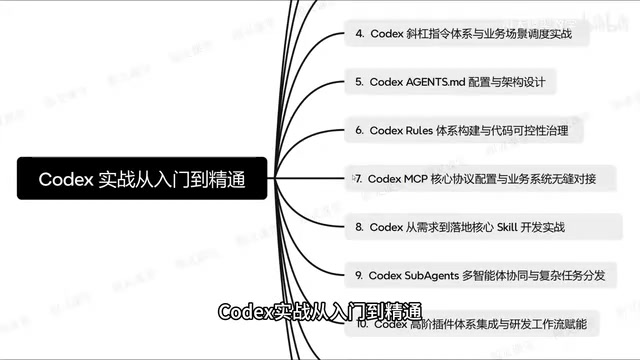
The first step to understanding Codex is getting clear on what it actually is. It's not just a code completion tool — it's a full AI programming system built around an engineering-driven development philosophy. Compared to simple conversational AI, Codex is designed with a much stronger emphasis on project-level control and collaborative capability.
The tutorial opens with Codex's core capabilities for a specific reason: without understanding the engineering design philosophy behind it, the more advanced features — slash commands, multi-agent collaboration, MCP protocol — will all feel disconnected. The value of Codex isn't in answering one-off questions; it's in embedding AI capabilities into a complete software development workflow.
Quick Installation and Building Your First Project from Scratch
The hands-on portion starts with environment setup. Installing Codex isn't complicated — the tutorial emphasizes getting to a point where you can actually do real project development, not just run demos.
The key here is understanding how the Codex CLI interaction model works. As a command-line tool, using Codex effectively depends on having clear interaction guidelines and disciplined usage habits. Many beginners stumble at this step — not because the tool is hard to use, but because they haven't developed consistent habits around how they phrase questions and write instructions. The tutorial walks through a concrete project example to show how to go from zero to a working project, turning abstract capabilities into actionable steps.
Slash Commands and AGENTS.md Configuration
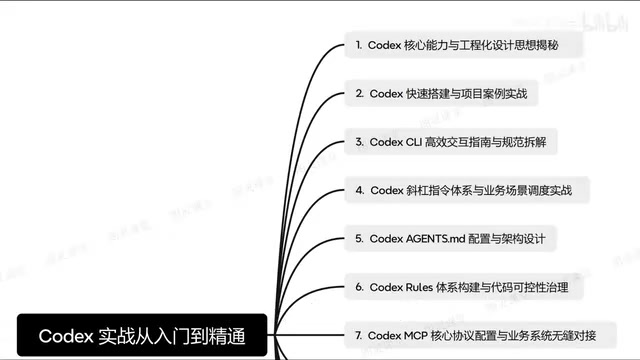
Codex's built-in slash commands form a complete system, not just a collection of isolated shortcuts. The core of this section is how to integrate slash commands with real business scenarios so that instructions actually serve the development workflow.
Architectural Design of AGENTS.md
AGENTS.md is the key configuration file for a Codex project — think of it as the project context and behavioral specification you're setting for the AI. The tutorial places particular emphasis on its architectural design: writing a good AGENTS.md isn't about jotting down a few lines of notes. It requires deliberate structural design so that Codex can accurately understand project conventions, the tech stack, and development standards.
This is especially important for team collaboration. A well-designed AGENTS.md can significantly improve the consistency and controllability of AI output, reducing the overhead of repeated corrections.
The design philosophy behind AGENTS.md is closely aligned with the software engineering principle of "convention over configuration." A well-structured AGENTS.md typically covers several dimensions: project background and tech stack description (informing the AI about language, framework, and dependency version constraints), code style and naming conventions (standardizing indentation, comment language, and variable naming), a list of prohibited behaviors (e.g., not modifying certain core files, not introducing specific dependencies), and testing and commit standards. At its core, this file is building "project memory" for the AI — compensating for the inherent limitation that large language models lack persistent context. For multi-person teams, AGENTS.md can also serve as a shared development contract between humans and AI, ensuring that no matter who invokes Codex on which machine, the output style and behavioral boundaries remain consistent.
Code Governance and MCP Protocol
Code controllability is an unavoidable concern when applying Codex at an enterprise level. The tutorial introduces a Rules-based governance framework — using rule constraints to keep AI-generated code auditable and predictable, rather than letting the AI run unchecked.
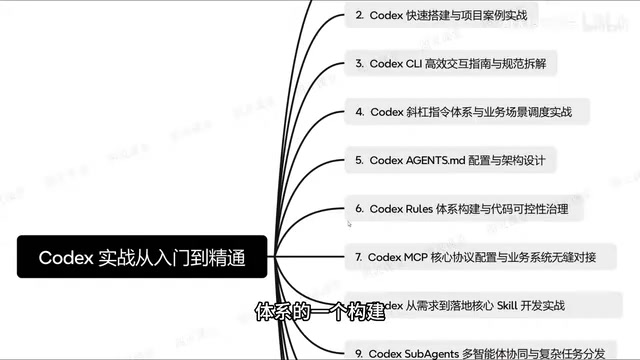
MCP (Model Context Protocol) configuration is another advanced focus. Through MCP, Codex can seamlessly integrate with existing business systems and adapt to an enterprise's existing technical architecture. This means Codex isn't an isolated tool — it can be woven into an organization's existing system ecosystem.
MCP (Model Context Protocol) is an open standard protocol proposed and championed by Anthropic in late 2024, designed to establish a unified communication interface between large language models and external tools and data sources. Think of it as the "USB port" of the AI world — any tool or system that implements the MCP specification can be directly invoked by an MCP-compatible AI model, without needing to build a custom integration for each tool. In the context of Codex, MCP means the AI can directly read and write databases, call internal APIs, access file systems, or trigger CI/CD pipelines — rather than just generating code snippets in isolation. Once MCP connections are configured, Codex gains the ability to "perceive" and "operate" within an enterprise's existing systems, extending AI-assisted programming from code generation into genuine business process automation.
Multi-Agent Collaboration and Enterprise-Grade Use Cases
The second half of the tutorial focuses on true enterprise scenarios. SubAgents multi-agent collaboration is the central concept here — when facing complex tasks, multiple agents work together through task coordination and distribution to accomplish workflows that a single AI couldn't handle alone.
Advanced Plugins and Workflow Integration
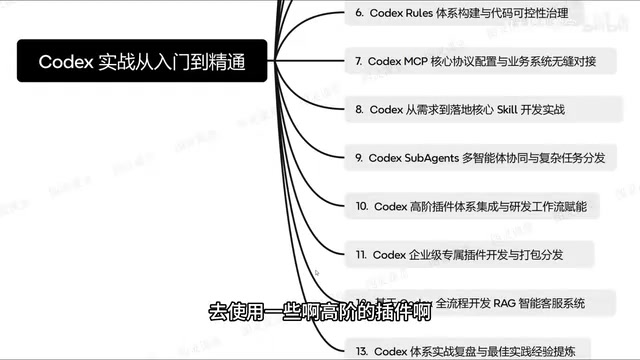
Codex supports integrating advanced plugins into project development and connecting them with the engineering workflow for broader impact. For enterprises, it's also possible to develop proprietary plugins for customized development. The tutorial notes that once a custom plugin is built, deploying it for web use involves additional packaging and distribution steps — this represents a transition from being a tool user to being a tool producer.
Complete Case Study: RAG Intelligent Customer Service System
The tutorial's capstone project is building a RAG-based intelligent customer service system from scratch using Codex. This case study ties together all the previous concepts — from requirements analysis and environment setup, through instruction configuration and multi-agent collaboration, to delivering a production-ready enterprise application.
The SubAgents (sub-agent) architecture is one of the most important paradigms in AI engineering today. Its core idea is to decompose a complex task into multiple subtasks, with an Orchestrator Agent responsible for planning and distribution, and a set of specialized sub-agents each handling execution — for example, one agent retrieves documents, another generates code, and a third runs tests and reports back results. This approach breaks through the limitations of a single context window and allows different subtasks to be processed in parallel, significantly improving the quality of complex workflow completion. In enterprise scenarios, the SubAgents architecture also makes it easier to set differentiated permissions and audit policies for different agents, meeting security and compliance requirements. A RAG (Retrieval-Augmented Generation) intelligent customer service system is a typical scenario for validating multi-agent collaboration: it simultaneously requires knowledge base retrieval, intent understanding, response generation, and session management — a full pipeline that a single agent would struggle to complete with high quality.
Learning Recommendations
The structure of this tutorial makes the learning path clear: Codex mastery is a gradual progression. Start by understanding the core capabilities and engineering philosophy, then get hands-on with environment setup, dive into slash commands and AGENTS.md configuration, and finally move into multi-agent systems, MCP, and enterprise-grade use cases.
For beginners, the most important mindset shift is this: Codex's barrier to entry isn't as high as you might think — natural language is the primary interaction mode. The real advanced challenges aren't in the tool itself, but in whether you've developed disciplined development habits and a genuine understanding of engineering-driven thinking.
Related articles

AI Colleagues on the Job: A Single-Platform Approach to Real-Time Telecom Fraud Detection
How to embed AI as a fraud-fighting colleague in a single platform for real-time telecom fraud detection: streaming features, model-rule collaboration, human-AI workflows, and challenges.

@ai-sdk/zai 3.0.38 Patch Release: Dependency Chain Upgraded in Sync
@ai-sdk/zai 3.0.38 patch released, synchronously upgrading three underlying dependencies including @ai-sdk/provider 4.0.32 and openai-compatible 3.0.76. This article covers the changes, upgrade impact, and version strategy.

The New Economics of AI Cost Management: A Key Turning Point for Enterprise AI Adoption
Enterprise AI adoption enters a new phase with AI cost management as a core issue. This article analyzes hidden sources of inference, infrastructure, and organizational costs, and offers refined management approaches including tiered invocation, observability, and budget guardrails.