Codex in Practice: A Complete Tutorial for Building a Native macOS App from Scratch in 25 Minutes

Build a native macOS app from scratch in 25 minutes using OpenAI Codex's agentic AI workflow.
This tutorial demonstrates how to use OpenAI Codex to build a fully functional native macOS notes app in just 25 minutes, from a vague one-sentence prompt to a working product with menu bar integration. It covers the difference between chat-based and agent-based AI, shows Codex's autonomous debugging capabilities, compares results with Claude Code, and offers practical security advice for AI-assisted development.
For those who have startup ideas and want to turn concepts into products but have always been blocked by the "I don't know how to code" barrier, AI coding agents are completely changing the game. This article is based on a complete hands-on demonstration showing how to use OpenAI Codex to build a fully functional macOS app from scratch in 25 minutes, with an in-depth analysis of how AI agents work and what the real experience is like.
Chat-based AI vs. Agent-based AI: Why the Agent Model Is Better for Building Products
Before getting our hands dirty, we need to understand a key concept: current AI tools can be divided into two major categories—Chat-based and Agent-based.
Chat-based tools like ChatGPT and Claude.ai work in a linear "you ask, I answer" conversation mode: you ask a question, it responds, you follow up, it continues. This is a passive interaction pattern.
Agent-based AI tools like Codex and Claude Code are fundamentally different. When you give them a task, they don't just answer you directly. Instead, they enter an Agentic Loop: Plan → Execute → Verify. If verification reveals problems, the agent automatically returns to the planning phase, rethinks, re-executes, and re-verifies until the task is complete.
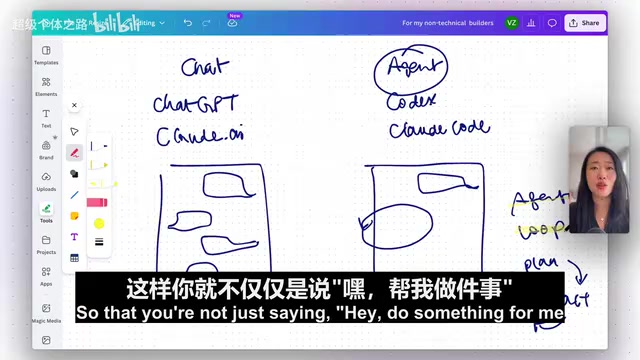
What does this mean? You essentially have an "AI colleague" that plans its own work, proactively executes, and self-corrects. The "Agentic Workflows" commonly discussed in enterprise contexts are essentially leveraging this autonomous loop to replace the process of repeated manual review.
Hands-On: Building the "Top of Mind" Notes App from Scratch with Codex
Background and Initial Setup
The demonstrator's pain point was very specific: he maintains a monthly note in Obsidian to record current thoughts (similar to a changelog). But every time he has to open Obsidian, find the corresponding file, and manually add content—a tedious workflow. He wanted a standalone native macOS app where he could type thoughts at any time and have them automatically appended to the corresponding month's Markdown file in Obsidian.
The preparation for building a macOS app with Codex is remarkably simple:
- Download and install Codex
- Enable two plugins: macOS Apps (for building native macOS applications) and Computer Use (allowing Codex to control the computer for automated testing)
- Set the model to GPT-4.5 (or the latest version), selecting high intelligence + fast mode

First Build: From Vague Requirements to a Running Product
The prompt given to Codex was extremely concise:
"I want to build an app where I can share what's top of mind and it gets captured in a markdown file inside my Obsidian vault. The idea is every single month I will have one md file and it will capture whatever is top of mind for me every time I type into it."
No UI style specified, no detailed feature specs, not even using the /plan command to have it plan first—just hitting enter and letting Codex build the entire macOS app in one shot.
What happened next was quite fascinating:
-
Automatic tech stack identification: Codex detected that the macOS Apps plugin was invoked and automatically loaded all the technical stack and specifications needed for building a native macOS app. The user didn't need to manually specify Swift, SwiftUI, or any other technical details.
-
Precise intent understanding: Despite the vague prompt, Codex accurately understood the "one file per month" intent, automatically designed a
year-month.mdfile naming convention, and decided to append notes to files to keep Obsidian tidy. -
Autonomous debugging capability: During the build process, Codex encountered API call issues. The key point is—it didn't stop to ask the user what to do. Instead, it autonomously entered a debugging loop, analyzed the error source, found a solution, and continued execution.

- Smart conflict detection: Codex discovered that a "Top of Mind" app with the same name already existed on the system (previously built with Claude Code), so it automatically renamed the new one to avoid conflicts.
In less than 10 minutes, the first usable version was complete. The app had basic functionality: selecting an Obsidian vault path, entering thoughts, and automatically appending them with timestamps to the current month's Markdown file.
Second Iteration: Three Requirements Handled at Once
During testing, the demonstrator identified three improvements and submitted them all to Codex at once:
- Newest content on top: New thoughts should appear at the top of the file, in reverse chronological order
- App icon design: There was no icon yet; one needed to be generated
- Menu bar quick entry: He didn't want to open the full app every time; he wanted an icon in the macOS menu bar for quick input
In less than 4 minutes, all three features were implemented. The icon design quality was admittedly poor (the demonstrator said outright it was "really ugly"), but functionally everything was spot on. This perfectly illustrates an important point: AI is already extremely powerful at feature implementation, but when it comes to aesthetics and design taste, human judgment remains irreplaceable.
Automated Testing: The Computer Use Plugin in Action
The final step was verification. Rather than clicking through tests himself, the demonstrator enabled the Computer Use plugin, letting Codex control the computer to test the macOS app it had just built.

An interesting detail: the OpenAI team made a design choice where Computer Use does not display the operation process while controlling the computer. The reasoning is that they want users to be able to continue doing other things while AI tests, rather than having their screen "hijacked." While not being able to see the process feels slightly unsettling, from a practical standpoint it's actually more reasonable.
Test results: Codex successfully added test entries and verified that the file existed with correct content. The entire process from build to test took approximately 25 minutes.
Codex vs. Claude Code: A Real Comparison with the Same Requirements
The demonstrator built apps using the same requirements on both Codex and Claude Code. The comparison results are quite informative:
| Dimension | Codex | Claude Code |
|---|---|---|
| UI Design | Sidebar included, more intuitive | Minimalist style, more restrained |
| App Icon | Lower quality | Noticeably better |
| Core Functionality | Fully implemented | Fully implemented |
| File Structure | Year-month naming, as expected | Same year-month naming |
The two are neck and neck on core functionality, with differences mainly in UI style and aesthetic details. This reinforces an important point: Which AI coding tool you choose isn't the most important thing. What matters is whether you, as the product definer, can clearly articulate what you want.
If you can provide a UI screenshot as a reference, both Codex and Claude Code can more precisely reproduce your design intent.
Security Reminders and Practical Advice
When using AI agent tools like Codex to build applications, there are several security points to keep in mind:
- Disable data training: Explicitly select "Do not use my data for training" in settings
- Data retention risks: Even with training disabled, most service providers still retain your data for a certain period
- Sensitive information management: Avoid exposing sensitive personal information or business data in conversations
- Trust boundaries: Decide the depth of information you share based on your level of trust in the service provider
The Technical Barrier Is Being Leveled—Start Building Now
The most valuable takeaway from this hands-on demonstration isn't the technical details—it's the signal it sends: The technical barrier is being rapidly leveled by AI agent tools like Codex.
Of course, vibe coding at this stage can't yet produce a billion-dollar product from a single sentence. Debugging can sometimes take longer than finding a great human engineer, and complex projects still require team collaboration. But for solving personal pain points, validating product ideas, and building MVPs, these tools are already powerful enough.
The hardest part is always taking the first step. If you've ever abandoned an idea because you "don't know how to code," now is the time to pick it up again. Start with a tool that solves your own small pain point, and naturally, you'll find yourself on an evolution path from macOS apps to iOS apps, from personal tools to user-facing products.
Related articles
 Tech Frontiers
A Rare Quiet Day in AI: Recursive Self-Improvement Stirs Beneath the Surface
A rare quiet day in AI sees multiple sources go silent simultaneously. Behind the calm, Recursive Self-Improvement (RSI) research continues. What this means for the industry.
 Tech Frontiers
Reve 2 vs. Ideogram 4: A Deep Dive into Layout Control in AI Image Generation
A deep comparison of Reve 2 and Ideogram 4's layout control capabilities, covering technical approaches, real-world use cases, and industry trends for designers and creators.
 Tech Frontiers
In the Weights: Check Your Influence Score in the AI World
In the Weights is an AI influence search engine that quantifies your presence in the AI world with a score. Explore how it evaluates practitioners and what it means for digital identity.