Codex on Both Fronts: A Complete Setup Guide for the Desktop and CLI AI Coding Clients

Step-by-step setup guide for both Codex desktop and CLI clients, with real cost data and GPT-5.6 tips.
This guide covers the full setup and configuration of OpenAI Codex in both its desktop (GUI) and command-line (CLI) forms, based on a hands-on walkthrough from scratch. It explains key config files, reasoning effort levels, third-party API relay integration, and the Prompt Caching mechanism — backed by real cost data showing two complete mini-games built for under ¥0.20.
Introduction: Getting Started with Both Versions of Codex
With the launch of GPT-5.6, OpenAI's coding assistant Codex has undergone a significant capability upgrade — along with a rebranding. The original Codex has been renamed and integrated into the ChatGPT desktop ecosystem, powered by the new model.
The Technical Evolution of Codex: OpenAI's Codex was originally released in 2021 as a standalone API — a model fine-tuned on code generation tasks based on the GPT-3 architecture, which primarily powered GitHub Copilot in its early days. As foundation models like GPT-4 and GPT-4o dramatically surpassed those early specialized models in coding ability, OpenAI gradually merged Codex into the unified ChatGPT ecosystem. The arrival of GPT-5.6 marks the completion of that integration — the model no longer distinguishes between "general-purpose" and "code-specific" variants, handling conversation, reasoning, and programming tasks with a single, unified base model. This is the core reason why the current Codex can tackle complex engineering tasks at extremely low cost.
This article is based on a complete hands-on screen recording by a Bilibili creator setting up Codex on a brand-new machine. It walks through the deployment and configuration of both usage modes: the desktop client (GUI) and the command-line client (CLI).
For developers looking to get started with AI coding with minimal friction, understanding the differences between these two modes — their cost structures and configuration essentials — is the first step toward using them effectively.
Two Modes: Desktop vs. CLI
Codex currently offers two primary usage modes. Both call the same underlying model, but differ noticeably in interaction experience and response performance.
Desktop Client: Feature-Rich, but Heavier
The desktop version is distributed through the Microsoft Store. Download speeds depend heavily on your network conditions, so some patience is required. After installation, the app automatically creates a Codex configuration directory under the user's home folder and begins "indexing" (vectorizing) the current working directory.
How Vector Indexing Works: This "indexing" process is essentially semantic vectorization (embedding). Code files, documentation, and other content are converted into high-dimensional vectors via an embedding model and stored in a local vector database. When a user submits a request, Codex first uses algorithms like cosine similarity to quickly retrieve the most relevant code snippets, then injects them into the prompt as context — without needing to send the entire project to the model each time. This is RAG (Retrieval-Augmented Generation) applied to the IDE context. It effectively handles the challenge of large projects exceeding the model's context window limit while also reducing wasteful token consumption.
The desktop client's strengths lie in its intuitive graphical interface and high degree of feature integration — it not only assists with coding but also extends its capabilities through a plugin marketplace, supporting tasks like processing Excel spreadsheets, generating PDFs, and even creating videos (with specific plugins).
However, its drawbacks are equally clear: every request comes bundled with a large set of official system prompts, making requests heavier and responses slower. From a performance standpoint, the CLI version tends to be the preferred choice among professional developers.
CLI Client: Lightweight, Clean, and Faster
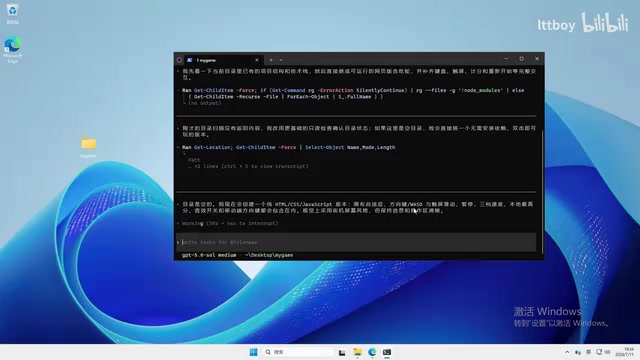
The CLI version is installed via Node.js using npm install -g (switching to a faster npm mirror beforehand is recommended). Once installed, simply type codex in your terminal to launch it.
Compared to the desktop version, CLI requests are much "cleaner" — no bloated system prompts, and response times are noticeably faster. In practice, each call completes in roughly 1 to 1.6 seconds. For developers comfortable with the command line, this version is better suited as a daily driver.
Core Configuration: Three Key Files
Regardless of which version you use, all configuration logic is centralized in the .codex directory under your home folder. The main configuration items are as follows.
Model and Reasoning Effort Configuration
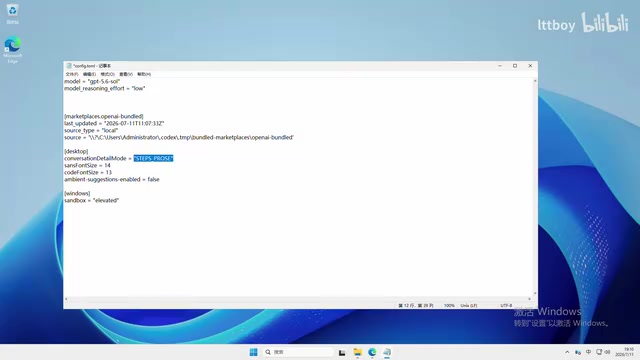
In the config file, set the model key to gpt-5.6 and specify the reasoning effort level. This parameter supports multiple levels: low, medium, high, extra high, and so on.
Reasoning Effort and How Inference Models Work: "Reasoning effort" is a core control parameter exclusive to OpenAI's reasoning model series (the o-series and subsequent GPT-5.x models). Unlike standard language models that output results directly, reasoning models perform internal Chain-of-Thought processing before generating a final answer — producing a large number of internal "thinking tokens" to break down the problem, self-verify, and reason step by step. Reasoning effort essentially controls the maximum token budget allocated to this internal thinking process: the higher the level, the more "thinking budget" the model gets, allowing it to handle greater logical complexity — but at a proportional increase in token consumption and latency. This explains why
extra highmode achieves a higher "IQ score" while also costing significantly more thanlowmode.
This introduces an important cost vs. intelligence tradeoff: the higher the level, the stronger the model's reasoning — but the faster it burns through tokens. Here are some practical recommendations:
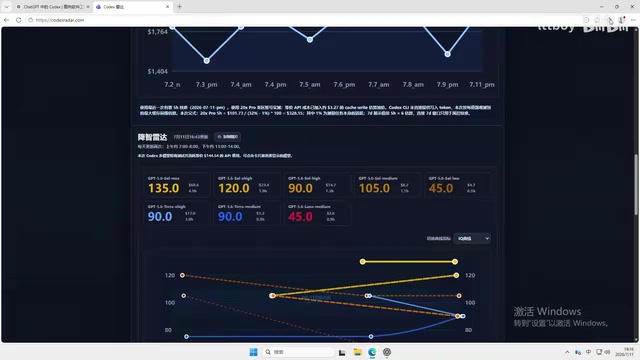
- An IQ score above 100 is sufficient for normal use — there's no need to chase the highest tier
- For everyday tasks,
lowor medium levels (roughly IQ 105–120) are more than adequate - Reserve
extra high(which can reach IQ 135) for complex logic problems
Third-Party API Relay and Authentication Configuration
When connecting to a third-party relay service, the key configuration points are:
- In the
configfile, setbase_urlto the relay domain (the trailing/v1can be omitted) - The
model_providername must match the rest of your configuration exactly - Write your API key to a separate
auth.jsonfile, filling in the key generated by your relay platform
How API Relay Services Work: The low pricing of third-party API relay services is rooted in bulk procurement and regional pricing arbitrage. These providers purchase OpenAI API credits in bulk under enterprise accounts, securing official volume discounts, while also exploiting pricing differences across regions. Technically, relay services transparently forward user requests to real OpenAI endpoints — from the user's perspective, only the
base_urlneeds to change, and the request format is fully compatible with the official API. That said, relay providers vary widely in stability, data security, and regulatory compliance. Exercise caution and carefully assess data leak risks when handling sensitive business code.
Important reminder: After modifying the configuration, you must fully quit the application (not just close the window) and restart it for changes to take effect.
Real-World Cost Testing: How Much Does AI Coding Actually Cost?
Cost data is arguably the most valuable part of this article. Through a relay service, GPT-5.6 can be accessed at roughly 0.12× the official price (just over one-tenth), while stable relay services on the market typically range from 0.2× to 0.5×. Here are the real-world numbers:
- A single call consumes roughly 1,400 tokens, costing less than ¥0.07
- Building a browser-based Snake game: 30+ requests, total cost approximately ¥0.10
- Completing a similar project via CLI: 44 requests, total cost approximately ¥0.15
- Developing a complete app consuming around 100 million tokens: total cost only ¥7–8
Caching: The Core Mechanism Behind the Savings
Codex has an efficient caching mechanism built in at the infrastructure level: within the same project, if a repeated or similar request's system prompt hits the cache, it's reused without being billed again. In practice, cache hit rates of 84% to 93% have been observed, particularly noticeable in projects undergoing continuous iteration.
How Prompt Caching Works: This corresponds to the Prompt Caching feature OpenAI introduced in 2024. When two requests share identical prompt prefixes that exceed a certain length threshold (typically 1,024 tokens), the model server reuses the previously computed KV Cache, billing that portion of tokens at the cached rate (usually 25% of the original price or less). In the Codex context, system prompts and existing code context are highly repetitive across multiple iterations of the same project — naturally ideal conditions for high cache hit rates. A hit rate of 84%–93% means those tokens only cost roughly 1/4 of the standard price. This is the key technical driver behind the extremely low overall costs — not simply a discount, but a fundamentally more efficient billing model.
Useful Tools and Practical Tips
The GPT Model "Radar": Real-Time Intelligence Monitoring
The video mentions a handy auxiliary tool — a GPT model "radar" (tools like Codex Render) — used to detect whether a model is in a degraded state. Developers can use it to check the model's current "IQ score" in real time and verify whether its reasoning capability is functioning normally. Testing shows the GPT-5.6 SO model scores 135, the highest currently available.
The so-called "intelligence degradation" phenomenon is related to the load-balancing mechanisms of inference models. During peak usage or under specific request conditions, the server may dynamically reduce the computational resources allocated to a single request, resulting in shallower reasoning and lower output quality. The radar tool evaluates current response quality against a standardized test set, helping developers confirm the model's state before starting real tasks.
Four Core Usage Recommendations
Based on the full hands-on process, here are the most practical takeaways:
- Decompose tasks first — Break complex requirements into smaller steps and let the model execute them sequentially, calling tools and creating files autonomously. This consistently outperforms throwing one large task at the model all at once.
- A pause doesn't mean an error — Many moments that look like freezes are actually the model invoking local tools, fetching dependencies, or verifying code quality.
- The model self-tests before delivery — Automatically testing edge cases before handing off code to ensure it runs out of the box is a standout feature of the latest version.
- Just start using it — that's the best way to learn — Whether you're writing code, building spreadsheets, or generating PDFs, hands-on use is always the most efficient path to mastery.
Conclusion
This zero-to-setup walkthrough on a brand-new machine makes it clear that the barrier to deploying both versions of Codex has dropped dramatically. Combined with low-rate relay services and the high-hit-rate Prompt Caching mechanism, the marginal cost of AI-assisted coding has become nearly negligible — two complete mini-games for just ¥0.20. For individual developers, the CLI version deserves priority consideration as a daily driver, thanks to its lightweight footprint, speed, and clean requests. The desktop version is better suited for scenarios that call for a graphical interface and plugin extensibility. Powered by GPT-5.6, AI-assisted programming has entered a genuinely low-cost, practical era.
Key Takeaways
Related articles
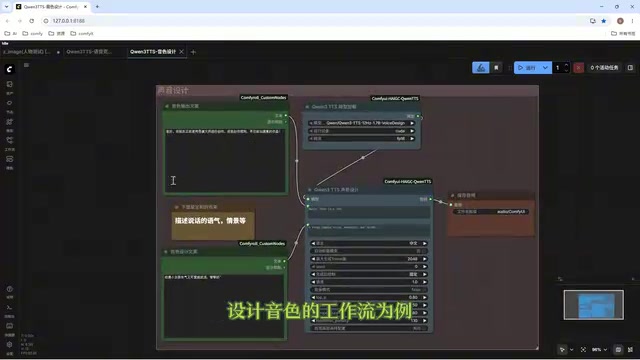
Director Master Tutorial: Full Workflow for AI Character Voice Design and Binding
Based on a Bilibili tutorial, this guide details how to design and bind AI character voices in Director Master: uploading voices, generating them via ComfyUI workflows, producing voice profiles alongside character design, and automatically inheriting voices in storyboard prompts.
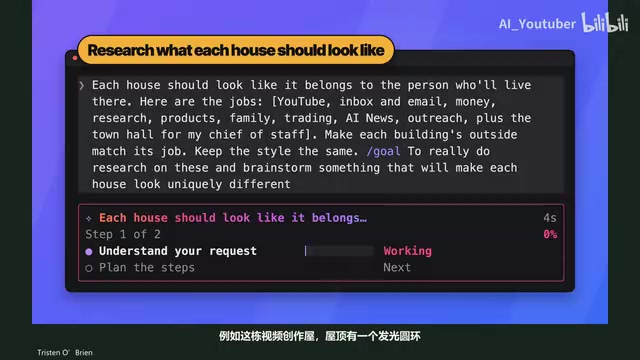
3.5 Hours and $47: Building an AI Agent Village Step by Step
A Bilibili creator built an AI Agent village in 3.5 hours for about $47: Claude Code handles logic and behavior, Higgs Field generates art. Seven steps cover maps and buildings, chief of staff and director roles, walkable areas and behavior rules, connecting to real tools like email and calendars, proving ground meetings, and retaining final human approval—including a cost ledger and prompt design thinking.

WorkBuddy Complete Beginner's Guide: Master Your AI Digital Employee in 7 Days
A detailed breakdown of the WorkBuddy beginner's guide: how this domestic Codex alternative works, its four advantages over traditional AI, and a learning path for newcomers.