Codex + Remotion in Practice: A Complete Tutorial on Generating Animated Videos with AI Conversations

Generate animated videos through natural language conversations using Codex and Remotion together.
This article introduces a workflow for AI-generated animated videos: using OpenAI Codex's conversational interface to generate Remotion animation code, creating data chart animations without writing any code. Through multi-turn conversations, you can iteratively refine animation effects (such as transparent backgrounds and format conversion), plus support visual secondary editing of titles, data, and language — achieving a complete pipeline from conversation to finished video.
Generate Animated Videos Just by Chatting?
Would you believe it? A polished data chart animation — no hand-written code required — generated just by typing a few natural language sentences into a chat box. This isn't science fiction; it's a workflow that's already achievable through the Codex + Remotion combination.
This article walks you through the core mechanics of this AI animation toolchain, the practical workflow, and key lessons learned along the way.
Hands-On Demo: From Conversation to Animated Video
Step 1: Generate Animations with Natural Language
Type "Create an animated chart using the Remotion plugin" in the Codex chat box, and the system automatically generates React component code along with a preview image. Then follow up with "Export the animated video," and it produces a previewable animated video.
About Codex: OpenAI Codex is an AI model based on the GPT architecture, fine-tuned specifically for code generation tasks, and serves as the underlying engine for GitHub Copilot. The next-generation Codex Agent released in 2025 has been upgraded to a fully capable software engineering agent that can autonomously run code in a sandbox environment, debug errors, read and write files, and preview results through a built-in browser — truly making the leap from "code completion tool" to "autonomous programming agent."
The entire process is conversation-driven — you don't need to manually write any code.
Step 2: Iterative Optimization Through Multi-Turn Conversations
The first version of a generated animation rarely meets all requirements perfectly, and this is where multi-turn conversation iteration shines. For example, if you want a transparent background, simply tell the AI "Change the video to have a transparent background." The AI will attempt to convert the MP4 format to WebM. If the result isn't ideal, keep following up until it adjusts — ultimately producing a MOV file with a transparent background.
Transparent Background Video Format Notes: Video alpha channel support varies by encoding format. Traditional MP4 uses H.264 encoding, which doesn't support alpha channels. WebM with VP9 encoding does support alpha channels, but compatibility with some editing software is limited. MOV format with Apple ProRes 4444 or Animation encoding fully preserves transparency information and is the mainstream choice for transparent assets in professional video production, with excellent support in major editing software like Final Cut Pro and Premiere Pro.
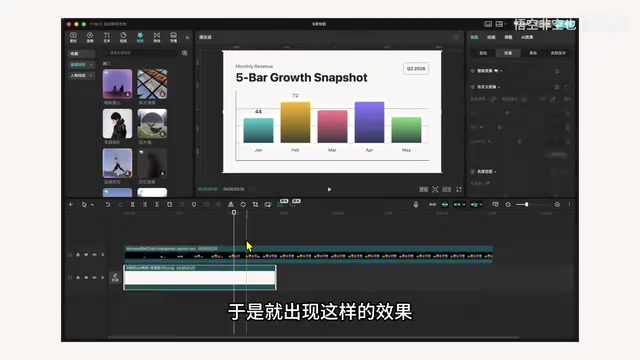
After importing the transparent-background video into an editing tool, you can freely overlay background images. In the image above, the first half has a background image added while the second half remains transparent, confirming that the transparency is indeed working.
Step 3: Visual Secondary Editing
After opening the project in Codex's built-in browser, you can make visual modifications on top of the generated code:
- Edit the title: Click the edit function in the upper right corner, change the chart title to "First Half of 2026 Growth Chart," and refresh the browser to see it take effect
- Modify data: Change the number 91 to 80, and the chart's bar height and displayed data update simultaneously — all related bar heights adjust automatically
- Language switching: Type "Change all English to Chinese" in the chat box, and all text in the video switches to Chinese
This combination of "conversation + visual editing" approach
Related articles
 Tutorials
ChatGPT Plus Subscription Guide: Are GPT-5.5, image-2, and Codex Worth the Upgrade?
A detailed look at ChatGPT Plus features — GPT-5.5, image-2, and Codex — with a Plus vs Pro comparison and a complete step-by-step subscription guide for users outside the US.
 Tutorials
Harness AI Engineering in Practice: Using Claude Code to Master Enterprise-Level E-Commerce Development
Deep dive into Harness AI Engineering: master enterprise e-commerce development with Claude Code using the Rules, Skills, Wiki, and Changes framework.
 Tutorials
Cursor + Codex Dual-IDE Collaboration: A Practical Methodology for Open-Source Project Customization
A complete methodology for open-source project customization based on real-world experience, detailing the Cursor+Codex dual-IDE workflow, seven-stage process, MVP validation, and AI source code reading techniques.