Codex User Guide: Five Key Concepts for Mastering Agent Workflows

Codex is an Agent, not a chatbot — use it with an Agent mindset to unlock its true power.
This article explains that Codex is fundamentally an Agent with a complete "perceive-decide-act" feedback loop, not a simple chatbot. To use Codex effectively, you need to master five key concepts: Thread (maintaining context continuity), Workspace (confirming working directory and permissions), Tools (understanding tool call logic), Patch (reviewing minimal changes), and Verification (always verifying after changes). Understanding these concepts is essential for safe and efficient AI-assisted programming.
Codex Is an Agent, Not a Chatbot
Many people treat Codex like regular ChatGPT the first time they use it — saying something and expecting a direct answer. But this approach not only wastes Codex's capabilities, it can also introduce real risks: a Codex that modifies code without examining your project first is the most dangerous kind.
To understand this, you need to distinguish between two fundamentally different AI systems. Chatbots (like early ChatGPT conversation mode) are essentially stateless "question-and-answer" systems: input some text, output some text, with each interaction relatively independent. An Agent, on the other hand, is a system with a complete "perceive-decide-act" feedback loop — it can proactively invoke external tools, read environment state, adjust its next steps based on intermediate results, and continue cycling until it achieves its goal. This pattern is known in the AI field as the ReAct (Reasoning + Acting) architecture.
Codex is designed on exactly this architecture: it can not only understand natural language instructions, but also invoke the file system, code search, terminal commands, and other tools, forming a true "observe → think → act → observe again" loop. This is why Codex is more like an Agent that "looks while it works" within your project. It doesn't just answer questions through language — it reads files, searches code, edits files, runs commands, examines results, and then continues adjusting. When you see it searching first, opening files first, or checking configurations first, don't think it's taking detours — that's exactly how it's supposed to work.
Five Key Concepts for Understanding How Codex Works
To truly use Codex well, you need to remember five core concepts: Thread, Workspace, Tools, Patch, and Verification. These five keywords connect the entire pipeline from when Codex receives a task to when it delivers results.
Thread: Maintaining Context Continuity
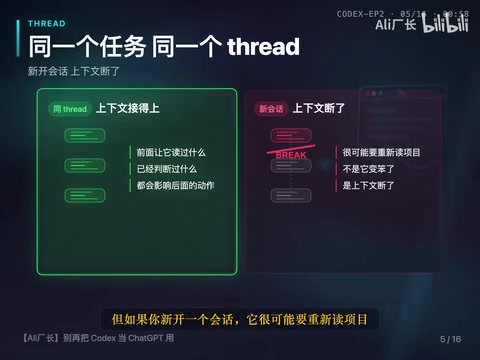
A Thread is the current task session. Try to complete the same task within the same Thread. What you had it read before and what it has already determined will all influence its subsequent actions.
The importance of Threads stems from the core mechanism of large language models — the Context Window. When modern LLMs process tasks, all their "memory" is stored in the current context window: including previous conversation history, file contents that have been read, tool call results, and more. Once you start a new Thread, all this information is cleared, and the model needs to understand the project from scratch. For code Agents, context continuity is especially critical — architectural understanding of a complex project, module dependency relationships, and discovered potential issues are all "working memory" that the Agent gradually accumulates during its work process.
For example, if it has already analyzed the login module, and you later ask it to modify the login button, it can continue from the previous context. But if you start a new session, it will likely need to re-read the project — it hasn't become dumber, the context was simply lost. Frequently switching Threads not only makes the Agent repeat unnecessary work, but may also lead to incorrect judgments due to lost critical context. Professional AI programming workflows typically recommend: a complete feature development or bug fix task should be completed from start to finish within the same Thread.
Workspace: Confirming Your Working Directory and Permissions
Workspace is the working directory that Codex currently sees. Which files it can see depends first on which directory you've opened; whether it can modify files or run commands also depends on the current permissions and mode.
Beginners should confirm two things before starting any task: the working directory and operation permissions. You can directly ask it to report the workspace and file structure first, then decide whether to proceed. This simple confirmation step prevents many problems — if you open the wrong directory, the more it does afterward, the further off track it goes.
Tools: Paying Attention to Tool Call Logic
Codex calls various tools: reading files is a tool, searching is a tool, editing files is a tool, and running tests is also a tool. You don't need to be afraid of it using tools. What you really need to watch for are two things:
- Whether it explains its reasoning before using a tool
- Whether it adjusts its judgment based on the results after using it

There's an underlying mechanism worth understanding here: each work cycle of Codex (the Agent Loop) includes four steps: "think → tool call → observe results → think again." Searching first and reading files first are necessary "Observation" steps in the Loop, not wasted time. An Agent that skips observation and jumps straight to conclusions is the one taking shortcuts and guessing.
If it starts drawing conclusions without looking at files, you can interrupt it and have it search for relevant files first, rather than guessing paths based on project conventions. An Agent that modifies code without examining the project is the truly dangerous one.
Patch: Reviewing the Actual Scope of Changes
Patch is what Codex actually changed. This concept comes from version control practices in software engineering — in version control systems like Git, a Patch refers to the precise difference description of a codebase: which files were modified, which lines were added or removed.
When reviewing code changes, the focus isn't on what it said, but on which files it changed. "Minimal Diff" is an important principle in software engineering: each modification should only include changes necessary to solve the current problem, without introducing unrelated changes. This principle is especially important in AI Agent scenarios — the Agent might "helpfully" fix other issues it discovers, causing the scope of changes to exceed expectations; large-scale changes also make code review difficult, and if new problems are introduced, they're harder to roll back and locate.
If a small requirement suddenly touches a dozen files, stop and ask for clarification. You can have it explain file by file: why was this change necessary? Converge non-essential changes to the minimum scope. The smaller the change, the more controllable the risk.
Verification: Changes Must Be Verified
It's not done until changes are verified. In software engineering, verification methods have a strict hierarchical system, from lightweight to heavyweight: Static Analysis (Lint) — checks code style and potential errors without running code; Type Check — such as TypeScript's tsc or Python's mypy, verifying type safety; Unit Test — verifying the behavior of individual functions or modules; Integration Test — verifying that multiple modules work together; End-to-End Test (E2E) — simulating real user operations to verify the complete flow.
Verification doesn't mean running the full test suite every time — for small tasks, you can run Lint, type checking, or provide manual verification steps. The reasonable approach is to choose the corresponding level of verification based on the scope of changes: if you modified a single utility function, run its unit tests; if you changed API interfaces, run integration tests; if you modified user-facing flows, consider E2E testing.
Related articles
 Tutorials
ChatGPT Plus Subscription Guide: Are GPT-5.5, image-2, and Codex Worth the Upgrade?
A detailed look at ChatGPT Plus features — GPT-5.5, image-2, and Codex — with a Plus vs Pro comparison and a complete step-by-step subscription guide for users outside the US.
 Tutorials
Harness AI Engineering in Practice: Using Claude Code to Master Enterprise-Level E-Commerce Development
Deep dive into Harness AI Engineering: master enterprise e-commerce development with Claude Code using the Rules, Skills, Wiki, and Changes framework.
 Tutorials
Cursor + Codex Dual-IDE Collaboration: A Practical Methodology for Open-Source Project Customization
A complete methodology for open-source project customization based on real-world experience, detailing the Cursor+Codex dual-IDE workflow, seven-stage process, MVP validation, and AI source code reading techniques.