Codex vs Claude Code: An In-Depth Comparison and Selection Guide for AI Coding Tools

A practical comparison of Codex vs Claude Code covering price, stability, and frontend vs backend strengths.
This article breaks down the key differences between Codex, Claude Code, and Cursor from a frontend developer's perspective. Covering Codex's four usage forms (with the APP as the standout), price comparison, stability issues like rate limiting, and how each tool excels in different coding contexts — it offers actionable guidance for developers choosing their primary AI coding tool.
With AI coding tools emerging at a rapid pace, developers face a very practical question: between Cursor, Claude Code, and Codex — the three dominant tools on the market — which one should you actually use? This article draws on the hands-on experience of a frontend developer to break down Codex's four usage modes and the key differences between Codex and Claude Code, helping you make the choice that fits your workflow best.
Codex's Four Forms: The APP Is the One That Matters
OpenAI Codex was originally released in 2021 as a language model specifically aimed at code generation. Built on the GPT-3 architecture, it was fine-tuned on billions of lines of public code — primarily from GitHub — and served as the underlying engine for GitHub Copilot, pioneering the commercialization of "AI-assisted programming." As the GPT-4 series rose to prominence, the standalone Codex model was gradually superseded by more capable general-purpose large language models. However, OpenAI retained the "Codex" brand to represent its AI coding toolchain. Today's Codex APP is no longer a single model — it's a fully integrated development platform powered by OpenAI's latest reasoning models (such as the o-series), featuring multi-turn dialogue, a code execution sandbox, and project-level context understanding. It's a fundamentally different product from the early "code snippet completion" era.
With the launch of the standalone Codex APP, the tool now exists in four distinct forms: CLI (terminal), web interface, editor plugin, and the latest APP.
In the past, most developers encountered Codex through plugins — integrating it into editors like VS Code to assist with coding. That's no longer the full picture.
Among the four forms, the APP is undoubtedly the most complete and the smoothest experience. It can run as a standalone tool or alongside traditional IDEs like VS Code, enabling a more efficient workflow. For developers who aren't comfortable with a purely terminal-based (CLI) workflow, the APP dramatically lowers the barrier to entry.

This is precisely why this article recommends the Codex APP as the starting point: compared to pure command-line operation in a terminal, the graphical interface lets users who aren't familiar with CLI get up and running quickly — right out of the box.
Codex vs Claude Code: The Core Comparison
Many developers naturally compare Codex and Claude Code side by side. Here's a straightforward breakdown across three dimensions: price, stability, and area of strength.
Price: Codex Offers Better Value
In terms of subscription cost alone, Codex APP is priced more affordably, while Claude Code sits on the pricier end. For indie developers or small teams that rely heavily on AI coding tools over the long term, price is an unavoidable consideration. On this dimension, Codex has a clear advantage.
Stability: Rate Limiting and Account Issues
Claude Code is a terminal-native AI coding agent developed by Anthropic, built on the Claude 3.5/3.7 model series and designed specifically for long-context, complex codebase understanding. Its standout feature is a context window of up to 200K tokens, allowing it to read and comprehend the full structure of large projects in a single pass. However, this high context consumption is also the root cause of its rate limiting issues — each conversation consumes far more tokens than a typical chat session, causing API quotas to drain quickly under heavy use. Anthropic applies a dynamic usage-based rate limiting policy: when request frequency or token consumption exceeds a threshold within a short timeframe, the service automatically throttles or suspends — which is the technical reason developers experience what feels like "getting rate-limited" in practice.
In day-to-day use, Claude Code has a few frustrating pain points — it's prone to triggering rate limits, and there's an occasional risk of account suspension. Codex, by contrast, has been noticeably more stable in this regard; the author has not encountered significant rate limiting or account issues in their own usage.
It's worth noting objectively that the issue of "model degradation" (a perceived drop in output quality) remains debated. Some users report experiencing this with Codex as well, though the author has not personally noticed it. This varies by individual, so readers should factor in their own experience.
Area of Strength: Frontend vs Backend — Each Has Its Edge
This is the most practically valuable insight in this article. The performance gap between AI coding tools in frontend versus backend contexts has deeper roots in training data and optimization objectives: backend code (Python, Java, Go, etc.) is evaluated against relatively objective standards — logical correctness, time complexity, type safety, design pattern compliance — all of which are quantifiable. Models optimized for logical rigor tend to shine here. Frontend code is different: CSS animations, color systems, interaction feedback — whether something "looks good" or "feels right" is highly subjective and aesthetic. OpenAI's models may have been exposed to more frontend, visually-oriented data during training (such as Dribbble, CodePen, and design system documentation), giving them an edge in generating UI code with strong visual polish. This difference isn't about one model being universally "stronger" — it reflects different training priorities and optimization targets.
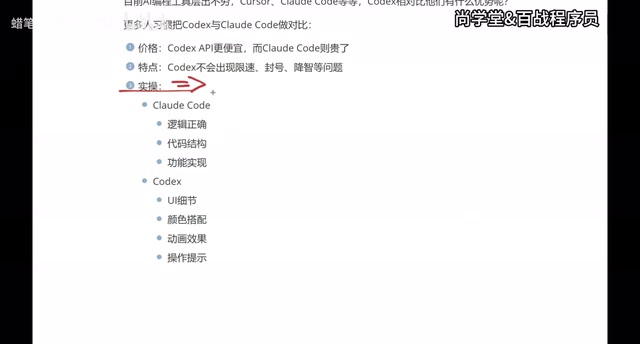
- Claude Code leans toward logical rigor, code structure, and functional correctness — which is why it tends to be more highly regarded by backend engineers.
- Codex pays more attention to UI detail, color schemes, animations, and interaction cues — which is why frontend developers and app-focused teams often gravitate toward it.
The author, being a frontend developer, found after a period of real-world comparison that Codex fits the frontend context better. Claude Code may well perform more impressively on pure logic tasks, which is why a significant portion of developers continue to prefer it.
This conclusion comes from personal experience and may not be universally applicable — but it carries strong practical value for developers in the process of choosing: if your focus is frontend and visual presentation, try Codex first; if you're deep in backend logic and architecture, Claude Code may feel more natural.
Master All Three Tools — Don't Pick Just One
Cursor is the most representative "AI-first IDE" on the market today. Its key differentiator is that it's not a plugin embedded in an existing editor — it's a standalone editor forked from the VS Code codebase and heavily reworked. This means Cursor can implement deeper code awareness at the editor's foundational layer — including AST (Abstract Syntax Tree) analysis, cross-file symbol indexing, and real-time error stream interception — capabilities that are difficult to achieve in plugin form due to editor API constraints. Cursor also supports connecting to multiple model backends including Claude and GPT-4, offering considerable flexibility. Its higher subscription price isn't a bad deal for power users, but it can feel hard to justify for lighter use.
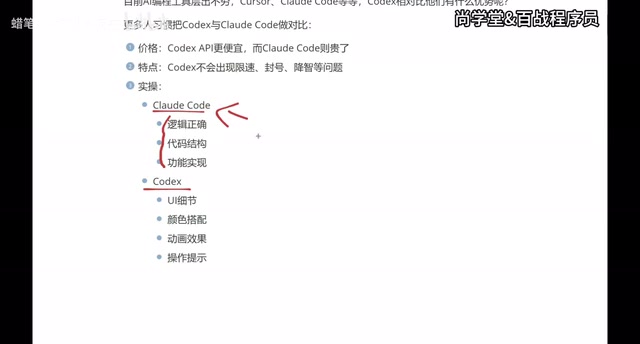
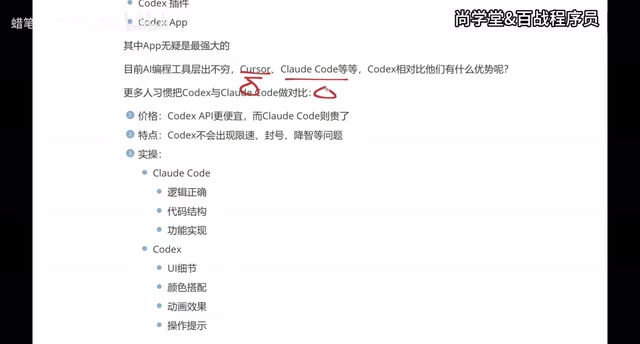
Despite the crowded AI coding tool landscape, the clearest "big three" right now are Cursor, Claude Code, and Codex. The author's core recommendation is: learn to use all three, rather than betting everything on just one.
The reasoning is practical: different companies may provide different account access, or require employees to use specific tools. Having command of multiple tools means you can switch fluidly across environments without letting tool constraints slow down your work.
The author's own tool evolution path illustrates this well:
- Started with Cursor for over six months — solid features, but the price stung every renewal cycle.
- Switched to Claude Code, which reduced costs somewhat after integrating certain domestic models, but the overall experience wasn't ideal. Combined with a personal discomfort with pure terminal-based workflows, usage gradually declined.
- Settled on Codex — primarily because the APP brought a more complete experience overall, with a smoother workflow when paired with VS Code, and especially better results for frontend UI work.
Choosing What Fits You Matters More Than Choosing the "Best"
Tool selection is ultimately personal. Price, stability, area of strength, and personal workflow preferences all factor into the final decision.
For frontend developers, those who prioritize visual product quality, or users who want quick results without heavy configuration, Codex — with its attention to UI detail and the ease of the APP form factor — often delivers a more immediately tangible payoff. Backend developers who prioritize logical rigor and clean code architecture will still find Claude Code to be a competitive option.
Whichever tool you ultimately choose, getting truly fluent with your primary tool is the real key to improving your coding efficiency. The recommendation is to make your choice based on your technical focus and actual budget — while maintaining a basic familiarity with all three major tools, so you can handle different work environments with ease.
Key Takeaways
Related articles

Salesforce Acquires Rune for $375M: AI Logistics Tech Bolsters Defense Business
Salesforce reportedly acquires defense tech startup Rune for $375M. Rune's AI logistics tech will strengthen Salesforce's Missionforce defense platform, continuing its M&A spree.

Why Fair Use Benefits Everyone in the AI Era
Starting from a Hacker News discussion, this article analyzes the legal logic and controversies of the fair use principle in AI training and content creation, and its dual impact on creators and the tech ecosystem.

Mistral Large 4 Open-Sources a Trillion Parameters, Microsoft Offers Voluntary Severance to 60,000 Employees
Mistral Large 4 open-sources a trillion-parameter multimodal model with a coding agent score of 48; SanDisk earnings show AI inference reshaping NAND demand; Google Gemini adds in-app file editing, OpenAI raises Codex quotas, and Microsoft offers voluntary severance to 60,000 employees.