Coding Agents: AI Programmer Assistants That Can Write, Run, and Debug Code

Coding agents can write, run, and modify code, lowering the barrier for zero-foundation users to build small tools.
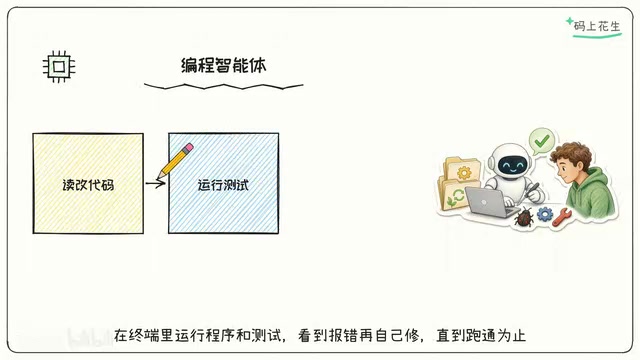
The article introduces the core capabilities of coding agents: they can open project files, modify code, and run tests in the terminal, forming a "modify—run—observe—modify again" closed loop, which is fundamentally different from the "you ask, I answer" of ordinary code Q&A. For zero-foundation users, agents greatly lower the barrier to building small tools, reversing the learning path to first build something that runs and then understand the principles. The human role shifts up to requirement description and result acceptance; when using them, note accepting results, iterating in small steps, keeping version records, and providing complete error messages.
Coding agents are changing the way people imagine "writing code." They no longer just spit out a sample snippet in a chat window — they can directly open project files, understand directory structure, modify code, run programs and tests in the terminal, and when they see an error, fix it themselves until the program runs successfully. According to the explanation in a Bilibili AI beginner series video, these tools are called "coding agents," and their core capability can be summed up in one sentence: they can write, run, and modify code.

How coding agents differ from ordinary code Q&A
Ordinary code Q&A is essentially "you ask, I answer": you describe a requirement, the model gives you a code snippet, and the rest — copying, pasting, creating files, installing dependencies, debugging — is all up to you. Coding agents take over that entire chain — they have the ability to operate on the project environment, can read multiple files in a repository, determine where changes should go, and then execute the modifications.
More importantly, it's a closed loop. After making changes, it proactively runs the program or test cases and reads back the terminal output. If there's an error, it continues adjusting based on the error message, forming a "modify—run—observe—modify again" cycle. This cycle is precisely the essential difference between an agent and a pure conversational model: the former terminates when the goal is achieved, while the latter terminates when a single round of reply is finished.
Agent in the field of artificial intelligence refers to a system that can perceive its environment, make autonomous decisions, and take actions to achieve a goal. Unlike traditional conversational models (such as early ChatGPT), an agent not only generates text but can also call tools, execute operations, and adjust behavior based on environmental feedback. In coding scenarios, the environment is the project file system and terminal, actions include reading and writing files and running commands, and feedback is the program's output or error messages. The core features of an agent are goal orientation and closed-loop control: it keeps acting until the goal is achieved or it cannot continue, rather than merely generating a single round of reply. This architecture typically involves modules such as planning, tool calling, and memory, shifting AI from "passive answering" to "active execution."
Dependency management refers to the process of managing external libraries or frameworks required by a project in software development. Modern programming languages usually come with package management tools (such as Python's pip or JavaScript's npm). Developers declare dependencies through configuration files (such as requirements.txt or package.json), and the tools automatically download and install the correct versions. Dependency management is the foundation for a project to run, but it often becomes a major obstacle for beginners due to version conflicts, environment differences, and other issues. Coding agents can automatically identify missing dependencies, execute installation commands, and adjust versions based on error messages, thereby lowering this barrier.
What it means for people with zero foundation
There's a very simple judgment in the video: for people with zero foundation, coding agents make building small tools possible. In the past, to build a usable small tool, you often had to get past several barriers — syntax, environment configuration, and dependency management — and many people gave up at the "can't get it to run" stage.
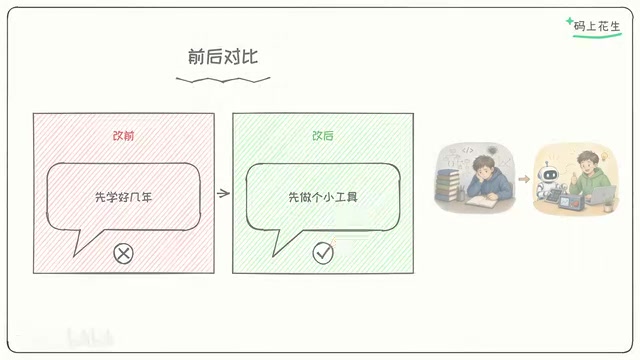
Agents dramatically lower this barrier. You only need to clearly state what you want, and the agent handles the rest of the build process. This doesn't mean programming knowledge becomes useless; rather, the learning path is reversed: first build something that runs, gain positive feedback, and then go back to understand how it works. The line in the video — "Before I changed my mind, I thought writing programs required years of study; after I changed my mind, I'd first build a small tool that works" — captures exactly this shift in mindset.
It's more like an assistant that takes action
It's more apt to understand a coding agent as "a programmer assistant that takes action itself." You propose requirements, and it handles implementation: writing code, running it, and fixing errors on its own. The human role shifts from "line-by-line implementation" up to "describing requirements, accepting results, and steering direction."
The direct benefit of this division of labor is that a sense of accomplishment comes quickly. Small projects that used to take days before you could see an interface can now have a working first version in perhaps an afternoon. But you should also be clear about its boundaries: agents are good at iterating toward a clear goal, but not at deciding "what should be done" for you. If the requirement description is vague, it will efficiently run far in the wrong direction.
A few things worth noting when using them
- Acceptance matters more than generation: An agent being able to run a program doesn't mean the logic matches your true intent — results need human confirmation.
- Small-step iteration beats explaining everything at once: Break requirements into verifiable small goals, so when something goes wrong it's easier to pinpoint which step went off track.
- Keep version records: Before letting an agent modify code, commit once first so you can roll back if problems arise — this is a low-cost safety net.
- Error messages are its fuel: Give it the complete terminal output — it's far more effective than paraphrasing "it seems there's an error."
The end of the video mentions that follow-up content will specifically cover how to use coding agents to build small tools one by one. For readers who are just getting started, starting from a specific small requirement fits the usage rhythm of these tools better than systematically grinding through tutorials before taking action. Let it run first, then gradually understand why it can run.
Version control is a system for tracking and managing code changes, and the most commonly used tool is Git. It allows developers to save historical snapshots of code so they can roll back to previous versions if problems arise. In scenarios using coding agents, version control provides a safety net: before letting an agent modify code, you can commit the current state, so if the agent's changes introduce errors, they can be easily restored. In addition, version records make it easy to compare the agent's modifications and understand its decision-making process. Even if you're not familiar with the command line, you can use graphical tools or the version control features built into your IDE.
One-line Summary
Coding agents can write, run, and modify code, lowering the barrier for zero-foundation users to build small tools.
Paragraph Summary
The article introduces the core capabilities of coding agents: they can open project files, modify code, and run tests in the terminal, forming a "modify—run—observe—modify again" closed loop, which is fundamentally different from the "you ask, I answer" of ordinary code Q&A. For zero-foundation users, agents greatly lower the barrier to building small tools, reversing the learning path to first build something that runs and then understand the principles. The human role shifts up to requirement description and result acceptance, and when using them you should note accepting results, iterating in small steps, keeping version records, and providing complete error messages.
Related articles

OpenAI Partners with Shield: How the Astra Agent Revolutionizes IT Troubleshooting
OpenAI and Shield launch the Astra agent, which autonomously logs into computers and legacy systems to fix IT issues in real time, 35-40% faster than traditional models, with humans involved only when judgment is needed.

iPhone Duo Battery Life Tested: One Charge a Day Is Unavoidable, and the Large Screen Is the Culprit
iPhone Duo battery test: heavy use needs at least one charge a day, and about 30% remains after 6.5 hours of screen-on time. How often the large screen is unfolded is key; a MagSafe battery pack helps, and long-term degradation is also worth watching.

Kimi K3.1 Pro Open-Sourced: 2.8 Trillion Parameters Close In on Opus
Moonshot releases the open-source MoE model Kimi K3.1 Pro, with 2.8T total parameters and 104B activated, trailing Opus 5.5 by under 1 point on Terminal Bench 4.0.