ComfyUI Video Matting Tutorial: Complete Workflow with RMBG Model + APNG Export

Build an automated video matting workflow in ComfyUI to generate lightweight transparent animation assets
This article walks through a ComfyUI video matting workflow built during a weekly AI hackathon: using the RMBG deep learning model for high-quality automatic background removal, combined with an image compression node to reduce APNG files from 160MB to 30MB. It establishes a complete pipeline from Midjourney video generation to mobile-ready transparent animation assets, while advocating for regular exploration time to discover new productivity possibilities through AI tool chain combinations.
Weekly AI Hackathon Day: Why It's Worth Doing
Every Tuesday, I dedicate an entire day to stepping away from regular projects and focusing on exploring the boundaries of AI capabilities. This concept is similar to Google's famous "20% time" policy, which originated from Google's 2004 IPO prospectus. Co-founders Larry Page and Sergey Brin formally proposed allowing engineers to spend 20% of their work time on self-directed projects unrelated to their main responsibilities. Products like Gmail, Google News, and AdSense were all born from this initiative. The underlying philosophy is about institutionalizing "exploratory innovation" — acknowledging that a company's long-term competitiveness comes from nonlinear knowledge accumulation rather than pure execution efficiency.
The BCG Matrix offers a more intuitive way to understand this kind of exploratory investment. The BCG Matrix (Boston Consulting Group Matrix), developed in the 1970s, uses market growth rate and relative market share as its two axes, categorizing businesses into four quadrants: "Stars," "Cash Cows," "Question Marks," and "Dogs." These side projects are like the "Stars" quadrant — they may not generate direct revenue now, but hold enormous future potential. Especially with AI tools growing increasingly powerful today, many things you think "probably can't be done" are actually achievable with AI.
This hackathon session accomplished two main things:
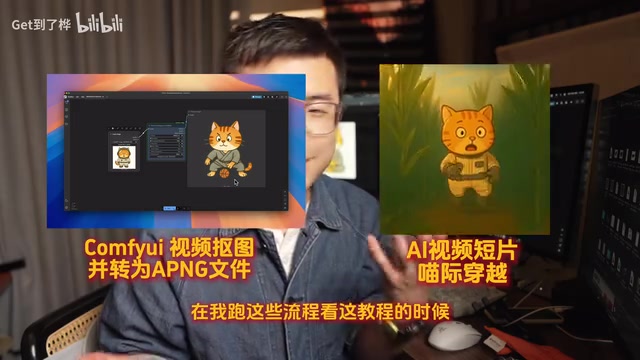
- Using ComfyUI to convert AI-generated animated videos into APNG files with transparent layers
- Creating a creative short film called "Interstellar Cat"
ComfyUI Video Matting Workflow in Detail
ComfyUI: A Node-Based AI Processing Pipeline
ComfyUI is an open-source, node-based AI image/video generation interface released by developer comfyanonymous in early 2023. Unlike linear operation interfaces such as WebUI, ComfyUI uses a Directed Acyclic Graph (DAG) architecture, allowing users to build processing pipelines by connecting different functional nodes. This design provides exceptional extensibility — community developers can publish Custom Nodes covering everything from image generation and video processing to model fine-tuning. The Video Helper Suite and Image Compressor used in this article are examples of such community extension nodes. It's precisely this open ecosystem that makes ComfyUI the go-to platform for complex AI workflows.
Pain Points of Third-Party Background Removal Websites
The conventional approach is to first generate a video in Midjourney, then use a third-party website for background removal, and finally produce an animation file with a transparent background. However, this approach has obvious problems — poor edge processing quality, with significant blurring artifacts and excess lines that affect the final display quality in apps.
The RMBG model in ComfyUI provides a superior solution, delivering not only higher-quality matting but also a fully automated batch processing pipeline.
Core Nodes and Workflow Setup
The key components of the entire ComfyUI video matting workflow include:
1. Video Helper Suite Plugin
This serves as the entry point for the entire pipeline. This plugin allows you to directly import video files, and the system automatically splits the video into an image sequence. Note that you need to manually set the correct height and width parameters during import, as the plugin may have issues automatically reading the video resolution.

2. RMBG Background Removal Model
RMBG (Remove Background) is a dedicated background removal model developed by BRIA AI, trained on the IS-Net architecture, and excels at fine edge processing (such as hair and semi-transparent objects). Unlike traditional matting algorithms based on color differences, RMBG uses deep learning semantic segmentation technology to understand the relationship between subjects and backgrounds in images, maintaining high accuracy even in scenes with complex textures or similar color tones. In video matting scenarios, while frame-by-frame independent processing doesn't account for inter-frame temporal consistency, it's practical enough for animation assets with static backgrounds. Its core advantages include:
- Automatically removing the background from every frame of the video
- Automatically combining the matting results into a sequence collection
- Edge processing quality far superior to third-party online tools
3. Image Compressor Node
This is an easily overlooked but critically important step. Without compression, the generated APNG files will be very large and unsuitable for mobile use.
About the APNG format itself: APNG (Animated Portable Network Graphics) is an animated extension of the PNG format, proposed by Mozilla in 2008. Compared to GIF, APNG supports 24-bit true color and a full Alpha transparency channel, enabling more refined color transitions and semi-transparent effects. Compared to WebP, APNG has better compatibility in the iOS ecosystem without requiring additional decoding libraries. APNG's main drawback is its larger file size — since each frame is stored as a lossless PNG, uncompressed high-resolution animation files can easily exceed 100MB. This is the core reason for introducing the compression node.
APNG File Compression: Real-World Results
Some testing was done on compression settings, revealing the following patterns:
| Parameter | Setting | Effect |
|---|---|---|
| Image Size | 1024→512 (50%) | Significant size reduction |
| Quality Parameter | Maxed out | Minimal change |
| Compression Level | Maxed out | Minimal change |
Final compression result: From 160MB down to just over 30MB, a compression ratio of nearly 80%.
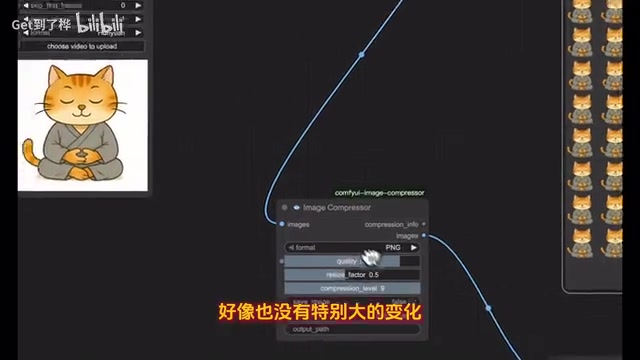
Key finding: What truly makes a difference is the size reduction (from 1024 to 512), while adjustments to quality parameters and compression levels have limited impact on the final file size. This phenomenon has a clear theoretical basis in image compression: image file size has a quadratic relationship with pixel count. Reducing resolution from 1024 to 512 decreases the total pixel count by 75% (from approximately 1 million to approximately 260,000), which directly determines the upper limit of data that needs to be encoded. The quality/compression level parameters in PNG essentially control the compression strength of the zlib compression algorithm. For highly randomized image data (such as complex textures), the marginal benefit of further compression is extremely low. Considering these animations are ultimately displayed at smaller sizes on mobile phones, 512px resolution is virtually indistinguishable from 1024px visually, making size reduction the most efficient method for optimizing file size.
The Complete Pipeline: From AI Video Generation to Mobile App
The value of this workflow lies in establishing a complete pipeline from AI video generation to mobile application:
- Midjourney generates animation → Obtain raw video assets
- ComfyUI matting + compression → Generate lightweight transparent APNGs
- App integration → Display animated stickers/characters in mobile apps
For indie developers or small teams, this means you can batch-produce high-quality transparent animation assets without needing a professional animator. The entire process is highly automated — once the workflow is set up, you only need to swap out the input video for subsequent runs.
Conclusion: The Value of Combining AI Tool Chains
This "Tuesday AI Hackathon" session demonstrated a very practical AI workflow optimization case. There are two core takeaways:
First, combining AI tool chains is more valuable than using any single tool. Midjourney handles creative generation, ComfyUI handles post-processing — each plays its role to form a complete production pipeline.
Second, regularly setting aside time for exploration is key to discovering new possibilities. Without deliberately scheduling this hackathon day, many tools and workflow optimizations might never be tried. In an era of rapidly iterating AI capabilities, maintaining a habit of exploration is more important than any single skill.
Related articles
 Tutorials
ChatGPT Plus Subscription Guide: Are GPT-5.5, image-2, and Codex Worth the Upgrade?
A detailed look at ChatGPT Plus features — GPT-5.5, image-2, and Codex — with a Plus vs Pro comparison and a complete step-by-step subscription guide for users outside the US.
 Tutorials
Harness AI Engineering in Practice: Using Claude Code to Master Enterprise-Level E-Commerce Development
Deep dive into Harness AI Engineering: master enterprise e-commerce development with Claude Code using the Rules, Skills, Wiki, and Changes framework.
 Tutorials
Cursor + Codex Dual-IDE Collaboration: A Practical Methodology for Open-Source Project Customization
A complete methodology for open-source project customization based on real-world experience, detailing the Cursor+Codex dual-IDE workflow, seven-stage process, MVP validation, and AI source code reading techniques.