Complete Android Developer Verification in 10 Minutes: A Must-Read for Global App Compliance

Google launches Android Developer Verification: apps distributed outside Play must complete identity and package name verification.
Google is introducing Developer Verification for the Android ecosystem, bringing third-party distribution channels outside the Play Store into a unified identity verification framework. The process can reportedly be completed in ten minutes. Over 99% of apps on Google Play are auto-registered; developers just confirm status in Play Console. Apps distributed entirely outside Play must proactively verify through the new Android Developer Console. The process includes identity verification (individuals submit ID; organizations also verify website and business info), package name and signing key registration, and ownership verification via embedding a code snippet and re-signing the APK. Verified apps maintain seamless installation across the ecosystem; unverified apps may face installation obstacles on third-party channels. This mechanism enhances distribution transparency and curbs malicious package squatting and counterfeit apps.
Google is installing a new security gate for the Android ecosystem—Developer Verification. The official video makes it clear that the entire process can be completed in under ten minutes. For developers who rely on Google Play, this is essentially zero-cost; but if you distribute apps through third-party channels, this new mechanism will directly determine whether users can successfully install your app.
The Core of the Verification Mechanism: Who Needs to Do It, Who's Already Done
The verification system is designed on the logic of "default coverage, exception supplementation." Official data shows that over 99% of apps distributed on Google Play have already been automatically registered. Developers only need to log in to Play Console to confirm their status—no additional action required.
What truly requires proactive handling are apps distributed entirely outside of Google Play. To address this, Google has created the Android Developer Console as an independent verification entry point. This distinction sends a clear signal: compliance costs within the Play ecosystem are minimized, while sideloading and third-party store distribution paths will be brought into the same identity verification framework.
Identity Verification: Two Paths for Individuals and Organizations
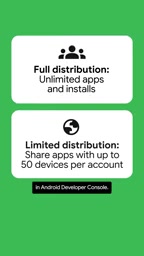
When creating an account in the Android Developer Console, the system offers two options based on distribution needs. Full distribution permissions require submitting a government-issued ID, phone number, and email address to confirm identity. If registering as an organization, additional verification of the website and business registration information is required.
These requirements are consistent with Google Play's existing developer identity policy, but extend it to channels outside of Play. For independent developers, the main cost is preparing identification materials; for small teams or companies, website and business qualification verification may become a new time bottleneck, so it's advisable to prepare in advance.
App Registration: New Package Names vs. Existing Apps
The registration process distinguishes between new apps and apps with existing installs. New apps only require entering the package name and app signing key. For apps with active installs, the system directly displays the current signing key for developer confirmation, avoiding verification failures due to incorrect entry.
The key here is the "signing key"—it serves as both the app's identity fingerprint and the credential that prevents others from fraudulently registering the package name. If your signing key management is disorganized, this step may expose legacy issues, so it's recommended to review your keystore before submitting.
Package name is the globally unique identifier for an Android app, typically formatted as a reverse domain name (e.g., com.example.app), and cannot be changed throughout the app's lifecycle. It determines the app's data storage path on the device, permission ownership, and interaction with other apps. Due to the global uniqueness of package names, malicious developers may squat on package names similar to well-known apps to trick users into installing counterfeit apps. The developer verification mechanism ensures that only the key holder can register the package name by binding the package name to the signing key, thereby curbing package name squatting and counterfeiting. For existing apps, if the signing key is lost or leaked, not only will verification fail, but subsequent updates will also be unable to overwrite the installation, making keystore backup and management a critical operational task in Android development.
Ownership Verification: One Code Snippet + One Signed Upload
To prove that you indeed own the app, the system provides a verification code snippet. Developers need to add it to the app source code, re-sign the APK, and then upload it. This step essentially completes the ownership loop through the exclusivity of the signing key: only those who can sign the correct APK have control over that package name.
After submission, the status will show as "in review." The process is only complete after receiving an email confirming successful package name registration. Google recommends that developers with multiple apps use the automation API to simplify batch processing—especially useful for teams with a large app portfolio.

APK signing is the security cornerstone of the Android platform. Developers use a private key to digitally sign the APK, and the system verifies the signature during installation to ensure the app has not been tampered with and comes from the same developer. Signing keys are divided into debug keys and release keys, with the latter requiring strict confidentiality. During ownership verification, Google requires developers to embed the verification code into the source code, re-sign, and upload the APK; the system confirms the developer's exclusive control over the key by comparing signature fingerprints. This process does not rely on any centralized database but instead uses the mathematical properties of asymmetric encryption to complete identity proof. If developers use Google Play App Signing, they should note the difference between the upload key and the signing key to avoid verification being blocked due to improper key management.
Practical Impact on Developers
The direct benefit after verification is a seamless user experience: registered apps can maintain uninterrupted installation processes across the entire Android ecosystem. Conversely, unverified apps may face installation obstacles when distributed through third-party channels.
From an industry perspective, this mechanism elevates the transparency of "who is distributing what app" to the platform level. For legitimate developers, it adds a ten-minute upfront investment; for malicious package name squatting and counterfeit apps, it raises the bar. We recommend that all teams distributing APKs outside of Play add verification to their release process checklist, rather than waiting for installation anomalies to appear before addressing it.
The official portal provides resources such as verification, deadline inquiries, and automation APIs; developers with multiple apps should prioritize evaluating automation solutions.
One-line Summary
Google launches Android Developer Verification: apps distributed outside Play must complete identity and package name verification.
Paragraph Summary
Google is introducing a Developer Verification mechanism for the Android ecosystem, aiming to bring third-party distribution channels outside the Play Store into a unified identity verification framework. The official claim is that the process can be completed in ten minutes. Over 99% of apps already listed on Google Play are automatically registered; developers only need to confirm their status in Play Console. Apps distributed entirely outside of Play must proactively verify through the newly created Android Developer Console. The process includes identity verification (individuals submit identification documents; organizations also need to verify website and business information), package name and signing key registration, and ownership verification by embedding a verification code and re-signing the APK. After verification, apps can maintain seamless installation across the entire ecosystem; unverified apps may face installation obstacles on third-party channels. This mechanism enhances the transparency of app distribution and effectively curbs malicious package name squatting and counterfeit apps.
Related articles

Controversial US Surveillance Law Section 702 Nears Expiration: Congress Races to Renew
FISA Section 702 surveillance authority is nearing expiration. Congress is urgently pushing reauthorization, possibly attaching it to the NDAA. This article analyzes the controversies, legislative strategy, and future outlook.

iFood Manages 15,000 Repositories with Coding Agents: An Architectural Lesson at 4 Cents per Run
How iFood scaled coding agents to 15,000 repositories with its Remote Agents Platform: REST API-driven, GPT-5.6 Luna selection, structured output acceptance, $0.04 per run, security fixes doubled.

The No-Space Vacuum: The Mystery of Geometric Origins in Quantum Gravity
The "no-space vacuum" in group field theory refers to a state with no geometric quantum excitations—not empty space, but no space. This article explains how this quantum gravity concept yields macroscopic cosmic geometry through condensed matter mechanisms, along with the theory's current status and controversies.