Complete Codex Workflow Configuration Guide: Plugins, Skills, MCP & CLI in Practice

A complete workflow setup and optimization guide for the Codex AI programming tool.
This article systematically covers the complete Codex workflow from installation to efficient usage, highlighting three core objectives of workflow architecture design (improving efficiency, reducing token costs, and helping AI understand projects). It provides detailed explanations of the plugin system, Skills selection strategies, and the token consumption advantages of CLI tools over MCP, offering practical cost control and productivity solutions for power users.
Introduction
Codex has been extremely popular in the AI programming community recently, but many users encounter various issues during installation, configuration, plugin selection, and workflow setup. As a power user who routinely consumes hundreds of millions of tokens on Web Coding, this article systematically covers the complete workflow from Codex installation to efficient usage, helping you get started quickly and boost development productivity.
Background: Codex is OpenAI's large language model series built on the GPT architecture, specifically optimized for code generation scenarios. Its core capabilities stem from pre-training on tens of billions of lines of open-source code. Unlike general-purpose conversational models, Codex has undergone specialized reinforcement for tasks such as code completion, cross-file dependency understanding, and multi-language translation. Most modern AI programming tools (such as GitHub Copilot, Cursor, etc.) derive their underlying capabilities from the Codex model series. Token consumption is the core cost metric when using these tools — the code context, system prompts, and message history fed into each conversation all count toward token usage. Therefore, context management strategies directly impact costs, which is the central design consideration of the workflow presented in this article.
Installation & Basic Configuration
Many people get stuck at the very first step — not knowing how to download and configure the required CLI tools. Codex workflows depend on the coordinated operation of multiple command-line tools, and their installation and environment variable configuration can be challenging for users without a development background.
The core recommendation is: manage all required CLI tools in a unified manner and install them step by step according to their dependency order. The community already offers packaged installation solutions that can set up the basic environment with a single command, avoiding the tedious process of manual configuration one by one.
Core Elements of Workflow Architecture Design
A well-designed Codex workflow architecture needs to fulfill three core objectives:
- Improve development efficiency — Reduce repetitive operations and let AI handle more mechanical work
- Reduce token consumption costs — Minimize unnecessary consumption through proper context management
- Help AI understand the project — Enable AI to accurately grasp project structure, dependency relationships, and the scope of changes
Deep Dive: Context Window & Token Management A large language model's context window refers to the maximum number of tokens the model can process in a single inference call. For the GPT-4 series, the context window typically ranges from 8K to 128K tokens. When a workflow loads too many plugin descriptions, Skills definitions, and MCP service specifications, these contents continuously occupy context space, causing two problems: first, the space available for actual code and conversation gets compressed; second, the cost of each API call increases linearly with the number of input tokens. A sound context management strategy — such as only loading high-frequency Skills and prioritizing CLI tools — is essentially about optimal allocation within a limited window of resources. For heavy users consuming hundreds of millions of tokens daily, this can yield significant cost savings.
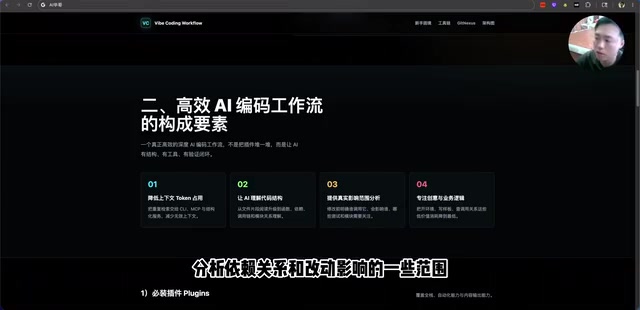
With a well-designed workflow architecture combined with proper plugins and Skills, we can focus more energy on creativity and business logic rather than struggling with code implementation details.
Codex Plugin System Explained
What Are Codex Plugins?
Plugins are essentially collections with built-in complete workflows and commands. A plugin can contain:
- Multiple Skills (skill modules)
- Script files
- MCP services
- CLI tools
This modular design makes feature composition more flexible, allowing users to selectively install based on their needs.
Recommended Popular Plugins
In daily use, several built-in Codex plugins are particularly useful:
- Micro OS (Computer Control): Enables AI to control applications on your computer and execute automated tasks
- Browser Control Plugin: Allows you to open web pages directly within Codex and perform visual editing in a side panel
The browser control plugin has a very typical use case: after AI creates a webpage, you can click the "Annotate" button in the preview window, select the area that needs modification, add comments describing the desired changes, and the AI will automatically complete the modifications based on the annotated region and comment content.

Skills Selection & Configuration Strategy
Skills are finer-grained functional units compared to plugins. It's important to note that many Skills are already built into plugins, so you should avoid conflicts with plugin-embedded Skills during installation. The principle for selecting Skills is: only install those you use frequently, and avoid loading too many to prevent context bloat.
This principle is backed by solid engineering logic: each Skill's definition description gets injected into the context when activated. Even if a particular Skill is completely irrelevant to the current task, its description text still occupies precious token space. Therefore, streamlining your Skills list isn't just a matter of good habits — it's a necessary measure for cost control.
CLI Tool Recommendations & Use Cases
An important distinction between CLI tools and MCP is that CLI tools don't consume much context window space, which is a significant advantage in long conversation scenarios.
Technical Principle: CLI (Command Line Interface) tools are lightweight programs that interact with AI systems through standard input/output. Their core advantage lies in the fact that invocation only requires passing a command string and necessary parameters, and the returned results are structured text — the entire interaction process consumes very few tokens. In contrast, MCP (Model Context Protocol) is a protocol standard that enables deep integration between AI models and external services. It extends functionality by injecting service descriptions, tool definitions, and state information into the context window, meaning every conversation carries this additional descriptive content. In long conversation scenarios, this significantly increases token consumption. This is the fundamental reason why this article recommends prioritizing CLI tools.
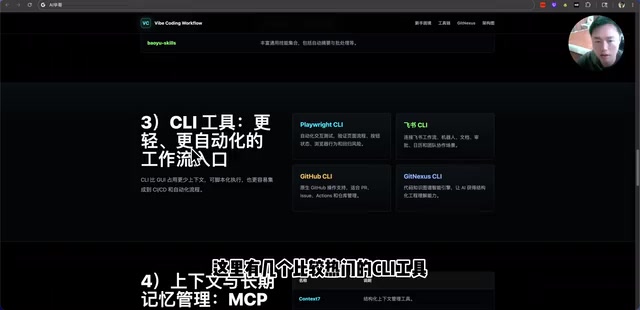
Here are several CLI tools worth noting:
Playwright CLI
This tool enables automated testing and automated task execution. For projects requiring frequent UI testing, it can dramatically reduce the time cost of manual testing.
Deep Dive: Playwright is Microsoft's open-source modern web automation testing framework, supporting three major browser engines: Chromium, Firefox, and WebKit. Its CLI tool allows you to drive browsers directly from the command line to perform operations including page screenshots, form filling, element clicking, and network request interception. In AI programming workflows, the value of Playwright CLI extends beyond testing — it can serve as the AI's "eyes and hands," enabling the model to actually access and manipulate web interfaces, verify the runtime results of generated code, and form a closed loop of "generate-execute-feedback-correct." This capability is especially important for frontend development and full-stack projects, transforming UI verification steps that previously required manual intervention into automated processes.
Related articles
 Tutorials
ChatGPT Plus Subscription Guide: Are GPT-5.5, image-2, and Codex Worth the Upgrade?
A detailed look at ChatGPT Plus features — GPT-5.5, image-2, and Codex — with a Plus vs Pro comparison and a complete step-by-step subscription guide for users outside the US.
 Tutorials
Harness AI Engineering in Practice: Using Claude Code to Master Enterprise-Level E-Commerce Development
Deep dive into Harness AI Engineering: master enterprise e-commerce development with Claude Code using the Rules, Skills, Wiki, and Changes framework.
 Tutorials
Cursor + Codex Dual-IDE Collaboration: A Practical Methodology for Open-Source Project Customization
A complete methodology for open-source project customization based on real-world experience, detailing the Cursor+Codex dual-IDE workflow, seven-stage process, MVP validation, and AI source code reading techniques.