Complete Guide: Connecting Claude Code to DeepSeek — Local Setup + VS Code Integration

Install Claude Code locally, integrate it with VS Code, and power it with the cost-effective DeepSeek API.
This guide shows how to install Claude Code on Windows, integrate it into VS Code, and swap its underlying model for China's DeepSeek via OpenAI-compatible API. It covers Node.js setup, npm mirror configuration, editing settings.json, and getting a DeepSeek API Key—giving developers a low-cost, VPN-free AI coding experience.
Why Give Claude Code a New "Brain"?
Claude Code is a command-line AI programming tool released by Anthropic in 2025. Unlike editor plugins such as GitHub Copilot, it is built around an "agentic" workflow—it can proactively read project files, execute terminal commands, understand multi-file context, and complete more complex, multi-step programming tasks. Thanks to its outstanding code comprehension and generation capabilities, it has won favor among developers.
This "agentic" workflow represents a paradigm shift in AI programming tools. Traditional code-completion tools are essentially "single-turn response" oriented—each interaction is independent, the tool retains no project context, and it takes no proactive action. Agentic tools, by contrast, possess a closed "perceive-plan-act" loop: they can read the directory structure of an entire code repository, understand the dependencies among multiple files, autonomously decide which files need to be examined, run test commands and adjust their strategy based on the output, and ultimately complete complex refactoring tasks spanning multiple files.
This capability is underpinned by the maturity of two key technologies. The first is the ever-expanding context window of large language models—the maximum amount of text the model can "see" at once. Early models like GPT-3 had a context window of only 4K tokens, whereas Claude 3.5 Sonnet has expanded to 200K tokens, equivalent to processing roughly 150,000 Chinese characters or thousands of lines of code at once. Only when a model can simultaneously "remember" the key structure of an entire code repository can it truly understand cross-file dependencies and call chains. The second is the Tool Use / Function Calling capability—first standardized by OpenAI in 2023—which allows a model to declare "I need to call a certain tool" while generating a response; an external system executes it and returns the result to the model, forming a closed loop. The combination of these two capabilities has evolved AI from a mere "text generator" into a "digital assistant" that can actually operate software environments. The model no longer merely "generates text"—it can genuinely "operate the environment."
However, Claude Code is bound by default to Anthropic's official Claude models, which pose access barriers and cost concerns for users in China.
Based on a hands-on demonstration by a Bilibili content creator, this article explains how to install Claude Code locally, integrate it into VS Code, and swap the underlying model for China's homegrown DeepSeekAd. This way, you can enjoy Claude Code's excellent engineering-oriented interaction experience while writing code with the more cost-effective and reliably accessible DeepSeek model.
About This Approach: This is a "workaround" combination—Claude Code provides the interface and workflow, while DeepSeek provides the actual reasoning power. Although its code-generation quality doesn't match top-tier solutions like Codex, the creator's hands-on testing confirms that "it's more than enough for regular coding tasks."
Step 1: Install the Node.js Runtime Environment
Claude Code is distributed through the Node.js ecosystem. Node.js is a JavaScript runtime built on Chrome's V8 engine, allowing JavaScript to run outside the browser. Its bundled npm (Node Package Manager) is the world's largest open-source package manager, and it's precisely through npm that Claude Code is installed globally onto your local system. So the first step is to install Node.js.
Download and Installation
Go to the Node.js official website (nodejs.org), click Download, and select the Windows version. It's recommended to get the installer directly from the official site rather than from dubious third-party channels.
The installation process is essentially a matter of clicking "Next" repeatedly. If your C drive is low on space, you can change the installation path to another disk in the wizard. Keep the optional components at their defaults.
Verify the Installation
Once installation is complete, open a Terminal to verify the environment.
Tip: Windows sometimes can't find the terminal. You can first install "Windows Terminal" from the Microsoft Store—it's a more full-featured upgrade over the old CMD and is friendlier for subsequent AI tool operations. It's recommended to run it as Administrator for full permissions.
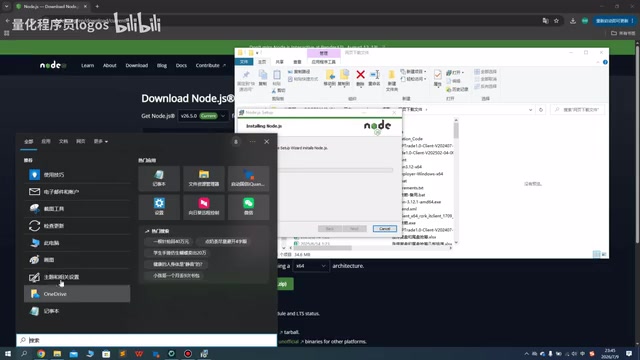
In the terminal, run the version-query commands in sequence to confirm that both Node.js and npm return version numbers correctly—this indicates the environment is ready.
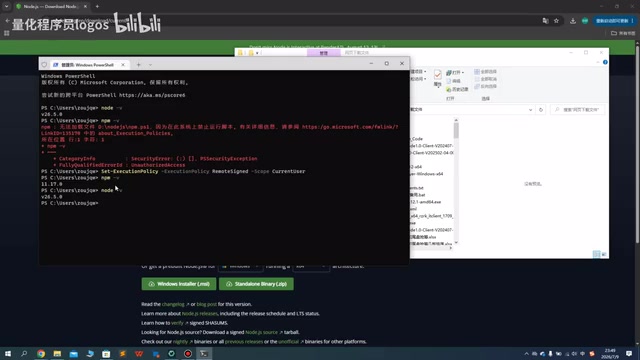
Step 2: Install Claude Code
Use a Domestic Mirror to Speed Up Downloads
By default, npm pulls packages from overseas servers (registry.npmjs.org), which can be slow or even time out for users in China. Configuring a domestic mirror (such as the Taobao mirror npmmirror.com) essentially redirects download requests to domestic CDN nodes, dramatically improving download speed. First run a command to configure the domestic mirror, then execute the Claude Code installation command. Notably, the entire installation process requires no VPN—through the Node.js mirror, domestic networks can pull the installation packages normally.
Note: If the direct installation fails, then consider using a proxy tool. For specific commands, refer to the notes the creator posted in the video's comment section.
Verify the Claude Code Installation
Once installed, type claude --version in the terminal to check the version number, then run the claude command directly. When the Welcome screen appears, it means Claude Code is running successfully on your machine.
At this point, you can interact with Claude Code directly in the terminal, but the pure command-line experience isn't very intuitive—the next step is to integrate it into VS Code.
Step 3: Configure DeepSeek Integration in VS Code
Install the Claude Code Plugin
Open the VS Code extension marketplace, search for "Claude Code", find the officially published "Claude Code for VS Code" plugin, install it, and wait patiently for the installation to complete.
The Core Step: Edit the Config File to Connect to the DeepSeek API
This is the crucial part of the entire process, and its technical principle lies in "protocol compatibility": Claude Code's underlying implementation follows the OpenAI-compatible REST API protocol format, and DeepSeek implements the same interface specification.
This design has a deep industry backdrop. Around 2023, OpenAI's Chat Completions API format (centered on the /v1/chat/completions endpoint, passing conversation history via a messages array) gradually became the de facto standard protocol for large language model services. This kind of standard diffusion is not uncommon in technology history—HTTP unified the web communication layer, POSIX unified Unix-like system interfaces, and the OpenAI API format is now unifying the invocation layer for LLM services. Dozens of model providers and inference platforms—DeepSeek, Mistral, Together AI, Groq, and more—have implemented the same interface specification, forming a vast compatible ecosystem. The value of this "protocol-layer compatibility" is that upper-layer applications only need to develop one set of request logic to seamlessly switch to any model service that implements the same interface. Therefore, you only need to replace the API Endpoint in the config file—from Anthropic's official address to DeepSeek's API address—and all of Claude Code's requests will be transparently forwarded to the DeepSeek model for processing, without modifying any workflow logic.
DeepSeek's technical background is worth mentioning. DeepSeek is a series of large language models released by DeepSeek AI, whose flagship model DeepSeek-V3 achieves performance comparable to the GPT-4 level on numerous programming benchmarks, while offering API access at pricing far lower than competitors of the same tier. DeepSeek uses the MoE (Mixture of Experts) architecture—the model contains a large number of "expert sub-networks," and each inference activates only a small fraction of them, substantially reducing computational cost while maintaining high-quality output. This is the key technical reason it can achieve low-cost commercialization.
By default, Claude Code calls the official model; we need to edit the config file to forward requests to DeepSeek.

Steps:
- Enter Claude Code's configuration directory on the C drive;
- Create a new settings.json file (be careful not to misspell the filename);
- Paste the preset JSON configuration content, which includes fields for DeepSeek's API address and key;
- Save the file.
Get Your DeepSeek API Key
An API Key is a string credential used by service providers for authentication and access control. Every time you call the API, the key is included in the request, and the platform uses it to track usage and bill you. The steps to obtain one are:
- Log in to the DeepSeek open platform (platform.deepseek.com);
- Go to the API Keys page and click "Create API Key";
- Copy the generated key and paste it into the corresponding field in settings.json;
- Save the file.
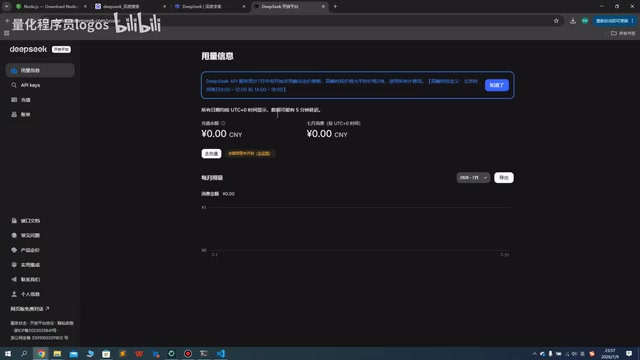
About Costs: The DeepSeek API is billed by token. A token is the smallest processing unit into which the model's tokenizer splits text—it is not simply equal to the "character count." In English, one token roughly corresponds to 4 characters, while each Chinese character typically corresponds to 1.5 to 2 tokens. In real programming scenarios, each interaction includes not only your question but also the code file content the model reads (input tokens) and the generated reply (output tokens); large project files can consume tens of thousands of tokens in a single pass. Even so, DeepSeek's pricing is an order of magnitude lower than GPT-4o or Claude 3.5 Sonnet, with input prices around 5%–10% of comparable overseas models. You'll need to top up your balance in advance, but the overall cost is quite affordable, and daily usage costs are far lower than those of overseas models.
Step 4: Verify the Integration
After saving the configuration, reopen the Claude Code plugin in VS Code, and it will automatically read the new config. You can verify it directly by asking "What model are you?"—in the creator's testing, the plugin replied that it was running the DeepSeek model, confirming a successful integration.
From then on, usage is identical to standard Claude Code: open a project folder with it, and you can write, modify, and ask questions about code in VS Code powered by DeepSeek.
Summary: Who Is This Combination For?
The core value of this approach lies in "decoupling"—separating an excellent tool interface from a flexible model backend. This "frontend interface + swappable backend" architectural pattern is becoming increasingly common in the AI tool ecosystem. In essence, it is a practical application of software engineering's "Dependency Inversion Principle" in the AI era—upper-layer applications should not depend directly on a specific model implementation, but on an abstract interface specification, with specific models injected as swappable "plugins."
As high-quality open-source models proliferate and the pricing of various closed-source models diverges, the cost and risk of "binding to a single model provider" grows ever higher, while "decoupling the tool layer from the model layer" gives developers the flexibility to choose on demand. This trend has fostered the flourishing of the following model-proxy middleware:
- LiteLLM: Provides a unified SDK as a Python library, supporting over 100 model providers, with built-in retry, load balancing, and cost tracking, meeting the need for "multi-cloud flexibility";
- OpenRouter: Appears as a SaaS middle layer where users can access dozens of aggregated models through a single API Key, with the system automatically handling routing and billing, meeting the need for "zero-deployment convenience";
- Ollama: Through containerized packaging, reduces the deployment difficulty of open-source models like Llama and Mistral to a "one-line command" level, letting developers use AI capabilities fully offline with data never leaving their machine, meeting the need for "data sovereignty."
In the future, supporting multiple model backends will likely become a standard feature of professional AI programming tools, rather than an advanced setting.
For developers in China, this combination brings three practical advantages:
- Lower cost: The DeepSeek API is far cheaper than mainstream overseas models;
- More stable access: Neither installation nor invocation requires a VPN;
- Preserved experience: You still enjoy Claude Code's complete engineering-oriented interaction workflow.
Of course, the creator also candidly points out that DeepSeek's code-generation capability "isn't as powerful as Codex"—it's at a "good enough but not top-tier" level. Here, "Codex" broadly refers to current top-tier programming models (such as OpenAI o3, Claude 3.7 Sonnet, etc.), which still hold a clear advantage in complex algorithms and large-scale codebase refactoring. But flagship models like DeepSeek-V3 are already quite practical for common tasks such as everyday CRUD coding, script generation, and bug localization. If you're chasing the ultimate in code-generation quality, there's a trade-off to weigh; but for daily development, learning, and small-to-medium projects, this combination offers outstanding value for money.
⚠️ Security Reminder: An API Key is a personal credential—once leaked, anyone can spend on your account. According to GitHub's official data, tens of thousands of code commits containing keys are detected daily, and attackers using automated tools can launch calls within seconds of a key going public, potentially racking up thousands of dollars in charges within hours. Never hard-code it and commit it to a public code repository (such as GitHub). During local development, it's recommended to store the key in a
.envfile and exclude that file in.gitignore. In team collaboration scenarios, assign separate keys to different members and set usage limits, to enable precise tracing and timely revocation.
Related articles

Resume Guide for Programmers Transitioning to AI: From an HR Perspective to Job Requirement Matching
How should programmers transitioning to AI write a resume? This Bilibili tutorial gives five key preparation actions: set aside two or three days to review skills and projects, choose a simple template, reverse-engineer the tech stack from job sites, emphasize LLM capabilities, and do a final check from an HR perspective.

Building a RAG Knowledge Base: A Complete Guide from Architecture to Retrieval Evaluation
A systematic overview of the full RAG knowledge base workflow: from overall architecture and mature retrieval solutions to key details of retrieval evaluation and who should learn it, helping developers build a path from beginner to hands-on practice.

Turn Screenshots into Web Code in Seconds: Anyone Can Write HTML with AI
A Bilibili creator demonstrates using AI to turn webpage screenshots directly into HTML and CSS code without manual coding. The article analyzes the tool's usage, new features like video-based app cloning, iterative refinement, and the real boundaries of AI giving zero-foundation users programming ability.