Complete Guide: Offline Installation of Claude Code on Ubuntu with DeepSeek V4 Integration

Offline install Claude Code on Ubuntu and connect to free DeepSeek V4 via CC Switch — no VPN needed.
This guide explains how to install Claude Code offline on Ubuntu in a restricted network environment. The core steps include: offline Node.js installation with environment variable configuration, installing Claude Code via npm, and using the CC Switch tool to redirect API requests to SiliconFlow's DeepSeek V4 model — enabling zero-cost AI programming assistance without a VPN.
Introduction
Claude Code is a command-line AI programming assistant developed by Anthropic. Unlike IDE plugins such as GitHub Copilot or Cursor, it uses the terminal as its core interaction interface, capable of directly reading and modifying project files, executing shell commands, and understanding the context of an entire code repository — making it particularly well-suited for server-side development and DevOps scenarios. However, since it requires access to api.anthropic.com under the hood, users in China often encounter download failures during online installation. This article provides a detailed guide on how to install Claude Code offline on Ubuntu and use the CC Switch tool to connect to the free DeepSeekAd V4 model, enabling smooth use of an AI programming assistant without a VPN.
The entire process takes approximately 10 minutes and involves three core steps: offline installation of the Node.js environment, installing Claude Code, and configuring CC Switch to connect to a domestic large language model.
Why Choose Offline Installation for Claude Code?
Online installation of Claude Code requires downloading dependency packages from overseas servers like GitHub. In China's network environment, the following issues frequently occur:
- Extremely slow download speeds: Some dependency packages are hosted on overseas CDNs and are nearly impossible to download without a VPN
- Installation interruptions: Unstable network connections cause the installation to fail midway, requiring repeated retries
- Version inconsistencies: Multiple retries can lead to dependency version conflicts
The core idea behind offline installation is: download all installation packages (Node.js, npm, and Claude Code itself) from official sources in advance, then manually install them sequentially on the target machine. While this approach requires an extra preparation step, it's stable, reliable, and has an extremely high first-attempt success rate.
Step 1: Offline Installation of the Node.js Runtime Environment
Claude Code is distributed as an npm package (@anthropic-ai/claude-code), so it relies on the Node.js ecosystem's module resolution mechanism to run. Node.js is a JavaScript runtime built on Chrome's V8 engine, and npm (Node Package Manager) is its companion package manager — currently the world's largest open-source software registry, hosting over 2 million packages.
For installation, we choose the LTS (Long Term Support) version — this is the stable version officially recommended by Node.js for production environments, typically providing 30 months of security update support. For offline installation, there's no need for NVM (Node Version Manager); directly extracting the precompiled binary package and configuring PATH is the simplest and most reliable approach, requiring no source code compilation whatsoever.
Extract and Configure Node.js Environment Variables
Copy the pre-downloaded Node.js installation package (this article uses the LTS version corresponding to v84.15.0) to the Ubuntu system, extract it to the target directory, and then configure environment variables to make it globally accessible.
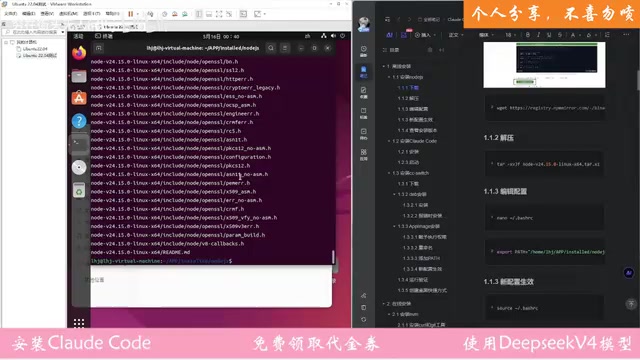
Detailed procedure:
- Extract the installation package to the designated directory
- Edit the
~/.bashrcor~/.profilefile, adding the Node.js bin path to thePATHenvironment variable - Save the configuration file with
Ctrl+O - Execute
source ~/.bashrcto apply the configuration
Note: Environment variable configuration is the critical foundation of the entire process. If PATH does not correctly include the Node.js bin directory, all subsequent steps that depend on
nodeandnpmcommands will fail.
Verify the Node.js Installation
After the configuration takes effect, run the following commands to verify the installation:
node -v
npm -v
If version numbers are displayed correctly, the Node.js environment is ready.
Step 2: Install Claude Code via npm
Once the Node.js environment is prepared, you can install Claude Code. This step requires downloading the Claude Code package from the network via npm. The good news is that this step does not require a VPN — the download speed may just be slightly slow.
npm install -g @anthropic-ai/claude-code
After installation, type claude in the terminal to launch Claude Code.

If the Claude Code interactive interface appears normally, the installation was successful. The interface may display a message about failing to connect to the model — this is expected because Claude Code natively points to Anthropic's official API server, and we haven't yet completed the model backend redirection configuration. We'll resolve this with CC Switch in the next step.
Step 3: Install CC Switch and Connect to DeepSeek V4
CC Switch is a model switching tool that works by modifying Claude Code's environment variables (such as ANTHROPIC_BASE_URL and ANTHROPIC_API_KEY), redirecting API requests originally destined for Anthropic's official servers to third-party compatible interfaces. Since platforms like SiliconFlow provide interface specifications compatible with the Anthropic API format, Claude Code can seamlessly switch model backends without any code modifications. This "API compatibility layer" design has become the mainstream pattern in the AI tool ecosystem, allowing a single client tool to connect to dozens of different model services.
Install the CC Switch Tool
Place the pre-downloaded CC Switch .deb installation package on the system and execute the installation command:
sudo dpkg -i ccswitch_xxx.deb
If dependency errors occur during installation, fix them with the following command:
sudo apt-get install -f
After fixing dependencies, re-run the installation command. Once successfully installed, you can find CC Switch in the application list and open it.
Obtain a SiliconFlow API Key
SiliconFlow is a leading domestic large model inference cloud platform in China, specializing in cost-effective model API services. It supports online inference for mainstream Chinese LLMs including DeepSeek, Qwen, and GLM. The platform offers free token quotas for newly registered users, providing a low-barrier path for domestic developers to access top-tier code models at zero cost. Steps to obtain an API key:
- Visit the SiliconFlow official website and log in with your phone number and verification code
- Complete identity verification on first login
- After verification, the system will grant vouchers for free usage
- Navigate to the API management page and click "Create New Key"
- Copy the generated API Key

Configure DeepSeek V4 Model Integration
Open CC Switch and paste the copied API key into the SiliconFlow configuration field. For model selection, DeepSeek V4 is recommended — this is a Mixture of Experts (MoE) architecture model from DeepSeek, delivering excellent performance in code generation and mathematical reasoning benchmarks. Some of its metrics approach GPT-4o levels, while its inference costs are significantly lower than comparable closed-source models, making it highly suitable as a backend engine for Claude Code.
Key points to note during configuration:
- Some older models may have been retired; detection will show a "model does not exist" error
- You can check currently available models in SiliconFlow's "Model Gallery"
- Copy the full model name of DeepSeek V4 and paste it into the configuration
After completing the configuration, click the "Test" button. If it shows a successful connection, the configuration is complete.

Step 4: Verify Claude Code Functionality
With everything configured, reopen the Claude Code terminal. The interface should now show that it has switched to the DeepSeek V4 model. Select a working directory and start using it — try entering a simple programming question as a test. If the model responds normally, the entire environment has been successfully set up.
Summary and Important Notes
Installation Components Checklist
| Component | Purpose | Installation Method |
|---|---|---|
| Node.js + npm | Runtime environment | Offline installation |
| Claude Code | AI programming assistant | npm online installation (no VPN required) |
| CC Switch | Model switching tool | deb package offline installation |
Common Issues and Notes
- System snapshots: It's recommended to take a snapshot of your Ubuntu system before installation for easy rollback if issues arise
- Model selection: SiliconFlow's models are updated periodically; if a model detection fails, check the Model Gallery to confirm it's still available
- Free quota: SiliconFlow's gifted voucher credits are limited; they're generally sufficient for light daily use, but heavy usage will require a paid plan
- Environment variables: After offline Node.js installation, always confirm that environment variables are correctly configured, otherwise all subsequent steps will fail
With this approach, developers in China can experience Claude Code's AI programming capabilities at zero cost without a VPN, while leveraging domestic large models like DeepSeek V4 for high-quality code generation and analysis services.
Related articles
 Tutorials
ChatGPT Plus Subscription Guide: Are GPT-5.5, image-2, and Codex Worth the Upgrade?
A detailed look at ChatGPT Plus features — GPT-5.5, image-2, and Codex — with a Plus vs Pro comparison and a complete step-by-step subscription guide for users outside the US.
 Tutorials
Harness AI Engineering in Practice: Using Claude Code to Master Enterprise-Level E-Commerce Development
Deep dive into Harness AI Engineering: master enterprise e-commerce development with Claude Code using the Rules, Skills, Wiki, and Changes framework.
 Tutorials
Cursor + Codex Dual-IDE Collaboration: A Practical Methodology for Open-Source Project Customization
A complete methodology for open-source project customization based on real-world experience, detailing the Cursor+Codex dual-IDE workflow, seven-stage process, MVP validation, and AI source code reading techniques.