Complete Guide to Claude Code Hooks: Deterministic Automation Configuration Explained

Claude Code Hooks ensure critical dev operations execute deterministically, not probabilistically.
Claude Code Hooks let you automatically run commands at key lifecycle points with guaranteed execution — unlike prompt-based instructions that AI may occasionally skip. This guide covers all five event types (pre/post tool use, prompt submit, notification, stop), practical setups for auto-formatting and blocking dangerous operations via exit codes, and best practices for sharing Hook configurations across teams via version control.
What Are Hooks? And Why Do You Need Them
Claude Code's Hooks mechanism allows you to automatically run commands at critical points in the code lifecycle. The fundamental difference between Hooks and other configuration methods like claude.md is: Hooks are deterministic — they execute every single time, without exception.
Here's an intuitive example: you can tell Claude in claude.md to run Prettier after every file edit to format the code. Most of the time it will comply, but occasionally it won't — AI isn't 100% reliable, after all. A Hook guarantees this happens every single time, without fail.
There's a deeper technical reason behind this distinction. In the AI coding assistant space, "instruction following rate" has always been a core challenge. Even the most advanced large language models exhibit "instruction forgetting" or "selective ignoring" when processing complex contexts — a phenomenon academically known as "instruction drift." As conversation turns increase and the context window fills with large amounts of code, the model's probability of following earlier instructions gradually decreases. The Hooks mechanism essentially extracts critical operations from the probabilistic LLM reasoning layer and pushes them down to the deterministic system layer for execution — a classic "separation of concerns" design philosophy.
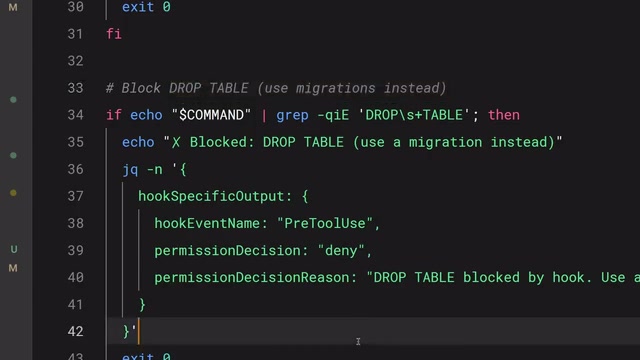
Common use cases include:
- Auto-formatting: Automatically run formatters like Prettier or Ruff after file edits
- Compliance logging: Record all executed commands for security auditing
- Blocking dangerous operations: Intercept high-risk actions like modifying production config files
- Task notifications: Automatically send notifications when Claude completes a task
The Five Hook Event Types
Hooks are configured in the settings.json file. You need to select an event type, optionally set a matcher to specify which tools it applies to, and then provide the command to execute.
Claude Code's configuration system uses a layered architecture. settings.json exists at multiple levels: user-level (~/.claude/settings.json), project-level (.claude/settings.json), and enterprise-level. This layered mechanism borrows from Git's configuration design philosophy — local config overrides global config, while enterprise-level config has the highest priority and cannot be overridden by lower levels. The matcher field in Hooks configuration supports exact matching of Claude Code's built-in tool names, including Write, Edit, MultiEdit, Bash, and others — these tools correspond to the different ways Claude interacts with the file system and terminal.
Claude Code provides the following five event hooks:
| Event Type | Trigger Timing |
|---|---|
user_prompt_submit | When the user submits a prompt, before Claude processes it |
pre_tool_use | Before a tool call is executed |
post_tool_use | After a tool call completes |
notification | When Claude sends a notification |
stop | When Claude finishes its response |
Among these, pre_tool_use and post_tool_use are the two most frequently used types in daily development, corresponding to the two core scenarios of operation interception and post-processing, respectively.
In Practice: Auto-Formatting After File Edits
Auto-formatting is the most typical use case for Hooks. The approach is to configure a post_tool_use hook with the matcher set to match the edit or multi_edit tools, so formatting is automatically triggered whenever Claude modifies a file.

The command script calls the appropriate formatting tool based on the file extension:
- TypeScript / JavaScript → Prettier
- Go →
go fmt - Python → Ruff
Each of these formatting tools represents the best practice in its respective language ecosystem. Prettier is the de facto standard formatter in the JavaScript/TypeScript ecosystem, supporting HTML, CSS, JSON, Markdown, and many other file types. Its core philosophy is "opinionated formatting" — reducing configurable options to eliminate style debates within teams. Go's gofmt is a language-level built-in formatting tool, with nearly 100% adoption of a unified style across the Go community — extremely rare among programming languages. Ruff is a rising star in the Python ecosystem, written in Rust, running 10-100x faster than traditional tools like Black and isort, and has rapidly become the preferred formatting and linting tool for Python projects. Integrating these tools into the AI coding workflow through Hooks ensures that AI-generated code always conforms to the project's style guidelines.
Regardless of which language and formatting tool your project uses, you can achieve full automation this way, completely eliminating manual formatting.
In Practice: Blocking Dangerous Operations with pre_tool_use
The pre_tool_use hook can intercept tool calls before they execute, making it the core mechanism for enforcing security policies.
The working principle is straightforward: the Hook script receives the tool name and input parameters (in JSON format) via STDIN, then uses exit codes to determine whether to allow the operation:
- Exit code 0: Allow execution
- Exit code 2: Block execution
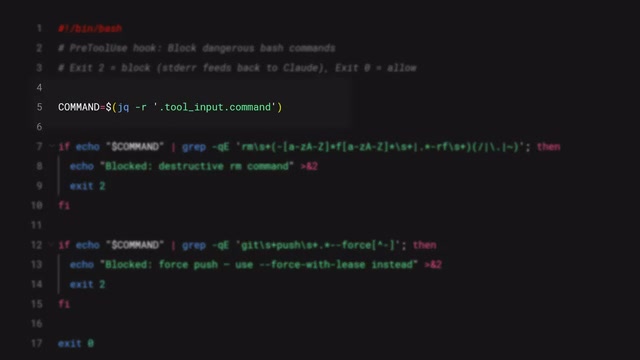
This exit code control mechanism is built on the fundamental conventions of Unix/Linux inter-process communication. In the POSIX standard, a process exit code of 0 indicates success, while non-zero values indicate various error states. Claude Code defines special semantics on top of this: exit code 2 is specifically used to indicate an "active rejection" of an operation. This design allows Hook scripts to be written in any programming language — whether Bash, Python, or Node.js — as long as they follow the exit code convention. Meanwhile, the three standard streams STDIN/STDOUT/STDERR each serve their own purpose: STDIN passes in context data (tool name and parameters in JSON format), STDOUT can be used to pass additional information to Claude, and STDERR provides human-readable error reasons when an operation is blocked. This interface design based on standard streams and exit codes is extremely lightweight, with virtually no integration barrier.
When an operation is blocked, the error message in STDERR is passed back to Claude as feedback, allowing it to understand why it was blocked and automatically adjust its subsequent behavior.
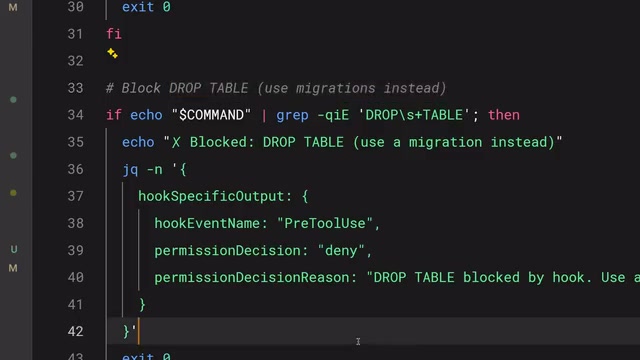
This is how you enforce hard rules — not "suggestions," but "guarantees":
- Block writes to production configuration directories
- Intercept bash commands containing
rm -rf - Prevent direct commits to the main branch
Team Collaboration and Best Practices
Sharing Project-Level Configuration
Hooks configuration is stored in .claude/settings.json as a project-level configuration that can be committed directly to the repository. This means the entire team automatically gets the same Hooks configuration without each person setting it up individually, significantly reducing collaboration overhead.
This approach aligns with the modern DevOps concepts of "Infrastructure as Code" and "Configuration as Code." Similar to configuration files like .eslintrc, .prettierrc, and .editorconfig, .claude/settings.json becomes part of the project's "development environment contract." When new team members clone the repository, all security policies and automation rules take effect immediately — no need to read lengthy onboarding documentation. This pattern is especially important in large teams — it upgrades security rules from "verbal agreements" to "code enforcement," fundamentally eliminating security incidents caused by individual oversight.
Path Reference Tips
Use the $CLAUDE_PROJECT_DIR environment variable in commands to reference script paths within the project. This ensures scripts can be correctly located and executed regardless of Claude's current working directory. This environment variable solves the portability problem of script paths — different developers may clone the project into completely different directory structures, but $CLAUDE_PROJECT_DIR always points to the project root, ensuring that relative path references in Hook scripts work correctly in any environment.
Core Principle
If something needs to happen every single time without exception, don't put it in a prompt — put it in a Hook.
Here's a summary of Hooks usage strategies:
post_tool_use: For post-processing like auto-formatting and operation loggingpre_tool_use: For blocking dangerous operations and enforcing security policies- Commit config to the repo: Submit
.claude/settings.jsonto the repository to ensure consistent team configuration
The Hooks mechanism upgrades Claude Code from an AI assistant that "listens most of the time" to an engineered tool with deterministic guarantees. For team collaboration and production environment security, this determinism is indispensable.
Related articles

Resume Guide for Programmers Transitioning to AI: From an HR Perspective to Job Requirement Matching
How should programmers transitioning to AI write a resume? This Bilibili tutorial gives five key preparation actions: set aside two or three days to review skills and projects, choose a simple template, reverse-engineer the tech stack from job sites, emphasize LLM capabilities, and do a final check from an HR perspective.

Building a RAG Knowledge Base: A Complete Guide from Architecture to Retrieval Evaluation
A systematic overview of the full RAG knowledge base workflow: from overall architecture and mature retrieval solutions to key details of retrieval evaluation and who should learn it, helping developers build a path from beginner to hands-on practice.

Turn Screenshots into Web Code in Seconds: Anyone Can Write HTML with AI
A Bilibili creator demonstrates using AI to turn webpage screenshots directly into HTML and CSS code without manual coding. The article analyzes the tool's usage, new features like video-based app cloning, iterative refinement, and the real boundaries of AI giving zero-foundation users programming ability.