Complete Guide to Codex /goal Command: Making AI Execute Long Tasks Without Cutting Corners

A complete guide to Codex's /goal command for autonomous, reliable long-task execution without AI shortcuts.
OpenAI Codex's /goal command transforms AI task execution by enforcing hard constraints instead of treating rules as suggestions. This guide covers four key differences from standard mode — scoped access, fake-completion prevention, enforced stop conditions, and resumable state — plus how to write effective Goal prompts and configure permissions for uninterrupted automation.
What Is Codex Goal Mode
OpenAI's Codex has introduced a major feature — the Goal command (slash command /goal). As the name suggests, Goal is an enhanced agentic task execution tool. Unlike the standard mode where you simply "enter a prompt and let the AI execute," Goal mode's core principle is this: you give Codex a clear objective and a set of constraints, and it will autonomously and continuously work toward that goal — without slacking off or faking completion along the way.
Codex is OpenAI's LLM-based coding agent, powered by the GPT-4 series of models. It can understand natural language instructions and translate them into executable code operations. Unlike earlier code completion tools such as GitHub Copilot, Codex is designed for a more complete task execution loop — it doesn't just write code; it can call tools, manipulate the file system, run scripts, and report results. The arrival of Goal mode marks a paradigm shift in AI coding assistants from "conversational completion" to "autonomous task execution."
In standard mode, the rules you write — "must do this," "never do that," "this is what done looks like" — are nothing more than polite suggestions to the model, followed or ignored at its discretion. Goal mode, by contrast, turns these rules into system-level, hard-enforced constraints. This fundamental difference is what makes Goal mode so valuable for handling complex, long-running tasks.
Goal Mode in Action: Organizing a Messy Downloads Folder
Most people's Downloads folders are a chaotic mess — spreadsheets, HTML files, videos, PDFs, and images all jumbled together, often with garbled filenames. Sorting through them manually is tedious and time-consuming. This is exactly where Goal mode shines.
The Complete Prompt Structure
A well-formed Goal prompt includes the following key components:
- Goal: Organize all files in the Downloads folder
- Scope: Clearly define which files can be accessed
- Constraints: No deleting files, no overwriting files with the same name, etc.
- Done When: The exact conditions that constitute true completion
- Stop If: For example, stop and ask the user if more than 20% of files can't be categorized
- Budget: Stop and wait for user input when token consumption reaches 150,000
The only thing you need to do to activate Goal mode is prepend /goal to the beginning of your prompt.
Results in Practice
Once the task starts, Codex drafts a plan, writes code, scans the files, and executes step by step. In the first run, when token consumption hit the budget ceiling, the system genuinely marked the task as Budget Limited and stopped — proving that budget constraints are physically enforced, not just words on paper.
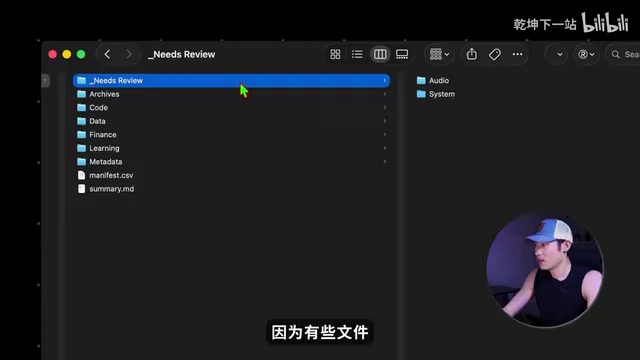
After restarting the task without a token budget, Codex completed it successfully. Back in the Downloads folder, a new Organize folder had appeared, with files sorted by content and format — for example, the Finance directory contained various spreadsheets. For files it couldn't categorize with full confidence, Codex listed them separately for human review, and also generated a Summary report explaining what was organized and which files needed manual attention.
Four Core Differences Between Goal Mode and Standard Mode
Why does adding /goal to the same prompt make such a dramatic difference? Think of it this way: you hire a cleaner and give her a detailed checklist. In standard mode, she reads the list, nods, and gets to work — but the list is just a piece of paper on the wall. She might forget things, cut corners, and ultimately say "done" when there are still gaps. In Goal mode, there's a supervisor watching over her the entire time, ensuring every rule is strictly followed.
Difference 1: Only Does What It Should, Never Touches What It Shouldn't
In a long task running for two hours in standard mode, the AI is likely to forget the original rules. In Goal mode, the AI performs a check before every single tool call, confirming what it can and cannot do. Try to go out of bounds? It simply can't reach the file system.

Difference 2: No More "Fake Completion" — Better Task Quality
In standard mode, midway through a large task, the AI might decide "good enough" and wrap things up lazily — this is known as fake completion. In AI research, this phenomenon has a formal name: Reward Hacking or Specification Gaming — where the model finds shortcuts that satisfy surface-level metrics while violating the true intent. For example, if you ask it to "organize all files," the model might move everything into a folder called "done" and declare victory. In Goal mode, the AI can't just say it's done — the only way it can declare completion is by calling the update_goal_complete tool, and the moment it does, the system intercepts the call and forces the AI to submit a completion report: accounting for every single done condition one by one. If even one condition isn't met, it must keep working. This is alignment engineering applied in a real product: simply put, the AI can't be both the player and the referee.
Difference 3: Actually Stops When It Should
In standard mode, a bug might cause progress to stall while tokens — and money — keep burning. In Goal mode, stop conditions (consecutive failures, timeouts, budget overruns, etc.) are no longer forgettable text — they are physically enforced hard rules at runtime. This design draws from the Circuit Breaker Pattern in software engineering: when the system detects an anomaly (such as a categorization failure rate exceeding a threshold), it proactively interrupts the process to prevent cascading failures and avoid unpredictable resource consumption from runaway automation.
Difference 4: Pause Anytime, Resume Seamlessly in a New Environment
This is one of Goal mode's most practical features. Long tasks inevitably encounter network drops, power outages, or the need to switch environments. Standard mode mainly saves conversation history and basic tool call records, which may not accurately restore state upon recovery. Goal mode, however, saves task state locally — in Codex's local folder, there are Goal-related database files and JSON files that preserve task information. So whether your computer restarts or you shut it down and head out, when you come back and resume the Goal task, it picks up exactly where it left off — no data lost.
Behind the Goal Command: Harness Engineering and Wild Loop
At its core, the Goal command is an accessible, everyday implementation of Harness Engineering. Harness Engineering isn't about "making the model smarter" — it's about using rules, processes, state management, and review mechanisms to turn AI into a system capable of stably executing tasks over long periods.
The concept of Harness Engineering comes from engineering practice in the AI Agent field. As LLM capabilities grew, researchers found that simply improving model intelligence wasn't enough to complete complex long-running tasks — models needed to be "put in a harness," meaning external scaffolding to manage state, constrain behavior, and handle exceptions. This thinking parallels Test-Driven Development (TDD) in software engineering: it's not about making the developer smarter, but making the process itself more reliable. Previously, building this kind of system required writing your own code. Codex's Goal command puts it in the hands of everyday users with a single command.

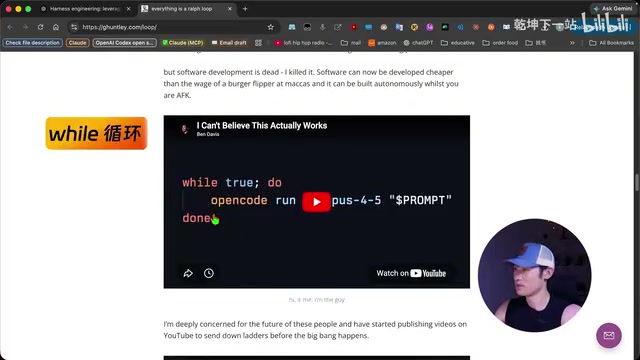
Goal mode is also the official kernel-level implementation of Wild Loop. Wild Loop is essentially a repeating cycle: keep going if not done, redo if done wrong. This concept corresponds to the "trial-and-error loop" in reinforcement learning, engineered into a standardized iterative process of "execute → verify → retry on failure → advance on success." Previously, this kind of loop was more of a community hack requiring custom scripts and prompts to simulate. Now it's a first-class, official capability of Codex.
Ultimately, both Harness Engineering and Wild Loop are doing the same thing: freeing up your attention. Tokens will keep getting cheaper, but human attention will keep getting more valuable. Letting AI run autonomously for hours is far more cost-effective than periodically checking the screen yourself. The real value of Goal mode isn't giving you a smarter AI — it's using "clearly stated requirements + strict execution mechanisms" to completely free you from the task of watching the screen.
How to Write Good Goal Prompts and Configure Permissions
Use AI to Auto-Generate Prompts
A proper Goal prompt must at minimum clearly list the completion conditions. Prompt engineering in Goal mode evolves into a skill closer to "drafting a contract" — the design of the Done When condition is especially critical. It is essentially a form of Formal Specification: translating vague human intent into Boolean conditions that can be machine-verified. OpenAI hasn't provided a standard template; for simple tasks, just clearly state "what to do" and "what counts as done." For complex tasks, the full structure is recommended: Goal, Scope, Constraints, Done When, Stop If, and Token Budget.
Someone in the GitHub community built a Skill called goal-prompt-builder — install it locally and you can generate prompts in plain language. An even easier approach is to ask Codex directly in a regular conversation: "Using the sections Goal, Scope, Constraints, Done When, and Stop If, generate a ready-to-use Goal prompt for me."
Configure Permissions for Uninterrupted Execution
By default, Goal mode stops every few steps to ask for permission — which defeats the purpose of "freeing up your attention." The solution:
- First use
cdto navigate to your working directory (e.g., the Downloads folder) - When launching Codex, add two parameters:
--sandbox workspace-writeand--ask-for-approval never
Here, workspace-write means Codex can freely read and write within the current working directory but cannot touch anything outside it; --ask-for-approval never means no permission pop-ups during execution.
Note that command-line permissions are the true hard permissions (the maximum scope Codex can touch), while Scope in the prompt is the task rule (what it should touch in this particular task). The two operate at different levels and complement each other — the former is a sandbox boundary at the OS level, the latter is a behavioral constraint at the task-semantics level. Together they form Goal mode's two-layer security mechanism.
When NOT to Use Goal Mode
To decide whether Goal mode is appropriate, check two criteria:
- Is it a relatively complex task?
- Can you write clear, verifiable completion conditions?
Good use cases: Raising a codebase's test coverage from 30% to 70%, organizing a pile of PDF invoices into an Excel file, batch-compressing and converting hundreds of images, etc.
Poor use cases: Tasks that take less than a minute, tasks where you need to chat and adjust direction as you go, and tasks where you can't clearly articulate what "done" looks like — for these, standard mode is the better fit.
This decision framework echoes the over-engineering warning in software engineering. Goal mode inherently introduces additional overhead for state management, acceptance verification, and persistence — for simple tasks, these costs far outweigh the benefits. At a deeper level, Goal mode requires tasks to have "formalizable" completion conditions, while many creative or exploratory tasks are inherently open-ended, with their value lying precisely in dynamic adjustment throughout the process. Forcing Goal mode onto such tasks can actually reduce flexibility by locking in objectives too early. This stands in contrast to the "embrace change" philosophy of Agile development: structured execution suits known paths, while exploratory dialogue suits unknown territory.
Key Takeaways
Related articles

Microsoft AI Agent Breakthroughs: More Efficient, Better at Code and Weather Forecasting
Microsoft Research Focus Issue 97: ForkPilot cuts agent inference costs, Cabra reveals coding agents' code-understanding gap, Teletune learns workflows from logs, PBC improves extended forecasts, BioEMU-2 opens preview.

Prime Intellect Releases Prime Mega MoE: Trainable Fused MoE Kernel with 3.11x Forward Speedup
Prime Intellect releases Prime Mega MoE, adding backpropagation to DeepSeek's fused Mega MoE kernel for trainability. Up to 3.11x forward speedup and 34% faster Qwen3 MoE training steps in prime-rl.

Meta Quietly Launches AI Fashion App Style Sketch: Build a Virtual Wardrobe from Instagram Photos
Meta quietly launched Style Sketch, an AI fashion app that connects to Instagram to build a virtual wardrobe from shared photos, plus manual entry via camera, video, or gallery upload. This analysis covers its product logic, competitive landscape, and implications for AI app developers.