Complete Guide to Codex's Four Modes: Comparison with Claude Code and Selection Guide

A comprehensive comparison of Codex's four modes vs. Claude Code with practical selection advice for developers.
This article analyzes OpenAI Codex's four usage modes — CLI, web interface, plugin, and standalone App — and compares them with Claude Code across pricing, stability, and capability focus. Codex excels in frontend/UI work with lower costs and fewer rate limits, while Claude Code leads in logic and backend tasks. The guide recommends mastering all three major tools (Cursor, Claude Code, Codex) for maximum flexibility.
Introduction: AI Coding Tools Enter the Multi-Mode Era
Competition among AI coding tools has reached a fever pitch. Cursor, Claude Code, and Codex form a three-way rivalry, each with its own loyal following. OpenAI's Codex recently launched a standalone App, giving it four distinct usage modes — CLI (terminal), web interface, plugin, and App — making it one of the most versatile AI coding tools available today.
This article draws on hands-on experience and community feedback to break down Codex's core strengths, ideal use cases, and real-world comparisons with Claude Code, helping developers make smarter tool selection decisions.

Codex's Four Modes Explained
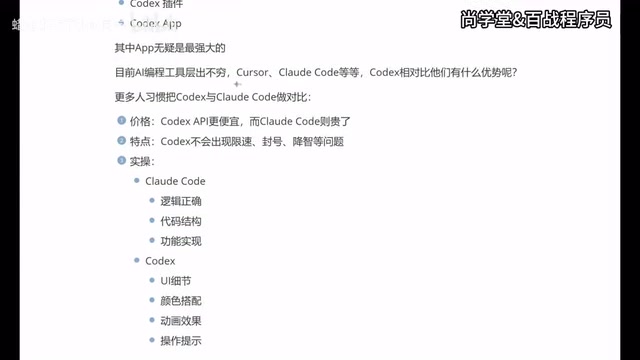
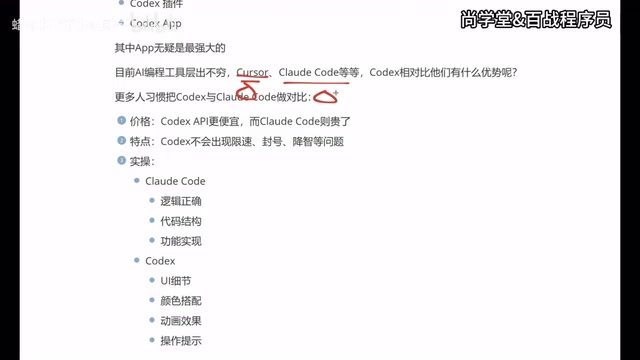
Codex currently offers four usage modes, catering to different developer workflows:
- CLI (Terminal): Command-line interaction for developers who prefer terminal operations, callable directly from project directories
- Web Interface: Browser-based access with no software installation required, ideal for quickly validating ideas
- Plugin: Integrated into IDEs like VS Code — the mode most familiar to early adopters
- App (Standalone Application): The newest standalone application, and currently the officially recommended mode
Among these four modes, the App is considered the most powerful. It features an independent interface while working seamlessly alongside traditional development tools like VS Code, balancing convenience with professional capability. For developers who previously used Codex through the plugin, upgrading to the App mode delivers a more complete experience.
Core Differences: Codex vs. Claude Code
Price and Stability Comparison
In terms of actual usage costs and stability, the two show clear differences:
| Dimension | Codex | Claude Code |
|---|---|---|
| API Price | Relatively cheaper | Relatively more expensive |
| Rate Limiting | Not observed | Frequent |
| Account Ban Risk | Very low | Risk exists |
| Quality Degradation | Barely noticeable | Reported by users |
The rate limiting and account ban issues frequently encountered by Claude Code users are the direct reason many developers switch to Codex. While a few users have reported quality degradation with Codex, this issue is not prominent in most usage scenarios.
Differences in Capability Focus
This is an extremely valuable practical summary:
Claude Code excels at:
- Logical correctness and rigorous reasoning
- Code structure design and architecture planning
- Completeness of feature implementation
- Backend development and algorithm scenarios
Codex excels at:
- UI detail handling and visual fidelity
- Color scheme suggestions
- Animation effect implementation
- Interaction design and operational prompts
- Frontend/App development scenarios
In short, Claude Code is the "logic-first" tool, while Codex is the "experience-first" tool. Backend developers may lean toward Claude Code's rigorous logic, while frontend and App developers often find Codex better aligned with their needs.
AI Coding Tool Selection Recommendations
Master All Three Tools
The current AI coding landscape is dominated by the Cursor, Claude Code, and Codex trio. A key recommendation: master all three tools rather than specializing in just one.
The reasons are practical:
- Different companies may provide accounts for different tools
- Different projects may require different AI tools
- Each tool performs noticeably differently across various scenarios
Migration Path from Cursor to Codex
Many developers follow this usage trajectory:
- Start with Cursor: Feature-rich and easy to pick up, but the monthly fee is high, creating cost pressure over time
- Try Claude Code: Costs drop when connected to domestic models, but the experience suffers, and terminal interaction isn't intuitive enough
- Settle on Codex App: Reasonable pricing, friendly App interface, and the best experience when paired with VS Code
This path is particularly suitable for frontend developers and non-professional programmers. Codex's advantages in visual presentation and interaction details mean that even zero-experience users can quickly build applications with solid visual results.
Who Should Use Codex?
Based on practical experience, the following groups are best suited to adopt Codex as their primary tool:
- Frontend developers: Codex offers more precise control over UI details
- App developers: Animation effects and interaction design are Codex's strong suits
- Designers transitioning to development: Codex produces higher-quality visual output
- Complete beginners learning to code: The App mode lowers the barrier to entry
- Cost-sensitive indie developers: Clear API pricing advantage
However, if your work primarily involves backend development, algorithm implementation, or demands strict logical reasoning, Claude Code may still be the better choice.
Conclusion
There's no absolute right or wrong when choosing AI coding tools — the key is matching your specific use case. With the flexibility of its four modes (especially the App), lower usage costs, and outstanding performance in frontend and UI work, Codex is becoming the go-to choice for an increasing number of developers. But the ideal approach is to be proficient in all three mainstream tools and switch flexibly based on project requirements — that's the tool literacy developers need in the AI era.
Related articles

Tencent WorkBuddy Hands-On: How AI Agents Crush Traditional Chat Assistants
WorkBuddy vs Doubao tested: how AI Agents directly operate computers to convert PPT to PDF, archive files and more. Analysis of WorkBuddy's low barrier, domestic ecosystem, pricing and plugin marketplace, plus AI Agent selection advice.

Azure Cross-Tenant Attack Chain: Root Cause Analysis of Five Paths
Binary Security analyzes five full cross-tenant compromise paths in Azure, trending 271 points on HN. This article interprets their shared root cause perspective and offers defense recommendations for cloud tenant isolation and reflections on responsibility boundaries.

Recreating a Real Bubble Tea Station in Isaac Sim: Script-Driven Unitree G1 Brews Tea
Developers recreated a real self-service tea station in NVIDIA Isaac Sim, using scripts to drive a Unitree G1 through a five-step tea-brewing process, exploring whether physics simulation can be a source of synthetic robot demonstration data and discussing contact stability and imitation learning.