Complete Guide to Creating Ant Civilization Videos with AI: Free Tools for Millions of Views

Complete tutorial on using free AI tools to create viral ant civilization videos for YouTube monetization.
Ant civilization videos are exploding on YouTube, with some channels earning ~$4,000/month. This article details the complete AI production workflow: use free Google AI Studio to analyze competitors and generate storylines, then use the Flow platform to create scene images and animations with sound, and finally edit everything together. The methodology is low-barrier and highly efficient, transferable to other microscopic world niches, though creators must focus on content differentiation and be aware of limited opportunity windows.
Recently, an explosively growing niche has emerged on YouTube — tiny ants building civilizations, waging wars, and surviving like real armies. These ant civilization videos routinely garner millions of views, with some channels earning approximately $4,000 per month. What's even more surprising is that these videos can be made entirely with AI tools, and the core tools are free.
The explosion of ant civilization videos is no accident — they precisely hit multiple key metrics of YouTube's recommendation algorithm. First, high watch-through rates — the visual spectacle of the microscopic world naturally creates an "I can't stop watching" stickiness, and the roughly 3-minute duration sits perfectly in the sweet spot between short-form and mid-form content. Second, high click-through rates — titles and thumbnails about ants building empires and waging wars create a powerful curiosity gap that viewers can hardly resist clicking. YouTube's recommendation system pushes videos with high CTR and high retention to larger traffic pools, creating a positive feedback loop. Additionally, this type of content has universal cross-language, cross-cultural appeal — it doesn't depend on language comprehension to attract global audiences, which massively expands the potential viewer base.
This article breaks down the complete AI video production workflow, covering every step from story conception and image generation to animation creation and final editing.
Using Google AI Studio to Analyze Competitors and Generate Storylines
The starting point of the entire workflow is Google AI Studio. Unlike ChatGPT, it's not only free with unlimited requests, but also has video analysis capabilities — which is the key advantage for creating ant civilization videos.
Google AI Studio is Google's free development and interaction platform based on the Gemini large language model. Compared to other competitors, its biggest differentiating advantage lies in native multimodal understanding — the Gemini model was designed from its architecture inception to support joint processing of text, images, audio, and video, rather than being patched together after the fact. This means when you upload a video, the AI can not only identify objects and scenes in the frame, but also understand camera movement, editing rhythm, narrative structure, and other higher-level information. This capability is particularly critical in content creation because it allows creators to "feed" competitor videos directly to AI for structured analysis, saving massive amounts of time that would otherwise be spent on manual frame-by-frame review.
Competitor Video Analysis Method
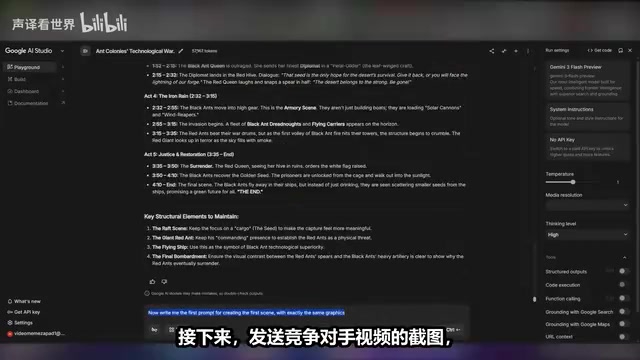
First, copy any competitor's ant civilization video link, paste it into Google AI Studio, and add the prompt: "Watch this video and tell me what it's about, analyze it." The AI will automatically parse the video content and generate a detailed breakdown, helping you quickly understand the narrative structure and pacing of this type of video.
Generating Original Storylines
After completing the analysis, have the AI generate a brand new storyline based on the competitor's style. Here's the key prompt template:
"I need to make a video in the same style but with a different storyline, about 3 minutes long. Write your own story but keep the video structure similar to the example."
The AI will generate a clear step-by-step storyline for your reference. Video duration is entirely up to you — 3 minutes is just a starting point. The core principle is crafting a compelling story — for example, ant civilizations competing against each other, developing and building their own empires. This kind of narrative tension is what makes videos stand out on YouTube.
Generating High-Quality Ant Civilization Scene Images with Flow
With a storyline in hand, the next step is generating visual assets for each scene. The tool used here is Flow, which offers a one-month free trial — more than enough to complete multiple video projects.
Flow is a creative platform that integrates various cutting-edge AI image and video generation models. Its core value lies in packaging open-source models like Stable Diffusion and Flux, as well as various commercial models, into user-friendly interfaces that lower the technical barrier. For creators who don't have programming skills, platforms like this make professional-grade AI generation capabilities accessible.
Prompt Generation and Image Creation
The workflow is very intuitive:
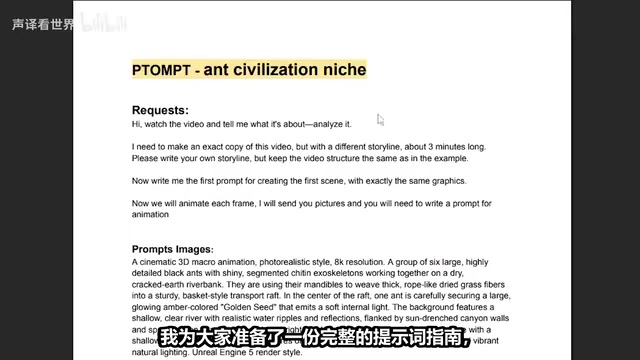
- Send screenshots from competitor videos to Google AI Studio so it understands the visual style you need
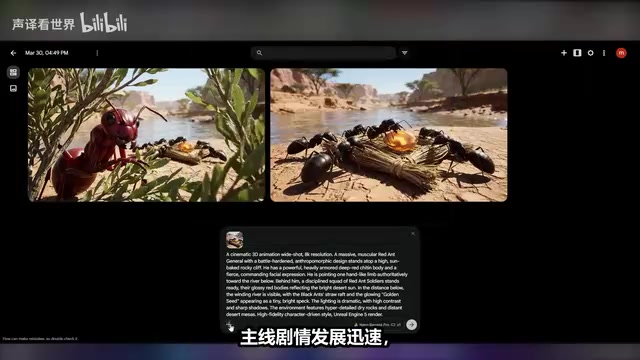
- Ask the AI to write image generation prompts for the first scene: "Write me the first prompt for creating the first scene with the same visual style"
- Copy the generated prompt and go to Flow
In this process, prompt quality directly determines the final output quality. Prompt Engineering has evolved into a systematic technical discipline, with core principles including: specificity (using precise descriptions instead of vague instructions), structure (describing in layers by subject, action, environment, style, lighting, etc.), and iterative optimization (continuously adjusting wording based on outputs). When producing ant civilization videos, a good image prompt needs to simultaneously control the sense of perspective from macro photography, the lighting atmosphere of underground tunnels, the arrangement density of ant colonies, and multiple other dimensions. Using Google AI Studio to auto-generate prompts essentially outsources this specialized skill to AI, but creators still need basic aesthetic judgment to filter and refine results.
Parameter settings in Flow:
- Resolution: 16:9 (matching YouTube's landscape format)
- Generation count: 1 is sufficient
- Model selection: Nano Banana Pro (the most advanced version currently available)
Nano Banana Pro is based on the Diffusion Model architecture — these models generate images by learning the process of gradually restoring random noise into clear images, excelling in detail expressiveness and style consistency. For subjects like ant civilizations that require intricate microscopic scenes, the model's ability to render textures, lighting, and tiny objects directly determines the believability of the visuals.
Paste the prompt, click generate, and within seconds you'll get a high-quality ant civilization scene image.
Iteratively Optimizing Image Quality
After generating the first image, send it back to Google AI Studio, then request prompts for the second scene. Repeat this cycle until all scene images are ready.
A few practical tips to boost efficiency:
- If you're missing a specific scene, just describe your needs to the AI and it will automatically generate the corresponding prompt
- If you're unsatisfied with any image, simply regenerate it with your own detail descriptions added
- You can add extra scenes as needed to make the ant civilization story richer and more complete
Transforming Static Images into Dynamic AI Animations
This is the most critical step in the entire AI video production workflow — bringing static images to life.
Writing Animation Prompts
Upload the first scene image to Google AI Studio and input: "Now we're going to animate frame by frame. I'll send you images and you write prompts for the animation." The AI will generate dedicated animation descriptions for each image, precisely controlling ant movement trajectories and scene changes.
Animation prompts are fundamentally different from static image prompts — they need to additionally describe motion direction, speed, camera push/pull, and other temporal information. For example, a description like "a group of ants slowly marching from the left side of the frame to the right, while the camera slowly pushes down to reveal the depth of the underground tunnel" produces far more precise animation results than simply "ants walking in a tunnel."
Generating Animation Clips in Flow
Return to Flow, select the corresponding scene image, click the three dots and choose "Animate," then configure the following settings:
- Output type: Video
- Aspect ratio: 16:9
- Generation count: 1
- Model: VO 3.1 Fast (cheaper than the Pro version, with nearly identical visual quality)
VO 3.1 represents a cutting-edge application of current Image-to-Video (I2V) technology. Its working principle uses a static image as the starting frame, combines it with motion information described in text prompts, and predicts subsequent frame changes through a temporal diffusion model to generate coherent video clips. The Fast version reduces computational costs through fewer inference steps and optimized sampling strategies, with only minimal quality loss but significant speed and price advantages.
Click generate, wait a few minutes, and you'll get a high-quality ant civilization animation clip.
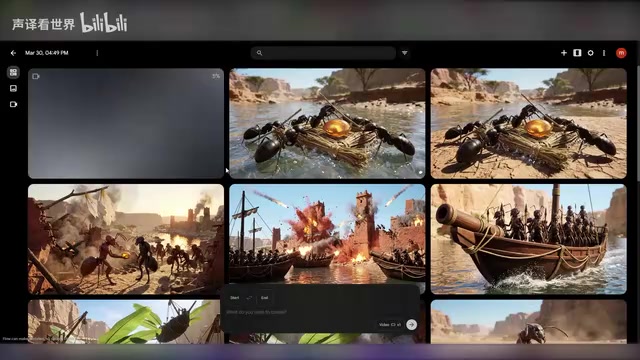
One notable advantage: The VO 3.1 model can already generate videos with sound, meaning you don't even need to add background music or sound effects separately — significantly reducing post-production complexity. This capability relies on joint audio-visual generation technology — the model simultaneously learned the correlation patterns between visual content and corresponding sounds during training, so sounds like the rustling of marching ants, echoes in underground tunnels, and collision sounds in battle scenes can all be automatically matched and generated based on visual content.
Repeat this process for all scenes in chronological story order. If any animation doesn't turn out well, have Google AI Studio rewrite the prompt and generate again.
Editing and Compositing the Final Ant Civilization Video
Once all animation clips are ready, it's time for the final editing and compositing phase.
Video Editing Workflow
You can use any video editing software — Premiere Pro, CapCut, or others all work. Specific steps:
- Create a new project and upload all AI-generated animation clips
- Place them on the timeline in chronological story order
- Trim excess portions — remove unnecessary movements or visual artifacts
- Ensure smooth and natural transitions between animations
Post-Processing Tips
- Removing watermarks: Slightly zoom in on the video frame to cover the watermark area
- Audio processing: VO 3.1 already includes ambient sounds, but if you feel it lacks atmosphere, you can overlay an additional layer of background music
- Export settings: Render at 1080p or 4K best quality to ensure the visuals remain crisp after uploading to YouTube
Monetization Prospects and Practical Advice
The core advantage of this AI video production workflow is low barrier to entry and high efficiency — two tools (Google AI Studio + Flow) can complete everything from concept to finished product. But before diving in, there are a few points that require sober consideration:
Content differentiation determines success or failure. The tools are available to everyone — what truly determines whether a video goes viral is the quality of the storyline. The reason ant civilization as a subject is compelling is that it projects grand narratives (war, empire, rise and fall of civilizations) onto the microscopic world, creating a powerful sense of contrast. You need to invest sufficient effort in story conception rather than simply copying others' formulas.
The window of opportunity for any niche is limited. When an AI video sub-niche gets exposed by numerous tutorials, competition intensifies rapidly. First-mover advantage is important, but the ability to consistently produce high-quality content is even more critical. Looking at YouTube's content ecosystem history, the dividend period for each new content wave typically lasts 6-12 months — early entrants can enjoy algorithmic traffic boosts, but as homogenized content floods in, the platform gradually raises recommendation thresholds, and only truly high-quality channels can maintain sustained exposure.
Be mindful of tool costs. Flow's free trial period is limited, and VO 3.1 Fast, while cheaper than the Pro version, still has costs. When scaling production, you need to calculate ROI in advance. Based on current pricing models, a 3-minute video requires generating approximately 10-15 scene images and a corresponding number of animation clips. Creators should thoroughly test the workflow during the trial period and evaluate whether the marginal cost per video can be covered by YouTube ad revenue.
Once you've mastered this methodology, you can not only create ant civilization videos but also transfer the same workflow to other microscopic world subjects — bee kingdoms, deep-sea creatures, microorganism wars, etc. The key is finding the next unsaturated sub-niche and seizing first-mover advantage with differentiated stories.
Key Takeaways
- Use Google AI Studio (free with unlimited requests) to analyze competitor videos and automatically generate storylines and image/animation prompts
- Use Flow's Nano Banana Pro model to generate high-quality scene images, then use the VO 3.1 Fast model to transform static images into animations with sound
- The entire production workflow forms a closed loop: competitor analysis → storyline generation → image creation → animation production → video editing, completable with just two free tools
- The core appeal of ant civilization videos lies in the contrast between microscopic worlds and grand narratives — storyline quality determines whether a video goes viral
- This methodology is transferable to other microscopic world subjects; the key is finding unsaturated sub-niches and seizing first-mover advantage
Related articles
 Tutorials
ChatGPT Plus Subscription Guide: Are GPT-5.5, image-2, and Codex Worth the Upgrade?
A detailed look at ChatGPT Plus features — GPT-5.5, image-2, and Codex — with a Plus vs Pro comparison and a complete step-by-step subscription guide for users outside the US.
 Tutorials
Harness AI Engineering in Practice: Using Claude Code to Master Enterprise-Level E-Commerce Development
Deep dive into Harness AI Engineering: master enterprise e-commerce development with Claude Code using the Rules, Skills, Wiki, and Changes framework.
 Tutorials
Cursor + Codex Dual-IDE Collaboration: A Practical Methodology for Open-Source Project Customization
A complete methodology for open-source project customization based on real-world experience, detailing the Cursor+Codex dual-IDE workflow, seven-stage process, MVP validation, and AI source code reading techniques.