Complete Guide to OpenCode: Installation, Configuration, and Custom Commands in Practice

A comprehensive guide to installing, configuring, and extending OpenCode, the terminal-based AI programming assistant.
This article provides a complete walkthrough of OpenCode, an open-source terminal AI programming tool. It covers two installation methods (direct and WSL-based), model configuration for multi-provider support, rules files for project conventions, Agent types and their ReAct-based architecture, custom commands for workflow automation, MCP protocol integration for tool extensibility, and Agent SQL capabilities for database operations.
What is OpenCode
OpenCode is a terminal-based AI programming assistant. Unlike the common IDE-embedded AI assistants on the market, OpenCode emphasizes completing intelligent coding tasks within a command-line environment. It's positioned between "AI code completion" and "Agent-driven automated development"—capable of responding to single instructions while also handling relatively complex multi-step tasks through its Agent mechanism.
OpenCode was born against the backdrop of terminal AI tools rapidly gaining prominence. Since 2023, terminal/CLI AI programming tools represented by Aider, Continue, and Claude Code have gradually formed an independent ecosystem, competing with IDE-embedded solutions through differentiation. Behind this trend lies developers' deep need for "composability"—terminal tools naturally follow the Unix philosophy of "do one thing well and combine through pipes," enabling free composition with hundreds of tools like grep, awk, and sed to form highly customized automation pipelines. The Unix philosophy was established by Ken Thompson and Dennis Ritchie at Bell Labs when they created the Unix system in the 1970s. Its core tenet—"Write programs that do one thing and do it well; write programs to work together; write programs to handle text streams"—continues to profoundly influence modern software tool design half a century later. For AI programming tools, this means OpenCode doesn't need to become an all-encompassing closed platform; instead, it can serve as an intelligent node in a pipeline, collaborating with specialized tools like jq, fzf, and tmux, each leveraging their respective strengths. By contrast, IDE-embedded AI assistants, while offering friendlier interactions, are often locked within specific editor ecosystems and difficult to reuse across tools. OpenCode further emphasizes multi-model support and protocol standardization, representing the next-generation design philosophy in this space.
The terminal (command-line) environment has long been the core workspace for professional developers. Compared to IDE-embedded AI assistants like GitHub Copilot and Cursor, terminal AI tools are closer to the daily workflows of DevOps, backend development, and systems engineers, enabling seamless collaboration with Git, Shell scripts, CI/CD pipelines, and other tools without constantly switching between graphical interfaces and the command line. This is a key reason why OpenCode chose the terminal as its primary platform.
For developers accustomed to terminal workflows, this design means they can invoke large model capabilities in their familiar environment without switching to a graphical interface. At the same time, OpenCode's open-source nature gives it a clear advantage in customizability—from model selection to tool extensions, nearly every aspect can be configured as needed.
Two Installation Methods
OpenCode offers two installation paths, corresponding to different use cases.
Direct Desktop Installation
The first method is direct desktop installation, with a very simple process suitable for users who want to get started quickly. This approach has minimal environment dependencies and can be completed in just a few steps, making it the recommended choice for beginners.
WSL-Based Installation (Officially Recommended)
The second method involves first installing WSL (Windows Subsystem for Linux) on a Windows system, setting up a virtual Linux environment through WSL, and then installing OpenCode on top of it.
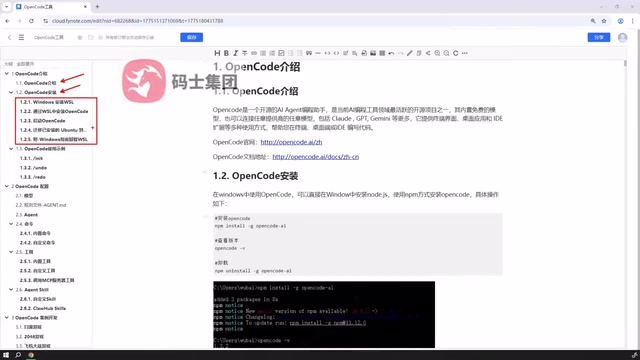
WSL (Windows Subsystem for Linux) is a compatibility layer technology from Microsoft that allows running Linux binaries natively on Windows. Understanding WSL's technical evolution helps explain why the official team recommends this approach: WSL 1 used a system call translation mechanism, converting Linux system calls to Windows NT kernel calls in real-time, with obvious compatibility limitations; WSL 2 was released in 2019 with a fundamental architectural change—it includes a complete Linux kernel (based on a lightweight Hyper-V virtual machine), enabling tools that depend on kernel features like Docker and eBPF to function properly. File system performance and system call compatibility improved dramatically compared to the first generation, and it has since become the mainstream solution for Windows developers running Linux toolchains.
The key difference between WSL 2's lightweight Hyper-V virtual machine and traditional VMs (such as VMware or VirtualBox) lies in startup speed and resource consumption: it completes startup in seconds, allocates memory on demand rather than pre-allocating a fixed quota, making developers barely notice the virtualization layer. This characteristic stems from Microsoft's deep optimization of Hyper-V isolation container technology—each WSL 2 instance is essentially a highly streamlined Linux virtual machine that shares the host machine's CPU scheduler and only dynamically requests memory when needed, fundamentally different from traditional VMs that pre-allocate fixed memory quotas.
For tools like OpenCode that deeply depend on Unix environment features, WSL 2 also resolves common compatibility pain points in native Windows environments, including line endings (CRLF vs LF), file permission bits (chmod), and Shebang script execution, providing a near-native Linux runtime environment. Additionally, WSL 2 supports GPU passthrough (via WDDM 2.9 drivers), making it possible to run local inference models (such as Ollama) in the WSL environment, further expanding OpenCode's usage boundary in local AI deployment scenarios. This feature is particularly important for enterprise developers who want to run open-source large models locally (such as Llama, Mistral, DeepSeek) to protect code privacy—code never needs to leave the local machine to receive AI assistance, fundamentally avoiding compliance risks of uploading sensitive code to third-party APIs.
This is also the officially recommended installation method. Many of OpenCode's capabilities run more stably with better compatibility in Unix-like environments, especially in scenarios involving command execution and tool invocation, where a Linux environment effectively reduces potential compatibility issues. For long-term use or advanced development, the WSL approach is worth the time investment to configure.
Common Commands and Basic Interaction
After completing installation, you can start using OpenCode through a series of commands.
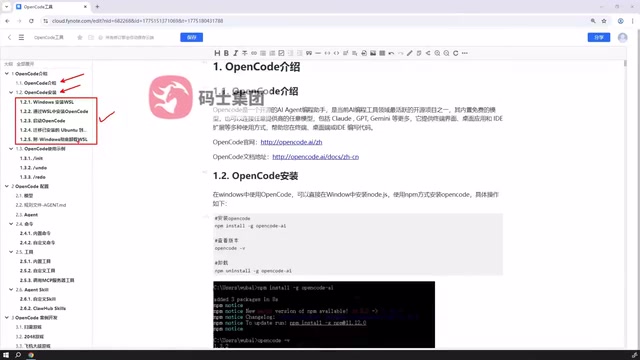
Beginners are advised to start with common commands and become familiar with the tool's basic interaction logic: how to initiate conversations, how to have the AI read or modify code, and how to execute tasks. The goal at this stage is to build intuition for "human-machine collaboration"—understanding what OpenCode can help you with in different scenarios and how to guide it toward expected outputs with clear instructions.
Good prompt engineering skills are especially important at this stage. Prompt engineering isn't mysticism but a systematic methodology with solid foundations: compared to vague natural language descriptions, structured instructions (clearly stating inputs, expected outputs, and constraints) often enable models to produce more precise code, reducing the time cost of multi-round corrections.
Common effective techniques include: using "role-play" prefixes (such as "As an engineer familiar with Python async programming") to activate the model's domain expertise; providing specific input/output examples (Few-shot Prompting) to anchor the expected format—Few-shot Prompting originates from a core finding in the GPT-3 paper, showing that large models can quickly infer task patterns from a small number of examples without fine-tuning, an ability called "In-context Learning"; and for complex tasks, asking the model to "think before outputting" (Chain-of-Thought) to make the reasoning process explicit and reduce logical leap errors—Chain-of-Thought was systematically proposed by the Google Brain team in 2022 in their paper "Chain-of-Thought Prompting Elicits Reasoning in Large Language Models," which demonstrated that this technique significantly improves model accuracy on mathematical reasoning and code generation tasks, with the most pronounced effects on models exceeding 100B parameters. Mastering these fundamental techniques enables a smoother transition into subsequent configuration and extension stages.
Core Configuration Explained
OpenCode's true power is reflected in its rich configuration capabilities, which can be divided into several layers.
Model Configuration
OpenCode supports connecting to different large models. Users can flexibly choose appropriate models based on task requirements, cost budgets, and response speed. This decoupled design prevents the tool from being bound to a single model, providing better adaptability.
There are important engineering considerations behind this design: different large models vary significantly in code generation capability, context window length, inference latency, and API pricing. For example, Claude 3.5 Sonnet excels in code understanding and multi-step reasoning, GPT-4o is more balanced in multilingual mixed scenarios, while models like DeepSeek Coder that are specifically optimized for code offer cost advantages in certain programming tasks. For complex tasks requiring high-precision code generation, you can select larger flagship models; for frequent simple completion tasks, you can switch to faster, lower-cost lightweight models, striking a balance between effectiveness and cost.
Notably, context window length has a particularly critical impact on programming tasks. The context window refers to the maximum number of tokens a model can process in a single inference. A token is the basic unit of text processing for models, roughly corresponding to half an English word or one Chinese character. Early GPT-3 only supported a 4K token context, meaning content exceeding approximately 3,000 English words would be truncated; modern flagship models have expanded this limit to 128K or even 200K tokens (such as the Claude 3.5 series), enabling entire modules or even entire projects' code to be included in a single inference, fundamentally changing AI's ability to handle large codebases. When processing large codebases, models need to simultaneously "see" the contents of multiple files to understand cross-file dependencies—a task that early 4K/8K window models simply couldn't accomplish.
From a cost control perspective, token-based billing means the longer the context and the more frequent the calls, the higher the cost; OpenCode's multi-model routing capability allows developers to set different default models for different task types, for example using lightweight models for code formatting and flagship models for architecture design, thereby significantly reducing overall API costs without sacrificing quality on critical tasks.
Furthermore, with the maturation of local inference frameworks like Ollama and LM Studio, OpenCode's multi-model support extends to fully offline local model scenarios. Developers can route tasks involving trade secrets to locally-running open-source models while routing general tasks to cloud APIs, achieving fine-grained tiered management between data security and model capability. OpenCode's multi-model support design essentially returns "model choice" to developers, avoiding lock-in to any single vendor's pricing strategy.
Rules File Configuration
Rules files define conventions that AI should follow within a project, such as code style, naming conventions, project context, etc. Through rules files, OpenCode's output can be made to better match team or personal development habits, reducing the cost of repeated corrections. This mechanism is akin to providing AI with a "project specification," enabling it to automatically follow established conventions when generating code without needing to repeat background information in every conversation.
From a technical implementation perspective, rules files are essentially a "system prompt persistence" mechanism. Large model behavior heavily depends on instructions in the context, and re-describing project background in every conversation is not only inefficient but also consumes precious context window space. Rules files pre-inject these fixed conventions into the model's working context, effectively establishing project-level "long-term memory" for the AI. This approach is philosophically aligned with OpenAI's "Custom Instructions" and Anthropic's "System Prompt" designs, with the distinction that rules files bind these instructions to the project codebase rather than to a user account—meaning when you switch to another project, the AI automatically switches to that project's normative context rather than carrying over conventions from the previous project.
For team collaboration scenarios, rules files can be incorporated into version control (such as Git), ensuring all members follow consistent code standards when using AI, thereby aligning AI output quality with team engineering standards. Rules file content can be quite rich: beyond code style (such as PEP 8, Google Style Guide) and naming conventions, they can include project tech stack descriptions, prohibited third-party libraries, security compliance requirements (such as prohibiting hardcoded keys), test coverage requirements, and more. Going further, rules files can describe the project's domain knowledge background (such as "This project is a financial trading system; all currency calculations must use the Decimal type rather than floating point"), enabling AI to automatically avoid domain-specific common errors when generating code. In essence, rules files encode a team's engineering culture in a machine-readable format, making AI an automatic enforcer of team standards rather than a potential disruptor.
Agent Types
OpenCode includes multiple types of Agents, each responsible for different duties. Understanding the division of labor among Agent types is key to fully leveraging the tool's automation capabilities.
An AI Agent is an AI system capable of autonomously planning, decomposing tasks, and cyclically executing multi-step operations, distinct from single-turn Q&A conversation modes. Its core is the "ReAct" (Reasoning + Acting) loop: the model first reasons about the current state, then selects a tool to execute an action, observes the result, and continues reasoning until the task is complete. This paradigm was formally proposed by Yao et al. in 2022 in the paper "ReAct: Synergizing Reasoning and Acting in Language Models" and has since been widely adopted by mainstream frameworks like LangChain, AutoGPT, and LlamaIndex, becoming the standard paradigm for building AI automation systems. ReAct's core innovation lies in unifying "Chain-of-Thought" with "Tool Use" within a single reasoning framework: the model no longer just outputs text but can dynamically decide during reasoning when to call external tools, which tools to call, and how to interpret tool results, extending AI's capability boundary from "language understanding" to "world interaction."
In programming scenarios, an Agent's toolset typically includes file reading/writing, Shell command execution, code search (such as ripgrep/AST parsing), and test running, enabling AI to autonomously complete the full "understand—modify—verify" loop in real codebases, dramatically reducing manual intervention. Notably, each "observation" step in the ReAct loop feeds execution results back to the model; this dynamic context update mechanism enables Agents to self-correct from errors rather than relying on one-shot static output. As a typical programming task example: when an Agent runs unit tests and discovers a test case failure, it automatically reads the error stack trace, locates the problematic code, generates a fix patch, and reruns the tests—the entire "red—green—refactor" cycle requires no human intervention.
OpenCode's multi-type Agent design further specializes this capability: different Agents come pre-configured with differentiated toolsets and reasoning strategies for different task types (code generation, code review, documentation writing, database operations, etc.), avoiding the decision confusion that occurs when a "universal Agent" encounters tool overload in specialized scenarios. In practical engineering, Agent reliability also depends on the design of "Guardrails" mechanisms—such as limiting the maximum number of steps per execution, requiring human confirmation before executing destructive operations (like file deletion or database modification), and automatically aborting and reporting when circular errors are detected. This "perceive—plan—execute" cyclical mechanism is the core technological evolution direction for current AI programming tools moving from "assistance" to "autonomy," and is the fundamental distinction between OpenCode and traditional code completion tools.
Custom Commands and Tool Extensions
Beyond configuration, OpenCode's extensibility is equally noteworthy.
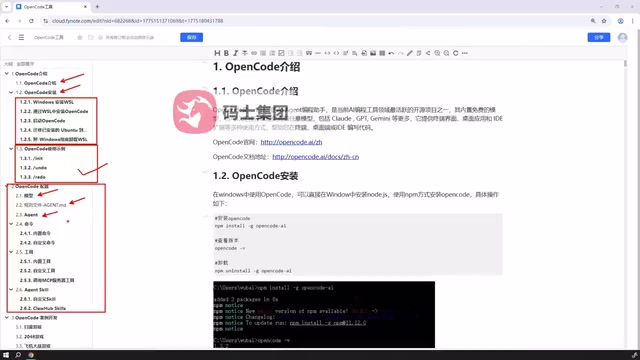
Custom Commands
Users can encapsulate high-frequency operations into reusable custom commands to improve daily development efficiency. This is especially practical for developers with fixed workflows. The essence of custom commands is transforming "human workflows" into "machine-executable instruction sequences"—for example, encapsulating the complete flow of "pull latest code → run tests → generate change summary → submit PR draft" into a single command, letting OpenCode automatically complete each step with AI assistance, achieving true development process automation.
From a software engineering perspective, custom commands embody an extension of the "Don't Repeat Yourself (DRY)" principle to the human-machine collaboration layer: abstracting repetitive AI interaction patterns into reusable commands not only saves time but also ensures consistent handling of similar tasks, avoiding output quality fluctuations caused by manually describing requirements each time. The DRY principle was first systematically articulated by Andrew Hunt and David Thomas in "The Pragmatic Programmer" (1999), with the core idea that "every piece of knowledge must have a single, unambiguous, authoritative representation within a system"—in the context of AI tools, this means solidifying validated optimal prompt patterns into commands rather than having each developer rediscover them in every interaction. Teams can package proven best practices into shared command libraries, distributed to all members through version control, forming organization-level AI usage standards.
Custom Tools and MCP Services
Beyond commands, OpenCode also supports custom tools and can invoke tools published by external MCP (Model Context Protocol) services.
MCP is a protocol standard proposed and open-sourced by Anthropic in late 2024, drawing on the successful experience of LSP (Language Server Protocol)—LSP was introduced by Microsoft alongside VS Code in 2016, and by defining a standard communication protocol between editors and language servers, it completely solved the combinatorial explosion problem of "M editors × N languages = M×N integrations," allowing any editor to access all LSP-supporting language tools by implementing the LSP client just once. MCP aims to play the same role between AI models and external capabilities: it defines standardized tool descriptions (Tool Schema), invocation formats (JSON-RPC), and response structures, aiming to unify the interaction interface between AI models and external tools/data sources.
Architecturally, MCP adopts a client-server model: AI applications (like OpenCode) serve as MCP clients, discovering and invoking tools exposed by various MCP Servers through standardized interfaces; MCP Servers are responsible for encapsulating specific external capabilities (database queries, API calls, file operations, etc.), communicating via the JSON-RPC 2.0 protocol, supporting both local inter-process communication (stdio) and remote HTTP/SSE transport. JSON-RPC 2.0 is a lightweight remote procedure call protocol using JSON as the data format, supporting both synchronous request/response and asynchronous notification modes, with its stateless, language-agnostic characteristics making it an ideal choice for cross-process tool invocation. Currently, mainstream services including GitHub, Slack, PostgreSQL, and Brave Search have published official MCP Servers, with ecosystem expansion accelerating significantly and community-contributed third-party MCP Servers numbering in the hundreds.
From a broader perspective, MCP's emergence marks a critical turning point in the AI tool ecosystem moving from "fragmented silos" to "protocol unification": before MCP, every AI application needed to develop a separate adaptation layer for each external service, resulting in massive duplicated effort; after MCP, tool developers only need to publish an MCP Server once for it to be directly invoked by all MCP-supporting AI applications, dramatically reducing ecosystem building costs. Notably, MCP's Tool Schema uses the JSON Schema standard to describe tool input/output formats, enabling AI models to dynamically discover available tools and understand their invocation methods at runtime without needing to pre-learn them during training—this "tools as data" design philosophy represents a fundamental improvement over earlier hardcoded tool invocation approaches. The significance of this protocol lies in breaking the closed nature of AI tools—developers don't need to develop separate integration adaptation layers for each tool but instead share tool capabilities through unified protocol standards, forming a sustainably extensible tool ecosystem. OpenCode's support for MCP means it can tap into this growing tool ecosystem, giving AI the possibility of invoking external capabilities.
Agent SQL Support
Another major highlight of OpenCode is its support for Agent SQL.
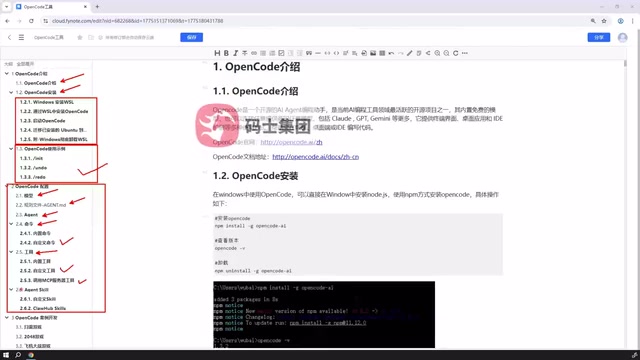
Users can either customize SQL-related Agent capabilities or directly reuse existing external SQL Agent resources, importing them into OpenCode for direct use. This dual-path approach of "customization + reuse" significantly lowers the barrier to entry for database-related scenarios.
SQL Agent is an important extension of AI programming tools in the data engineering domain, with capability boundaries far exceeding traditional Text-to-SQL solutions. Traditional Text-to-SQL is a static single-round conversion: given a natural language question, the model outputs a SQL statement, with no feedback loop in the entire process—if the generated SQL contains logical errors or table structure misunderstandings, the user can only re-describe the requirement and try again. Text-to-SQL technology traces back to natural language database interface systems like LUNAR and BASEBALL in the 1970s, but was limited by early NLP technology capabilities and remained in academic research for a long time; only with the rise of large language models did Text-to-SQL's practicality achieve a qualitative leap, with accuracy on standard benchmarks like Spider and WikiSQL jumping from under 50% to over 85%.
Agent SQL can complete true multi-round interactive closed loops: first autonomously exploring database structure through metadata queries like DESCRIBE, SHOW TABLES, and INFORMATION_SCHEMA, then generating queries based on actual table structures, analyzing returned results after execution, and automatically adjusting query logic if results don't match expectations (such as correcting JOIN conditions, adding filter predicates, or rewriting subqueries). This is particularly crucial for scenarios involving complex multi-table JOINs, window functions, recursive CTEs, or query performance tuning—scenarios that often require multiple iterations to achieve correct and efficient queries. Additionally, Agent SQL can automatically interpret query plans after executing EXPLAIN or EXPLAIN ANALYZE, identify performance bottlenecks like full table scans and missing indexes, and proactively suggest optimizations—capabilities that exceed the daily abilities of ordinary developers.
Particularly noteworthy is the data security dimension: mature SQL Agent implementations typically auto-generate transaction wrappers and rollback scripts before executing write operations (INSERT, UPDATE, DELETE), rehearse execution results in a sandbox environment, and only commit to the production database after human confirmation, thus preserving a human review safety valve for high-risk operations while maintaining Agent autonomy. For production environments with large data volumes, Agents can also automatically add LIMIT clauses to queries for preview sampling, avoiding performance incidents caused by full table scans.
OpenCode's support for reusing external SQL Agent resources means developers can directly import specialized Agents deeply optimized for specific databases (such as PostgreSQL, BigQuery, Snowflake). These specialized Agents typically have built-in dialect knowledge, performance optimization patterns, and common pitfall avoidance strategies for their respective databases, making them far more reliable than relying on general models' zero-shot capabilities, enabling developers to quickly leverage existing community achievements for deeper intelligent support in database operation scenarios.
Practical Case Demonstration
Tying together the previously discussed knowledge through complete development cases—from environment setup and model configuration to command usage and tool invocation—helps learners truly understand OpenCode's practical value in real projects.
Summary
OpenCode is a terminal AI programming tool with clear design philosophy and exceptional customizability. Its learning path is equally well-defined: first understand the concepts, then complete installation (WSL method recommended), next familiarize yourself with common commands, then dive deep into model, rules, and Agent configurations, and finally extend capabilities through custom commands, tools, MCP services, and Agent SQL to gradually build your own efficient development environment.
For developers who want to embrace AI programming in the command line, OpenCode is well worth the time investment to learn thoroughly.
Related articles

Greek Fire: The Ultimate Military Secret Guarded by the Byzantine Empire for a Millennium
Greek Fire was the Byzantine Empire's most closely guarded state secret — an ancient flamethrower that burned on water. Learn how it helped repel Arabs and Vikings and ensured the empire's survival.

7 Vibe Coding Agents Tested & Ranked: Which AI Coding Tool Should Beginners Choose?
Hands-on comparison of 7 Vibe Coding agents including Trae, Cursor, Claude Code, Codex, WorkBuddy & CoderWork, ranked by beginner-friendliness and performance.

AI-Generated Series 'Nido de Villanas': How AI Tells a Soap Opera Story
Deep analysis of AI-generated telenovela Nido de Villanas Episode 2: examining dialogue design, narrative tension, and AI's potential in dramatic storytelling.