Complete Hermes Agent Setup Guide: Deploy Your Private AI Employee with Zero Coding

Deploy your own always-on AI agent with persistent memory and automation for as little as $6/month.
Hermes Agent is an open-source AI agent framework by Naus Research. Unlike ordinary chat tools, it runs continuously in the cloud, retains memory across sessions, and autonomously writes reusable skills. This guide walks through one-click deployment on Hostinger, connecting OpenRouter models (nearly 4M tokens for just $0.13 in testing), setting up a Telegram bot, and configuring scheduled tasks — all in natural language with no coding required.
What Is Hermes Agent: How It Differs From Ordinary Chatbots
Hermes Agent is an open-source AI agent framework released by Naus Research under the MIT license, with fully auditable code. It differs from conversational tools like ChatGPT in three fundamental ways: continuous operation, cross-session memory, and autonomous skill learning.
Ordinary chat windows only work while you have them open — close the tab and they stop. Hermes runs on a cloud server, capable of executing tasks at 4 a.m. and proactively pushing messages to your phone. Its memory doesn't disappear when a session ends — writing preferences you share today will still apply when you start a brand-new conversation next week. Most importantly, when it figures out a workflow for handling complex tasks, it writes those steps into reusable "skills" that can be called directly in the future.
The cost structure is also fundamentally different from subscription-based SaaS: the software itself is free, and you only pay for AI model token usage plus a cloud server running at around $6/month.
Setting Up the Environment: One-Click Cloud Server Deployment
Choosing a Server and Template
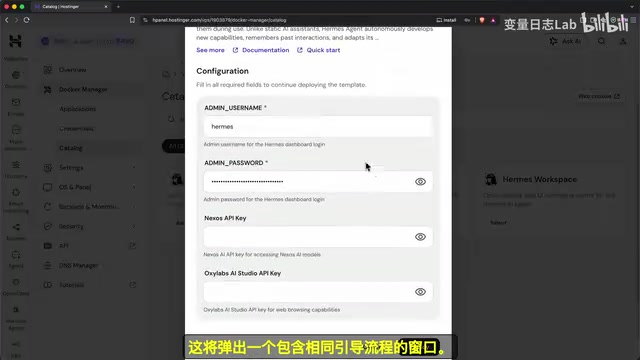
This guide uses Hostinger's KVM1 plan, primarily because it offers a one-click Docker template for Hermes, eliminating the need to manually configure terminal commands. KVM1 is the smallest tier — more than sufficient for a single agent's daily conversations. If you later need to handle heavy web browsing tasks, you can upgrade at any time without reinstalling.
When paying, make sure to uncheck the pre-selected "Ready-to-use AI" add-on — that's a credit top-up for a separate AI service that overlaps with our setup. You'll need to select a 12-month or longer plan to activate discount codes.
Security Isolation: Why Choose Cloud Deployment
There's an important security consideration worth noting: Hermes has the ability to write files, execute code, and browse the web — and web content may contain "prompt injection" attacks targeting AI systems, where malicious instructions disguised as ordinary content attempt to hijack the agent's behavior.
Running the agent on a dedicated cloud server means that even if an attack succeeds, the blast radius is limited to that blank machine — not your local documents and files. This is one of the core reasons to choose cloud deployment over running it locally.
Configuring the Brain: Connecting to OpenRouter Models
Why Choose OpenRouter
OpenRouter is a model aggregation platform where a single account gives you access to hundreds of AI models from different providers, billed by actual token usage. The recommended starting model is DeepSeekAd V4 Flash: low cost, fast responses, and strong tool-calling capabilities — and "using tools" is the core working mode for agents.
The real-world numbers are compelling: across the entire production of a tutorial video, 105 requests and nearly 4 million tokens in total consumption cost just $0.13. The key to low costs is the caching mechanism — unchanged parts of each request (system prompts, tool lists, memory) are recognized by the provider and served at extremely low prices, with roughly 75% of tokens going through the cache. A $5 initial top-up can sustain thousands of messages at this rate — enough to last several weeks.
Setting Up Your API Key and Spending Limits
After creating an API Key in the OpenRouter dashboard, it's recommended to immediately set a spending cap (e.g., $10/week) to prevent accidental overcharges. Save the key to a password manager, then enter it in the Keys page of the Hermes console. From there, go to the Models page to switch to your target model.
Connecting Communication: Telegram Bot Setup in 3 Minutes
Quick Mobile Integration
Hermes supports over 20 communication platforms. Telegram is the recommended starting point thanks to its built-in QR code quick-authorization flow. The full configuration steps are:
- Open the Chat page in the Hermes console
- Click "Create with QR"
- Scan the code with your phone and name the bot
- Click "Save and Restart" on the desktop
Once the restart completes, Telegram will show "Connected," and you can start chatting with the agent by sending any message from your phone. When you first receive a "no Home Channel" prompt, click the /set home link — this is the default destination for the agent's proactive outbound messages.
The account used to scan the QR code is automatically whitelisted. Anyone else who finds this bot and messages it will receive no response, keeping things private. Multiple Telegram clients across different devices share the same agent and the same memory without any additional configuration.

Installing the Desktop App: Multiple Entry Points to One Agent
Hermes offers Mac/Windows desktop clients. After installing, don't let it spin up a new agent locally — instead, go to Settings, select "Remote Gateway," paste your server address, and log in with your existing credentials. This connects the desktop app and Telegram to the same agent and the same memory.
The desktop client has a particularly useful feature: pressing Command+Shift+H (Mac) collapses the interface into a floating input bar that overlays whatever window you're currently using. It fades out after you submit your question, keeping your workflow uninterrupted. It supports voice input, voice-read responses, and even wake word detection — completely hands-free operation.

Memory and Skills: Making the Agent Actually Remember You
Persistent Cross-Session Memory
This is the defining feature that separates an agent from an ordinary chat window. The test is straightforward: in one session, tell the agent "my writing style preference is short sentences, three paragraphs maximum, no headings or lists" — it will immediately write this preference into memory. Close the window, open a brand-new session, ask it to write an article on a completely different topic — and it will still follow that preference.
That's because memory is persisted across sessions, not stored as temporary context. Memory files, skill files, and the sold-out.md file that defines the agent's identity are all stored on your own server — not in a third-party account.
Autonomously Writing Reusable Skills
The Skills page shows all the skills the agent has mastered or self-taught. Each skill is a readable plain-text workflow you can open and inspect. The Skills Hub provides a community-shared skill library with category-based search — Google Workspace integration, for example, is already built in and requires no separate installation.
Scheduled Tasks: Let the Agent Work Proactively on Your Behalf
Scheduled tasks (Cron jobs) are the feature that best demonstrates an agent's value. Just describe your need once in natural language, and the agent handles all the configuration. For example, send a message like this:
Monitor AI productivity trends on YouTube, design your own checking approach, keep track of content you've already pushed to me, run every few hours, and only notify me when you find something new.
The agent will install dependencies, search videos, write skill scripts, create the scheduled job, and send you a report after the first run. In the Schedule Jobs page, you can see the job's run frequency, next execution time, and the prompt it uses — with options to manually trigger or pause it.
The significance of this loop: you described a result, the agent built the mechanism to achieve it, and from that point forward it runs without any further input from you.

Advanced Capabilities: Parallel Sub-Agents and Multi-Platform Expansion
For complex tasks, Hermes supports splitting work across multiple sub-agents running in parallel. When planning a trip, for instance, you can simultaneously launch four sub-agents to research accommodation, restaurants, nearby activities, and transportation — the main agent aggregates the results and returns a complete itinerary in far less time than sequential processing.
For communication channels, the Desktop App's Messaging section or the Web console's Channels page lets you add Discord, Slack, WhatsApp, Email, and more — all channels share the same agent and the same memory. The desktop app also supports multiple profiles, allowing you to fully isolate a work agent from a personal one.
Users migrating from OpenClawAd can simply tell the agent "I want to import my OpenClaw configuration" and it will guide you through the entire migration process.
Cost and Model-Switching Strategy
Your model choice isn't set in stone. Continue using DeepSeek V4 Flash for everyday tasks to keep costs low, and temporarily switch to Claude or GPT-series models in the model selector when you need stronger reasoning. In Telegram, use the /model command to switch on the fly.
The server cost (~$6/month) is a fixed expense; model costs are the variable to watch. OpenRouter's Activity page gives you a clear breakdown of token consumption and cost per request — combined with the API Key spending cap, your budget stays fully under control.
Naus Research also offers a subscription plan called Nowse Portal at around $20/month, which requires no API Key management and is suited for users who don't want to deal with billing details.
Related articles

Salesforce Acquires Rune for $375M: AI Logistics Tech Bolsters Defense Business
Salesforce reportedly acquires defense tech startup Rune for $375M. Rune's AI logistics tech will strengthen Salesforce's Missionforce defense platform, continuing its M&A spree.

Why Fair Use Benefits Everyone in the AI Era
Starting from a Hacker News discussion, this article analyzes the legal logic and controversies of the fair use principle in AI training and content creation, and its dual impact on creators and the tech ecosystem.

Mistral Large 4 Open-Sources a Trillion Parameters, Microsoft Offers Voluntary Severance to 60,000 Employees
Mistral Large 4 open-sources a trillion-parameter multimodal model with a coding agent score of 48; SanDisk earnings show AI inference reshaping NAND demand; Google Gemini adds in-app file editing, OpenAI raises Codex quotas, and Microsoft offers voluntary severance to 60,000 employees.