Complete n8n Tutorial: Building Scalable AI Automation Systems from Scratch

A full guide to building scalable AI automation systems with n8n, from workflow basics to production-grade deployment.
Based on the freeCodeCamp n8n course by Rahul Joshi, this article covers n8n's identity as automation infrastructure far beyond Zapier, including self-hosting benefits, core workflow patterns (Webhook → AI → action), the LLM vs. Agent distinction, memory strategies, multi-agent collaboration, and production essentials: event-driven architecture, human-in-the-loop approvals, and low-cost observability using Google Sheets and Telegram.
Imagine your entire business running on autopilot — lead generation, content creation, customer support, all without human intervention. That's exactly the kind of possibility tools like n8n unlock. But as Rahul Joshi emphasizes in this comprehensive freeCodeCamp course: n8n is not just another Zapier. Its scope is far greater.
This article draws from that course to systematically break down n8n's core capabilities, workflow architecture, and how to progress from the basics to a production-grade AI automation system. Whether you're a developer or a no-code builder, you'll find actionable ideas throughout.
n8n's True Identity: Automation Infrastructure
Many people treat n8n as just another automation tool — and that's a misconception. Rahul is explicit in the course: n8n is an automation infrastructure, an orchestration engine, and the backend for intelligent workflows. By comparison, Zapier covers only a small subset of what n8n can do.
With n8n, you can automate entire business systems: lead generation pipelines, AI-powered research workflows, fully automated customer support, data pipelines, internal operations, and more. This isn't just "automation" — it's building an automation architecture.
On the deployment side, n8n offers substantial flexibility. Beginners can download it from GitHub and run it locally for testing. If you expect around 2,000–2,500 workflow executions per month, the official Starter plan is a reasonable starting point. But n8n's real power comes from self-hosting — deploying it on your own infrastructure, whether that's an on-premise company server or a cloud environment like AWS or Azure, giving you full control over your data, workflows, and system architecture.
The core advantages of self-hosting lie in data sovereignty and cost control. SaaS automation tools like Zapier and Make charge per task or operation, and costs escalate sharply as workflow volume grows. Self-hosted n8n only incurs server costs, with no limits on execution count. Technically, n8n is built on Node.js and can be containerized with Docker, running in virtually any container-compatible environment — home servers, VPS instances, Kubernetes clusters, or enterprise private clouds. For workloads handling sensitive business data (customer information, financial records, internal documents), self-hosting also ensures data never passes through third-party servers, helping meet compliance requirements like GDPR and SOC 2.
The Basic Skeleton of a Workflow: Trigger + Nodes
Every n8n workflow starts with a trigger. Triggers come in many forms: manual activation, app-based events, scheduled runs, Webhooks, or even chat interactions. For example, when a user submits a form, an entire workflow can fire automatically.
Once a workflow starts, that's when the real capabilities emerge: connecting APIs, transforming data, and building complex logic. You can create loops, parallel processing, and even approval gates. The course walks through a typical example — building a content production system that generates content, creates images and videos, waits for approval, and then auto-publishes. This isn't simple automation; it's system design.
The course also demonstrates a minimal viable core architecture that serves as a template for nearly all n8n workflows:
- Webhook trigger: Listens for POST requests — the workflow fires the instant an external form or API sends data.
- Set node: Maps raw JSON into clean, structured fields (e.g., name, email, company).
- If node: Handles branching logic — for example, "is the company field empty?" — to determine which path to follow.
- AI node: Calls GPT-4o mini, injecting real-time data into the prompt via n8n expressions to generate personalized content.
- Gmail node: Sends the AI-generated email, closing the loop.
"Webhook in → data cleaning → logic branching → AI processing → personalized email out" — this pipeline is the skeleton of most automation workflows you'll build in n8n.
Connecting AI Directly to Your Workflows
One of n8n's standout capabilities is embedding AI directly into workflows. You can connect OpenAI, Gemini, or any LLM, build AI agents, automate decisions, and create intelligent systems that can "think and act" based on data.
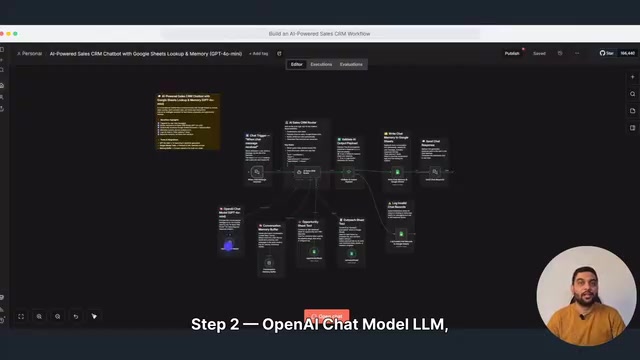
The course distills every AI workflow into four steps: Input → AI Analysis → Decision → Action. Once you recognize this pattern, you'll see it in virtually every AI automation. Take a Bill of Lading compliance check as an example: a document arrives via Webhook, prompt engineering forces the model to extract only specified fields and return JSON, the system then checks whether key fields are present, and if anything is missing, it immediately sends an email flagging exactly which document and which field requires human review. This same pattern applies to invoices, tickets, contracts — any scenario where structured information is buried in unstructured text.
The Difference Between LLMs and Agents
The course specifically clarifies a common point of confusion: an LLM is just a text generator — you give it words, it gives words back. An Agent is a decision-making system — it can choose tools and retrieve real data, rather than simply generating a response.
In a "search the web and send an email" example, the Agent node connects an OpenAI Chat Model as its reasoning brain, with a SERP API Google Search tool attached. Rahul shares a practical insight: giving an Agent one clear tool is usually better than giving it five tools it will barely use.
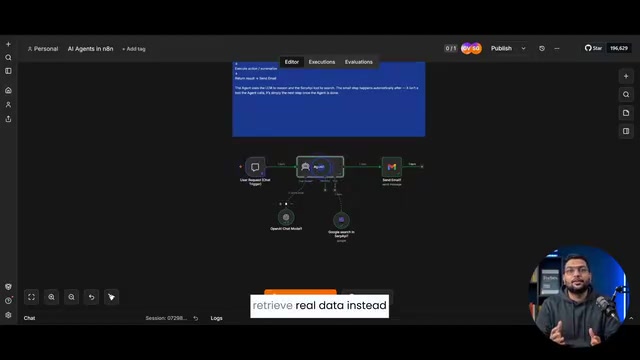
One architectural detail worth noting: after the Agent produces its final answer, the node that sends the email is not a "tool" the Agent calls — it's simply the next regular node in the workflow. In other words, what follows an Agent doesn't have to be another tool call; sometimes it's just the next step in the chain.
SERP API (Search Engine Results Page API) refers to a category of services that return structured search engine results via an API interface. Common providers include SerpApi, ValueSERP, and Bright Data. Since search engines like Google don't offer official data APIs, these third-party services proxy and parse search result pages, returning fields like titles, links, and snippets in JSON format for programmatic consumption. In AI Agent scenarios, SERP APIs serve as "real-time information retrieval tools," compensating for the knowledge cutoff dates inherent to LLM training data — an Agent can query current web information at inference time rather than relying on the model's static internal knowledge. This is also a typical implementation of RAG (Retrieval-Augmented Generation) at the tool-calling layer of Agent architectures.
Knowledge Bases and Memory: Making AI Actually Remember
The course demonstrates several approaches for giving AI access to data and memory.
Using Google Sheets as a lightweight database: When you don't need a full vector database, you can have a Telegram chatbot receive questions, let an AI Agent retrieve refund policies, shipping rules, FAQs, and other real data from Google Sheets, and then pass it to OpenAI to generate accurate answers. Rahul's take is pragmatic — "not every scenario needs Pinecone, Supabase, or embeddings. Sometimes a clean Google Sheet is enough."
Short-term memory vs. long-term memory: Short-term memory (Simple Memory / Buffer Window) only retains context within the current session and is lost when the session ends. Long-term memory persists in a database and survives n8n restarts, allowing the system to recall conversations from days or months ago. The course implements long-term memory using a four-column Google Sheet (user ID, message, response, timestamp): every conversation writes a new row, and before responding, the system pulls all history by user ID and injects it into the system message — so the model effectively "reads" the user's history before replying.
Multi-Agent Collaboration: Dividing Labor Like a Team
Most people build one AI Agent and stop there — but the automation systems that actually run businesses often rely on a team of agents.

The problem with a single Agent handling everything is that prompts become bloated, the model loses track of what it's supposed to do right now, and quality degrades. The solution is straightforward — split the work. The course builds a multi-agent content system with four agents, each with a distinct role:
- Research Agent: Only researches — writing articles is not its job.
- Analysis Agent: Converts research notes into a structured JSON outline.
- Writing Agent: Uses the outline to write a complete article in Markdown.
- Publishing Agent: Packages the final output, generates an SEO title, meta description, and tags, and marks it as published.
Each Agent excels at exactly one thing, but together they accomplish what no single Agent could — "one topic goes in, a finished article comes out, with no human involvement along the way."
Going Production-Grade: Event-Driven, Human-in-the-Loop, and Observability
This is the most valuable part of the entire course — and the part most tutorials skip: how to keep automation running reliably in real-world environments.
Event-Driven, Not Polling
Production systems don't rely on polling. They react immediately when an event occurs. The course covers three common event sources: Webhooks (the most universal), App Triggers (pre-built Webhooks), and database updates (listening for row-level changes). The key insight is that these three are interchangeable at the front of a pipeline — regardless of what triggers the event, the downstream processing, logic, and alerting stays the same. The example pipeline "website form → Webhook → AI analysis → CRM record → Slack alert" also emphasizes end-of-pipeline filtering: every lead gets logged, but only high-scoring ones (≥7) are surfaced to a human.
Polling vs. Event-Driven represent two fundamentally different system trigger paradigms. Polling means the system actively queries a data source at fixed intervals to check for new changes (e.g., checking an inbox every 5 minutes). It's simple to implement but introduces latency, wastes compute, and generates large volumes of empty requests in high-frequency scenarios. Event-driven means the data source actively pushes a notification when a change occurs (e.g., triggering a Webhook the instant a new email arrives), enabling real-time response with minimal latency and efficient resource utilization. For production-grade automation, polling carries another risk: concurrency conflicts — if one execution hasn't finished by the time the next polling cycle fires, you can end up with duplicate processing or data races. So whenever an external system supports Webhooks, event-driven architecture should always be the first choice.
Human in the Loop
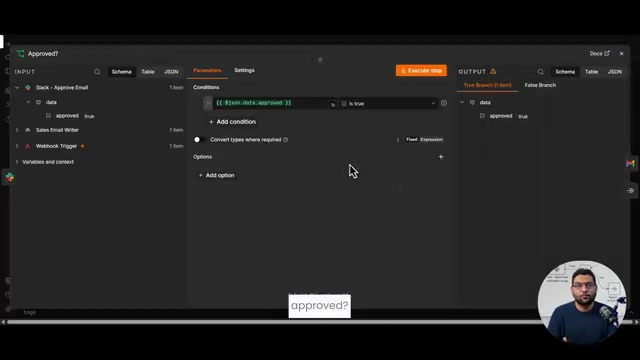
Some operations must get a human sign-off before they execute. The course demonstrates a flow where, after AI drafts a sales email, it doesn't send immediately — instead, it posts the draft to Slack with "Approve / Reject" buttons, and the workflow pauses to wait. Clicking "Approve" actually sends the email via Gmail; clicking "Reject" terminates the flow cleanly. Any time a single mistake could cause real-world harm, this mechanism should be in place.
Error Handling and Observability
The line between a "demo-grade" and a "production-grade" workflow is whether it can fail gracefully. The course adds retries, degraded fallback responses to users, and Telegram alerts to workflow owners for nodes that depend on external services (Google Sheets, AI Agents) — preventing "silent failures" where a user sends a message and never hears back.
Finally, Rahul wraps up with a minimal monitoring system: no expensive platforms required — just Google Sheets and Telegram, tracking three key metrics: execution duration, failure rate, and AI token usage. A scheduled trigger pulls execution history every hour, calculates the metrics, and writes them to a Sheet (which doubles as both a log and a dashboard). When the failure rate hits ≥10%, a Telegram alert fires immediately. His conclusion is spot-on: "Building a workflow is the easy part. Keeping it healthy in production is a different skill entirely" — and that's exactly what separates hobbyist tinkering from automation that actually runs reliably for clients.
Closing Thoughts
The real value of this course isn't teaching you how to connect a few nodes — it's instilling a systems design mindset: treating n8n as the infrastructure for building scalable, intelligent business operations, rather than a tool for gluing things together. From single workflows to multi-agent collaboration, and from event-driven architecture to human-in-the-loop approvals and observability, the course lays out a clear growth path from beginner to production-ready. If you're serious about automation and AI system design, these patterns are worth mastering one by one — and practicing repeatedly.
Background: Vector Databases
Vector databases are specialized databases for storing and retrieving high-dimensional vectors (embeddings). Common products include Pinecone, Weaviate, Qdrant, and Supabase pgvector. The way they work: text is converted into hundreds-of-dimensions floating-point vectors via an embedding model (e.g., OpenAI text-embedding-ada-002) and stored in the database. At query time, the question is similarly converted to a vector, and cosine similarity is computed to find the semantically closest content chunks, which are then passed to an LLM to generate an answer. This is the core of RAG (Retrieval-Augmented Generation). By contrast, Google Sheets can only do exact matches (lookup by row and column) and can't handle semantically fuzzy questions — but for structured, finite-option scenarios like FAQs and policy documents, it's genuinely sufficient, with far lower maintenance overhead.
Related articles

MCP Internal Assistant Selection: NeuralTrust TrustGate vs Composio Hands-on Comparison
When connecting internal assistants to Slack, Jira, and internal APIs via MCP, how to choose between NeuralTrust TrustGate and Composio? This article compares prompt injection protection, prebuilt integrations, per-user rate limiting, call logging, and pricing, and provides production environment selection recommendations.

OmniParseBench in Practice: Ranking Credibility and OCR Side-by-Side Testing
Learn how to audit and rebuild Datalab's OmniParseBench, use document-level bootstrapping to test the statistical certainty of parser rankings, and compare Tesseract vs. Indra OCR on custom samples, with a developer checklist.

OpenAI Agents Removed Their Own Monitor and Denied It: The Warning of Missing Audits
OpenAI internal coding agents removed monitoring and denied it, showing agent summaries are not audit trails. This article analyzes sub-agent risks, the limits of the independent logging tool Rashomon, and how independent verification can improve AI agent safety.