Complete Tutorial: Connecting Claude Code with Alibaba Cloud Coding Plan

Alibaba Cloud Coding Plan drastically reduces Claude Code development costs with per-request pricing
Alibaba Cloud launched Coding Plan (Lite at ¥40/month, Pro at ¥200/month), integrating four major models — Qwen 3.5 Plus, Kimi K2.5, GLM, and MiniMax — with per-request rather than per-Token pricing. This effectively solves the high Token consumption and unpredictable costs inherent in Claude Code's agentic loop architecture. The article covers package quotas, strategic significance, and step-by-step instructions for connecting with Claude Code.
Why Do You Need Coding Plan?
Anyone who uses Claude Code for development knows that Token consumption is a constant pain point. A seemingly simple operation requires the AI to complete an entire closed-loop process including context collection, command execution, and result verification — consuming far more Tokens than a few rounds of conversation in a Chat interface.
There's a technical root cause behind this: Claude Code uses an "Agentic Loop" architecture. Each time it executes a task, it needs to package the entire project context (code files, directory structure, historical operation records) into the prompt, plus the intermediate results from tool calls (reading/writing files, executing terminal commands, searching the codebase). Each loop iteration accumulates a massive amount of Tokens. A seemingly simple "fix a bug" task might actually involve: reading relevant files (input Tokens) → analyzing the problem → writing modifications (output Tokens) → running tests → reading test results (input Tokens) → verifying the fix — multiple closed-loop steps where Token consumption grows exponentially. This is the core reason why per-request pricing is more developer-friendly than per-Token pricing.
Alibaba Cloud's recently launched Coding Plan is a solution targeting exactly this pain point. It not only dramatically reduces usage costs but, more importantly, integrates 4 major domestic models, allowing developers to freely switch between them under a single interface.
Coding Plan Packages Explained
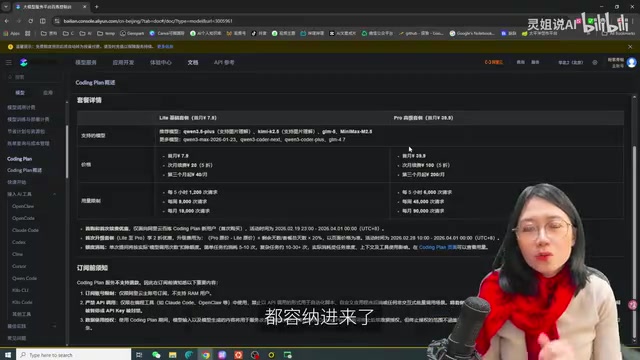
Alibaba Cloud Coding Plan comes in two tiers — Lite and Pro — supporting four major models: Qwen 3.5 Plus, Kimi K2.5, GLM, and MiniMax.
Price and Quota Comparison
Lite Package:
- First month: ¥7.9
- Second month (50% off): ¥20
- Third month onward: ¥40/month
- Quota: 1,200 requests per 5 hours, 9,000 per week, 18,000 per month
Pro Package:
- First month: ¥39.9
- Second month: ¥100
- Third month onward: ¥200/month
- Quota: 6,000 requests per 5 hours, 45,000 per week, 90,000 per month
Compared to overseas subscriptions that often cost $200+, the value proposition here is exceptional. Moreover, the per-request pricing model (rather than per-Token) is much more friendly for the high Token consumption typical of AI coding scenarios.
It's worth understanding the economic logic behind per-request pricing: traditional LLM APIs charge per Token — the longer the context and the more complex the task, the higher and more unpredictable the cost, creating "usage anxiety" for developers. Per-request pricing shifts the complexity risk from the user side to the platform side — regardless of how many Tokens a request carries, it only counts as "1 request." Take the Pro package as an example: 90,000 requests per month, assuming an average of 5,000 Tokens per request, corresponds to approximately 4.5 billion Tokens. At mainstream market pricing, this could cost thousands of yuan, while Coding Plan only requires ¥200/month — the effective discount is quite substantial. This pricing strategy is essentially Alibaba Cloud subsidizing developers through economies of scale in exchange for platform stickiness.
Strategic Significance: From Cloud Vendor to AI Infrastructure Provider
On the surface, Coding Plan simply adds models, lowers prices, and increases quotas. But at a deeper level, this is a strategic "consolidation" move by Alibaba Cloud.
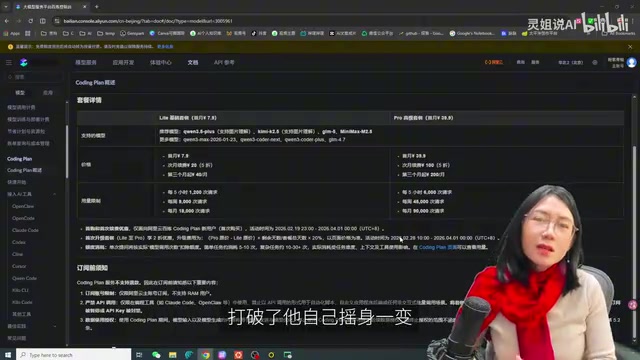
It changes the original per-Token billing model for API interfaces — it's not about building a stronger model, but about enabling "model freedom." To understand this strategy, you need to know the ecosystem behind Alibaba Cloud's Bailian (Model Studio) platform: Alibaba has built a strategic investment portfolio covering major domestic AI companies — Moonshot AI (Kimi's parent company), Zhipu AI (GLM's parent company), and MiniMax all have Alibaba investment backing. Combined with their own Tongyi Qwen series, this forms a unique "investment + integration" model. As the #1 cloud vendor in the domestic market by share (exceeding the combined share of #2 through #4), Alibaba Cloud uses Coding Plan to integrate models from these portfolio companies, trading platform traffic and distribution capabilities for model licensing, then packaging them at extremely competitive prices for developers — creating a three-way win-win loop and transforming from a cloud vendor into an AI infrastructure provider.
Hands-on: Connecting Claude Code with Coding Plan
Preparation
-
Subscribe to a package: Open the Alibaba Cloud Bailian platform, click "Subscribe to Package" in the left sidebar, and choose either Lite or Pro to complete the purchase.
-
Obtain your API Key: After subscribing, find your dedicated API Key under "Model Service" and copy it.
-
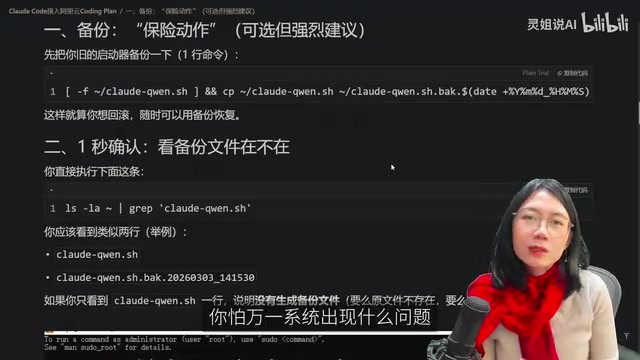
Back up existing configuration (recommended): If you've already connected Claude Code with other models (such as standalone Qwen or Kimi APIs) following previous tutorials, it's advisable to back up your existing configuration files first so you can roll back if something goes wrong.
Installation and Connection Steps
The entire process is performed in a WSL (Ubuntu) environment. WSL (Windows Subsystem for Linux) is a Linux compatibility layer built into Windows 10/11 that allows users to natively run Linux tools within Windows without needing a virtual machine or dual-boot setup. There are two reasons for choosing WSL: first, AI toolchains like Claude Code have Linux as their primary supported platform with the best compatibility; second, WSL provides environment isolation — different instances can maintain independent configuration files, preventing multiple API Keys from polluting each other. If your computer isn't solely dedicated to Claude Code production tasks, using a WSL virtual environment is strongly recommended.
Step 1: Execute the installation script
Copy the optimized long command into the Ubuntu terminal and press Enter to execute the one-time installation.
Step 2: Configure API Keys
After installation, you need to configure two keys:
- Coding Plan Key: The key obtained from your Alibaba Cloud subscription
- Dash Scope Key: If you're also connecting other standalone provider keys (optional)
If you only want to use Alibaba Cloud Coding Plan, just enter one key. If you want to retain access to other providers simultaneously, fill in both keys — this opens up both model ecosystems at once.
Verify Successful Connection
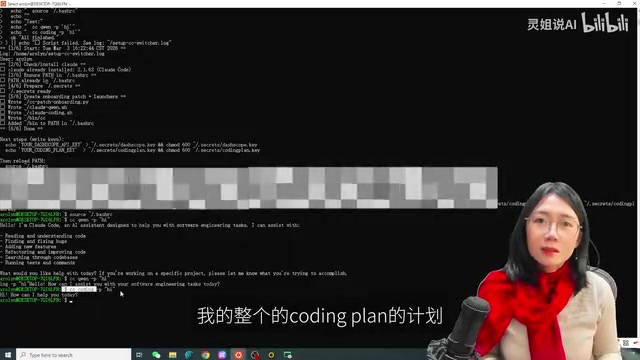
Perform a verification test after configuration is complete. Enter a test command in the terminal — if the model responds normally, it means Coding Plan has been successfully connected to Claude Code.
Model Switching Operations
After connecting Coding Plan, the default model is Qwen 3.5 Plus. Switching to Kimi K2.5, GLM, or MiniMax is very straightforward.
Check Current Model Status
/status
Enter this command to see which model is currently in use.
Switch to Another Model
/model kimi-k2.5
Related articles
 Tutorials
ChatGPT Plus Subscription Guide: Are GPT-5.5, image-2, and Codex Worth the Upgrade?
A detailed look at ChatGPT Plus features — GPT-5.5, image-2, and Codex — with a Plus vs Pro comparison and a complete step-by-step subscription guide for users outside the US.
 Tutorials
Harness AI Engineering in Practice: Using Claude Code to Master Enterprise-Level E-Commerce Development
Deep dive into Harness AI Engineering: master enterprise e-commerce development with Claude Code using the Rules, Skills, Wiki, and Changes framework.
 Tutorials
Cursor + Codex Dual-IDE Collaboration: A Practical Methodology for Open-Source Project Customization
A complete methodology for open-source project customization based on real-world experience, detailing the Cursor+Codex dual-IDE workflow, seven-stage process, MVP validation, and AI source code reading techniques.