Connecting DeepSeek V4 in VSCode: Complete Claude Code Plugin Setup Tutorial

Connect DeepSeek V4 in VSCode via the Claude Code plugin and CCSwitch for powerful, low-cost AI Agent coding.
As GitHub Copilot's benefits shrink and Anthropic restricts mainland China access, this guide shows how to combine the Claude Code for VS Code plugin, CCSwitch, and the DeepSeek V4 API. Keep your familiar VSCode environment while gaining strong Agent capabilities at just 25% of the original price—ideal for students and researchers.
Why More and More Developers Are Abandoning GitHub Copilot
For developers and researchers who work long-term in the VSCode environment, choosing an AI coding assistant has always been an unavoidable topic. In the past, GitHub Copilot won over a large user base with two major advantages: first, its relatively friendly billing model, which counted conversations toward a fixed token allotment rather than charging strictly by usage; second, it once offered students the Copilot Pro Educational Benefits for up to two years, amounting to roughly $240 in savings.
GitHub Copilot was launched as a technical preview in 2021 and became commercially available in 2022. Its underlying technology was powered by OpenAI's Codex model—Codex being OpenAI's fine-tuned version of GPT-3 (175 billion parameters) specifically for code generation scenarios, further trained on billions of lines of public code from GitHub, making it far superior to general-purpose language models at tasks like code completion, function generation, and multi-language translation. When Codex was released in 2021, it achieved a 28.8% pass@1 score on the HumanEval benchmark. However, GPT-4 has since surpassed 67% on the same benchmark, and Claude 3.5 Sonnet went even further—this cross-generational capability gap made product designs relying on a single foundation model unsustainable, forcing Copilot to shift toward a "model marketplace" architecture that lets users call frontier models from different providers on demand. While this structural shift expanded the capability ceiling, it also directly introduced the complex billing logic of tiered per-model pricing. The early pricing strategy deliberately lowered the barrier to entry—free for students and open-source maintainers, individual subscriptions at just $10/month—which helped it rapidly capture the market and accumulate millions of users. However, as the capabilities of GPT-4 and the Claude series surged dramatically, Codex was gradually replaced by more advanced models, and GitHub Copilot progressively introduced a multi-model support system. This technical evolution trajectory directly gave rise to the later commercial logic of tiered pricing by model level.
Behind this commercial logic lies a structural transformation across the entire AI service industry, shifting from "burning cash to acquire customers" to "tiered monetization." After Microsoft completed its approximately $13 billion additional investment in OpenAI in 2023, it needed to accelerate cost recovery through its AI product lines. As the most mature AI commercial product within Microsoft's ecosystem, GitHub Copilot naturally became a priority target for price increases and tiered monetization. As Microsoft continued to ramp up its investment in OpenAI, and as enterprise-grade AI service competition intensified, GitHub began tightening its benefits system and introduced differentiated per-model tiered billing, restricting high-parameter, high-capability frontier models to premium tiers—essentially transforming the "AI coding assistant" from a standardized tool into a tiered-monetization subscription SaaS product.
However, this system is rapidly collapsing. A recent series of policy adjustments has caught many users off guard: the student verification portal has been completely closed, and new Pro Pro registrations have been halted simultaneously.
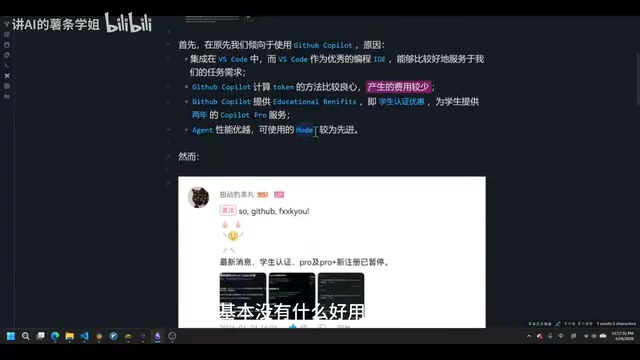
Shrinking Student Benefits: Fewer and Fewer Available Models
The regression in model availability is equally frustrating. In the Educational Benefits system, after Claude Opus 4.6 was removed, only GPT-5.3 Codex remained available for a time—but now even Codex has been taken offline, leaving almost no worthwhile models within student verification.
Even Copilot Pro users paying $10/month can't access Claude Opus 4.6—calling more advanced Opus models requires purchasing a premium membership at $30–40/month, and this model also carries a token multiplier of up to 7.5 to 15 times, making the overall cost absurdly high.
AI service providers commonly introduce a "token multiplier" mechanism when pricing, to balance the compute cost of models. Take Copilot as an example: when calling Claude Opus 4.6 with a 7.5 to 15 times multiplier, a conversation that consumes 1,000 tokens is billed as 7,500 to 15,000 tokens. This design means the actual per-conversation cost of high-capability models can exceed user expectations by several times or even tenfold. By contrast, Chinese AI vendors like DeepSeekAd often offer discount windows in the form of "price wars," pushing the per-token price of comparable-scale models to below one-tenth of mainstream international services. This is precisely the core economic rationale behind choosing DeepSeek V4 in this solution.
Clarifying Core Needs: A Capable Agent + A Familiar IDE
Since Copilot is no longer easy to use, finding an alternative becomes inevitable. When making a selection, there are two core needs every developer should prioritize.
Need One: Retain the VSCode Development Environment
This is the fundamental reason this solution doesn't choose Cursor or directly use the Claude Code native client. Switching to a brand-new IDE means reconfiguring themes, highlighting rules, Markdown rendering, plugin systems, and an entire suite of personalized settings. These habits accumulated over years can't be migrated smoothly and will significantly drag down daily efficiency.
The ideal path is to embed the AI Agent as a plugin into the VSCode you're already comfortable with—achieving a functional upgrade while keeping the environment unchanged.
Need Two: Bypass Access Restrictions in Mainland China
The practical network issue is equally unavoidable. Anthropic is not friendly toward mainland China—even if a company is registered in the US or Western Europe, as long as Chinese capital accounts for more than 50%, it may be denied service. This causes extremely unstable connections when using Claude Code directly, and even risks losing work progress.
Anthropic's service restrictions on mainland China stem from the US Department of Commerce's regulatory framework targeting AI technology exports. As a US-registered AI safety company, Anthropic is bound by the Export Administration Regulations (EAR) and must fulfill compliance review obligations when providing high-capability AI services to certain regions. For overseas companies with more than 50% Chinese capital ownership, Anthropic applies similar compliance criteria, so even if the company is registered in the US or Western Europe, a Chinese-controlled background may trigger the service-denial mechanism. This policy context has spawned the technical need to bypass restrictions through third-party relay APIs or local proxy solutions. Notably, this regulatory logic is not unique to Anthropic—major US AI labs like OpenAI and Google DeepMind are subject to similar frameworks, forming the deep institutional root of the current geographic fragmentation of large-model service access.

The emergence of the Claude Code for VS Code plugin provides a viable workaround: invoking Claude Code's Agent capabilities within VSCode while connecting to cheaper third-party model APIs, thereby balancing stability with cost control.
Claude Code is a command-line-native AI coding Agent launched by Anthropic in 2024. Unlike traditional code completion tools, it adopts a "Tool Use" architecture, whose underlying design is highly consistent with the academic ReAct (Reasoning + Acting) paradigm. ReAct was jointly proposed by Princeton and Google Research in 2022, with the core idea of letting the language model interleave external tool calls while generating reasoning chains, weaving "thinking" and "acting" into a unified trajectory—the model not only outputs text but also outputs structured tool-call instructions (such as reading files, executing commands, searching code), which the host environment executes and feeds the results back into the model context, forming a sustainable "perceive-decide-execute" loop. Compared with traditional completion tools that rely solely on static parametric knowledge, the biggest advantage is the introduction of real environmental feedback, enabling the Agent to proactively read and write the file system, execute terminal commands, search codebases, and coordinate modifications across multiple files—achieving truly autonomous task execution.
Claude Code's core capabilities are also built on the Claude model's long-context understanding (supporting up to 200K token context), allowing an entire code repository to be "loaded" into the context window for global reasoning—compared with early tools that required manually chunking large codebases, this represents a qualitative leap in the practicality of coding Agents. The Claude Code for VS Code plugin embeds this Agent capability into VSCode as an extension, allowing developers to drive the complete Agent workflow without switching interfaces, while its open API endpoint supports replacing Anthropic's native models with third-party compatible interfaces.
Complete VSCode-to-DeepSeek V4 Integration in Three Steps
The entire configuration process breaks down into three major steps with clear logic—even beginners can get up to speed quickly.
Step One: Install and Enable the Claude Code Plugin
Open the VSCode extension marketplace, search for Claude, find the Claude Code for VS Code plugin, then install and enable it. After installation, open any file, and an icon resembling a text doodle will appear in the top-right corner—clicking it summons the interaction interface.
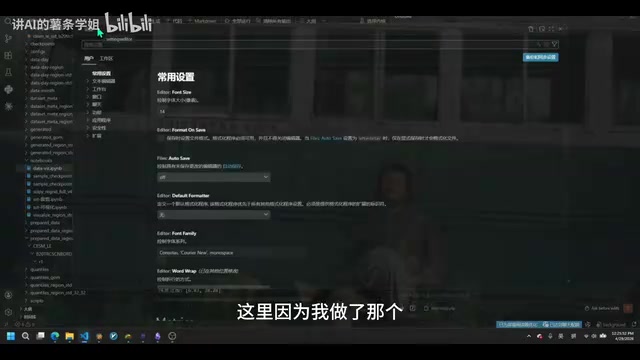
Since mainland users face obstacles registering a Claude Code account, you need to add a custom configuration in the plugin's settings.json. Open settings with the shortcut Ctrl + ,, find the plugin in the extensions list, choose "Edit in settings.json," add the configuration lines and save, then restart the plugin.
Step Two: Obtain the DeepSeek V4 API Key
DeepSeek V4 (the latest iteration of the DeepSeek-V3 series) is a large language model trained by DeepSeek based on the Mixture of Experts (MoE) architecture, with a total of about 671B parameters and roughly 37B active parameters. The key to understanding this numerical difference lies in how MoE works: the MoE architecture replaces the model's feed-forward network layers with multiple parallel "expert" subnetworks, and uses a learnable gating network to dynamically select a few experts to activate (usually Top-2) for each input token, while the remaining experts don't participate in that computation. This means the 671B total parameter scale is only used to store knowledge capacity, while the actual computation invoked per inference (FLOPs) is equivalent to a dense model of about 37B. The MoE architecture was first systematically proposed by Google in the 2017 paper "Outrageously Large Neural Networks." DeepSeek V4 further combines fine-grained expert slicing with a shared-expert mechanism, and introduces an "auxiliary-loss-free load balancing" strategy—preventing the Expert Collapse problem by dynamically adjusting token routing bias terms rather than using traditional auxiliary loss functions, maintaining training stability while reducing interference with the main task loss. In addition, its Multi-head Latent Attention (MLA) mechanism reduces KV cache memory usage to 5% to 13% of standard multi-head attention through low-rank joint key-value compression, which is decisive for controlling inference-stage costs, ultimately achieving the engineering goal of "large-model capability at small-model cost"—which is precisely the fundamental technical reason it can provide service at pricing far below GPT-4o or Claude Sonnet. DeepSeek V4's code generation capability has approached or even surpassed some GPT-4-level models on multiple benchmarks (such as HumanEval and LiveCodeBench), and combined with its 1-million-token ultra-long context window, makes it a strong competitor for large-codebase analysis scenarios.
The reason for choosing DeepSeek V4 is straightforward: its current pricing is extremely competitive, with a 75% discount (25% of original price) on cache hits, cache misses, input, and output alike (offer valid until May 31, 2026). In actual testing, topping up 10 RMB and completing the tests in this tutorial consumed only about 0.08 RMB.
Visit the DeepSeek official website (deepseek.com), enter the API open platform, complete registration (email or phone number supported) and identity verification, and a minimum top-up of 1 RMB activates it. Then create a new API Key in the console, fill in a name (such as test) to generate the key, and be sure to copy and save it immediately—it cannot be viewed again once the page is closed.
Step Three: Complete API Integration via CCSwitch
Finally, you'll need the open-source tool ccswitch maintained by developer Ferran1231 on GitHub, which is specifically designed to manage multi-configuration switching for Claude Code.
The fundamental reason CCSwitch can achieve cross-provider model replacement is that the REST interface specification defined by OpenAI when it launched the GPT-3 API in 2020 has effectively become the industry standard for large-model integration—its core endpoint /chat/completions request body structure, streaming output protocol (Server-Sent Events), and even error code system have been almost exactly replicated by mainstream domestic service providers such as DeepSeek, Zhipu AI, and Alibaba Cloud Bailian, forming a "de facto standard" status similar to that of SQL for relational databases. The formation of this compatibility ecosystem is essentially a game of platform ecosystem lock-in versus anti-lock-in: service providers choose to be compatible with OpenAI specifications in the short term to lower developer migration costs and accelerate user acquisition, but in the long run, this objectively builds a "decentralized API interchange layer"—developers' toolchain investment is no longer bound to a single provider, and underlying model suppliers instead face fiercer price competition, with the ultimate beneficiaries being the technical users capable of leveraging this replaceability for cost arbitrage. CCSwitch's existence is a concrete embodiment of this ecosystem structure. Based on this compatibility, you only need to replace the BaseURL and API Key to seamlessly switch providers. CCSwitch is essentially a lightweight request proxy layer: it intercepts and rewrites API requests issued by Claude Code, redirecting calls originally aimed at Anthropic's official endpoint to the user-specified custom BaseURL, while handling API Key injection and model name mapping—completely transparent to Claude Code's Agent core logic, requiring no modification of the plugin's own code. CCSwitch further packages this process into a graphical interface, greatly lowering the barrier for non-technical users to manually edit environment variables or configuration files.
Download the corresponding Windows MSI installer on the project's Releases page, and open the tool after installation.

Create a new configuration in CCSwitch, select the DeepSeek provider, enter the API Key saved in Step Two, set the model to DeepSeek V4 Pro, and configure a 1-million (1M) token context window. Click add, then restart VSCode, and the entire configuration is complete.
Verifying the Results: Actual Performance and Advanced Usage
After configuration, type "What Agent and Model are you using" in the interaction interface to test. The assistant will clearly reply: the Agent is Claude Code, running in the VSCode native extension environment, the model is DeepSeek V4 Pro, and the context window reaches 1 million tokens.
The actual usage experience shows no obvious difference from other mainstream AI Agents—code modifications, file creation, and multi-turn conversations all run smoothly. You'll obtain a workflow like this: the familiar VSCode editor + Claude Code's Agent orchestration capabilities + the DeepSeek V4 model at just 25% of the original price.
Skills System: Building a Personalized AI Workflow
This solution also supports rich Skills functionality, allowing users to "distill into Skills" specific capabilities—even the professional knowledge of colleagues or friends—for the Agent to invoke, offering enormous room for imagination in building personalized research and coding workflows.
At the technical level, Claude Code's Skills system corresponds to a combined mechanism of "system prompt templating" and "tool-call presets." Users can distill domain-specific operating norms, code style conventions, or professional knowledge into structured prompt packages, persistently store them in the form of Skills, and call them on demand across different projects—similar to "distilling" human expert experience into reusable Agent behavior patterns. This design philosophy aligns closely with the popular research directions of prompt engineering and Agent Memory in recent years: prompt engineering focuses on how to structurally express task intent to stably improve model output quality, while Agent Memory explores how to persist knowledge and preferences across sessions—the combination of the two forms the technical essence of the Skills system, and is also a key capability node in the evolution of AI coding tools from "single Q&A" to "long-term collaboration partner." From a more macro perspective, the "knowledge distillation-reuse" logic implied by the Skills system has an analogy to the concept of Knowledge Distillation in machine learning: the former encodes human expert experience into prompts, while the latter compresses large-model capabilities into small-model parameters—both attempt to solve the core problem of "how to make valuable expert knowledge scalable and reusable." For researchers, laboratory-specific data processing norms or paper writing styles can be encoded into Skills, forming a highly personalized knowledge-base-driven workflow.
Conclusion
When Copilot's available models keep shrinking and Anthropic sets access barriers for specific regions, the combined solution of the Claude Code for VS Code plugin + CCSwitch + DeepSeek V4 API lets developers retain their existing VSCode coding environment while enjoying powerful Agent capabilities at extremely low cost. For budget-conscious students and researchers, this is a low-barrier, effective, and long-term-worthy path.
Key Takeaways
Related articles

SpaceX Eyes Boost Mobile Acquisition in Bid to Become Fourth Largest US Carrier
SpaceX considers acquiring Boost Mobile to enter mobile communications and become the fourth largest US carrier; Anthropic's IPO filing shows $33.2B revenue but $23.3B loss; European grocery freezers hit by cyberattack. A three-minute Vergecast roundup of tech news.

Trajectory Raises $45M at $300M Valuation to Let Non-Technical Experts Train AI Models
One-year-old startup Trajectory raises $45M at a $300M valuation to let non-technical domain experts participate in AI model training. Analysis of funding, product positioning, competition, and industry impact.

Apple iPhone Duo Production Ramping Up, But When Supply Will Improve Remains Hard to Predict
Apple iPhone Duo production is ramping up, but Apple admits it's hard to predict when supply will meet demand, with shipping delays extending into next year. This article analyzes the supply-demand challenges and supply chain difficulties facing the new foldable device.