Constraining AI Agents with the srt Sandbox: Kernel-Level Security and Damage Control

Anthropic's srt uses kernel-level sandboxing to hard-limit AI agents' file and network access.
The article introduces Anthropic's Sandbox Runtime (srt), a lightweight sandbox based on OS kernel mechanisms for constraining AI agents running in autonomous mode. Traditional prompts or permission settings are soft constraints easily bypassed by prompt injection or model errors, whereas srt places the agent and its child processes in a restricted environment using BubbleWrap on Linux, Seatbelt on macOS, and restricted users plus filter drivers on Windows. Users configure allowedDomains, deniedDomains, denyRead, and allowWrite via .srtsettings.json; denied files are overlaid with /dev/null, and network requests are adjudicated by a local proxy against an allowlist. The article demonstrates wrapping curl, claude, omp, and other commands with srt, and notes that Claude Code's /sandbox only applies to Bash commands and may be bypassed by auto-allow, making direct srt claude safer. srt suits local development; production environments still need stronger isolation such as containers.
When you run an AI agent in autonomous mode, have you ever considered that it might read your SSH keys, leak API keys from your .env file, or freely access external networks? According to a technical share from the YouTube channel Neural9, Anthropic's Sandbox Runtime (srt) offers a lightweight sandbox solution built on kernel-level mechanisms that can hard-limit an agent's file and network access without sacrificing its autonomy.
Why Do AI Agents Need a Sandbox?
Traditionally, we constrain AI agent behavior through system prompts or permission settings, but these are only "soft constraints"—agents can be hijacked by prompt injection attacks or execute dangerous operations due to model errors. Once an agent has full system privileges, it can read sensitive files, access arbitrary domains, or even write to system directories. For users who like to let agents handle tasks autonomously in automatic mode, this risk is especially prominent.
srt takes a completely different approach: it uses the operating system's kernel-level mechanisms to place the agent and all its child processes into a restricted environment. On Linux, it relies on BubbleWrap; on macOS, it uses Seatbelt; Windows alpha support is implemented through restricted users, NTFS access control lists, and Windows filter drivers. This means that whether the agent is curl, a Python script, or a full coding assistant, as long as it is launched through srt, it cannot break through these hard rules.
Kernel-Level vs. User-Space Sandboxes
Where a sandbox is implemented determines its strength. User-space sandboxes (such as those intercepting system calls via LD_PRELOAD, or pure Python-layer permission checks) run at the same level as the application—once the agent process itself is compromised or finds a bypass path, the constraints fail. Kernel-level sandboxes delegate access control to the OS kernel: every file open and network connection request issued by the process must be adjudicated by the kernel's mandatory check module, and the process itself cannot modify these rules. srt's chosen BubbleWrap uses Linux namespaces and seccomp isolation, while Seatbelt uses macOS sandbox profiles to describe allowed system calls and paths; both belong to this category. This is the technical meaning of "hard constraints" as described in the original article: bypassing it requires exploiting a kernel vulnerability, not prompt engineering tricks.
Installing and Basic Usage of srt
Installing srt is very simple—just use NPM. After installation, prefix any command with srt, and that command will run inside the sandbox. For example, running curl https://neural9.com directly fetches the web page normally, but executing srt curl https://neural9.com causes the connection to be intercepted by the sandbox's network proxy, returning "tunnel failed" or a 403 error. Similarly, access to Google.com yields different error messages depending on the protocol.
This network blocking is global: unless explicitly allowed in the configuration file, the agent cannot communicate with any external host. The same applies to filesystem access—files on the deny list are overlaid with /dev/null, and the agent cannot even perceive their original contents.
How Network Interception Works: Proxy and Tunnels
srt doesn't block the network by simply letting connections time out; it takes over outbound traffic through a local proxy. The agent process's HTTP/HTTPS requests are directed to a local proxy port controlled by the sandbox, which decides whether to forward based on the allowedDomains allowlist. HTTPS requires establishing a CONNECT tunnel first, so the typical error when denied is "tunnel failed"; for plaintext HTTP requests, a 403 may be returned directly. This is why the original article shows different error messages for different sites—the error type depends on the request protocol and whether a tunnel was attempted. Understanding this helps with troubleshooting: seeing a tunnel failure usually means the domain isn't in the allowlist, not that the network itself is broken.
Configuration File: Defining Hard Boundaries
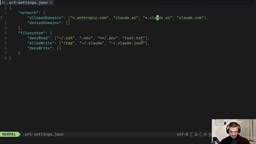
The core of srt is the configuration file .srtsettings.json, typically located in the user's home directory. This JSON file contains two main sections: network and fileSystem.
In network, you can precisely control which domains the agent can access via allowedDomains and deniedDomains. For example, allowing only Anthropic and Claude-related domains keeps the agent's normal communication working while blocking all other network requests.
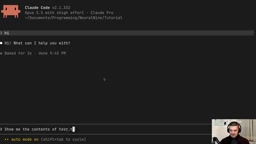
In fileSystem, the denyRead list specifies files or directories the agent cannot read, such as ~/.ssh, the .env in the current directory, and .env files in any subdirectory. allowWrite restricts the agent to writing only to specific locations, such as /tmp, ~/.claude, etc. According to the demonstration, the agent reading test2.txt (not on the deny list) returns its contents successfully, while reading test.txt and .env results in permission denied errors.
These rules are not permission prompts or system preferences—they are hard constraints enforced by the kernel. The agent cannot bypass them through any prompt unless it finds a sandbox escape vulnerability—and that would be a much more complex task.
Implementing "Unreadable" by Overlaying with /dev/null
/dev/null on Linux and macOS is a special device file that discards all writes and returns EOF immediately on reads. When the sandbox bind-mounts a denied path to /dev/null, the agent can successfully open the file at that path but reads nothing, and cannot determine whether the original file exists or how large it is. Compared to directly returning an EACCES permission error, this approach reduces information leakage: an attacker cannot probe which sensitive files actually exist through differences in error codes. This is the strategy srt adopts for denyRead, which differs from relying solely on file permission bits.
Integration with Claude Code: Two Modes
For Claude Code users, srt offers two ways to use it. The first is to launch directly via srt claude, in which case the entire Claude process and all its child processes are constrained by the sandbox. The second is to use the /sandbox command inside Claude Code, which is also based on srt but only applies to Bash commands; other operations still rely on the regular permission system.
In the demonstration, when using /sandbox mode, the agent's attempt to read test.txt was denied, but its attempt to access neural9.com succeeded. Further investigation revealed that the "auto-allow" feature in this mode may whitelist specific domains for individual use cases, creating a bypass path. Therefore, if you want maximum security, using srt claude directly is the more reliable choice, as it applies global constraints from the moment the process starts.
Why /sandbox Only Covers Bash Commands
Claude Code's /sandbox is dynamically enabled within an existing session; it can only re-wrap the shell execution portion of tool calls in srt, while the Claude process itself, file read/write tools, built-in editors, etc. continue to run outside the sandbox and go through the regular permission confirmation flow. Applying kernel constraints after a process has started typically only affects newly spawned child processes and cannot retroactively constrain resources and handles the parent process has already acquired. Therefore, this mode naturally has coverage blind spots; whereas srt claude is fully constrained from the very moment the process is created, with parent and child processes inheriting the same set of rules—a more complete semantic. This also explains the difference in test results between the two modes in the original article.
Cross-Tool Compatibility and Caveats
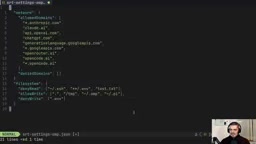
srt is not exclusive to Claude Code. In the demonstration, the author also used it to sandbox other agent tools, such as omp. With a command like srt -s srt-settings-omp.json omp, you can specify independent configuration files for different tools, precisely controlling the domains they can access and the directories they can write to.
However, some tools may have compatibility issues. For example, anti-gravity cannot log in properly because it uses the keyring feature; enabling the relevant functionality may require enabling Unix sockets, but that brings risks related to Docker access and root privileges. The author admits that such cases require additional workspace or configuration adjustments.
Use Cases and Limitations
srt is ideal for local development environments, especially when you want to let agents execute tasks freely in autonomous mode without constantly watching their every move. It provides a simple, cross-platform way to enforce the "principle of least privilege": agents can chat, write code, and execute commands, but can only access allowlisted domains and files.
However, for production environments, srt may not be the ultimate solution. More complex scenarios may require containerized isolation or more fine-grained security policies. But as a damage control tool for local development, srt's ease of use and kernel-level guarantees make it a worthwhile addition to your toolbox.
Ultimately, security is a layered process. srt is not a panacea, but it adds a solid line of defense for autonomous AI agent operation—allowing you to enjoy the convenience of automation without sacrificing system security.
Related articles

Nothing CMF Buds 2A Drops to $17.89 on Black Friday: A New Low for ANC Earbuds
Nothing CMF Buds 2A wireless earbuds Black Friday deal: just $17.89 on Amazon, about $11 off retail and a record low. ANC earbuds at an entry-level price.

When AI Creation Gets Accused of "Spitting": Hacker News Heats Up Over the Glaude Controversy
A Hacker News post, "Spitting in the Face of Glaude," sparks debate on AI creation transparency and attribution ethics. This analysis examines the blurred creator identity behind the controversy and offers practical advice for AI content production.

Akai Embraces Custom Firmware: MPC Sample 1.4 Lets Users AI-Program Their Sampler
Akai embraces the modding community with MPC Sample 1.4 firmware, supporting vibe-coded custom firmware and effects. We analyze the impact of this open strategy on music hardware and AI-assisted programming.