Coze Book List Workflow Tutorial: Generate Short Videos with Just a Book Title

Build an AI workflow on Coze to auto-generate book list short video assets from just a book title.
This article explains how to build a book list AI automation workflow on the Coze platform. Simply input a book title and author, and the system uses large language models to extract book quotes, generate voiceovers, batch-create background images, translate copy, and package all assets into complete short video content. The entire workflow contains 88 nodes, but through encapsulation techniques, only 18 nodes need to be manually built.
Overview
Book list accounts are currently one of the hottest content formats on short video platforms like Douyin and Xiaohongshu (RED) — by recommending books paired with beautiful visuals and voiceovers, creators can deliver valuable content while monetizing through embedded book purchase links. The core monetization logic of book list accounts is "content seeding + purchase links": on Douyin, creators can attach product links from Douyin Store or third-party bookstores to their videos, earning 5%-20% commission on actual sales; Xiaohongshu primarily uses image-text posts, generating revenue through brand collaborations and product promotion. Book list accounts typically need to publish 1-3 videos daily to maintain algorithmic recommendations — this is precisely why AI-automated workflows are so valuable in this scenario.
However, the traditional approach requires manually selecting books, extracting quotes, recording voiceovers, designing graphics, and editing the final video — a tedious and time-consuming process. This article will walk you through building a complete book list AI workflow on the Coze platform — simply input a book title and author, and the system automatically generates complete video assets including voiceover, background images, subtitles, and sound effects.
The entire workflow actually contains approximately 88 nodes, but through encapsulation techniques, you only need to manually build 18 nodes to complete the full configuration.
Overall Architecture of the Coze Book List Workflow
About the Coze Platform
Coze is an AI application development platform launched by ByteDance in 2024, available in a domestic version (coze.cn) and an international version (coze.com). Its core positioning is a "no-code/low-code AI workflow building platform," allowing regular users to combine large language models, plugins, knowledge bases, and other capabilities into automated processes through visual drag-and-drop interfaces. Coze's workflow functionality is similar to the automation logic of Zapier or Make (formerly Integromat), but deeply integrates AI capabilities, making it particularly suitable for content production, data processing, and similar scenarios. The platform offers a free tier and a personal advanced tier, with the advanced tier supporting workflow import/export and other premium features — this is crucial for the encapsulated node usage steps that follow.
Core Process
The overall workflow logic is divided into six stages:
- Input Stage: Book title, author, cover image, account nickname, image API key
- Content Extraction: Extract classic book quotes through a large language model
- Voiceover Generation: Opening voiceover + batch text-to-speech for body content
- Background Image Generation: Generate storyboard prompts based on copy, then batch-generate images
- Translation Processing: Translate Chinese copy to English (for visual decoration)
- Asset Packaging: Consolidate all audio, video, and image assets to output the final product
Detailed Build Steps
Step 1: Create the Workflow and Configure the Start Node
Enter coze.cn in your browser's address bar, then find "Coze Programming" on the left sidebar and click the add workflow button in the upper right corner of the resource library.
The start node requires 5 input variables:
- Book Title (String type, required)
- Author (String type)
- Cover (File/Image type — note: not String)
- Platform Nickname (String type, default value can be set)
- Image API Key (String type, for calling image generation services)
Important note: The cover variable must be set to Image type; otherwise, you can only enter a URL rather than upload an image. Passing the image API key as a runtime parameter (rather than hardcoding it in the workflow) makes it convenient for multiple people to share the workflow template and effectively prevents key exposure risks.
Step 2: Extract Classic Book Content Using a Large Model
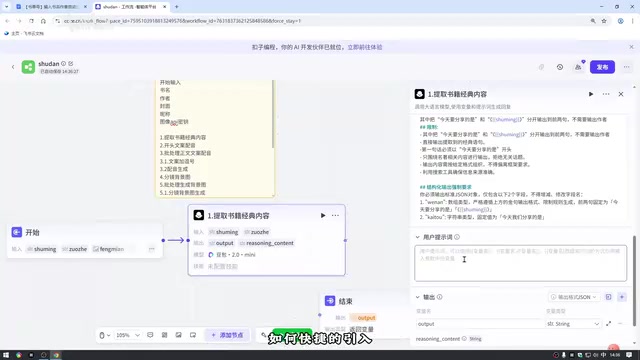
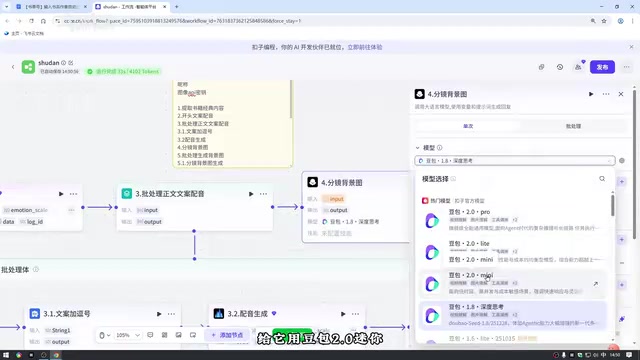
Add a large model node and select the Doubao 2.0 Mini model. Doubao 2.0 Mini is the lightweight version of ByteDance's Doubao large model series — it has lower calling costs and faster response times on the Coze platform, making it suitable for scenarios that require high-frequency calls with moderate output quality requirements. Key configurations:
- Settings: Increase the maximum reply length to avoid output timeouts. The "maximum reply length" parameter directly affects the token output limit — if set too low, the model will be truncated mid-output, causing JSON format corruption or incomplete book excerpt content.
- Input: Reference the book title and author from the start node
- System Prompt: Define the role as a book content extraction expert, requiring structured output
- User Prompt: Must reference input variables (use Shift+curly braces shortcut to insert)
- Output: Configure "copy" (array format) and "opening" (String format) as two output fields
Step 3: Generate Voiceover Audio
Opening Voiceover: Use the "Text-to-Speech" plugin with the opening copy from the large model output as input, selecting an audiobook-style voice.
Body Batch Voiceover: Use a batch processing node (maximum 10 at a time; it's recommended to lower this to avoid errors).
How batch processing nodes work is similar to a "parallel for loop" in programming — splitting an array into multiple independent tasks, executing them concurrently, then merging results back into an array output. This dramatically improves efficiency compared to traditional sequential processing, but introduces a critical pitfall: each subtask within the batch processor operates in an isolated independent context, so you must reference the current iteration item's output within the batch body, not outputs from external nodes.
The batch body contains:
- Text Processing (string concatenation): Add a comma at the end of each sentence to ensure natural pauses in the voiceover
- Text-to-Speech: Generate voiceover for the processed copy
Important reminder: When referencing data within the batch body, always select "content output by the batch body," not external node outputs. Although the content appears identical, choosing incorrectly will cause all subtasks to read the same fixed value, producing identical results.
Step 4: Batch Generate Storyboard Background Images
This is completed in two steps:
- Generate Prompts (large model node): Based on the copy array, generate 7 image descriptions closely related to everyday reading scenarios, output in array format
- Batch Image Generation (batch processing + image generation plugin): Use the Jimeng API to generate images based on prompts, supporting custom dimensions (4:3 or 9:16 recommended)
Jimeng is ByteDance's AI image and video generation platform. Its image generation capability is based on Diffusion Model technology, supporting high-quality image generation through text prompts. The choice of image aspect ratio directly affects how the final video displays on different platforms: Douyin's full-screen vertical format is 9:16, while Xiaohongshu's image-text covers commonly use 4:3 or 1:1.
Step 5: Copy Translation Processing
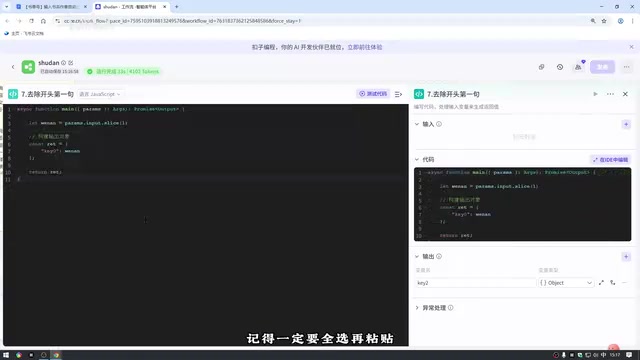
Remove the First Sentence: Use a code node to remove the first item from the copy array (since the opening has been processed separately). The code logic is simple — input an array, output a new array with the first item removed.
Opening and Book Title Translation: Large model node with deep thinking disabled to improve speed. "Deep thinking" mode (similar to OpenAI's o1 series reasoning models) causes the model to perform chain-of-thought reasoning before answering — while this improves accuracy for complex problems, it significantly increases response time. For relatively simple tasks like translation, the trade-off isn't worthwhile, and disabling it can substantially reduce latency.
Related articles
 Tutorials
ChatGPT Plus Subscription Guide: Are GPT-5.5, image-2, and Codex Worth the Upgrade?
A detailed look at ChatGPT Plus features — GPT-5.5, image-2, and Codex — with a Plus vs Pro comparison and a complete step-by-step subscription guide for users outside the US.
 Tutorials
Harness AI Engineering in Practice: Using Claude Code to Master Enterprise-Level E-Commerce Development
Deep dive into Harness AI Engineering: master enterprise e-commerce development with Claude Code using the Rules, Skills, Wiki, and Changes framework.
 Tutorials
Cursor + Codex Dual-IDE Collaboration: A Practical Methodology for Open-Source Project Customization
A complete methodology for open-source project customization based on real-world experience, detailing the Cursor+Codex dual-IDE workflow, seven-stage process, MVP validation, and AI source code reading techniques.