Coze Platform Tutorial: A Beginner's Guide to Architecture and Workflows

A beginner's guide to ByteDance's Coze platform: Agents, workflows, and AI Application architecture explained.
Coze is ByteDance's AI application development platform, comparable in scope to the open-source tool Dify but proprietary. It streamlines AI building into two categories: Agents and AI Applications. Agents can be extended via skills, knowledge bases, and memory, and support both single-Agent and multi-Agent collaboration. AI Applications add a visual drag-and-drop interface for delivering ready-to-use product pages. Workflows are the platform's most flexible module, with a node library that far exceeds Dify's, covering logic, databases, image processing, and plugins. Coze also supports custom plugins and Python/Java API integration for embedding AI into external systems. The free personal plan is sufficient for beginners to get started.
ByteDance's Coze is an AI application development platform with a feature set closely comparable to the open-source tool Dify. For beginners looking to quickly build AI Agents and workflows, Coze offers a relatively gentle onboarding path. This article is based on a comprehensive tutorial from a Bilibili creator, summarizing Coze's platform architecture, core concepts, and learning roadmap to help you build a solid foundational understanding.
What Is Coze: An AI Development Platform on Par with Dify
At its core, Coze is an AI tooling platform that lets you build all kinds of AI applications. It's similar to Dify — a platform many developers are already familiar with — supporting capabilities like Agents, workflows, and conversation flows.
The most critical difference between the two lies in openness: Dify is an open-source project, while Coze is not. This means that when we talk about Coze's "platform architecture," we're not analyzing source code — we're understanding the terminology, hierarchy, and logical organization involved in building AI applications on it.
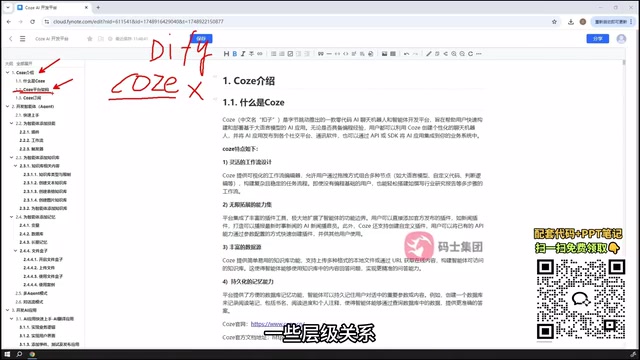
The two platforms also differ in application types. Dify supports five categories: chatbots, agents, text generators, workflows, and conversation flows. Coze streamlines this into two main types: Agents and AI Applications. Understanding this distinction is the starting point for mastering Coze — building AI on Coze essentially means choosing between these two approaches.
Subscription Model: Free Tier for Individuals, Paid Plans for Enterprise
Coze offers both a personal (free) plan and an enterprise plan. The personal plan includes a daily free quota, which is more than enough for learning and lightweight usage. If your usage is heavier or you have enterprise-level requirements, you'll need to upgrade to a paid plan.
For beginners, the free personal quota covers the vast majority of experiments during the onboarding phase — no upfront cost required.
Agent Development: From Single-Agent to Multi-Agent Patterns
Agents are the first major capability in Coze. The tutorial's approach is to start with a quick hands-on example to build intuition, then gradually move into more advanced configurations.
Agent capabilities can be extended along three dimensions:
- Skills: Add callable tool capabilities to an Agent
- Knowledge Base: Enable the Agent to retrieve domain-specific knowledge
- Memory: Allow the Agent to maintain context and state across conversations
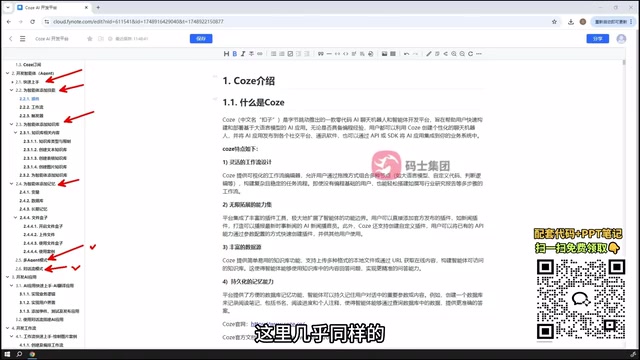
Beyond that, Coze Agents support different organizational patterns. In addition to the standard single-Agent setup, Coze also offers a multi-Agent mode and multi-conversation mode. Multi-Agent means multiple agents collaborate to handle complex tasks — ideal for scenarios that require a clear division of labor. The tutorial includes dedicated examples for each mode, making it easy to understand when each pattern applies.
Multi-Agent architectures generally follow two paradigms: the Orchestrator-Worker pattern, where a primary Agent handles task decomposition and dispatches subtasks to specialized Agents; and the Collaborative pattern, where multiple Agents process their respective areas in parallel and then consolidate results. This architecture draws inspiration from microservices in software engineering. The core advantage is that a single Agent has a limited context window — pushing complex tasks to one Agent can lead to information loss or reasoning errors. By splitting the work, each Agent only needs to focus on its assigned subproblem, significantly improving overall reliability. In practice, multi-Agent setups are well-suited for workflows like content production (Research Agent + Writing Agent + Proofreading Agent) or tiered customer service (Intent Recognition Agent + Business Processing Agent).
AI Application Development: Visual Interfaces and Nested Workflows
AI Applications are the second major capability in Coze. Although they may seem to take up less space in the tutorial outline, that doesn't mean they're simple — in fact, AI Applications often go deeper, since their more complex workflow components are broken out into a dedicated chapter.
The distinction between AI Applications and Agents is worth noting: Agents focus on calling tools to complete user tasks, while AI Applications go further — they can embed workflows that guide the LLM through user-defined steps, and they also support a visual interface.
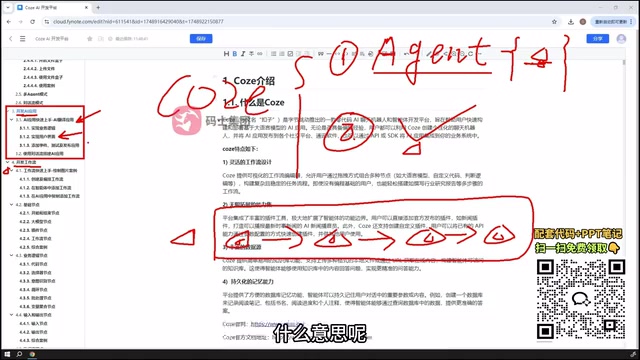
Using a drag-and-drop approach, users can assemble a complete application page. End users can then interact with the AI directly on that page — whether chatting, generating images, creating presentations, or other tasks — all within the visual interface. This makes Coze AI Applications feel closer to a "deliverable product" rather than just backend functionality.
Workflow Development: Coze's Most Flexible Core Module
Workflows are the most worth mastering in the Coze ecosystem. Simply put, a workflow is a data processing or task execution pipeline built to your specifications — a series of connected nodes that guide the LLM through predefined steps to complete a task.
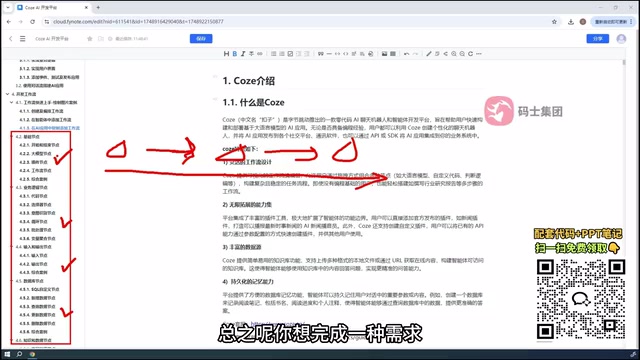
It's worth emphasizing that Coze's workflow node library far exceeds Dify's in both quantity and flexibility, and even includes nodes submitted by third-party users. The tutorial systematically categorizes nodes by type:
- Basic Nodes: The skeleton of a workflow
- Business Logic Nodes: Handle conditional branching, loops, and other logic
- Input/Output Nodes
- Database Nodes
- Knowledge & Data Nodes
- Image Processing Nodes
- Plugin Nodes
Given the sheer volume of nodes, no tutorial can cover them all. A more practical approach is to master commonly used nodes while learning to "search on demand" — when you have a specific need, just search for the corresponding node directly on the platform.
The underlying logic of workflows closely mirrors a Directed Acyclic Graph (DAG) in programming: each node represents an operation unit, the connections between nodes define data flow and execution order, and the graph cannot form circular dependencies (unless you explicitly use loop nodes). This design allows workflows to be visually "drawn" while also natively supporting parallel execution — when two nodes have no dependency on each other, the platform can trigger them simultaneously to improve efficiency. Compared to writing code directly, the core value of workflows lies in decoupling LLM calls from traditional logic processing: data retrieval, conditional branching, and format conversion are handled by dedicated nodes, while LLM nodes focus solely on natural language understanding and generation — significantly improving the maintainability and debuggability of the entire pipeline.
Plugins and Code Integration: Two Ways to Extend Capabilities
Coze's plugin system is similarly open. Within workflows, nodes can be in plugin form; within Agents, you can designate specific plugins for the Agent to call. Coze supports official plugins, community-submitted plugins, and user-defined custom plugins — when neither official nor community options meet your needs, custom plugins serve as a reliable fallback.
Finally, there's code-level integration. Once you've built an Agent, if you want to call it programmatically, Coze provides API support, allowing you to interact with the Agent via Python, Java, or other languages. This opens the door to integrating Coze capabilities into your own systems.
Coze's API essentially wraps an Agent you've built on the platform into a standard HTTP endpoint. External programs send user messages via POST requests with an API Key, and the platform returns the Agent's responses. This is similar in form to OpenAI's Chat Completions API — but instead of calling a bare model, you're calling a fully configured Agent (including its bound plugins, knowledge base, and workflows). This means developers can handle complex business logic orchestration in Coze's visual interface, then connect it to a WeChat bot, internal enterprise system, or any custom application with just a few lines of Python — no need to build your own backend, dramatically lowering the engineering barrier between "knowing how to use AI" and "getting AI into a product."
Learning Recommendations: Start with Examples, Reference Docs as Needed
It's worth being realistic: the majority of Coze tutorial content is derived from the official documentation. The creator's added value lies primarily in supplementing with hands-on examples. The official docs contain far more detail, and the tutorial only covers the core essentials needed for onboarding.
For beginners, this learning path is more than sufficient: start by following examples to get Agents and workflows running end-to-end and build intuitive understanding, then dive into the official docs when specific needs arise. Once you're comfortable with Coze, you'll also be better equipped to judge when to choose Coze over Dify for a given scenario — which is exactly the comparison the tutorial wraps up with.
Related articles

AgentCore in Practice: Connecting Custom Tools and MCP Servers to Agents
DebuggerCafe tutorial shows how to connect custom tools and MCP servers to Amazon Bedrock AgentCore agents, covering tool contract design, MCP reuse, and production concerns.

816B Parameters Scores Only 39? The Real Cost-Effectiveness of the Open-Source LLM Parameter Race
Meta's 816B Muse Spark Open scores just 39 on Artificial Analysis, while 180B Qwen3.8-Flash-Next scores 40. This article analyzes 11 open-weight models' parameters vs. scores, exploring the real impact of activated parameters, quantized size, and deployment cost.

Aerial Manipulators: The Next Step for Drones from 'Seeing' to 'Changing'
Starting from a Reddit discussion, this article analyzes the technical challenges, potential applications, and deployment bottlenecks of aerial manipulators, exploring the key challenges for drones moving from environmental perception to physical manipulation.