Cursor 2.0 Download, Installation & Subscription Guide: Get Started from Scratch in 5 Minutes

A beginner's guide to downloading, installing, and subscribing to the Cursor 2.0 AI coding tool
This article provides a complete getting-started guide for the AI coding tool Cursor 2.0, covering download and installation from the official site, registration and login, and a comparison of three subscription plans (Pro $20/month, Pro+ $48/month, Business $160/month) with purchasing recommendations. Cursor has eliminated its free tier, so beginners are advised to start with a monthly Pro Basic subscription. It supports Alipay payment, and its core advantage is integrating top AI models like GPT, Claude, and Gemini in one place.
Cursor is currently the hottest AI coding tool and has become the go-to IDE for an increasing number of developers. With the continuous iteration of version 2.0, both functionality and user experience have seen significant improvements. This article will walk you through the entire setup process for Cursor 2.0—from download and installation to subscription purchase—so even complete beginners can get up and running quickly.
Downloading & Installing Cursor 2.0
Downloading the Installer
Visit the official Cursor website at cursor.com. The page will automatically detect your operating system and display the corresponding download button. Windows users click "Download for Windows," while Mac and Linux users will see download options for their respective platforms. The interface and features are essentially identical across all three platforms, so there's no need to worry about compatibility.
The latest version is currently 2.6.13. Cursor updates extremely frequently—almost every few days—so it's recommended to keep auto-update enabled for the best experience.
Installation Steps
After downloading, double-click the installer to begin. The entire process is straightforward:
- Accept the license agreement
- Choose whether to create a desktop shortcut (recommended)
- Click "Install" and wait for installation to complete
- Click "Finish" to launch Cursor
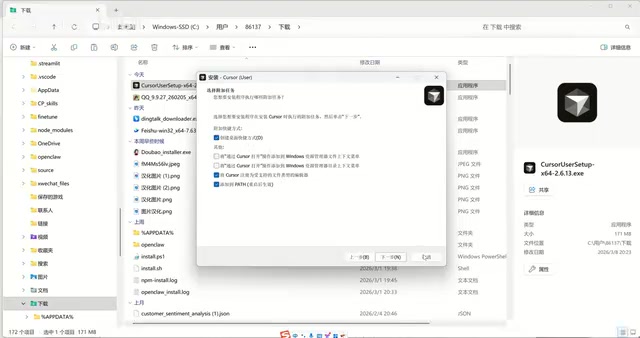
The entire installation takes just a minute or two with no complex configuration options—very beginner-friendly.
Registration & Login
When you first launch Cursor, you'll need to register an account. If you've already registered before, simply click Sign In to log in. The registration process is also simple—just follow the on-screen prompts to enter your email and set a password.
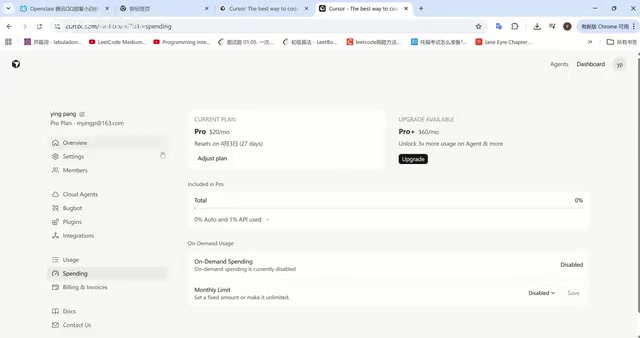
After logging in, you can check your current usage (Spending) in your account settings, including the number of model calls used and remaining quota.
Cursor Subscription Plans Explained
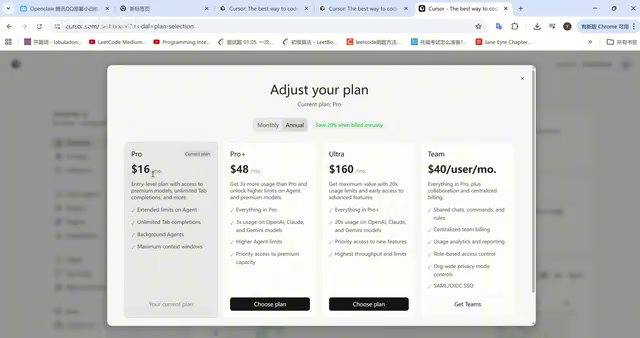
Important note: Cursor has eliminated its free tier. After registration, you'll need to purchase a subscription to use the AI coding features. Here's a detailed comparison of the three subscription plans:
Pro Basic ($20/month)
This is the entry-level plan, which drops to $16/month with annual billing—saving you $48 per year. This plan includes:
- Access to premium models (mainstream large language models)
- A set number of model call credits
- Automatic downgrade to smaller models once your quota is exhausted
For users who write Python scripts daily or work on small projects, the Pro Basic plan is more than sufficient.
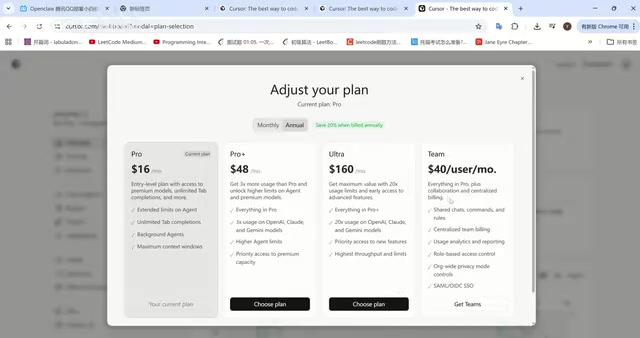
Pro+ Advanced ($48/month)
Designed for heavy coding users, this plan provides 3x the call quota for top-tier models like OpenAI, Claude, and Gemini. If you use AI-assisted coding extensively every day and frequently interact with models, Pro+ is the better choice.
Business Enterprise ($160/month)
Offers 20x the model call quota and supports team collaboration, code sharing, and other enterprise-grade features—ideal for development teams.
Purchase Recommendations
For users new to Cursor, here are some practical tips:
- Start with a monthly subscription: For your first time, buy just one month to try it out. If you like it, then consider switching to annual billing.
- Purchase directly from the official website: Alipay payment is supported, coming to approximately 140 RMB/month. Avoid purchasing through third-party channels like Taobao, as there are account security risks.
- Choose annual billing for long-term use: Once you've committed to long-term use, annual billing saves $4/month—$48 per year.
Mainstream Coding Models Supported by Cursor
The top-performing models in code generation currently include OpenAI's GPT series, Anthropic's Claude, and Google's Gemini. Cursor's core advantage lies in integrating all these top-tier models, allowing users to flexibly switch between them depending on the coding task. There's no need to purchase API access from each provider separately—one subscription gives you access to all mainstream AI models.
Summary
The installation and configuration process for Cursor 2.0 has been simplified to the extreme. Even users with zero programming background can complete the entire journey from download to first use in under 5 minutes. While the entry price of $20/month isn't exactly cheap, considering it integrates coding capabilities from multiple top-tier AI models, the boost to development productivity is very real.
Beginners are advised to start with the Pro Basic plan and decide whether to upgrade to Pro+ based on actual needs as usage deepens. In our next article, we'll dive deep into Cursor 2.0's core features and usage tips—stay tuned.
Related articles
 Tech Frontiers
A Rare Quiet Day in AI: Recursive Self-Improvement Stirs Beneath the Surface
A rare quiet day in AI sees multiple sources go silent simultaneously. Behind the calm, Recursive Self-Improvement (RSI) research continues. What this means for the industry.
 Tech Frontiers
Reve 2 vs. Ideogram 4: A Deep Dive into Layout Control in AI Image Generation
A deep comparison of Reve 2 and Ideogram 4's layout control capabilities, covering technical approaches, real-world use cases, and industry trends for designers and creators.
 Tech Frontiers
In the Weights: Check Your Influence Score in the AI World
In the Weights is an AI influence search engine that quantifies your presence in the AI world with a score. Explore how it evaluates practitioners and what it means for digital identity.