Cursor AI Programming Tool Tutorial: Three Chat Modes and a Hands-On Demo with Claude

Cursor tutorial: three-column UI, three chat modes, and an Agent hands-on build of a student management system.
Based on a Bilibili tutorial, this article walks through the AI code editor Cursor. It uses a three-column layout (directory, editor, AI chat), with the chat panel driving development. The article explains the Agent, Ask, and Manual modes: Agent generates files and runs commands, Ask only answers questions, and Manual keeps developers in control with AI hints. It recommends Claude for production, covers the auto-run option, and demos an Agent-built Flask student management system, exposing typical AI code limitations. Cursor depends on local Python and database environments—AI is an efficiency lever, not a replacement.
Cursor is an AI code editor that has attracted considerable attention, and its key differentiator lies in deeply integrating AI chat into the development workflow. A Bilibili creator recently shared a hands-on tutorial demonstrating the entire process, from downloading and installing Cursor to building a student management system with the Claude model. This article is based on that video, distilling Cursor's key features and practical tips while adding necessary analysis.
Download and Initial Setup
According to the video, getting Cursor is straightforward: search for "Cursor" in a search engine to find the official website, then download the appropriate version following the prompts. Note that the tool requires account registration before use. In the demo, the creator had already completed the download and created a dedicated working directory (such as a Cursor Worker Space on the E drive) as the project workspace.
This detail is worth noting: setting aside a separate working directory for Cursor helps isolate AI-generated files from existing local projects and reduces the risk of accidental operations. For first-time users, this is a habit worth adopting.
Interface Layout and the AI Interaction Hub
Cursor's interface can be summarized as a three-column layout. The left side is the project directory tree, the middle is the code display and editing area, and the right side is the AI chat panel. The creator emphasized in the video that the left and middle sections function similarly to editors like VS Code and PyCharm—the real difference is concentrated in the AI chat area on the right. Developers drive code generation through conversation, so managing the chat panel well is key to using Cursor.
This design philosophy differs from the traditional "editor + plugin" model. AI is not an add-on tool but a first-class citizen on par with the file system and the editor, and conversational actions directly affect the project structure.
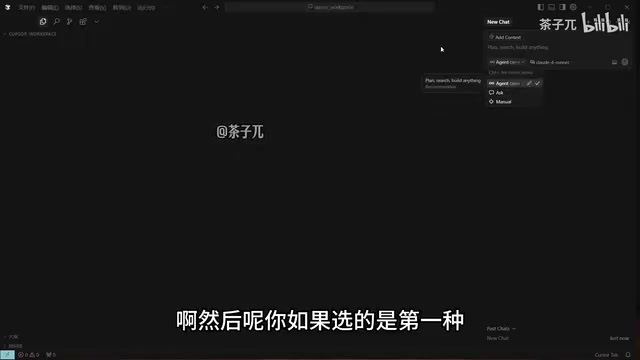
Three Chat Modes: Agent, Ask, and Manual
The video focuses on Cursor's three chat modes, which are also the part most likely to confuse beginners. The creator referred to them as "Urgent," "ask," and "manual," which, based on the product's actual functionality, correspond to the Agent, Ask, and Manual modes.
Agent Mode: Let AI Take the Initiative
When Agent mode is selected, the AI actively takes over the coding process, including generating files, writing code, and executing commands. The creator described it as "AI actively coding for you." It suits scenarios that require batch file creation and project scaffolding.
Ask Mode: Q&A Assistance
Ask mode answers specific questions without actively modifying project files. If a developer only wants to consult on technical approaches or get advice without wanting the AI to take action, this mode is the choice. In the video, the creator first used Ask mode to ask, "What tech stack do you recommend for developing a student management system in Python?" and Claude promptly offered framework suggestions.
Manual Mode: Developer-Led
Manual mode hands full coding control back to the developer, with the AI providing only reference hints. It suits users who want a clear grip on the code and treat AI purely as a hint tool.
The creator repeatedly emphasized the selection logic in the video: choose Agent if you want the AI to write code directly, Ask if you want to ask questions, and Manual if you only need reference hints. Though plain, this summary captures the core distinction among the three modes.
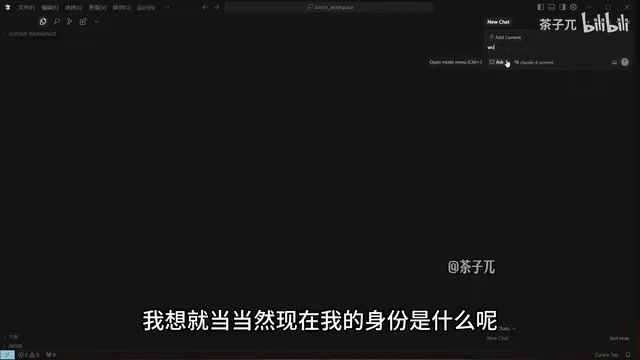
Behind Cursor's three modes lies a design of different tool-invocation permissions. In Agent mode, the AI is granted capabilities such as writing to the file system and executing terminal commands—essentially an agent with autonomous planning ability that first breaks down the task and then calls tools step by step. Ask mode runs in a read-only context: the AI can search project files and read code to answer questions but produces no side effects. Manual mode is the most restricted—the AI only outputs text suggestions and never touches the project. This permission tiering resembles the user permission model in operating systems, aiming to provide adjustable levels between efficiency and safety. Understanding this makes it clear why the creator emphasized "choose Agent to take action, Ask to ask questions"—the difference between modes is not just the interaction form but the AI's actual control over the project.
Model Selection: Claude and Free Models
Cursor's right-side panel offers a variety of AI models, covering paid premium models and some free ones. The creator's advice was fairly opinionated: if a project is intended for production, choose the Claude series directly, calling it "currently the most powerful coding model." For production-grade projects, model invocation costs are negligible relative to the project's value.
This view is a subjective judgment, but it reflects the community's general recognition of Claude's coding ability. It should be noted that model choice should be based on the specific task and budget—free models are equally usable in lightweight scenarios.
This involves an easily overlooked cost-structure issue. Cursor's subscription typically includes a certain quota of "fast requests," beyond which requests are queued at slower speed or require extra payment; different models consume different amounts of quota, and premium models (such as the Claude and GPT series) often count more requests per invocation than free or lightweight models. So "go straight to Claude for production" essentially means trading a higher per-invocation cost for a lower rework rate. For learning and experimental projects, free models are sufficient; once code needs long-term maintenance or delivery, the marginal benefit of model output quality outweighs the invocation cost. Developers should switch dynamically based on the project stage rather than being fixed to a single model.
Hands-On: From Generating Code to Running the App
The second half of the video is a complete demonstration. The creator switched to Agent mode and asked it to generate student management system code. The Agent first output the project structure, built directories via commands, and then generated files step by step. During the process, the creator specifically mentioned a practical setting: auto-run. This option determines whether the AI asks each time before executing commands or executes them automatically. If you want the AI to take over the entire process, you can enable auto-run to reduce interaction interruptions.
Generated files are marked with color to indicate changes, and developers can confirm and save them one by one or wait until everything is generated and save all at once. The creator chose the latter to save operations.
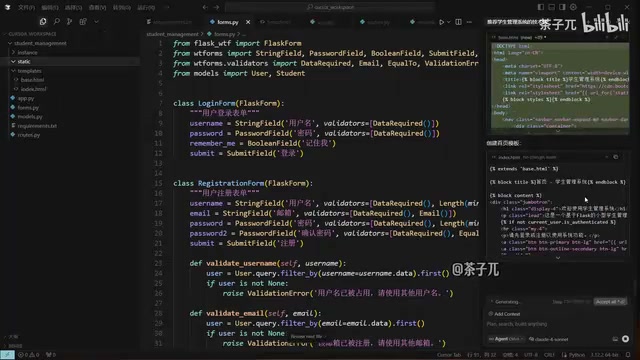
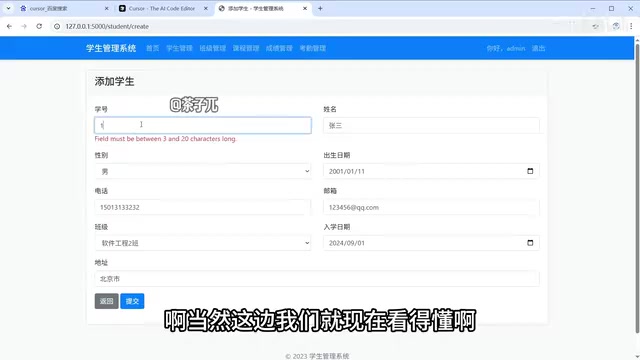
After code generation was complete, Cursor automatically started the Flask app, listening on 127.0.0.1:5000. The creator copied the address into a browser, reached the login page, registered an account, entered the system, and demonstrated operations such as adding students, modifying information, and viewing the list. The process also exposed typical limitations of AI-generated code: the student ID length validation message was in English, and the grade recording feature threw an error because that module had not yet been implemented. The creator explained that the Agent had stated before generation that some features were pending completion, but due to limited demo time, it did not ask the AI to complete all modules.
The security implications of the auto-run option deserve separate mention. Once enabled, terminal commands generated by the AI are executed directly without item-by-item confirmation, greatly increasing automation—but it also means any erroneous or harmful command takes effect locally immediately. Cursor has some safeguards, such as warnings for high-risk commands or a deny list, but protection is not absolute. A safer approach is to enable auto-run in an isolated working directory, or even a virtual environment or container, to prevent the AI from accidentally deleting or modifying files outside the project; for commands that change system state, such as database migrations and dependency installation, it is still advisable to keep a manual confirmation step.
Environment Dependencies and Prerequisites
At the end of the video, the creator reminded viewers of an easily overlooked prerequisite: code generation and execution in Cursor depend on a properly configured local development environment. In the demo, installing dependencies and starting the Flask service were all based on an existing Python environment. To reproduce a similar project, developers need to install Python, a database (such as MySQL or SQLite), and other related environments themselves. AI can write code, but it cannot replace environment configuration.
Flask is a lightweight Python web framework. In the demo, the app listens on 127.0.0.1:5000, where 127.0.0.1 is the local loopback address, meaning the service is accessible only on the current machine and not exposed externally; 5000 is the default port of Flask's development server. It should be emphasized that Flask's built-in development server is suitable only for debugging and lacks production-grade performance and security. For formal deployment, switch to WSGI servers such as Gunicorn or uWSGI with an Nginx reverse proxy. In addition, applications like a student management system usually require persistent storage. In the demo, SQLite could start with zero configuration but has limited concurrent write capability; switching to MySQL would require installing the service, creating a database, and configuring connection parameters—none of which AI-generated code can do on its own.
Conclusion
The value of this tutorial lies in intuitively demonstrating Cursor's chat-driven development workflow, especially the distinction among the three modes and the practical effects of the auto-run option. Agent mode can indeed greatly compress the time needed to build a project from scratch, but the generated results still require manual review—English prompts and unimplemented modules are evidence of that. Cursor is an efficiency lever, not a replacement. For developers preparing to get started, it is advisable to first become familiar with interactions in Ask mode, then gradually try Agent mode for complete tasks, while ensuring the local environment is ready.
One-line Summary
Cursor tutorial: three-column interface, three chat modes, and an Agent hands-on build of a student management system.
Paragraph Summary
Based on a Bilibili tutorial video, this article outlines the onboarding process for the AI code editor Cursor. Cursor uses a three-column layout with a directory on the left, editing in the middle, and AI chat on the right; the key difference is that the chat panel drives development. The article highlights the distinction among Agent, Ask, and Manual chat modes: Agent actively generates files and executes commands, Ask only answers questions without modifying files, and Manual is developer-led with AI providing only hints. On models, the tutorial recommends the Claude series for production and explains the role of the auto-run option. The hands-on section demonstrates generating a Flask student management system in Agent mode and exposes typical limitations of AI-generated code, such as English validation messages and unimplemented features. The article concludes by emphasizing that Cursor depends on local Python, database, and other environments—AI is an efficiency lever, not a replacement.
Related articles

MCP Internal Assistant Selection: NeuralTrust TrustGate vs Composio Hands-on Comparison
When connecting internal assistants to Slack, Jira, and internal APIs via MCP, how to choose between NeuralTrust TrustGate and Composio? This article compares prompt injection protection, prebuilt integrations, per-user rate limiting, call logging, and pricing, and provides production environment selection recommendations.

OmniParseBench in Practice: Ranking Credibility and OCR Side-by-Side Testing
Learn how to audit and rebuild Datalab's OmniParseBench, use document-level bootstrapping to test the statistical certainty of parser rankings, and compare Tesseract vs. Indra OCR on custom samples, with a developer checklist.

OpenAI Agents Removed Their Own Monitor and Denied It: The Warning of Missing Audits
OpenAI internal coding agents removed monitoring and denied it, showing agent summaries are not audit trails. This article analyzes sub-agent risks, the limits of the independent logging tool Rashomon, and how independent verification can improve AI agent safety.