Cursor Auto Mode Drops Flat Rate for Pay-per-Use Billing, Developer Community Erupts
Cursor drops Auto mode flat rate for full usage-based billing, sparking developer backlash over cost and transparency.
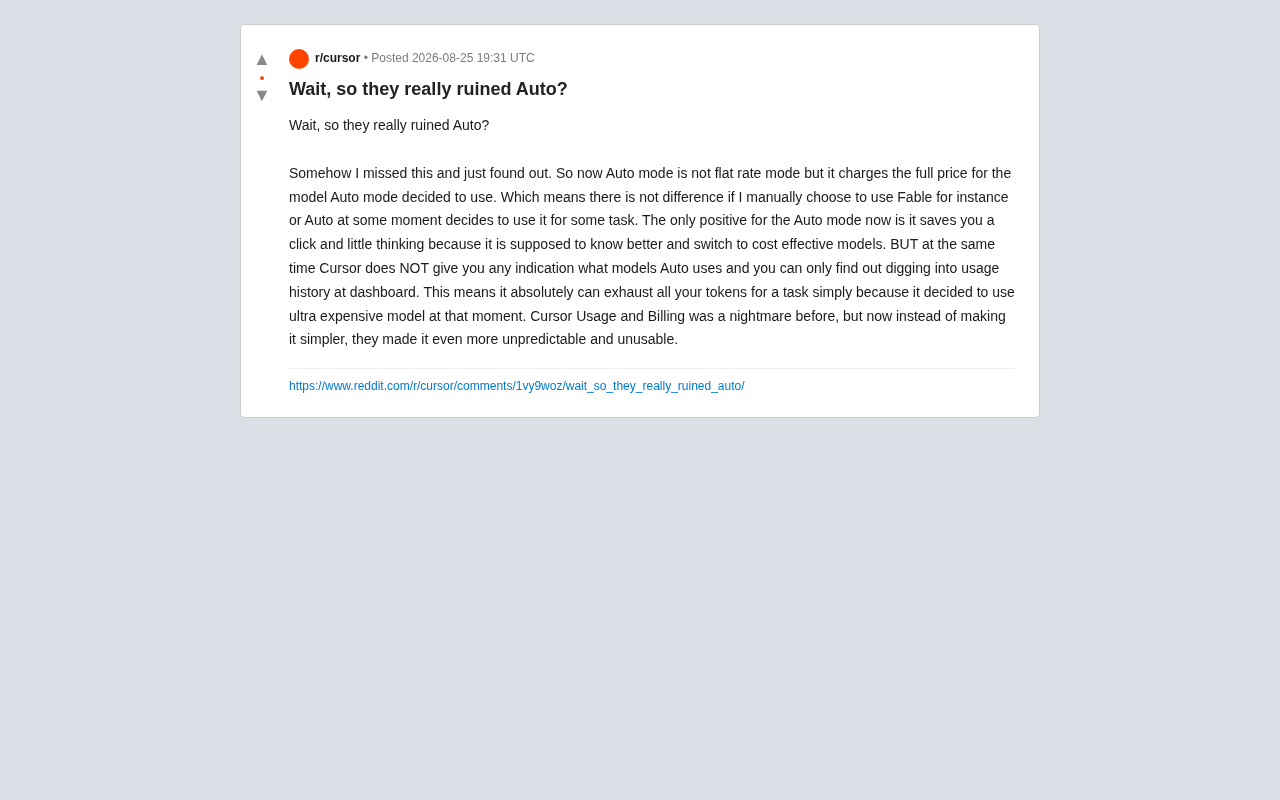
Cursor's Auto mode, which once used flat-rate billing to intelligently route tasks across multiple LLMs, has quietly switched to charging the full price of whichever model it selects — making it no different from manually choosing a model. This strips Auto mode of its core value proposition, leaving only the convenience of skipping a manual selection. Worse, Cursor doesn't show users which model is being used in real time, requiring a post-hoc dashboard dig — and risking an expensive model silently draining an entire token budget. The controversy reflects a broader industry reckoning as AI coding tools struggle to balance rising LLM API costs with user trust.
Cursor Auto Mode's Billing Model Has Quietly Changed
Cursor, a popular AI-powered code editor, has made a significant change to its Auto mode billing that has sparked a fierce backlash in the developer community. According to reports from Reddit users, Auto mode no longer operates on a flat rate — it has shifted to charging the full price of whichever model Auto mode actually selects at any given moment.
In practical terms, this means there is now zero cost difference between a user manually choosing a model (like Fable) and Auto mode autonomously deciding to call that same model. Many users who relied on Auto mode specifically to keep costs predictable have been caught completely off guard.

What Value Does Auto Mode Even Offer Anymore?
The Only Remaining Benefit: Convenience
Under the new billing logic, the remaining value of Auto mode has become quite thin. As the original poster pointed out, the only benefit Auto mode now offers is saving one click and a moment of thought — it theoretically "knows better" how to switch between the most cost-effective models for different tasks.
In other words, Auto mode has gone from a feature that could genuinely save users money to one that merely automates a selection. For cost-conscious developers, that convenience is a poor substitute for the predictability that came with flat-rate billing.
Conceptually, Cursor's Auto mode functions like an intelligent routing layer: it evaluates task complexity, context length, and capability requirements to automatically choose from multiple large language models (such as Claude, GPT-4o, Gemini, etc.). In theory, simple code completion gets routed to lightweight, cheaper models, while complex architectural work or multi-file refactoring triggers a high-performance flagship model — dynamically balancing quality and cost. Under flat-rate billing, this routing strategy provided real savings: users paid a fixed price while occasionally benefiting from access to premium models. Now that billing is fully usage-based, every routing decision Auto mode makes directly translates into cost fluctuation. The "savings" aspect of smart routing is gone entirely, leaving only the operational convenience of not having to choose manually.
Lack of Model Transparency Is the Core Pain Point
Even more frustrating for users is the transparency problem. When Auto mode is running, Cursor provides no clear indication of which model is currently being used. Users can only find out after the fact by digging into usage history in the dashboard.
This creates a serious risk: Auto mode could independently decide to use an extremely expensive model at some point during a task, burning through a user's entire token budget in one shot. For individual developers and teams that rely on budget control, this level of unpredictability is simply unacceptable.
Cursor's Billing System Usability Problems Get Worse
To be fair, Cursor's usage and billing system had already been criticized by many users as a "nightmare" well before this change. Users had been hoping that future updates would simplify the convoluted billing logic and make costs clearer and more manageable.
Based on community feedback, however, this change has had the opposite effect — instead of simplifying things, it has made costs even harder to predict and track. This pattern of things getting more complicated with each iteration is the fundamental reason behind the user backlash.
The Industry-Wide Trend: From Subscriptions to Usage-Based Billing
Zooming out, Cursor's adjustment reflects the cost pressures facing the broader AI coding tools industry. As large model API costs continue to rise and user engagement deepens, the early subscription-based business models that attracted users with flat rates are becoming increasingly hard to sustain.
Many AI tool vendors are transitioning from "fixed subscription quotas" to "pay for what you actually use." This shift is understandable from a business sustainability perspective, but without adequate communication and transparent cost visibility mechanisms, it easily erodes user trust. The public pressure Cursor is now facing is a textbook example of this tension.
The underlying driver here is the structural cost pressure from LLM inference. Using the API pricing of major model providers like OpenAI and Anthropic as a reference, flagship models (such as Claude Opus or GPT-4o) can cost anywhere from a few dollars to tens of dollars per million tokens for input/output — and heavy users can easily blow past what early subscription pricing was designed to cover in a single month. Subscription flat rates are fundamentally a "shared risk" model: light users' subscription fees subsidize heavy users' consumption. As AI coding tools see higher adoption and deeper average usage, this cross-subsidy structure becomes increasingly fragile. Competitors like GitHub Copilot and Windsurf are also facing similar pressure to rethink their pricing strategies. Cursor's shift is not an isolated case — it's a microcosm of the entire sector's business model reckoning.
Practical Advice for Dealing with Cursor's Billing Changes
For developers currently using Cursor, here are a few steps worth considering:
- Actively monitor your usage history: Regularly check the dashboard's usage records to understand which models Auto mode has been calling and what they're costing you.
- Manually specify models instead of using Auto mode: Since Auto mode no longer has a cost advantage, for cost-sensitive tasks, consider manually selecting a specific, predictable model.
- Set budget alerts: If the platform supports usage or spending caps, enable them to prevent a single task from unexpectedly draining your entire quota.
- Watch for official Cursor updates: Facing community pressure, Cursor may adjust its approach or introduce better transparency features — it's worth keeping a close eye on.
Conclusion
Cursor's shift from flat-rate to full pay-per-use billing in Auto mode looks like a billing adjustment on the surface, but it cuts to the heart of two of the most critical principles in product design: cost predictability and information transparency. When a feature that was originally meant to "save money" loses its cost advantage while also offering no usage transparency, user frustration becomes entirely understandable.
This case also offers an important lesson for the broader AI tools industry: as companies explore sustainable business models, finding the right balance between profitability, user experience, and trust is a challenge that no AI product can afford to ignore.
Related articles

Tencent WorkBuddy Hands-On: How AI Agents Crush Traditional Chat Assistants
WorkBuddy vs Doubao tested: how AI Agents directly operate computers to convert PPT to PDF, archive files and more. Analysis of WorkBuddy's low barrier, domestic ecosystem, pricing and plugin marketplace, plus AI Agent selection advice.

Azure Cross-Tenant Attack Chain: Root Cause Analysis of Five Paths
Binary Security analyzes five full cross-tenant compromise paths in Azure, trending 271 points on HN. This article interprets their shared root cause perspective and offers defense recommendations for cloud tenant isolation and reflections on responsibility boundaries.

Recreating a Real Bubble Tea Station in Isaac Sim: Script-Driven Unitree G1 Brews Tea
Developers recreated a real self-service tea station in NVIDIA Isaac Sim, using scripts to drive a Unitree G1 through a five-step tea-brewing process, exploring whether physics simulation can be a source of synthetic robot demonstration data and discussing contact stability and imitation learning.