Cursor Auto Mode Still Charging? Check Sub-Agent Model Settings

Cursor's Auto mode only constrains the parent agent; sub-agents can run high-cost models and silently incur charges.
The article notes that Cursor users commonly assume setting chat mode to Auto prevents credit consumption, but official docs state the model selector only sets the parent agent's model, while sub-agents can independently specify third-party models like Claude Opus or Fable and bill to prepaid credits or other model pools. Sub-agents bypass Auto settings by hardcoding model IDs in `.cursor/agents` and `.claude/agents` files, causing users to exhaust extra credits after just two prompts. The article recommends checking these config files, setting models to `inherit` or plan-included Composer 2.5, and auditing sub-agent run records via the usage dashboard; team admins can restrict available model ranges to control costs.
Why Does Auto Mode Still Consume Extra Credits?
Many Cursor users assume that setting the chat mode to Auto will prevent credit consumption, but that's not the case. According to analysis from a YouTube channel, even when the parent agent uses Auto mode, sub-agents may still run designated third-party models like Claude Opus or Fable, consuming prepaid credits or other model pools. Cursor's official documentation explicitly states that the model selector only sets the model for the parent agent and does not constrain sub-agent behavior.
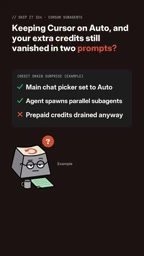
This mechanism causes users to unknowingly exhaust extra credits after just two prompts. Sub-agent model selection is independent of the parent agent, so Auto mode is not a safeguard for saving credits.
Parent agents and sub-agents are core concepts in Cursor's multi-agent architecture. The parent agent refers to the main agent the user interacts with directly in the chat interface, responsible for understanding requirements and breaking down tasks; sub-agents are execution units spawned by the parent agent that can handle subtasks in parallel (such as code search, file editing, and test running). The key point is that the two have independent model configurations: the model selector only applies to the parent agent, while sub-agent models are determined by their own configuration files. So even if the parent agent is set to Auto (where the system automatically selects low-cost or available models), sub-agents may still be hardcoded to high-cost models like Claude Opus, and their calls are billed to prepaid credits or separate model pools. This design improves task execution flexibility but also makes credit consumption opaque.
How Do Sub-Agents Bypass Auto Mode and Incur Charges?
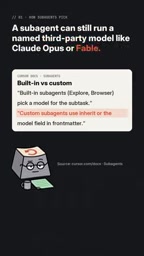
Sub-agents can specify models independently — for example, by hardcoding third-party model IDs like Claude Opus in configuration files. Even when the chat interface shows Auto, sub-agents will still run according to the hardcoded model and count toward prepaid credits or other model pool consumption. The YouTube channel points out that this explains why users still see credits draining quickly despite having Auto enabled.
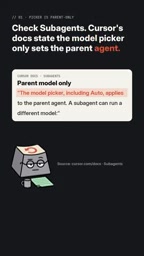
This design separation means users need to proactively check sub-agent model configurations rather than relying on the parent agent's Auto setting.
Hardcoded model IDs refers to writing specific model identifiers (such as claude-opus-4, fable, etc.) directly into agent configuration files instead of using dynamic selection or inheritance. In Cursor, configuration files under the .cursor/agents and .claude/agents directories can declare the model field for sub-agents; once a third-party model ID is hardcoded, that sub-agent will ignore the parent agent's Auto setting and always run with the specified model. Auto mode is essentially "automatic routing" at the parent agent level and has no downward-binding force. Hardcoded models often stem from template copying, third-party agent packages, or legacy configurations, and are hard to notice unless users check each file. This is also the typical reason extra credits are exhausted after two prompts: each task may trigger multiple sub-agents, each billed at a high-cost model.
How to Check and Fix Sub-Agent Model Settings
To avoid unexpected charges, users should check the .cursor/agents and .claude/agents files in their projects to look for hardcoded model IDs. If a third-party model is specified, you can set the model to inherit (inherit from the parent agent) or pin it to a Cursor model included in your plan, such as Composer 2.5.

Additionally, users can audit sub-agent run records in the usage dashboard to see which models were actually called. For team accounts, administrators can restrict the range of models available to team members to control costs at the source.
inherit is a special value in sub-agent model configuration that indicates the sub-agent does not specify an independent model but instead uses the model currently in use by the parent agent. After setting the sub-agent model to inherit, the parent agent's Auto mode can truly cover the sub-agent, restoring the expectation that "Auto means saving money." Another approach is to pin to a Cursor-native model included in your plan (such as Composer 2.5), which typically does not consume extra prepaid credits. When fixing, prioritize all configuration files under .cursor/agents and .claude/agents, focusing on third-party model IDs in the model field; for team scenarios, you can also restrict the available model range at the organization level so members cannot select high-cost models.
Usage Monitoring and Team Governance Recommendations
Beyond checking configuration files, regularly auditing the usage dashboard is an effective way to detect abnormal consumption. According to the analysis, sub-agent run records appear in the dashboard, allowing users to identify whether high-cost models were called. For teams, restricting the model pool can prevent members from inadvertently using expensive models.
In short, Auto mode is not a universal money-saving switch. Understanding the independent model configuration mechanism of sub-agents is essential to effectively managing Cursor usage costs. If you encounter similar issues, consider reporting them to the relevant community.
Related articles

Gemini 4 Neon Leak: A Potential Strong Contender Against Opus 5.5
A Hacker News thread suggests Gemini 4 Neon looks like an Opus 5.5 competitor. This article unpacks the product positioning behind this community signal, shifts in the top-model competitive landscape, and what it means for developers' model selection strategy.

Claude Fable 5.2's Self-Authored Short Film 'Fable' Sparks Discussion
A short film 'Fable,' credited to Claude Fable 5.2 for script, visuals, and directing, appears on Hacker News. This article analyzes the significance of full-pipeline AI creation, community reactions, and what it means for content creators.

Anthropic IPO Pricing: A Signal of AI Giants Going Public
Anthropic's IPO pricing draws attention. This article analyzes its potential impact on AI industry valuation, commercialization paths, and the competitive landscape, and highlights public-market expectations and challenges for AI companies.