Cursor Beginner's Guide: 2024 AI Coding Tools Comparison & Selection Guide
A comprehensive 2024 guide comparing top AI coding tools to help developers choose the right assistant.
This article introduces the core philosophy of AI programming — using natural language to interact with large language models to generate code, enabling even non-technical users to build software. It compares leading AI coding tools (Cursor, GitHub Copilot, Windsurf, Trae), analyzes their strengths and weaknesses, and highlights the importance of prompt engineering for improving code quality, noting the shift from simple code generation to solving complete development problems.
What Is AI Programming? From Traditional Development to Intelligent Assistance
In traditional programming, software development is a highly specialized discipline. Developers need a solid technical foundation — mastery of at least one programming language (such as Python, Java, or C++) and a clear understanding of complex logic and algorithms. The entire development process has a steep learning curve and long timelines, requiring programmers to write code line by line to tell the computer exactly what to do.
With the rapid advancement of AI, the way we write code is undergoing a revolutionary shift. Today, nearly every developer uses AI tools in some form — even if not Cursor, they're turning to DeepSeekAd, ChatGPT, or similar tools to ask questions, generate code snippets, or find solutions. This has become a deeply ingrained part of the modern developer's daily workflow.

The Core Philosophy of AI Programming: Natural Language-Driven Development
At its heart, AI programming is about using natural language conversation — backed by powerful large AI models and intelligent processing — to let even non-technical users interact with AI and quickly generate the code they need.
The foundational technology behind AI coding tools is the Large Language Model (LLM). These models are pre-trained on massive code repositories (such as billions of lines of open-source code on GitHub) and natural language text, learning the syntax, programming patterns, and semantic logic of code. Modern LLMs like GPT-4 and Claude 3.5, with hundreds of billions of parameters, can understand context, infer intent, and generate logically sound code. This is fundamentally different from early rule-based code completion (like IDE autocomplete) — LLMs don't simply match keywords; they genuinely "understand" a programmer's intent. That's why modern AI coding tools can handle complex, multi-step development tasks.
From "Generating Code" to "Solving Complete Problems"
In the past, we only asked AI to generate a snippet of code — a very narrow use case. Today, expectations have evolved significantly. We want AI to act as a true programming partner, helping solve complete problems and dramatically compressing development timelines:
- Projects that used to take one or two months can now be completed in a week
- Projects that used to take a year can now be done in three months
The prerequisite for this kind of productivity boost is learning how to communicate effectively with AI — mastering the art of writing prompts so the AI fully understands your requirements.
Prompt Engineering refers to the practice of carefully crafting the text instructions you give to an AI model in order to guide it toward more accurate, expected outputs. This field has matured significantly, with techniques such as: Chain-of-Thought prompting, which guides the model to reason step by step; Few-shot Prompting, which provides examples to help the model understand the task format; and Role Prompting, which instructs the model to respond as a specific type of expert. In AI coding contexts, a high-quality prompt means clearly describing the requirements, tech stack constraints, expected inputs/outputs, and edge cases — rather than simply saying "write me a login feature." Research shows that optimizing prompts can improve code generation accuracy by more than 30%.
Lowering the Barrier to Entry — Anyone Can Build
This paradigm dramatically lowers the barrier to programming, enabling more people to participate in software development. Whether you're a complete beginner or an experienced developer, you can leverage the intelligent assistance of large AI models to quickly bring your ideas to life.
Comparing the Top AI Coding Tools: Cursor vs Copilot vs Windsurf
Beyond Cursor, there are several excellent AI coding tools on the market today, each with its own strengths. Here's a breakdown of each to help you make the right choice.
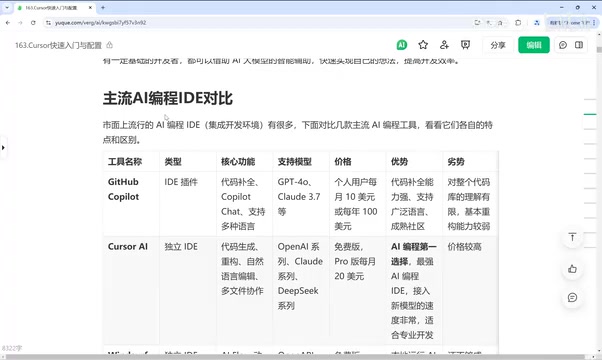
GitHub Copilot
- Type: IDE plugin (supports VS Code, JetBrains, and more)
- Core Features: Code completion, conversational chat, code editing
- Supported Models: GPT-4, Claude 3.5
- Strengths: Powerful code completion, broad language support, mature community (backed by the GitHub open-source ecosystem)
- Weaknesses: Limited understanding of the full codebase; weaker refactoring capabilities
GitHub Copilot was jointly launched by GitHub and OpenAI in 2021, initially powered by the Codex model (a code-specialized version of GPT-3). It was the first large-scale commercial AI code completion tool and pioneered the concept of "AI pair programming." Copilot's core technology lies in its contextual understanding of entire code files — it doesn't just analyze the code around your cursor; it reads other files, comments, and function signatures across the project to infer developer intent. The Copilot X upgrade in 2023 introduced conversational interaction and code explanation features, and 2024 brought support for Claude 3.5, with notable improvements in code comprehension and long-context handling. Its deep integration with the GitHub ecosystem allows it to learn from coding patterns across millions of open-source projects — the fundamental reason its community maturity far exceeds that of competitors.
Cursor
- Type: Standalone IDE (based on VS Code)
- Core Features: Code generation, refactoring, natural language editing, multi-file collaboration
- Strengths: The go-to choice in AI coding, feature-rich, supports advanced capabilities like MCP
- Weaknesses: Relatively expensive (Pro plan at $20/month)
Cursor was launched by Anysphere in 2023, with a core technical innovation in codebase-level context understanding. Unlike plugin-based tools like Copilot, Cursor is a standalone IDE (a fork of VS Code) that builds a vector index of your entire project codebase, enabling the AI to retrieve and understand cross-file code relationships when answering questions. Its Composer feature supports simultaneous multi-file editing, allowing coordinated changes across dozens of related files in a single conversation. Cursor also introduces a "Shadow Workspace" mechanism, where AI predicts the developer's next action in the background and pre-generates suggestions for millisecond-level response times. This deeply integrated architecture is a core competitive moat that plugin-based tools struggle to replicate.
The MCP (Model Context Protocol) supported by Cursor is an open standard protocol introduced by Anthropic in 2024, designed to solve the integration challenges between AI models and external tools and data sources. Previously, every AI application had to build custom adapters for different data sources (databases, APIs, file systems, etc.) — an extremely costly process. MCP provides a unified protocol specification that allows AI models to call external tools and access contextual information in a standardized way, much like how USB unified hardware connection standards. Cursor's support for MCP means developers can seamlessly integrate their AI assistant with database queries, browser control, code execution, and more — dramatically expanding the boundaries of AI-assisted programming.
Windsurf
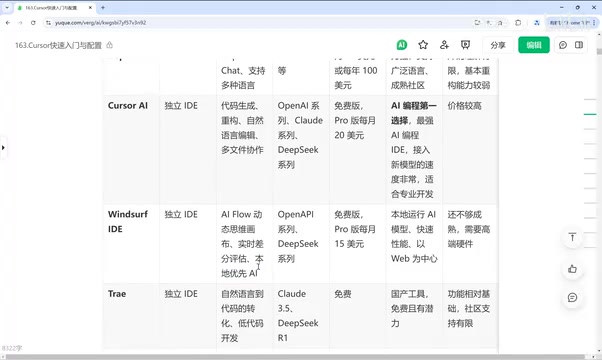
- Type: Standalone IDE
- Core Features: AI Flow workflows, dynamic thinking canvas, real-time diff evaluation
- Highlights: Runs AI models locally for fast performance; web development-focused
- Weaknesses: Features are still maturing; requires high-end hardware
Trae (ByteDance)
- Type: Standalone IDE
- Core Features: Natural language to code, high degree of intelligence
- Supported Models: Claude 3.5, DeepSeek R1
- Strengths: Free to use; built toward an "AI-first code editor" vision
Related articles
 Tech Frontiers
A Rare Quiet Day in AI: Recursive Self-Improvement Stirs Beneath the Surface
A rare quiet day in AI sees multiple sources go silent simultaneously. Behind the calm, Recursive Self-Improvement (RSI) research continues. What this means for the industry.
 Tech Frontiers
Reve 2 vs. Ideogram 4: A Deep Dive into Layout Control in AI Image Generation
A deep comparison of Reve 2 and Ideogram 4's layout control capabilities, covering technical approaches, real-world use cases, and industry trends for designers and creators.
 Tech Frontiers
In the Weights: Check Your Influence Score in the AI World
In the Weights is an AI influence search engine that quantifies your presence in the AI world with a score. Explore how it evaluates practitioners and what it means for digital identity.