Cursor + CodeRabbit in Practice: A Complete Guide to AI-Powered Automated Code Review

Cursor + CodeRabbit enables a one-command automated workflow for AI code generation, review, and fixing.
This article demonstrates how to integrate CodeRabbit's CLI tool within the Cursor editor to achieve an end-to-end automated workflow covering code generation, automated review, and issue resolution. Using Cursor's Agent mode, developers can chain the entire process with a single prompt. The article also shares three key techniques: enabling Concise Mode to control token costs, using incremental review instead of full scans, and shifting reviews left into the coding phase — significantly boosting development efficiency and code quality.
Why AI Code Review Deserves Your Attention
Code review is a critical step in ensuring code quality, but in reality, many teams' review processes are either superficial or painfully slow. A PR sitting for two to three days before anyone looks at it is far from uncommon in fast-paced iteration cycles.
Code review as a software engineering practice has a long history — Michael Fagan first proposed a formalized method at IBM in 1976. After nearly 50 years of evolution, it has become a standard process for virtually all professional development teams. Google's engineering practice data shows that each internal code change requires approval from an average of 1-2 reviewers, with a median review cycle of about 4 hours. However, for most small and medium-sized teams, limited reviewer resources, diverse tech stacks, and inconsistent review standards lead to highly variable review quality. A study by SmartBear also found that developers' defect detection rates drop sharply after reviewing more than 400 lines of code. AI code review tools have emerged precisely to address the natural limitations of human reviewers in terms of attention, consistency, and response speed.
AI programming tools are changing this landscape. The approach introduced in this article is: integrating CodeRabbit's command-line tool within the Cursor editor to achieve a one-stop workflow from code generation to automated review to issue resolution.
CodeRabbit is a tool focused on AI code review. Built on large language models, it supports PR reviews on mainstream code hosting platforms like GitHub and GitLab, while also providing a command-line interface (CLI) for local use. Unlike traditional static analysis tools (such as ESLint or SonarQube), CodeRabbit doesn't rely on predefined rule sets. Instead, it leverages LLMs for deep semantic understanding of code, capable of identifying logic errors, architectural issues, security vulnerabilities, and other higher-level code quality problems. Its review process incorporates project context — including change diffs, related files, and project structure — to generate targeted review comments. The introduction of CLI mode allows developers to complete reviews locally before code is pushed to a remote repository, providing the technical foundation for integration with local editors like Cursor.
Cursor is currently the most popular AI programming editor, and its Agent mode can automatically execute complex multi-step tasks. Using both tools together delivers results far exceeding what either tool can achieve alone.
Hands-On Demo: Complete Code Review Workflow with a Single Command
Project Background
This demo uses an AI Fitness Coach application. The demonstrator, Edgar, is CodeRabbit's Technical Product Marketing Manager. He needs to complete the architectural improvements for phase 8.4 of the application and automatically run CodeRabbit for review after code changes.
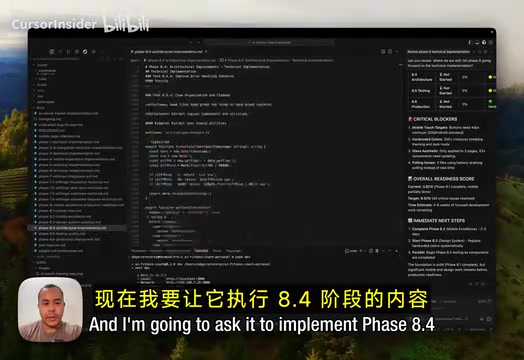
Prompt Design: Chaining Three Steps into One Pipeline
The core of the entire operation is a carefully designed prompt. In Cursor's Agent mode, Edgar's instruction contains the following key elements:
To understand this, we need to grasp the technical principles behind Cursor's Agent mode. Cursor is an AI-native editor built on the VS Code architecture, and its Agent mode is the core capability that distinguishes it from ordinary AI code completion. In Agent mode, Cursor no longer passively responds to single requests — instead, it operates like an intelligent agent (AI Agent) with autonomous decision-making capabilities. It can decompose complex tasks, read project files, execute terminal commands, modify multiple files, and dynamically adjust subsequent actions based on intermediate results. This capability is built on large language models' Function Calling and Tool Use mechanisms, where the model can decide during inference when to invoke external tools and which context information to read. It's precisely this autonomous orchestration ability that makes it possible for a single prompt to drive multi-step automated workflows.
Specifically, this instruction contains the following key elements:
- Task objective: Implement phase 8.4 architectural improvements, with detailed content referencing project documentation
- Trigger CodeRabbit review: Automatically run the review command after code changes are complete
- Concise Mode: Optimize token usage and reduce API call costs
- Only check uncommitted changes: Use specific parameters to have CodeRabbit review only the current modifications, skipping full scans
- Auto-fix: Require Cursor to automatically address all discovered issues after the review completes
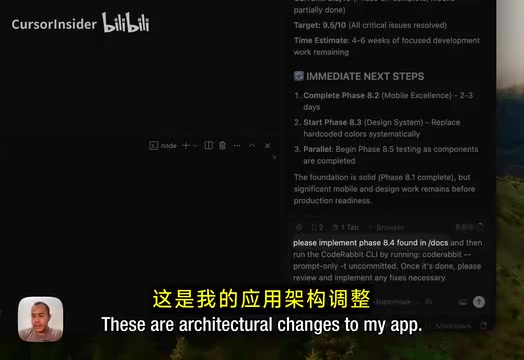
The design philosophy behind this instruction is worth studying — it chains "code generation," "code review," and "issue fixing" into a single automated pipeline. The developer only needs to issue one command, and AI takes over all subsequent work.
How to Read CodeRabbit Review Reports
Report Structure Overview
Once CodeRabbit starts running, review results are displayed in real-time in Cursor's terminal. Each review comment contains four key pieces of information:
- Error location: Precise down to filename and line number
- Code type: Identifies the code category the issue belongs to
- Brief description: Describes the essence of the problem in one or two sentences
- Fix method: Provides specific fix suggestions and code examples
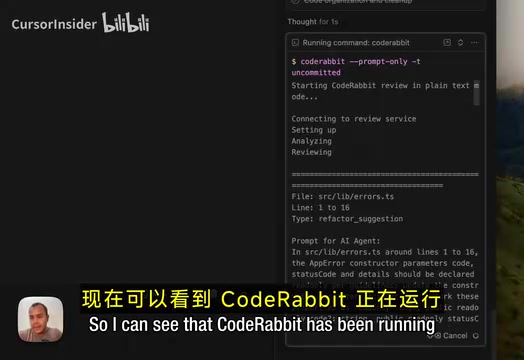
Common Issue Types
CodeRabbit can identify various code issues. In this demo, the following main categories appeared:
- Refactoring Suggestions: Optimizations for code structure and maintainability, such as function splitting and separation of concerns
- Potential Issues: Code risks that may lead to runtime errors or performance bottlenecks
- Other types: Including code style, security, and other aspects
The benefit of this classification mechanism is that developers can quickly determine priorities — fix high-risk potential issues first, then gradually optimize code structure.
Cursor Auto-Fix: A Complete Loop from Review to Resolution
After the review is complete, Cursor's Agent automatically reads CodeRabbit's review results and applies fix suggestions one by one. The entire process requires no manual intervention from the developer.
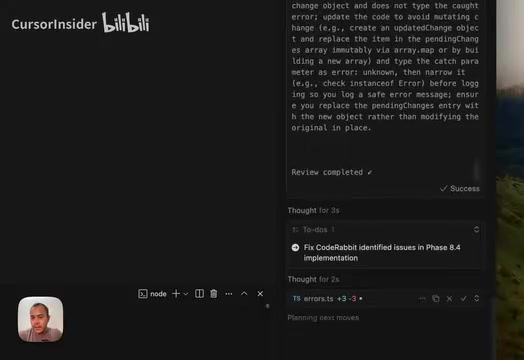
The final result: all suggestions from CodeRabbit were successfully applied by Cursor, and tests passed smoothly. The entire workflow forms a complete closed loop:
Code Generation → Automated Review → Issue Identification → Auto-Fix → Test Verification
From issuing the command to full completion, the developer basically only needs to confirm the results at the end.
Three Key Techniques for Boosting Efficiency
Technique 1: Enable Concise Mode to Control Costs
CodeRabbit's Concise Mode can significantly reduce token consumption. If you frequently trigger reviews during daily development, this parameter can save you considerable API costs. The difference in token usage becomes especially pronounced in large projects.
To appreciate the value of this technique, you need to understand the basics of token economics. In large language model usage, tokens are the fundamental billing unit — one token corresponds to approximately 4 characters in English or 1-2 Chinese characters. Taking GPT-4-level models as an example, the cost per million input tokens ranges from a few dollars to tens of dollars, with output tokens typically costing more. In code review scenarios, each review requires sending code content, context information, and instructions to the model as input, with review comments returned as output. If performing a full scan of a large project, a single review might consume tens of thousands or even hundreds of thousands of tokens. Concise Mode significantly reduces token consumption while maintaining review quality by streamlining prompt templates, compressing context information, and reducing redundant output — this is critical for cost control in high-frequency usage scenarios.
Technique 2: Incremental Review Instead of Full Scan
By using parameters to limit CodeRabbit to only checking uncommitted changes rather than scanning the entire codebase, you get two benefits: faster review speed and more focused results — you only need to pay attention to issues introduced by your current changes.
Incremental review relies on Git's diff mechanism. When developers make local code modifications that haven't been committed yet, these changes exist in Git's Working Directory or Staging Area. The git diff command can precisely capture the content of these uncommitted changes, including specific lines that were added, deleted, or modified. CodeRabbit's incremental review parameter leverages this mechanism to send only the diff content of the current changes to the AI model for analysis, rather than the entire codebase. This approach not only dramatically reduces the amount of code to process but also eliminates noise from large volumes of unrelated code, making review comments more precisely focused on issues that the current changes may introduce.
Technique 3: Shift Review Left into the Coding Phase
Many teams are accustomed to performing reviews only after code is committed, but a more efficient approach is to embed reviews into the coding process. Triggering a review and fix cycle after completing each functional module means problems are discovered earlier and cost less to fix. This is the core philosophy demonstrated in this article.
This concept aligns with the "Shift Left" philosophy in software engineering. Shift-left testing was first proposed by Larry Smith in 2001, with the core argument being: the later a defect is discovered in the software development lifecycle, the more its fix cost grows exponentially. Data from IBM's Systems Sciences Institute shows that fixing a defect in production costs 6-100 times more than finding and fixing it during the design phase. Traditional code review happens after a PR is submitted, at which point the developer's attention may have already shifted to the next task, making context-switching costs high. By triggering AI reviews in real-time during coding, the developer is still within the mental model of the current code, making understanding and fixing issues maximally efficient. This pattern essentially transforms quality assurance from post-hoc inspection to real-time accompaniment.
Conclusion: Let AI Write Your Code and Review It Too
The Cursor + CodeRabbit combination represents an important direction in AI-assisted development: not just having AI write your code, but also having AI review and fix your code. This end-to-end automated workflow frees developers from tedious review work, allowing them to focus more energy on architectural design and business logic.
As the AI programming toolchain continues to mature, more and more stages of the software development process will be automated and connected by AI. Getting familiar with these tools early will provide tangible benefits for both individual development efficiency and team collaboration quality.
Key Takeaways
- Cursor's Agent mode can chain code generation, review, and fixing into a complete workflow through a single prompt
- CodeRabbit review results include error location, code type, problem description, and fix methods, supporting multiple categories including refactoring suggestions and potential issues
- Using Concise Mode and incremental review parameters can optimize token consumption and improve review efficiency
- Cursor can automatically read CodeRabbit's review results and apply fix suggestions one by one, achieving an end-to-end automated closed loop
- Embedding AI code review into the coding process rather than reviewing after commits enables earlier problem detection and lower fix costs
Related articles
 Tutorials
ChatGPT Plus Subscription Guide: Are GPT-5.5, image-2, and Codex Worth the Upgrade?
A detailed look at ChatGPT Plus features — GPT-5.5, image-2, and Codex — with a Plus vs Pro comparison and a complete step-by-step subscription guide for users outside the US.
 Tutorials
Harness AI Engineering in Practice: Using Claude Code to Master Enterprise-Level E-Commerce Development
Deep dive into Harness AI Engineering: master enterprise e-commerce development with Claude Code using the Rules, Skills, Wiki, and Changes framework.
 Tutorials
Cursor + Codex Dual-IDE Collaboration: A Practical Methodology for Open-Source Project Customization
A complete methodology for open-source project customization based on real-world experience, detailing the Cursor+Codex dual-IDE workflow, seven-stage process, MVP validation, and AI source code reading techniques.